
BadgerDB Transactions: Concurrent Reads and Writes
BadgerDB supports concurrent reads and writes - give each goroutine its own transaction. Use DB.View for snapshot reads, DB.Update for atomic read-modify-write work, and DB.NewTransaction when commit timing needs manual control.
Keep these rules in mind:
- Readers see a fixed snapshot, not changes committed after their transaction starts.
- Check commit errors. On
badger.ErrConflict, retry the whole operation in a new transaction. Set a limit, such as 5 attempts, and keep external side effects outside retry callbacks. - Copy data before it leaves the transaction. Use
Item.ValueCopy(nil)for values needed later or sent to another goroutine. - Keep transactions short. Defer
Discard()for manual transactions, and callCommit()to save writes. EnableSyncWriteswhen stronger crash durability is needed.
A safe copy solves a data-lifetime problem - not a Go data race. Shared data still needs clear ownership or synchronization.
Read-Only Transactions with DB.View
Which Changes Can DB.View Read?
DB.View reads a fixed snapshot: it sees writes and deletes committed before the transaction started, but not later commits. Keep the callback read-only. Do not call Set or Delete inside it; use DB.Update for writes.
Transaction Cleanup After the Closure Returns
BadgerDB automatically calls Discard when the callback returns, whether it returns nil or an error. Any callback error becomes the error returned by db.View. Do not discard the transaction yourself or retain the transaction or its items after the callback returns. Only copied bytes remain valid.
Keep the callback short: read, copy, and return. Avoid waiting on workers or making network calls while the transaction is open. This efficiency is a core skill for those following a data engineering roadmap. Copy any data you'll need later before returning.
Returning a Value Safely
Declare result outside the callback, call txn.Get, and copy the value before returning from the callback. Then check err after db.View returns. Use this pattern when a value needs to outlive its transaction:
func readValue(db *badger.DB, key []byte) ([]byte, error) {
	var result []byte

	err := db.View(func(txn *badger.Txn) error {
		item, err := txn.Get(key)
		if err != nil {
			return err
		}

		result, err = item.ValueCopy(nil)
		return err
	})
	if err != nil {
		return nil, err
	}

	return result, nil
}
For a missing key, txn.Get returns badger.ErrKeyNotFound. Return that error unchanged so the caller can handle the missing value explicitly. On success, result owns its bytes and remains valid after the transaction ends. If any later step fails, return nil, err.
sbb-itb-61a6e59
Using Badger DB for Golang Projects + Writing Tests
Concurrent Reads and Writes
Once bytes are copied safely, the next question is how readers and writers run in parallel.
Reading and Writing in Separate Goroutines
Give each goroutine its own transaction. db.View and db.Update can run at the same time, but a single *badger.Txn is not safe for concurrent use. Copying data fixes lifetime issues; it does not make shared Go variables safe.
A reader that starts before an update commits keeps its existing snapshot. A reader that starts afterward can see the committed change. If a read must include a particular update, start it only after that update succeeds.
These guarantees apply only to database work. Shared Go state still needs synchronization, and external side effects cannot be made atomic with the commit.
With transaction ownership clear, choose the narrowest API for the job.
Choosing View, Update, or NewTransaction
Use closure-based helpers for scoped work. Choose NewTransaction when you need to control commit timing or transaction lifetime.
| API | Reads | Writes | Lifecycle | Use case |
|---|---|---|---|---|
DB.View |
Yes | No | Automatic discard after closure | Snapshot reads |
DB.Update |
Yes | Yes | Commits on nil error; discards afterward | Scoped updates |
DB.NewTransaction(true) |
Yes | Yes | Explicit Commit; defer Discard |
Manual read-write control |
DB.NewTransaction(false) |
Yes | No | Explicit Discard |
Manual read-only control |
A nil closure return does not guarantee a commit. db.Update can still fail with badger.ErrConflict, and it does not retry automatically. For manual transactions, defer txn.Discard() immediately, then call Commit() explicitly to persist writes.
Commits, Conflicts, and Retries
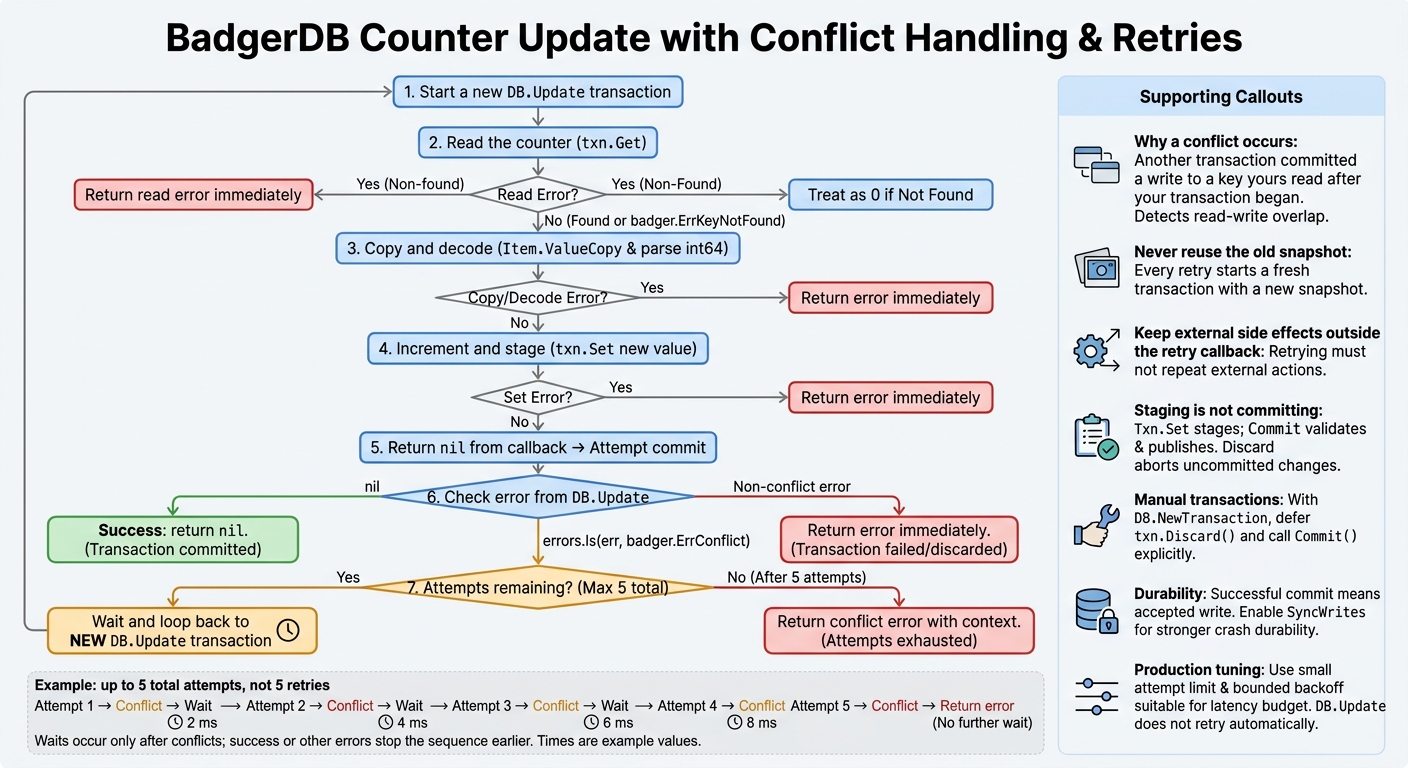
BadgerDB Commit and Conflict Retry Flow
Committing or Discarding a Transaction
Once you've chosen an API, you need to know when pending writes become durable.
Txn.Set and Txn.Delete only stage changes. Commit() validates and publishes those writes; Discard() aborts the transaction and releases resources. Use both with NewTransaction. With DB.Update, committing and discarding happen automatically.
A successful commit means Badger accepted the write. Enable SyncWrites for stronger crash durability.
When BadgerDB Returns ErrConflict
With default conflict detection, Badger can return badger.ErrConflict at commit time if another transaction, after yours began, committed a write to a key your transaction read. This checks for read-write overlap - not violations of application rules.
After a conflict, start a new transaction and read the data again. Don't reuse the old snapshot; every retry needs a new one.
Retrying Updates with an Attempt Limit
This example gives a counter update up to five attempts and treats a missing key as 0. Between conflicts, it waits 2, 4, 6, then 8 milliseconds. Each new DB.Update contains the entire read-modify-write operation.
func incrementCounter(db *badger.DB, key []byte) error {
	const maxAttempts = 5

	for attempt := 1; attempt <= maxAttempts; attempt++ {
		err := db.Update(func(txn *badger.Txn) error {
			item, err := txn.Get(key)
			if err != nil && !errors.Is(err, badger.ErrKeyNotFound) {
				return err
			}

			var value int64
			if err == nil {
				raw, err := item.ValueCopy(nil)
				if err != nil {
					return err
				}
				value, err = strconv.ParseInt(string(raw), 10, 64)
				if err != nil {
					return fmt.Errorf("decode counter: %w", err)
				}
			}

			value++
			return txn.Set(key, []byte(strconv.FormatInt(value, 10)))
		})

		if err == nil {
			return nil
		}
		if !errors.Is(err, badger.ErrConflict) {
			return err
		}
		if attempt < maxAttempts {
			time.Sleep(time.Duration(attempt*2) * time.Millisecond)
		} else {
			return fmt.Errorf("counter update failed after %d attempts: %w",
				maxAttempts, err)
		}
	}
	return nil
}
Retry only errors that match badger.ErrConflict, including wrapped conflicts. Return other errors immediately. Keep side effects outside the closure so retries don't repeat them. Under contention, use a small attempt limit and bounded backoff that fit your latency budget. Add jitter if needed.
The next issue is how long bytes remain valid after the transaction closes.
Value Lifetimes and Safe Copies
How Long Item.Value Bytes Remain Valid
When data leaves a transaction, you need to know whether its bytes are still valid.
Treat bytes from Item.Value as valid only inside the callback. Assigning saved = val copies the slice header - not the bytes. Read or copy the data before the callback returns.
Never use an Item or call its methods after the transaction ends, including after DB.View returns. During iteration, copy any data you need before advancing.
If the data needs to outlive the callback, copy it before handing it off.
Copying Values Before Sending Them to Workers
The same rule applies when passing data to another goroutine. ValueCopy(nil) creates independent storage for concurrent work, but safe handoff also means controlling mutation. This example copies the value inside the transaction, then sends it afterward:
func enqueueValue(
	db *badger.DB,
	key []byte,
	work chan<- []byte,
) error {
	var value []byte

	err := db.View(func(txn *badger.Txn) error {
		item, err := txn.Get(key)
		if err != nil {
			return err
		}

		value, err = item.ValueCopy(nil)
		return err
	})
	if err != nil {
		return err
	}

	work <- value
	return nil
}
The copied slice is independent of the transaction. You can also return it with return value, nil.
A copy protects lifetime, not concurrent mutation. Give each worker its own copy or synchronize access. Mastering these patterns is a core part of a data engineering career path.
Conclusion: Transaction Safety Checklist
With value lifetimes covered, check these points before shipping transaction code. Keep transaction scope short and ownership clear. Put independent work in separate goroutines, each with its own transaction.
For explicit transactions, call defer txn.Discard() immediately. For read-write transactions, also call txn.Commit(). Check errors from reads, writes, transaction helpers, and commits.
On badger.ErrConflict, retry with a new transaction. Reread inputs and recompute the update on each attempt. Cap retries and return the error if contention continues. Return non-conflict errors without retrying automatically.
Review transaction boundaries and make sure any data leaving the transaction is copied safely. Also check that your code no longer treats copied data as transaction-owned. Database consistency does not protect Go memory lifetimes.
FAQs
How do long-running reads affect BadgerDB resources?
Long-running reads can keep a BadgerDB transaction open. While it stays open, the database must retain older data versions that compaction and garbage collection would otherwise reclaim. This can increase storage usage and memory pressure.
Keep transactions short to limit these resource costs. Before closing a transaction, make sure your Go application copies any data it needs into local memory or data structures.
How can I reduce conflicts between concurrent updates?
Right-size your aggregates. Aggregates that are too large can cause lock contention. Those that are too small add management complexity. Keep fields in separate aggregates when they don’t need synchronized updates.
Use optimistic concurrency. Check the expected version before committing. If a write fails because the version has advanced, reload the state, replay new events, and retry the command. For workflows that span multiple aggregates, use the Saga pattern rather than forcing cross-aggregate transactions.
When can I safely reuse a ValueCopy buffer?
You can safely reuse a ValueCopy buffer only after its associated transaction closes successfully. The buffer’s data is tied to the transaction’s lifecycle. Accessing or changing it while the transaction is open can cause race conditions or data corruption.
Before the transaction finishes, copy any data you need to keep into a separate memory allocation. Once the transaction closes successfully, the buffer is ready for reuse.