
Provisioned Concurrency vs On-Demand: Latency Tradeoffs
I’d start with on-demand and pay for Provisioned Concurrency when cold starts push latency past your target. AWS reports cold starts in fewer than 1% of invocations, but that can still affect your slowest requests. My first check: compare client-observed P95 and P99 latency during bursts and after idle periods.
The trade-off is simple: on-demand avoids idle capacity charges; Provisioned Concurrency pays to keep capacity ready. Neither fixes slow code or downstream calls.
Quick Comparison
| Criteria | On-demand | Provisioned Concurrency |
|---|---|---|
| Startup latency | New capacity can encounter cold starts | Less startup delay within the ready pool |
| Bursts | Creates capacity as requests arrive, within limits | Needs capacity ready beforehand; overflow uses on-demand if limits allow |
| Cost | Request and execution charges | Capacity charges - even while idle - plus requests and execution |
| Setup | Default execution model | Requires a published version or alias, sizing, and monitoring |
| Workload fit | Sparse traffic and delay-tolerant events | Latency-sensitive APIs and predictable peaks |
Before choosing, I’d check three things:
- Capacity: Estimate concurrency as requests per second × average execution time in seconds. Then test peaks, spillover, and throttling.
- Timing: Schedule provisioned capacity before known spikes and confirm it is ready. For streams and events, also measure backlog and event age.
- Cost: Compare the same workload and time window using current regional prices in U.S. dollars. Include idle capacity, overflow, logging, and downstream services.
My rule: <u>measure before paying for a baseline</u>. Keep the benchmark repeatable, and review latency, capacity use, and costs after code changes or traffic shifts.
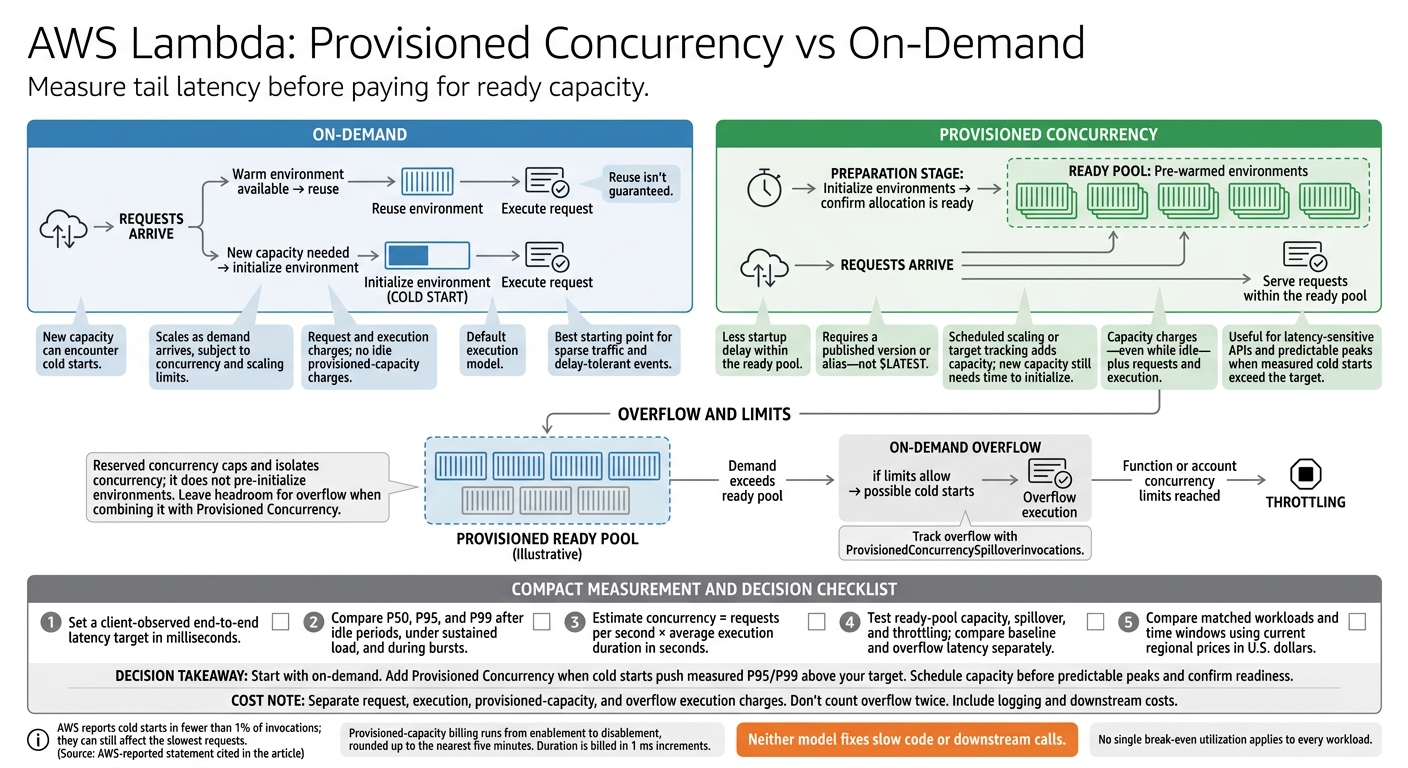
AWS Lambda: Provisioned Concurrency vs On-Demand
129. Lambda Provisioned Concurrency
sbb-itb-61a6e59
How Provisioned Concurrency and On-Demand Work
These mechanics determine whether a traffic burst uses warm capacity, triggers cold starts, or gets throttled.
| Dimension | Provisioned Concurrency | On-demand execution |
|---|---|---|
| Initialization timing | Environments initialize before requests arrive. | New environments initialize when Lambda needs more capacity. |
| Scaling behavior | Scheduled scaling or target tracking adds capacity, but that capacity still needs time to initialize. | Lambda creates environments as demand grows, subject to concurrency and scaling limits. |
| Overflow and throttling | Traffic beyond the ready pool falls back to on-demand if limits allow. | Requests are throttled when function or account limits are reached. |
The key question is how fast each model can handle a spike without adding latency.
Provisioned Concurrency: Capacity Ready Before Requests
Configure Provisioned Concurrency on a published version or alias, not $LATEST, and route production traffic there. Wait until the allocation is ready before depending on it. For bursts that stay within the ready pool, this reduces initialization-related tail latency. You pay for configured capacity, requests, and duration, with capacity billing rounded up to five minutes.
Schedule capacity ahead of known peaks, or use target tracking with LambdaProvisionedConcurrencyUtilization as demand changes. Scale out early: new capacity still needs time to initialize.
On-Demand: Warm Reuse and Cold Starts
On-demand environments may stay warm between invocations, but Lambda can remove them at any time. Warm environments can be reused, but reuse isn’t guaranteed. A spike may require new environments to initialize the runtime, dependencies, extensions, and application code. Understanding these infrastructure nuances is a core skill taught in our free data engineering bootcamp. On-demand avoids idle capacity charges, though startup delays still vary.
Overflow, Reserved Concurrency, and Throttling
Reserved concurrency caps and isolates a function’s concurrency, but it doesn’t pre-initialize environments. When using it with Provisioned Concurrency, leave headroom below the cap so overflow traffic can fall back to on-demand. If requests hit function or account limits, Lambda throttles them. That ceiling determines the latency tradeoff during bursts.
Compare Latency and Workload Fit
Cold starts, not warm reuse, drive the latency tradeoff. Provisioned Concurrency lowers tail latency within its ready pool. On-demand avoids paying for idle capacity, but tail latency can increase when Lambda creates new environments.
Compare tail latency, burst behavior, and workload shape to see which model fits.
| Factor | Provisioned Concurrency | On-demand execution |
|---|---|---|
| P95/P99 latency | More consistent within the ready pool; handler and downstream latency still apply. | Tail latency can increase when bursts create new environments. |
| Traffic bursts | Works best when capacity is ready before the burst. | Scales as demand arrives, subject to scaling limits. |
| Management complexity | Requires sizing, version or alias setup, and capacity monitoring. | Simpler to manage, but latency still needs monitoring. |
P95/P99 Latency During Traffic Bursts
Averages can hide the slow requests users notice most. Compare P50, P95, and P99 during steady traffic, sudden bursts, and scale-in or scale-out periods.
Account for burst ceilings when planning capacity. Use ProvisionedConcurrencySpilloverInvocations to detect overflow. Measure end-to-end latency, including downstream calls, queueing, and batching - not just handler execution.
Capacity Choices for APIs, Streams, and Events
Choose the default model based on workload shape, not handler speed alone. Ask who’s waiting, how long they can wait, and how predictable demand is.
For streams, check parallelism, batch size, iterator age, and backlog. Ready environments don’t remove polling or batching delays.
| Workload | Latency sensitivity | Predictability | Preferred strategy | Caveat |
|---|---|---|---|---|
| Synchronous APIs | High | Varies | Provision a baseline and let overflow spill to on-demand. | Size for the target P95/P99, not average demand. |
| User-facing services | Very high | Often follows usage patterns | Provisioned capacity with scheduled adjustments | Surges can exceed the ready pool. |
| Streams | Depends on processing deadline | Source-dependent | Evaluate on-demand first | Check shard or partition parallelism and backlog. |
| Asynchronous events | Often delay-tolerant | Varies | On-demand | Monitor event age, retries, and dead-letter destinations. |
| Scheduled jobs | Startup and completion timing matter | High | Scheduled provisioned capacity if startup matters | Confirm readiness; reduce capacity afterward. |
| Bursty traffic | Application-dependent | Low unless scheduled | Baseline plus overflow, or scheduled capacity | Test ramp rate, throttling, and spillover latency. |
Hypothetical Examples: Sparse Traffic and Predictable Peaks
The same latency goal can call for different capacity choices. Predictable peaks favor provisioned capacity when startup timing matters. Sparse traffic or delay-tolerant work favors on-demand.
Function Traffic pattern Default choice Internal reporting function A few calls per hour; initialization delay is acceptable On-demand Customer-facing ordering API Daily demand with promotional peaks; strict interactive target Provisioned baseline with on-demand overflow; track P95/P99 and spillover. Transaction-processing workflow Batch starts at 9:00 a.m. every business day; startup and completion timing matter Scheduled provisioned capacity
Measure Latency, Capacity, and Cost
Once you choose a candidate model, run a controlled benchmark to compare provisioned and on-demand latency. Set a target in milliseconds and define the traffic conditions it must handle. Measure client-observed end-to-end latency, not just Lambda Duration. For event processing, set an acceptable event age or completion time, too.
Benchmark Cold Starts and Tail Latency
Keep the function version, runtime, memory size, package size, dependencies, AWS Region, request shape, and downstream services unchanged. Repeat tests after idle periods, under sustained load, and during bursts.
Record request rate, concurrency, duration, initialization duration, errors, throttles, and client-side P50, P95, and P99 latency. Use trace IDs to separate initialization, handler work, downstream calls, and network overhead.
Test demand above the provisioned baseline. Document reserved concurrency and account limits, and report provisioned and overflow invocations separately.
Estimate Concurrency and Idle Capacity Costs
Start with concurrency = requests per second × average execution duration in seconds. Convert milliseconds to seconds before doing the math. This gives you a starting estimate - not a final capacity plan. Check it against observed peaks, retries, and longer executions under load.
Use the same test window to compare latency and cost side by side.
| Model | Utilization pattern | Latency objective | Traffic variability | Main cost exposure |
|---|---|---|---|---|
| On-demand only | Sparse or unpredictable traffic, or workloads that tolerate occasional initialization | P95/P99 can tolerate cold starts | Sparse or unpredictable traffic | Pay primarily for requests and execution; tail latency may increase after idle periods or bursts |
| Provisioned baseline | Capacity stays consistently utilized | Strict tail-latency target for the configured baseline | Predictable or schedulable demand | Pay for configured capacity even when idle, plus requests and execution |
| Provisioned baseline with on-demand overflow | Baseline covers normal demand; overflow handles peaks | Measure baseline and overflow latency separately | Peaks increase overflow usage | Provisioned-capacity charges, including idle time, plus requests, provisioned execution, and on-demand overflow execution |
Compare matched workloads using the same request volume and time window. Report costs in U.S. dollars, and check current regional pricing, architecture, memory configuration, usage tiers, and free-tier eligibility on the AWS Lambda pricing page.
Separate request charges, execution-duration charges, provisioned-capacity charges, and overflow execution charges. Don't count overflow twice. Include logging and downstream service costs.
Provisioned-capacity billing runs from the time capacity is enabled until it is disabled, rounded up to the nearest five minutes. Duration is billed in 1 ms increments. There is no single break-even utilization that applies to every workload.
Build an AWS Lambda Benchmark Project
Package the test so you can repeat it after code or configuration changes.
Test one function in three configurations: on-demand, a provisioned baseline, and an undersized baseline that allows overflow. Save the exact configuration, traffic profile, latency percentiles, initialization counts, provisioned and on-demand invocation counts, utilization, throttles, retries, and itemized costs. These records let another run reproduce the tradeoff analysis.
Rerun the benchmark after changes to the runtime, memory, dependencies, or initialization. This benchmark fits the hands-on data engineering and AI engineering training at DataExpert.io Academy.
Conclusion: Match Capacity to Your Latency Target
Choose the option that meets your latency target at the lowest steady cost. Use provisioned concurrency only when cold starts push measured P95/P99 above your target. On-demand avoids idle capacity costs, but traffic bursts can still trigger cold starts.
For sparse workloads that can tolerate delays, use on-demand. For predictable traffic where some slowdown at peak times is acceptable, use a provisioned baseline with on-demand overflow.
Review capacity monthly and after major releases or traffic shifts. Track P95/P99, utilization, spillover, throttles, and billed capacity. Treat spillover and throttles as signals to reassess capacity and resize it to match measured demand.
FAQs
How can I tell if cold starts cause my latency spikes?
Measure queue wait time: the time between adding a task to the queue and a worker starting to process it. If queue depth grows while worker CPU usage stays low, that points to a startup or scheduling issue - not a shortage of compute capacity.
Log timestamps for job creation and processing start to pinpoint the delay. If startup delay is the bottleneck, use distributed tracing to tell scheduler lag apart from cold-start overhead.
How much provisioned capacity should I keep as a buffer?
Set a minimum capacity that matches expected steady-state traffic to avoid cold starts on customer-facing or latency-sensitive endpoints. Let auto-scaling handle spikes.
For high-performance ETL, keep a higher minimum worker count to avoid scaling delays. For cost-sensitive tasks, set a lower minimum, such as one or two workers. Use queue depth or pending requests to trigger scaling, rather than relying on CPU alone. These signals can give earlier warnings that latency is creeping up.
How can I avoid cold starts during deployments?
Use provisioned concurrency to pre-initialize a fixed number of execution environments and avoid cold starts. Package container dependencies in custom images so they don’t need to be installed at runtime.
Keep the API layer thin: have it forward requests to a warm, persistent model-serving tier. For data warehouses, maintain a provisioned baseline or disable auto-suspend for critical production workloads to eliminate provisioning delays and cache misses.