Checklist for Choosing Stream Processing Tools
Stream processing tools are essential for handling data in real time, enabling businesses to react to events instantly. Choosing the right tool requires careful evaluation of factors like performance, scalability, cost, and ease of use. Here’s a quick summary of what to consider:
- Scalability & Performance: Tools like Apache Flink and Amazon Kinesis excel in low-latency, high-throughput environments. Features like fault tolerance and event-time processing are critical for accuracy.
- Ease of Use: Managed services (e.g., Confluent Cloud) simplify deployment but may limit customization. Open-source options (e.g., Kafka Streams) offer more control but demand technical expertise.
- Cost: Open-source tools have no licensing fees but require significant investment in infrastructure and skilled data engineering personnel. Managed services reduce operational overhead but come with higher subscription costs.
- Support: Open-source tools rely on community resources, while proprietary platforms include vendor support and SLAs.
- Security: Look for encryption, access controls, and compliance certifications to meet industry standards.
Quick Comparison
| Tool | Type | Latency | Cost | Support | Scalability |
|---|---|---|---|---|---|
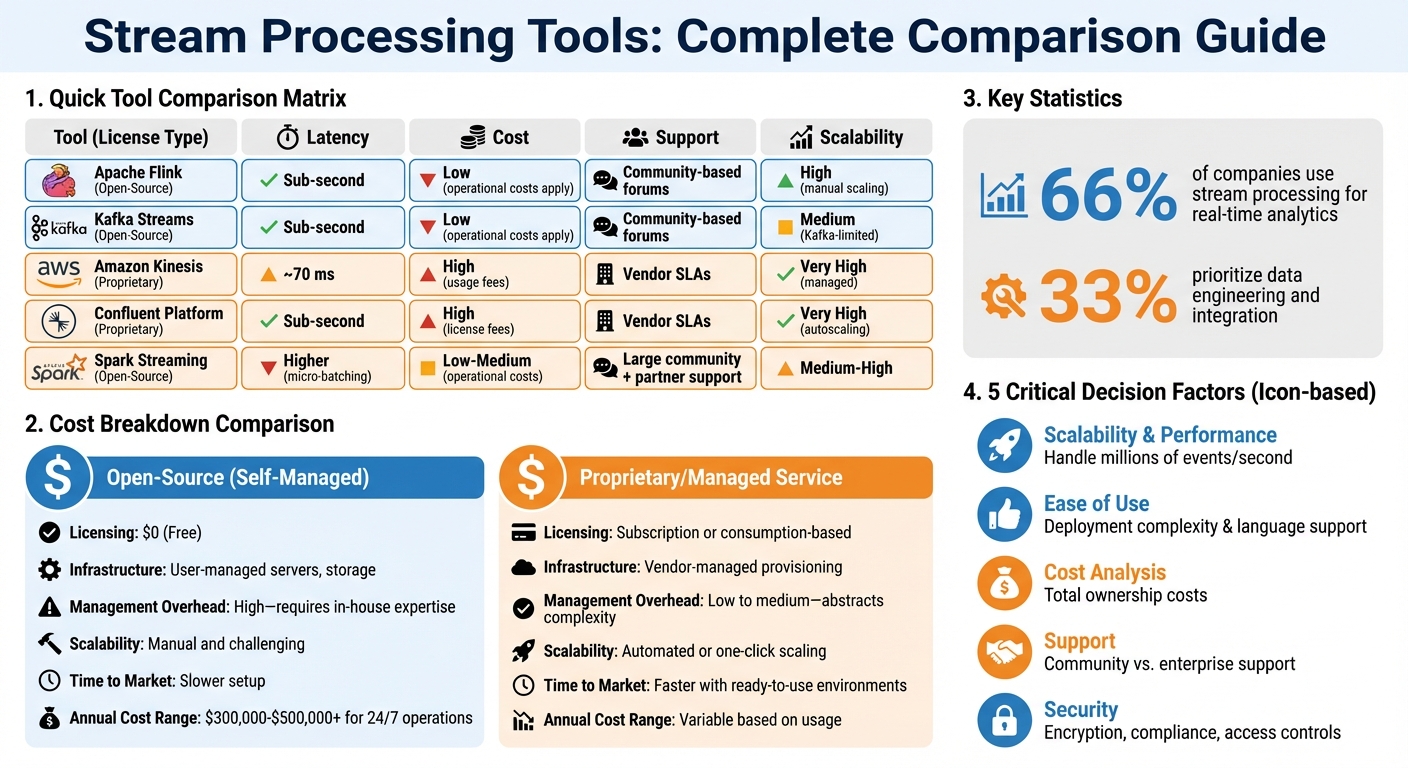
| Apache Flink | Open-Source | Sub-second | Low (operational costs apply) | Community-based forums | High (manual scaling) |
| Kafka Streams | Open-Source | Sub-second | Low (operational costs apply) | Community-based forums | Medium (Kafka-limited) |
| Amazon Kinesis | Proprietary | ~70 ms | High (usage fees) | Vendor SLAs | Very High (managed) |
| Confluent Platform | Proprietary | Sub-second | High (license fees) | Vendor SLAs | Very High (autoscaling) |
To make the right choice, define your use case, run a proof of concept, and plan for future scalability. Whether you prioritize cost-efficiency, ease of use, or advanced features, this checklist ensures your tool aligns with your goals.
Stream Processing Tools Comparison: Open-Source vs Proprietary Solutions
How to Choose the Right Streaming Tool for You! Flink, Kafka, and More Compared!
Key Factors to Consider When Selecting Stream Processing Tools
Choosing the right stream processing tool involves evaluating several aspects to ensure it aligns with your operational needs and business goals. Here’s a breakdown of the most important factors to guide your decision-making process.
Scalability and Performance
When assessing tools, focus on their ability to handle high-speed data streams with low latency, robust scalability, and fault tolerance. For instance:
- Processing latency: True streaming systems like Apache Flink and Kafka Streams offer sub-second latency and manage millions of events per second, making them ideal for time-sensitive tasks like fraud detection.
- Throughput capacity: Tools like Azure Event Hubs are designed to handle massive data loads, including unexpected surges, often referred to as "streaming flash floods".
- Scalability: Solutions such as Amazon Kinesis Data Streams provide near-instant scaling, while others, like Amazon MSK, may take longer.
- Fault tolerance: Look for exactly-once processing semantics to ensure data integrity even during failures. Tools that minimize recovery times and handle state management effectively are key.
- Handling late or out-of-order data: Features like watermarks and event-time processing help maintain accuracy despite timing irregularities.
Ease of Use and Integration
While performance is critical, the usability and integration capabilities of a tool can significantly impact productivity.
- Deployment complexity: Managed services like Amazon MSK and Kinesis allow rapid deployment, whereas self-managed tools like Apache Kafka require more setup.
- Language support: Compatibility with languages such as SQL, Python, Java, and Scala ensures your team can work efficiently without extensive retraining.
- Integration: The tool should seamlessly connect to various data sources and formats (e.g., relational databases, IoT devices, JSON, Parquet) while minimizing custom coding requirements.
- Automation: Features like schema inference, schema evolution handling, and historical data loading reduce manual errors. Redpanda, for example, claims to simplify setup and boost speed compared to Apache Kafka.
As Sumit Pal, a former Gartner VP Research Analyst, notes:
Stream processing is littered with failed technologies. Because of the changed paradigm and principles with stream processing, the technology is complex and has a steep development, deployment, operationalization, and adoption curve.
Strong documentation, intuitive interfaces, and modular architectures can ease this complexity and accelerate adoption.
Cost Analysis
Understanding the total cost of ownership is crucial. This includes licensing, infrastructure, personnel, and scalability expenses.
- Licensing: Open-source tools are free but come with hidden costs, while managed services charge subscription or consumption-based fees.
- Infrastructure: Self-managed tools require significant investment in servers, storage, and networking, along with disaster recovery systems. Managed services often include these features.
- Personnel: Self-managed solutions demand specialized expertise for setup and maintenance, whereas managed services reduce this overhead but still require skilled developers.
- Scalability: Open-source systems require manual scaling, which can be costly and time-consuming. Managed services typically offer automated or one-click scaling, though costs may rise unpredictably as data grows.
- Time to market: Managed services often enable faster deployment, reducing the time it takes to extract value from your data.
| Cost Factor | Open-Source (Self-Managed) | Proprietary / Managed Service |
|---|---|---|
| Licensing | $0 (Free) | Subscription or consumption-based |
| Infrastructure | User-managed servers, storage | Vendor-managed provisioning |
| Management Overhead | High - requires in-house expertise | Low to medium - abstracts complexity |
| Scalability | Manual and challenging | Automated or one-click scaling |
| Time to Market | Slower setup | Faster with ready-to-use environments |
Balancing these factors ensures a solution that is both effective and cost-efficient.
Community and Vendor Support
The availability of support can make or break your experience with a stream processing tool.
- Community resources: Open-source tools like Apache Kafka and Apache Flink benefit from active communities, but less popular tools may leave you without sufficient help.
- Documentation: High-quality, well-organized guides with practical examples are essential for troubleshooting and onboarding new team members.
- Vendor support: Managed services often include SLAs with guaranteed response times and escalation paths, reducing risks during outages.
- Professional services: Many vendors offer trial periods, migration assistance, and training programs to ease adoption.
Security and Compliance
Security features are non-negotiable, particularly for industries with strict regulatory requirements.
- Data encryption: Ensure encryption for both data in transit and at rest, with support for managing your own encryption keys.
- Access controls: Role-based access control (RBAC) and integration with identity providers like Active Directory enable granular permissions.
- Audit logging: Look for tools that provide tamper-proof logs for compliance and security investigations.
- Certifications: Compliance with standards like GDPR, HIPAA, SOC 2, and PCI DSS is critical for regulated industries.
Open-Source vs Proprietary Tools: Direct Comparison
When deciding between open-source and proprietary stream processing tools, the choice often boils down to balancing control with ease of operation. Open-source tools like Apache Flink, Kafka Streams, and Spark Streaming offer unparalleled customization options but demand significant expertise and internal resources. Proprietary platforms, such as Amazon Kinesis and Confluent Platform, simplify operations by managing much of the complexity for you - though this convenience comes with higher costs and the risk of vendor lock-in.
For example, Apache Flink excels with sub-second latency and high throughput, making it ideal for real-time applications. On the other hand, Amazon Kinesis achieves latencies as low as 70 milliseconds with its Enhanced Fan Out feature and offers one-click scaling. Meanwhile, Spark Streaming provides a unified API for both batch and streaming data but introduces higher latency due to its micro-batching approach.
Costs: Open-Source vs Proprietary
While open-source tools don’t come with licensing fees, they aren’t free. Hidden costs - like infrastructure setup, hiring specialized talent, and ongoing maintenance - can quickly add up. For 24/7 operations, these expenses can range from $300,000 to over $500,000 annually. Proprietary platforms, though more expensive upfront, may help reduce operational overhead through managed services. As Bohdan Voroshylo, CTO at Upstaff.com, explains:
Open-source allows for extensive customization, but commercial solutions streamline processes with out-of-the-box functionalities.
Support: Community vs Enterprise
Support is another key differentiator. Open-source tools rely on community forums and GitHub discussions, which can be inconsistent and lack formal guarantees. Proprietary platforms, however, typically include dedicated 24/7 support teams, service-level agreements (SLAs), and professional training. These features can significantly reduce downtime and improve recovery times during outages.
Feature Comparison Table
| Tool | Type | Advantages | Disadvantages | Scalability | Cost | Support |
|---|---|---|---|---|---|---|
| Apache Flink | Open-Source | Sub-second latency; rich APIs for machine learning and complex event processing; dynamic resource allocation | High operational complexity requiring dedicated clusters | Very High | Low software fees; high operational costs | Community forums; third-party support |
| Kafka Streams | Open-Source | Native Kafka integration; no additional infrastructure required; lightweight | Limited to the Kafka ecosystem; scalability constrained by partition count | High | Low software fees; moderate operational costs | Community-based support |
| Spark Streaming | Open-Source | Unified batch/stream API; extensive ecosystem; deep integration | Higher latency due to micro-batching; limited dynamic scaling | Medium-High | Low software fees; moderate operational costs | Large community; partner support (e.g., Databricks) |
| Amazon Kinesis | Proprietary | One-click scaling; seamless AWS integration; as low as 70 ms latency | Exclusive vendor dependency; costs can increase with scale | Very High (managed) | High usage-based costs | AWS Enterprise Support with SLAs |
| Confluent Platform | Proprietary | Managed Kafka with Kora Engine; 120+ connectors; enterprise-grade RBAC | Direct licensing costs; less control over low-level configurations | Very High (autoscaling) | High license-based costs | 24/7 enterprise support with SLAs |
This overview highlights the trade-offs between open-source flexibility and proprietary convenience, helping you weigh your priorities when selecting the right tool for your needs.
sbb-itb-61a6e59
Implementation Readiness Checklist
Before diving into a stream processing tool, it’s essential to take a methodical approach. This checklist, based on the evaluation factors mentioned earlier, will help you ensure both technical and operational readiness.
Define your primary use case.
What’s your goal? Are you creating real-time dashboards, automating decisions, or prepping data for storage? Around 66% of companies focus on real-time analytics, while 33% prioritize data engineering and integration. Your use case will shape your requirements - like whether you need millisecond-level responses for IoT or fraud detection, or if a "business real-time" window of up to 15 minutes suffices. Also, identify your data types (structured, semi-structured, or unstructured) and decide if your processing demands stateful or stateless logic. Once you’ve nailed down your use case, test the tool’s capabilities under real-world conditions.
Conduct a proof of concept to validate tool performance.
Kevin Petrie, VP of Research at BARC US, emphasizes the importance of this step:
Have your team devise a rigorous proof of concept that tests tools' ability to support your most rigorous use cases with the right latency, throughput and concurrency.
During your PoC, simulate sudden event spikes to confirm the tool can scale elastically without failures. Keep an eye on CPU and memory usage, test schema evolution, and see how the tool handles late or out-of-order data. For stateful applications, compare the performance of state stores. For example, RocksDB can be significantly slower than on-heap alternatives due to serialization overhead.
Plan your migration.
Mike Rosam, CEO & Co-Founder of Quix, offers this advice:
To make the right decision on event-stream processing, business leaders must consider how much data they need to ingest and process now - and how well the solution can scale in the future.
Decide between a self-managed setup, which gives you more control but requires in-house expertise, or a managed service that’s quicker to implement but comes with higher costs. If your team lacks these skills, you might consider comparing data engineering bootcamps to accelerate your internal training. If your migration is complex, use savepoints to capture consistent execution states, enabling you to pause and resume without data loss. Also, confirm the tool supports "exactly-once" delivery guarantees to avoid duplicate data - critical for financial transactions. Automate schema inference and load historical snapshots before enabling live Change Data Capture pipelines. Once your migration plan is ready, test it thoroughly in a controlled environment.
Establish separate R&D sandboxes for testing.
Setting up dedicated sandboxes allows your team to experiment with event-stream processing without putting production systems at risk or requiring large upfront investments. Evaluate whether your team has the skills to handle complex open-source frameworks (often requiring Java, Scala, or JVM expertise) or if simpler interfaces like Python, SQL, or low-code tools are a better fit. Build in monitoring, disaster recovery, and fault tolerance to meet a 24×7×365 service level agreement. Finally, decouple your business logic from the infrastructure layer to future-proof your systems against potential technology changes. By following these steps, you’ll ensure your stream processing tool aligns with your technical needs and fits seamlessly into your operations.
DataExpert.io Academy Recommendation
If you're eager to put your stream processing skills to the test, the Winter 2026 Data Engineering Boot Camp by DataExpert.io Academy could be your next step. Running from February 16 to March 13, 2026, this five-week program is designed to give you hands-on experience with tools like Databricks and AWS, focusing on real-world challenges. You'll dive into tasks such as ingesting Kafka streams and creating Delta Live Tables. The curriculum includes lab sessions on topics like Structured Streaming Kafka to Delta Live Table, Databricks and Advanced Spark, and Data Lakes with Delta Table.
What sets this program apart is its practical approach. You'll learn to orchestrate message brokers, containers, and processing engines, tackling real-world scenarios in capstone projects such as Real-Time Formula 1 Analytics and BetFlow - Real Time Sports Betting App. These projects focus on stateful processing, helping you address challenges like identifying patterns in cybersecurity logs or detecting financial fraud. You'll also gain experience in "batch-first" scenarios where high throughput and quick response times are critical.
The toolkit provided goes beyond Databricks and AWS, including Snowflake, Astronomer for Airflow orchestration, Kafka, and even OpenAI. Weekly guest speaker sessions, TA office hours, and career development resources round out the program, making it a comprehensive learning experience.
Led by instructor Zach Wilson, who brings extensive Big Tech experience to the table, the boot camp is highly regarded for its clear teaching on cumulative table design, date list data structures, and building reliable data sets. Zach’s use of real-world examples ensures concepts are both understandable and applicable.
The program costs $3,000 for lifetime access and boasts a 4.9/5 rating on Trustpilot from 641 reviews. To enroll, you'll need intermediate Python skills and some familiarity with Spark, ensuring you're ready to tackle advanced stream processing from day one.
Conclusion
Picking the right stream processing tool isn't about chasing the most popular technology - it’s about finding the one that matches your specific needs. This checklist is designed to help you cut through the noise of overlapping options, from data streaming platforms to processing engines and streaming databases.
Start by evaluating whether the tool can handle your message volume, whether it scales from 10,000 to 100,000 messages per second. Consider your team’s expertise - does it support Python, or will it require specialized Java skills? Factor in your budget, the availability of 24/7 vendor support, and whether the tool meets your security requirements.
Taking a systematic approach ensures you avoid making decisions based on hype, which can lead to unnecessary complexity. For example, the checklist helps clarify the build-versus-buy dilemma: if your team has fewer than three dedicated data engineers, relying on open-source tools might cost more in salaries than investing in a commercial solution. On the flip side, if you need custom connectors or need to handle unpredictable data spikes, open-source tools running on commodity hardware could save you money.
This method ensures critical non-functional requirements, such as 24/7 uptime and reliable disaster recovery, while reducing the risk of vendor lock-in. With around 66% of companies now leveraging event-stream processing for real-time analytics, choosing the right tool is more important than ever. By using this checklist, you align technical precision with strategic priorities, ensuring your stream processing solution supports your operational goals effectively.
FAQs
What should I consider when choosing between open-source and proprietary stream processing tools?
When choosing a stream processing tool, it's important to weigh factors like cost, customization, support, and ease of use.
Open-source options such as Apache Kafka, Flink, and Spark Streaming offer a high degree of flexibility and scalability. These tools are ideal for organizations with strong technical expertise, as they are typically free to use. However, they require substantial resources for setup, ongoing maintenance, and ensuring compliance with regulations.
Proprietary tools, on the other hand, often come with managed services that simplify deployment and include built-in support. They frequently offer additional perks like service-level agreements (SLAs) and compliance certifications, making them appealing for organizations aiming to get up and running quickly while minimizing operational burdens. The trade-off? These solutions usually come with recurring costs and the potential for vendor lock-in.
In short, open-source tools are a great fit for those who value flexibility and lower upfront costs, while proprietary tools cater to teams that prioritize convenience and comprehensive support.
What factors should I consider to calculate the total cost of ownership for stream processing tools?
To figure out the total cost of ownership (TCO) for stream processing tools, you’ll need to look at both direct and indirect costs.
Direct costs cover obvious expenses like infrastructure, licensing fees, and ongoing maintenance. Indirect costs, on the other hand, include things like operational overhead, staffing, and the time and resources needed for training.
Don’t forget to factor in scalability and future expenses - things like system upgrades or costs tied to increased usage over time. A thorough breakdown of these elements will help you make a decision that fits both your budget and your business objectives.
What should I look for when assessing the scalability of a stream processing tool?
When assessing the scalability of a stream processing tool, the key is to determine how well it can handle increasing data volumes without compromising performance. A truly scalable solution should let you add more resources or instances while maintaining consistent, efficient operation. Ideally, you want near-linear scalability, where performance grows proportionally with the addition of resources.
Take a close look at the tool’s architecture. Does it support microservices or cloud-native deployments? These features often indicate better resource management and flexibility. Another critical factor is the tool’s ability to dynamically scale up or down based on demand, all while keeping latency low as data throughput rises.
Lastly, prioritize tools that make effective use of cloud resources and can adjust seamlessly to real-world workloads. These are the solutions that tend to deliver the reliability and efficiency needed for long-term scalability.