
Databricks vs Snowflake: Cost Efficiency in Embedded Analytics
When it comes to embedded analytics, Databricks and Snowflake offer distinct advantages depending on your workload and priorities. Both platforms operate on usage-based billing, but their pricing models and scaling methods differ significantly:
- Snowflake: Best suited for SQL-based dashboards and reporting. It uses a credit-based system with charges for compute, storage, and cloud services. Costs can rise with high-concurrency workloads, but features like auto-suspend and multi-cluster warehouses help manage usage.
- Databricks: Ideal for data pipelines, machine learning, and large-scale analytics. It relies on Databricks Units (DBUs) and offers granular control over compute resources. Serverless options and workload-specific pricing can lead to cost savings for specific tasks.
Quick Comparison
| Feature | Snowflake | Databricks |
|---|---|---|
| Compute Pricing | $2.00–$4.00/credit | $0.15–$0.40/DBU |
| Storage Pricing | $23.00/TB/month (compressed) | $0.020–$0.023/GB/month |
| Scaling | Vertical (sizes) & horizontal (clusters) | Dynamic autoscaling (worker nodes) |
| Serverless Options | Snowpipe (data ingestion) | Serverless SQL Warehouses |
| Best For | SQL-based dashboards, ad-hoc queries | ETL, machine learning, large datasets |
Key Insight: Snowflake excels in predictable, high-concurrency SQL workloads, while Databricks offers better cost control for complex, large-scale tasks. Both platforms have serverless features to optimize costs for irregular query patterns. Choose based on your specific analytics needs.
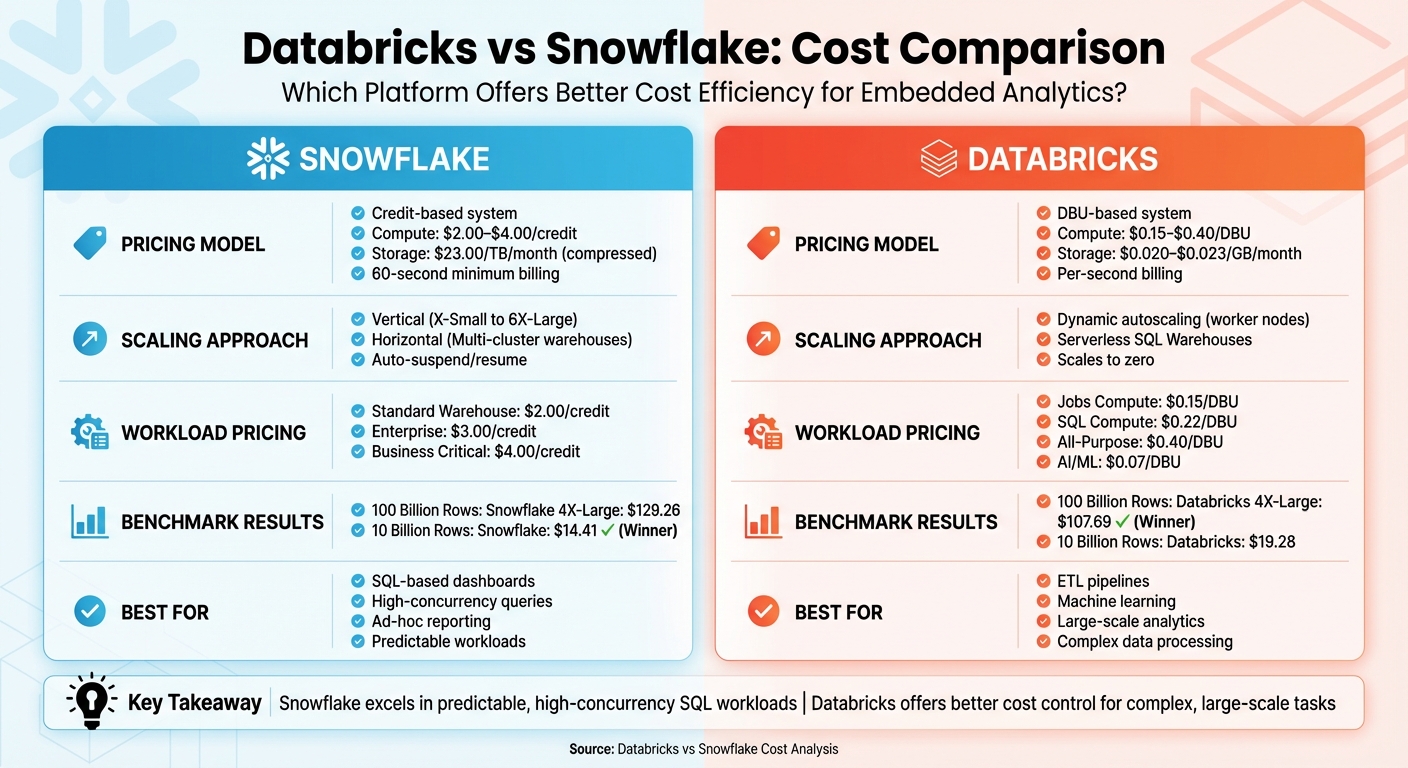
Databricks vs Snowflake Cost Comparison for Embedded Analytics
Snowflake vs Databricks: Which Is Best for Your Big Data & AI Projects in 2025?
Snowflake Pricing Model for Embedded Analytics
Snowflake's pricing structure breaks down into three main components: storage, compute (virtual warehouses), and cloud services. This pay-as-you-go model ensures you’re only charged for what you use. Let’s take a closer look at how each of these components influences costs for embedded analytics.
Snowflake Cost Components
Compute costs are measured in Snowflake credits, and the rate varies depending on the edition. For instance, in AWS US East (Northern Virginia), the Standard Edition costs $2.00 per credit, Enterprise is $3.00 per credit, and Business Critical comes in at $4.00 per credit. Virtual warehouses, which handle your queries, consume credits based on their size and runtime. The larger the warehouse, the more credits it uses - for example, an X-Small warehouse uses 1 credit per hour, while a 4X-Large consumes 128 credits per hour.
Billing for compute is calculated per second, with a minimum charge of 60 seconds for each warehouse startup or resize. This level of precision can help manage costs, but frequent restarts - common in embedded analytics where dashboards trigger sporadic queries - can quickly add up.
Storage costs are more straightforward. Snowflake charges around $23 per terabyte per month, based on the average daily amount of compressed data stored. Since data is compressed before calculating storage fees, your actual costs may be significantly lower than the raw data size.
The cloud services layer covers tasks like metadata management, authentication, and query optimization. Most customers won’t see extra charges here, as Snowflake only bills for cloud services if their usage exceeds 10% of daily compute consumption. For example, if you use 100 compute credits and 20 cloud services credits in a day, you’d only be charged for 10 additional cloud services credits (20 total minus the 10% allowance).
Data transfer fees arise when moving data out of Snowflake. While data ingress is free, egress fees vary. Transferring data to another region within the same cloud provider typically costs $20 per terabyte, whereas moving data to a different cloud platform or the internet can cost $90 per terabyte in AWS US East. Keeping an eye on these costs is essential for managing your analytics budget.
Workload Scenarios That Impact Snowflake Costs
The type of workload you’re running has a big impact on your Snowflake bill. Here’s how different scenarios affect costs:
- High-concurrency dashboards: These dashboards, often accessed by dozens or even hundreds of users at once, benefit from multi-cluster warehouses available in the Enterprise Edition and above. These warehouses scale horizontally by adding clusters during peak demand, with each active cluster consuming credits based on its size and runtime.
- Large-scale data ingestion: Snowpipe, Snowflake’s serverless data-loading feature, is a great fit here. It charges based on the volume of data loaded (per GB) and eliminates the need for a continuously running warehouse, which can translate to significant savings.
- Complex analytical queries: For heavy-duty queries processing large datasets, larger warehouses may be necessary. While a Medium warehouse (4 credits/hour) costs twice as much as a Small (2 credits/hour), it also delivers double the computing power, potentially halving execution time and keeping overall costs comparable.
- Frequent metadata operations: Embedded applications that make numerous small, rapid queries can increase cloud services usage. If this usage exceeds the 10% threshold of daily compute, additional charges apply. Monitoring these patterns can help you identify inefficiencies and optimize your queries.
| Workload Type | Primary Cost Driver | Impact on Snowflake Billing |
|---|---|---|
| High-Concurrency Dashboards | Multi-cluster Warehouses | Scales horizontally; credit use depends on the number of active clusters and their runtime |
| Large-Scale Data Ingestion | Snowpipe / Serverless | Charges per GB loaded; avoids maintaining a constantly running warehouse |
| Complex Analytical Queries | Warehouse Size (XS to 6XL) | Larger warehouses burn more credits but can reduce execution time, balancing costs |
| Frequent Metadata Tasks | Cloud Services | Extra charges apply if usage exceeds 10% of daily compute; common with high-frequency queries |
Databricks Pricing Model for Embedded Analytics
Databricks uses a pricing structure centered on Databricks Units (DBUs) - a standardized way to measure compute power. Your total costs are made up of two components: the DBUs you use (billed by Databricks) and the charges for the underlying cloud infrastructure, such as virtual machines, storage, and data transfer (billed directly by AWS, Azure, or GCP). DBUs track resource usage over time.
Let’s break down how DBUs work and what influences your overall costs.
How Databricks Units (DBUs) Work
A DBU represents one unit of processing power consumed per second. The number of DBUs you use depends on several factors:
- Workload type: Whether you're running SQL analytics, batch jobs, or interactive notebooks.
- Virtual machine size: Larger instances consume more DBUs.
- Platform edition: Standard, Premium, or Enterprise tiers affect pricing.
- Performance tools: Features like the Photon engine can impact DBU usage.
For embedded analytics, you’ll typically rely on SQL Compute (also called SQL Warehouses), which starts at $0.22 per DBU. This option is tailored for business intelligence tasks like dashboard queries. If you’re automating data preparation pipelines, Jobs Compute is available at $0.15 per DBU, offering savings of 30–50% compared to interactive workloads. Additionally, platform editions influence costs: Premium is about 1.5× the Standard rate, while Enterprise costs roughly 2× Standard pricing.
Main Cost Drivers in Databricks
Several factors play a role in determining your Databricks costs:
1. Cluster Configuration
The size of your cluster - larger instance types and more worker nodes - directly impacts DBU consumption per hour. While bigger clusters cost more per hour, they can process workloads faster, potentially offsetting the higher hourly rate.
2. Workload Type
The type of workload you run has a significant effect on costs. For example, switching from All-Purpose Compute ($0.40/DBU) to Jobs Compute ($0.15/DBU) for production ETL jobs can cut DBU expenses by half. Since ETL jobs often represent 50% or more of a company's total data costs, this adjustment can lead to meaningful savings.
3. Serverless vs. Classic Compute
Serverless SQL warehouses charge only for active query time and scale quickly, starting in seconds. On the other hand, classic compute options take longer to spin up, which could inflate costs. Serverless options also include VM costs in the DBU price, simplifying billing and removing the need to manage cloud instances separately.
4. Storage and Data Transfer
Cloud storage and data transfer fees are additional costs. Storage typically runs about $0.020–$0.023 per GB per month, while cross-region data transfers range from $0.02 to $0.10 per GB. Using Unity Catalog managed tables can reduce storage costs by over 50% through features like automated clustering and statistics collection, while also speeding up queries by as much as 20×.
| Databricks Compute Options | Starting Price (per DBU) | Primary Cost Consideration |
|---|---|---|
| Jobs Compute | $0.15 | Best for scheduled, automated workloads |
| SQL Compute | $0.22 | Designed for concurrent user queries |
| All-Purpose Compute | $0.40 | Higher cost for interactive development tasks |
| AI & Machine Learning | $0.07 | Special pricing for model training workloads |
sbb-itb-61a6e59
Cost Comparison for Embedded Analytics Workloads
Building on the earlier pricing models, let’s dive into how these costs play out in embedded analytics workloads. To make the most of embedded analytics, it’s crucial to grasp both the pricing structures and how they affect actual workloads.
Comparison Metrics
When it comes to costs, Databricks and Snowflake differ in three key areas: compute, storage, and scaling. Snowflake charges between $2.00 and $4.00 per credit for compute, $23.00 per TB per month for compressed storage, and imposes a 60-second minimum for warehouse starts or resizes. On top of that, Snowflake applies extra charges for cloud services exceeding 10% of daily compute usage.
Databricks, on the other hand, uses DBUs (Databricks Units), priced between $0.15 and $0.40 per unit, with storage billed at standard cloud rates. Databricks also offers per-second billing, which includes scaling costs.
Cost Comparison Table
Here’s a side-by-side look at how costs stack up for common embedded analytics workloads:
| Workload Scenario | Snowflake Cost Driver | Databricks Cost Driver |
|---|---|---|
| Batch Processing | Standard Virtual Warehouse | Jobs Compute ($0.15/DBU) |
| High-Concurrency Queries | Multi-cluster Warehouse (Enterprise+) | SQL Warehouses ($0.22/DBU) |
| Real-Time Dashboards | Search Optimization / Snowpipe | Serverless SQL / Streaming |
| Interactive Development | Standard Virtual Warehouse | Interactive/Apps ($0.40/DBU) |
Benchmark Insights
In a benchmark test processing 100 billion rows, a Snowflake 4X-Large warehouse completed the workload for $129.26, while a Databricks 4X-Large cluster handled it for $107.69. However, for smaller workloads - such as processing 10 billion rows - Snowflake emerged as the more cost-efficient option at $14.41, compared to Databricks at $19.28.
These results highlight how cost efficiency depends on workload scale. Snowflake tends to shine with bursty, ad-hoc SQL queries, while Databricks offers better value for sustained, large-scale tasks. This sets the foundation for further discussions on scalability and optimizing overall costs.
Scalability and Cost Optimization
When it comes to embedded analytics, mastering scalability is key to managing costs without compromising performance. Building on earlier cost comparisons, this section dives into how Snowflake and Databricks handle scaling under different workloads. Snowflake relies on virtual warehouses that scale either vertically (ranging from X-Small to 6X-Large) or horizontally by adding identical clusters. On the other hand, Databricks adjusts dynamically, scaling worker nodes based on demand.
Snowflake Scalability Features
Snowflake offers several features aimed at efficient scaling and cost control. Its auto-suspend and auto-resume functionalities ensure that credits are only consumed during active query processing. For example, setting auto-suspend to 60 seconds helps minimize idle costs, though it adheres to the 60-second billing minimum. For scenarios with high user concurrency, Snowflake's multi-cluster warehouses (available in the Enterprise edition and above) automatically scale by adding or removing clusters to handle fluctuating user loads. Additionally, Snowflake provides serverless compute options like Snowpipe, which automatically adjusts resources based on workload demands, eliminating the need for manual intervention.
Databricks Scaling and Performance Options
Databricks takes a more dynamic approach to scaling. Its autoscaling compute reallocates worker nodes during different job phases, ensuring resources match the computational intensity. Serverless SQL Warehouses are particularly efficient, scaling up or down quickly to handle query bursts while optimizing costs better than Snowflake’s fixed 60-second billing minimum. The Photon Engine further boosts performance by using vectorized processing, reducing the active runtime of compute resources. To minimize startup delays, Databricks also offers Cluster Pools, which keep instances ready for immediate use. For cost-conscious workloads that can handle interruptions, Databricks supports spot instances for worker nodes, significantly lowering infrastructure expenses.
Scalability Features Comparison Table
| Feature | Snowflake | Databricks |
|---|---|---|
| Scaling Mechanism | Vertical (T-shirt sizes) and Horizontal (Multi-cluster) | Horizontal (Autoscaling worker nodes) and Serverless SQL |
| Idle Cost Control | Auto-suspend/resume (60-second minimum billing) | Auto-termination for interactive clusters; Serverless scales to zero |
| Startup Time | Fast resume, but billed for a 60-second minimum | Serverless SQL starts in seconds; Cluster Pools reduce startup |
| Concurrency Handling | Multi-cluster warehouses add identical clusters | Serverless SQL uses Intelligent Workload Management |
| Performance Optimization | Search Optimization Service and Automatic Clustering | Photon Engine and Predictive Optimization |
| Cost Safeguards | Resource Monitors with spending limits | Compute Policies and budget alerts |
Which Platform Offers Better Cost Efficiency?
Key Findings
When it comes to cost efficiency, the pricing structure and scalability options of each platform play a significant role. Snowflake provides predictable pricing tailored for SQL-based embedded analytics. With a fixed credit-per-hour system - starting at $2.00 per credit for its Standard Edition - budgeting becomes straightforward. Additionally, Snowflake’s fully managed architecture reduces administrative tasks, which is especially advantageous for teams with limited engineering resources.
On the other hand, Databricks shines in handling complex, engineering-heavy workloads that combine data processing with analytics. Its granular scaling approach - allowing the addition of individual worker nodes instead of doubling resources - offers precise control over compute costs. This approach is particularly beneficial for specialized workloads like ETL, where significant savings can be achieved.
"On job compute, the non-interactive workloads will cost significantly less than on all-purpose compute." – Databricks Documentation
While both platforms bill per second, there’s a notable difference in how they handle scaling. Snowflake imposes a 60-second minimum per warehouse resume, which can lead to higher costs during fluctuating demand. In contrast, Databricks’ Serverless SQL warehouses scale down to zero without a minimum, making them a better choice for irregular query patterns.
These distinctions make it clear that the right platform depends heavily on the specific needs of your embedded analytics use case.
Recommendations
Selecting the ideal platform comes down to your workload and scalability priorities. If your primary need is SQL-based reporting and dashboards with high user concurrency, Snowflake is the better fit. Its multi-cluster warehouses can automatically adjust to fluctuating user loads, and the reduced administrative overhead can lower overall costs, especially when factoring in staffing.
For more complex analytics involving data pipelines, machine learning, or multi-language support, Databricks is the optimal choice. To manage costs effectively, use Jobs Compute for scheduled tasks and take advantage of Serverless SQL warehouses for interactive, user-facing queries. Additionally, the open-source Delta Lake format offers flexibility in storage and avoids vendor lock-in.
Both platforms also offer serverless options that dynamically scale resources for high-concurrency scenarios with unpredictable demand. However, keep an eye on data transfer fees, as cross-region or multi-cloud egress charges can quickly offset potential savings.
FAQs
How do Databricks and Snowflake compare in terms of cost efficiency for different workloads?
Snowflake is designed to keep costs in check by allowing you to scale its virtual warehouses to match your workload demands. These compute clusters are billed per second (with a 60-second minimum), giving you flexibility to resize them or even pause them when not in use. For tasks like nightly ETL jobs that are sporadic or low-intensity, smaller warehouses that operate intermittently can help you save money. Snowflake's serverless features, such as Snowpipe for data ingestion, only charge for the compute resources you actually use, making them a smart choice for continuous or on-demand tasks. To further manage expenses, you can set up resource monitors and budgets.
Databricks, on the other hand, offers flexibility through different compute modes tailored to your workload. For scheduled tasks like batch ETL processes, Jobs Compute is a more affordable option. If you’re running interactive queries, SQL warehouses can be configured to prioritize either cost savings or performance. The Photon engine adds another layer of efficiency by improving query performance and storage usage. Databricks also supports Delta Lake in an open format, which allows you to take advantage of cloud-provider discounts. Plus, you can switch between clusters optimized for speed or cost, making it a strong choice for AI/ML projects and large-scale analytics.
For those looking to master cost optimization, DataExpert.io Academy offers hands-on training on configuring both Snowflake and Databricks to suit different workload requirements.
What factors impact the cost of using Databricks for embedded analytics?
The cost of using Databricks for embedded analytics depends on several factors that can influence your overall expenses:
- Compute usage: Pricing varies based on the type of compute you use, whether it's for job-specific tasks, general-purpose workloads, or SQL warehouse operations.
- Cluster management: The size of your Spark clusters, how long they remain active, and startup overhead (including warm-up pools) all contribute to costs.
- Databricks Unit (DBU) rates: Charges are calculated per second, depending on the type and size of the clusters you're running.
- Storage efficiency: Leveraging optimized storage formats like Delta Lake can help reduce compute time, which in turn lowers costs.
For additional savings, committed-use contracts can provide discounts, making cost management even more effective. To get the most value, it’s crucial to manage resources efficiently and plan workloads carefully.
How does Snowflake's credit-based pricing model affect costs during high-concurrency workloads?
Snowflake uses a credit-based pricing model, charging per second for each active virtual warehouse, with a minimum of 60 seconds. In situations with high concurrency, costs can rise as additional warehouses are brought online to manage the workload. However, Snowflake provides several tools to help keep expenses in check, such as per-second billing, auto-suspend, and resource monitoring tools.
These features let you set spending limits, control resource usage, and fine-tune warehouse activity, making it easier to maintain cost efficiency - even during periods of heavy demand.