
How AWS IoT Core Processes IoT Event Streams
AWS IoT Core routes device messages; it doesn’t calculate averages across them. I use its rules to filter and send each reading, then add downstream processing for tasks like a 5-minute temperature average.
Here’s how I separate the work:
- Ingestion: MQTT delivers messages to permitted subscribers and matching rules. Basic Ingest sends telemetry straight to a named rule, skipping subscriber delivery.
- Routing: Rules filter and reshape messages, then run up to 10 actions to send results to services such as Lambda, Kinesis, Firehose, or DynamoDB.
- Processing and recovery: I choose storage for history, retained streams for replay, Lambda for per-event logic, and MQTT subscriptions for device commands. Retries aren’t replay, so recovery needs retained events.
- Cost and reliability: I check permissions, quotas, consumer lag, and failure handling. Rules Engine usage is metered in 5 KB increments, so a 12 KB payload counts as three units for the applicable calculation.
My starting point: <u>decide how much event history you need before choosing destinations</u>. Then plan for late readings, duplicate events, traffic spikes, and alerts - not just message delivery.
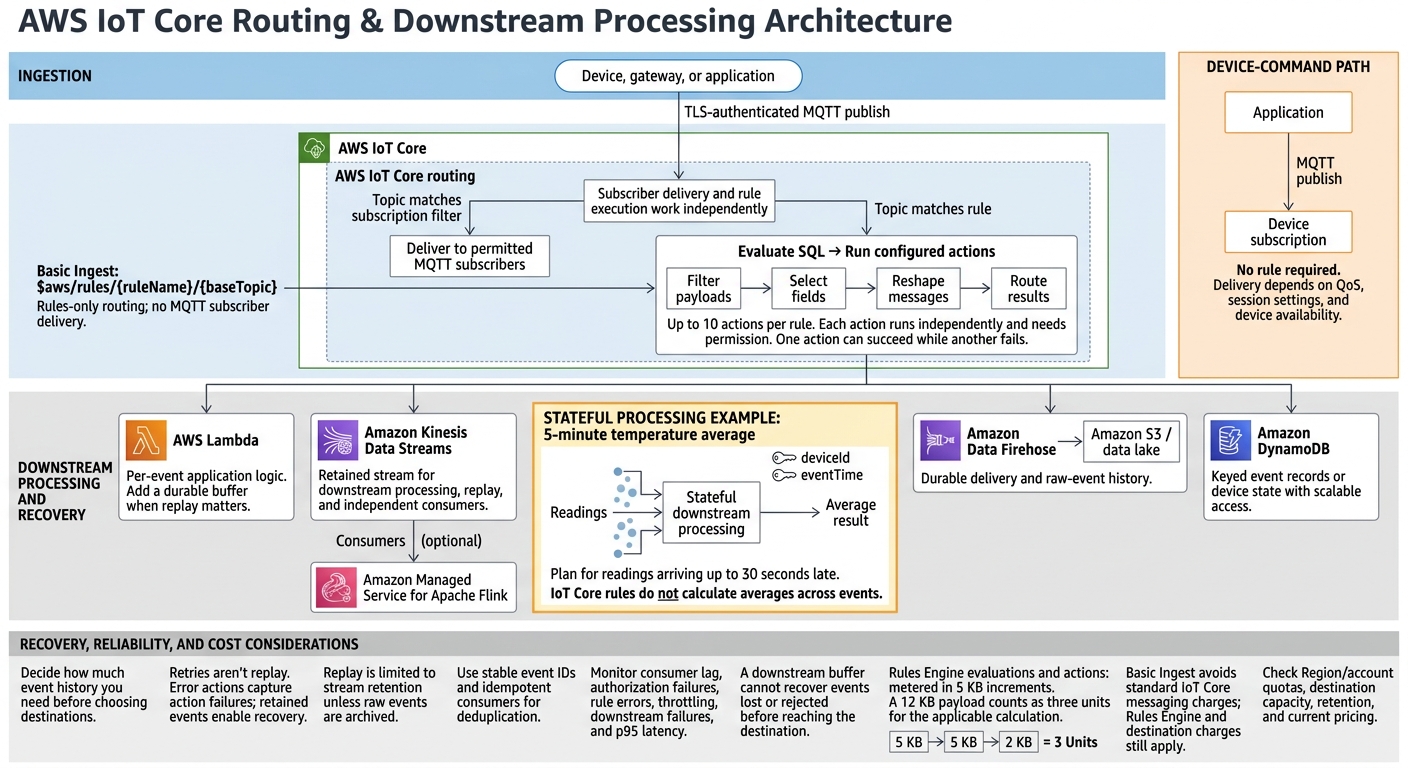
AWS IoT Core: From Device Events to Processing
AWS Real-Time IoT Data Pipeline | IoT Core → Kinesis → Lambda → S3 + DynamoDB | AWS Tutorial
sbb-itb-61a6e59
MQTT Ingestion and Message Routing
Subscriber delivery and rule execution work independently. A published message can reach subscribed clients, trigger matching rules, or do both.
Device, gateway, or application
        │
        │ TLS-authenticated MQTT publish
        ▼
AWS IoT Core
        ├── Topic matches subscription filter
        │       └── Deliver to permitted MQTT subscribers
        │
        └── Topic matches rule
                └── Evaluate SQL → Run configured actions
MQTT Clients, TLS, and Authentication
Devices, gateways, and apps can act as MQTT clients, publishing messages or subscribing to them. Use TLS to protect the connection.
Topics, Subscriptions, and Payloads
Topic names and subscription filters determine which authorized subscribers receive a published message. That same message can match a rule separately.
Basic Ingest for Rules-Only Routing
For backend telemetry, publish to $aws/rules/{ruleName}/{baseTopic}. AWS IoT Core sends these messages directly to the named rule, without delivering them to MQTT subscribers. The rule can then filter, transform, and route events to AWS services.
Rules Engine Processing and AWS Destinations
When a message matches a rule, AWS IoT Core evaluates the SQL statement and sends the result to one or more destinations.
SQL Filters and Event Transformations
The Rules Engine routes messages from MQTT ingestion to downstream processing. AWS IoT Core rules use SQL to filter payloads, select fields, and reshape messages before sending them along.
After filtering and shaping the event, choose a destination that fits the workload.
Choosing Rule Actions and Destinations
AWS IoT Core commonly sends rule output to AWS Lambda, Amazon Kinesis Data Streams, Amazon Data Firehose, or Amazon DynamoDB. Each serves a different purpose:
- AWS Lambda handles per-event application logic.
- Amazon Kinesis Data Streams supports downstream stream processing and multiple consumers.
- Amazon Data Firehose provides durable delivery to Amazon S3 or a data lake.
- Amazon DynamoDB stores device state or event records that need scalable access.
Each action runs independently, so reliable routing depends on permissions and failure handling.
Multiple Actions, Permissions, and Error Handling
A rule can run up to 10 actions, and each action needs its own permission. AWS IoT must have permission to access each destination resource. One action can succeed while another fails.
Use an error action to capture action failures. Retries and error routing help with reliability, but they do not provide replay. Downstream consumers should be idempotent and use stable event IDs for deduplication.
Pipeline Design, Scaling, and Monitoring
After IoT Core routes each event, choose its downstream path based on latency, replay, and fanout needs.
4 Common IoT Pipeline Patterns
Keep raw history, live analytics, alerts, and device control separate. Use Basic Ingest for storage-only telemetry and MQTT subscriptions for device commands.
The rule determines what happens next to telemetry. Device commands use a separate subscription path.
| Pattern | Flow | Key decision |
|---|---|---|
| Storage | MQTT or Basic Ingest → IoT rule → S3 or DynamoDB | Use S3 for raw history; DynamoDB for keyed records or device state. |
| Continuous processing | MQTT → IoT rule → Kinesis Data Streams or Amazon MSK → consumers | Use a retained stream for replay and independent consumers. |
| Per-event logic | MQTT → IoT rule → Lambda → destination | Add a durable buffer when replay matters. |
| Device commands | application → MQTT publish → device subscription | Plan delivery around QoS, session settings, and device availability; no rule is required. |
If your pipeline needs to keep state across events, routing alone isn't enough. You'll need stream processing.
Stream Windows, Replay, and Backpressure
A five-minute temperature average needs stateful processing on
deviceIdandeventTime, not just a per-message threshold.
Decide how readings arriving up to 30 seconds late should affect results. Kinesis consumers or Amazon Managed Service for Apache Flink can handle this aggregation. You can replay events only within the stream's retention period unless you also archive raw events for recovery.
Watch consumer lag. When consumers fall behind, add processing capacity and reduce work per record. A downstream buffer can't recover an event that was rejected, malformed, unauthorized, or lost before reaching the destination.
Once you've chosen a pattern, check throughput, retention, and quotas together.
Scaling Limits, Throughput, and Costs
Quotas vary by Region and account. Before launch, check rule and evaluation quotas in your target Region. Your pipeline pattern determines destination capacity, retention, and spending.
| AWS-managed capability | Team responsibility |
|---|---|
| Broker and Rules Engine infrastructure | Define schemas, topic contracts, peak traffic, and selective routing |
| Managed destination infrastructure | Size stream partitions, consumer capacity, buffering, and retention |
| TLS endpoints and service integrations | Configure least-privilege policies, certificates, roles, and encryption |
| Service metrics and quota reporting | Build alarms, load tests, recovery procedures, and reconnect backoff with jitter |
Rules Engine evaluations and actions are metered in 5 KB increments.
A 12 KB payload represents three units for the applicable calculation.
Basic Ingest avoids standard IoT Core messaging charges, but Rules Engine and destination charges still apply. Compact payloads and selective rules cut unnecessary work. Balanced partition keys help prevent hot partitions.
Check current Region-specific USD rates on the AWS IoT Core pricing page. Calculate storage, stream capacity, Lambda, and monitoring costs separately.
Setup and Reliability Checklist
Create a test certificate and restrict topic and destination permissions. Then publish telemetry that reflects expected traffic and confirm that it reaches the destination.
Set alarms for authorization failures, rule errors, throttling, downstream failures, consumer lag, and p95 latency. Test malformed and oversized payloads, duplicates, outages, reconnects, and traffic spikes.
Document raw-event retention, checkpoint behavior, replay procedures, schema migration rules, and who owns each alert.
Conclusion: Building Reliable IoT Event Pipelines
After ingestion, rules, and routing, the remaining decisions center on latency, replay, and consistency. AWS IoT Core works best when you need low-latency, event-driven delivery. The tradeoff is balancing latency, correctness, and scalability.
For recovery and backfills, use storage that supports replay. This lets you reprocess events without maintaining separate batch and streaming paths. Use strongly consistent stores when correctness matters most, and scalable, eventually consistent destinations for high-volume telemetry.
AWS IoT Core handles ingestion and routing, while downstream services manage state, replay, and long-lived processing.
FAQs
How do I choose a retention period for IoT events?
Balance day-to-day needs, cost, and security requirements. Set limited retention windows for retry, quarantine, and dead-letter queues. These queues should support diagnosis and recovery - not long-term storage - so you avoid unnecessary costs and duplicate data. Classify data fields so retention matches payload sensitivity and regulatory requirements.
To support recovery, use cold storage with Iceberg, Delta Lake, or Hudi for event replay and backfills, rather than keeping all data in expensive primary storage.
How can I prevent duplicates from skewing averages?
Make your pipeline idempotent: processing the same event multiple times should leave the state unchanged after the first pass. Give each message a stable event ID or business idempotency key, and enforce uniqueness at the sink.
With Delta Lake, use MERGE for upserts or foreachBatch with txnAppId and txnVersion to prevent duplicate writes during retries. Make sure the full pipeline design supports exactly-once processing guarantees.
How do I size my pipeline for traffic spikes?
Start with data partitioning: input topic partitions set the maximum parallelism. If network, memory, or disk limits slow processing, add machines. For CPU-heavy tasks, increase CPU cores and adjust thread settings. Monitor consumer lag to spot processing delays.
During high traffic, set a minimum time between triggers to prevent overload. Use scheduler pools to keep resource-heavy queries from monopolizing the cluster.