
Arrow IPC: Zero-Copy Reads With Memory-Mapped Files
Arrow IPC can read eligible, uncompressed buffers directly from a memory-mapped file - without copying their data. Close the writer first, then use pa.memory_map() and ipc.open_file() to select a record batch. Batch index 1 selects the second batch, not the second row.
Zero-copy does not mean zero disk I/O or zero memory use. Compressed buffers may need decompression, and conversions to Python, NumPy, or pandas can allocate memory.
This guide covers how to:
- Write and finalize an IPC file for indexed batch reads.
- Inspect validity, offset, and value buffers while keeping the mapping open.
- Compare uncompressed, LZ4, and Zstandard files using read time, CPU time, Arrow allocations, and process memory.
Measure reads that access values, not just file opening. Report first-run and warm-cache results separately; the first run is not necessarily a cold-cache test.
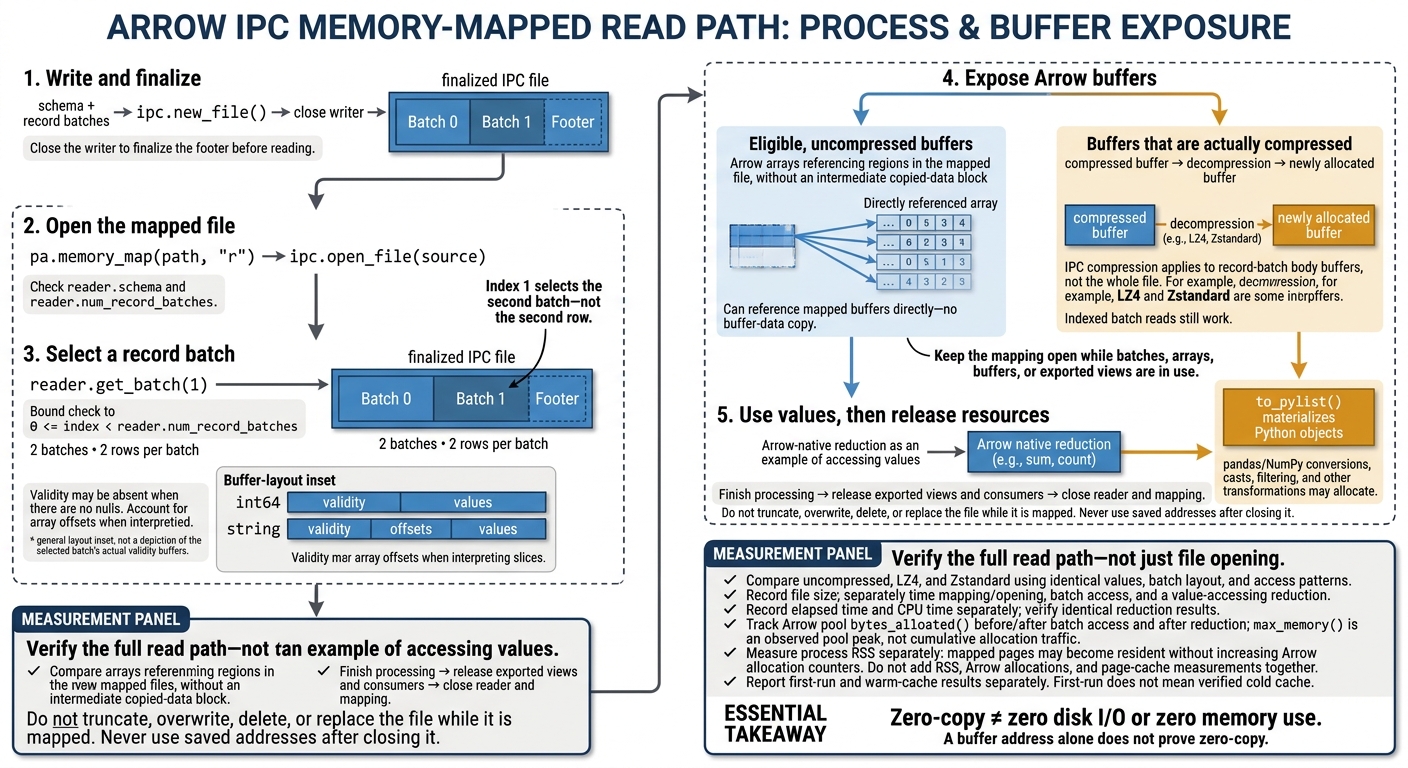
Arrow IPC Zero-Copy Reads: From File to Buffers
2. Write and Finalize an Arrow IPC File
Define the Schema and Create Record Batches
Use this three-column schema for the remaining examples. Each batch contains two rows and follows the same schema. Store money as integer cents: 2599 means $25.99. The null customer in the first batch adds a validity bitmap to the string column, which you’ll see during the next buffer inspection.
import pyarrow as pa
import pyarrow.ipc as ipc

schema = pa.schema([
    ("sale_id", pa.int64()),
    ("customer", pa.string()),
    ("amount_cents", pa.int64()),
])

batches = [
    pa.RecordBatch.from_pydict(
        {
            "sale_id": [1001, 1002],
            "customer": ["Ava", None],
            "amount_cents": [2599, 12500],
        },
        schema=schema,
    ),
    pa.RecordBatch.from_pydict(
        {
            "sale_id": [1003, 1004],
            "customer": ["Liam", "Mia"],
            "amount_cents": [4999, 8750],
        },
        schema=schema,
    ),
]
Write and Close the File With ipc.new_file()
With the batches created, handle serialization in a separate block. Every batch must match the writer’s schema. The inner context closes the writer and finalizes the footer before the file handle closes.
Write the uncompressed baseline, then check the finalized file’s schema and batch count:
path = "sales-uncompressed.arrow"
options = ipc.IpcWriteOptions(compression=None)

with pa.OSFile(path, "wb") as sink:
    with ipc.new_file(sink, schema, options=options) as writer:
        for batch in batches:
            writer.write_batch(batch)

with pa.memory_map(path, "r") as source:
    reader = ipc.open_file(source)
    assert reader.num_record_batches == 2
    assert reader.schema == schema
These checks confirm that the footer was finalized and that ipc.open_file() can open the file. It’s now ready for memory-mapped reads.
Choose IPC Buffer Compression
Keep sales-uncompressed.arrow for buffer inspection. Write separate LZ4 and Zstandard variants only when PyArrow supports those codecs. Use the same batches in every file so later measurements isolate compression and let you compare buffer behavior.
def write_variant(path, compression):
    if not pa.Codec.is_available(compression):
        print(f"Skipping {compression}: codec unavailable")
        return

    options = ipc.IpcWriteOptions(compression=compression)
    with pa.OSFile(path, "wb") as sink:
        with ipc.new_file(sink, schema, options=options) as writer:
            for batch in batches:
                writer.write_batch(batch)

    with pa.memory_map(path, "r") as source:
        reader = ipc.open_file(source)
        assert reader.num_record_batches == len(batches)
        assert reader.schema == schema

write_variant("sales-lz4.arrow", "lz4")
write_variant("sales-zstd.arrow", "zstd")
IPC compression applies to record-batch body buffers, not the whole file. Indexed reads still work, but compressed buffers may need decompression and new allocations.
sbb-itb-61a6e59
3. Read Memory-Mapped Batches and Inspect Buffers
Open the Mapping and Select a Batch
Check reader.schema and reader.num_record_batches before calling get_batch(1). Index 1 selects the second batch - not the second row. For an uncompressed file, Arrow can read file-backed buffers directly.
After loading the second batch, inspect its buffers to see what the reader exposed without converting the values.
Inspect Validity, Offset, and Value Buffers
Use batch.column() and array.buffers() to inspect storage. An int64 array usually exposes validity and values buffers. A string array usually exposes validity, offsets, and values buffers. The validity buffer can be None when there are no nulls. Layout varies by type, and interpreting sliced arrays requires accounting for their offsets.
def inspect_batch(batch):
    for name in ("sale_id", "customer"):
        array = batch.column(batch.schema.get_field_index(name))
        print(
            f"{name}: type={array.type}, length={len(array)}, "
            f"offset={array.offset}, nulls={array.null_count}"
        )
        for index, buffer in enumerate(array.buffers()):
            if buffer is None:
                print(f"  buffer {index}: absent")
            else:
                print(
                    f"  buffer {index}: {buffer.size} bytes, "
                    f"address=0x{buffer.address:x}"
                )

with pa.memory_map("sales-uncompressed.arrow", "r") as source:
    with pa.ipc.open_file(source) as reader:
        print(reader.schema)
        print("Record batches:", reader.num_record_batches)

        batch_index = 1
        if not 0 <= batch_index < reader.num_record_batches:
            raise IndexError(f"batch index {batch_index} is out of range")

        batch = reader.get_batch(batch_index)
        print("Batch rows:", batch.num_rows)
        inspect_batch(batch)
        # Finish any downstream processing before leaving this scope.
A buffer address alone does not prove zero-copy. Calling to_pylist() materializes Python objects. Pandas conversion, casts, filtering, and other transformations can also allocate memory independently of the mapped read.
Keep the Mapping Open While Using Buffers
Keep the mapping alive until you no longer need any batch, array, or exported view. Zero-copy only helps while the mapping stays open and its buffers remain in scope. Release any exported memoryview, NumPy view, or C data interface before closing the mapping. Never use saved addresses after closing it.
Treat the file as read-only while it is mapped. Do not truncate, overwrite, delete, or replace it while it is in use.
The next section measures the read cost of these same files.
For those looking to master data engineering and optimize high-performance systems, understanding these low-level memory mechanics is essential.
4. Measure Read Time and Memory Allocations
After inspecting buffers, measure how compression affects the same read path.
Compare Uncompressed, LZ4, and Zstandard Files
Measure the end-to-end read cost for each file variant. Compressed buffers need decompression and new allocations. Uncompressed buffers can remain directly usable from the mapping.
Results depend on the data and workload. IPC compression may also repeat compression already handled by the storage or transport layer. Compare the full read cost - not just file size.
| File option | Storage size | Read latency | Decompression CPU | New allocations |
|---|---|---|---|---|
| Uncompressed | Usually largest | Often low with warm pages | None | Usually avoided for compatible mapped buffers |
| LZ4 | Usually smaller | Depends on I/O savings | Typically lower than Zstandard | Required for buffers that are actually compressed |
| Zstandard | Often smaller than LZ4 | Depends on data and compression settings | Often higher than LZ4 | Required for buffers that are actually compressed |
Use the same batch access pattern for every file variant.
Benchmark Reads That Access Values
Keep the batch layout and values identical across files; change only compression. Run an Arrow-native reduction on a fixed numeric column, and check that every file produces the same result. Record file size, then separately time opening the mapping, reading a batch, and running the reduction. Record CPU time separately, too: elapsed time alone cannot isolate decompression cost.
Record pa.default_memory_pool().bytes_allocated() before and after batch access, then again after the reduction to isolate the reduction’s allocation delta. Also record max_memory(), but treat it as the pool’s observed peak - not cumulative allocation traffic. Temporary allocations may have been released before you take a reading.
Repeat each test and report first-run and warm-cache results separately. Do not label the first run “cold cache” unless you verified cache eviction.
Measure process resident memory (RSS) separately. Mapped pages can become resident without increasing Arrow’s allocation counter. RSS includes Python and native-library memory as well as resident mapped pages. Operating-system page-cache usage provides another view. Do not add these measurements together or treat any one of them as total memory use.
5. Conclusion: Check the Zero-Copy Read Path
Zero-copy applies only to eligible Arrow buffers, not every downstream operation. Finish writing the IPC file, memory-map it, and select a batch with ipc.open_file(). Arrow can reference mapped regions directly for compatible, uncompressed buffers. Decompression and conversions may allocate new memory.
Use this checklist to check the read path from the completed file through batch access:
- [ ] Close
ipc.new_file()before reading. Then open the finished file withpa.memory_map()andipc.open_file(). - [ ] Check the batch index:
0 <= index < reader.num_record_batches. - [ ] Inspect the array’s validity, offset, and value buffers, accounting for any missing buffers.
- [ ] Keep the mapping open until every reader, batch, array, buffer, and downstream consumer is done. Then close the reader and mapping.
- [ ] Measure uncompressed, LZ4, and Zstandard files separately because compression can add allocations. Expect allocations during decompression and conversion.
FAQs
How can I verify that my reads are truly zero-copy?
Check the memory addresses of the record batch’s data buffers. For zero-copy reads, those addresses should sit within the memory-mapped file’s address range. This shows that the buffers read mapped data directly, without an intermediate heap copy. Addresses outside that range suggest the data was copied.
How do I choose a record batch size?
Choose a record batch size that fits comfortably in memory without extra allocations, but is large enough to keep per-batch overhead low. Profile throughput and memory usage as you increase the batch size. Stop increasing it when memory pressure, allocations, or latency worsen.
Decompression may require new allocations. Use smaller batches or compression settings that allow faster decompression to limit allocation churn.
When do compression savings outweigh decompression costs?
Compression saves time when the reduction in storage or network I/O outweighs the time spent decompressing data. For active training workloads, Snappy balances smaller files with fast decompression. Gzip is a better fit for archiving, where saving storage space matters more than CPU usage.
Efficient storage management - including high-performance file systems - can cut total infrastructure costs, even if the storage itself costs more.