30 Snowflake Interview Questions for Data Engineers
If I were preparing for a Snowflake interview today, I’d focus on 4 things first: how Snowflake runs queries, how warehouses affect speed and cost, how recovery works, and how data is loaded and protected. That covers most of what interviewers want to test.
Here’s the short version:
- Architecture: I’d be ready to explain Snowflake’s storage, compute, and cloud services layers.
- Performance and cost: I’d know when to use warehouse sizing, auto-suspend, multi-cluster warehouses, result cache, and resource monitors.
- Storage and recovery: I’d explain zero-copy cloning, Time Travel, and how recovery choices affect storage spend.
- Loading and security: I’d compare
COPY INTOvs. Snowpipe, talk through streams for incremental loads, and cover roles, masking, row access policies, and network rules.
A few facts matter here:
- Snowflake warehouses bill per second after a 60-second minimum
- Each warehouse size step usually doubles credit use
- Multi-cluster helps with concurrency, not one long query
- Result cache can cut repeat query compute to $0.00 for that run if cached results are used
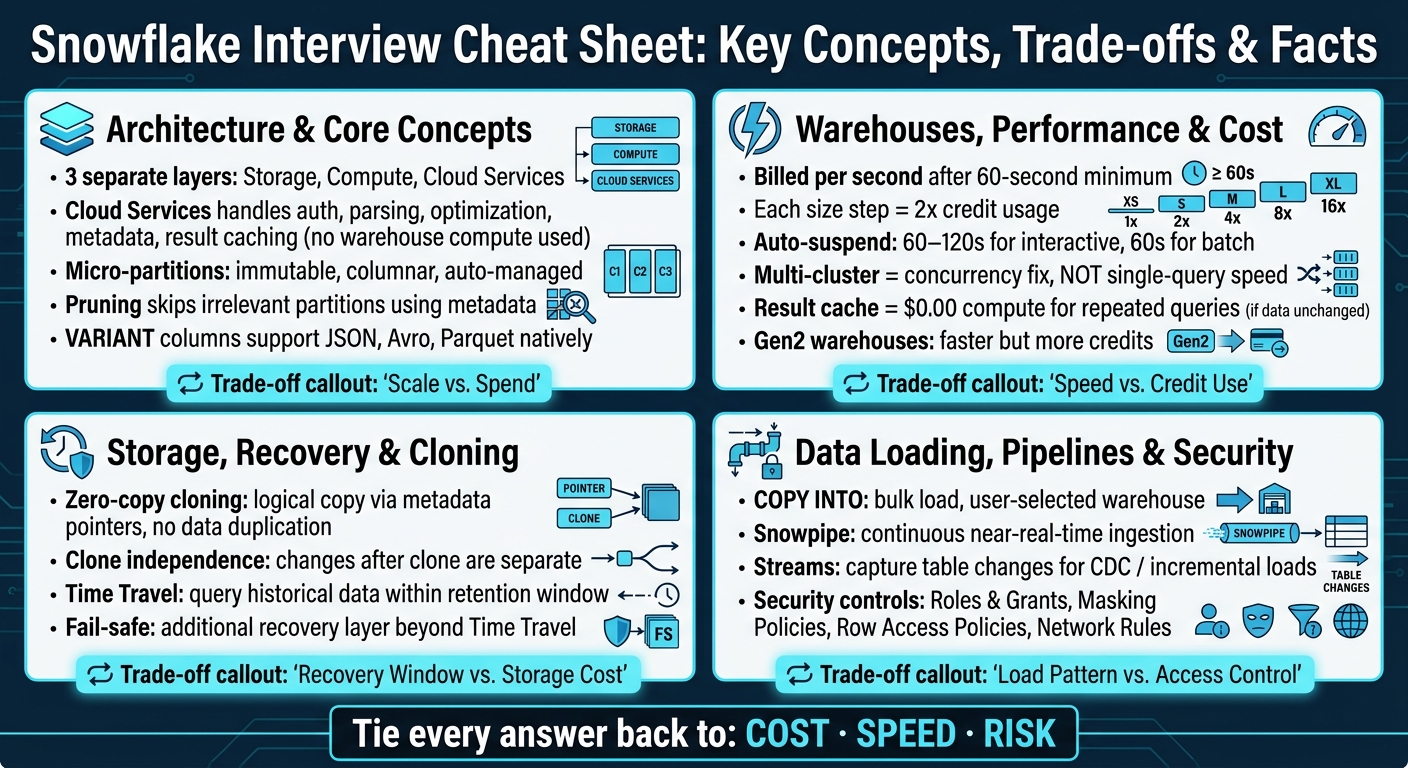
Snowflake Interview Cheat Sheet: Key Concepts, Trade-offs & Facts
Snowflake - Top 30 Interview Questions for Data Engineers & Data Architects - Part 1
sbb-itb-61a6e59
Quick Comparison
| Area | What I’d know | Main trade-off |
|---|---|---|
| Architecture | Storage, compute, cloud services, micro-partitions | Scale vs. spend |
| Warehouses | Sizing, auto-suspend, multi-cluster, cache | Speed vs. credit use |
| Recovery | Cloning, Time Travel, fail-safe | Recovery window vs. storage cost |
| Loading & Security | COPY INTO, Snowpipe, streams, roles, masking |
Load pattern vs. control |
If you can tie each answer back to cost, speed, or risk, you’ll usually sound clear and prepared. The rest of the article builds on that.
1. Architecture & Core Concepts
Snowflake is built on three separate layers: storage, compute, and cloud services. Each one scales on its own. That setup sits at the center of many data engineering interview questions because it shapes how queries run, how billing works, and why Snowflake behaves the way it does under load.
Interviewers often start here to see if you understand the path a query takes through Snowflake. If you do, a lot of other topics start to make sense, from performance tuning to warehouse sizing.
Here are 6 core concepts you should be ready to explain:
- Shared data architecture and virtual warehouses: Snowflake keeps a single copy of data in cloud storage, while separate warehouses query that same data in parallel. You can pause, resize, or add warehouses without moving the data.
- Micro-partitions and pruning: Snowflake stores tables automatically in immutable, columnar micro-partitions. It then uses metadata to skip partitions that can't match a filter.
- Cloud services layer: The cloud services layer handles authentication, parsing, optimization, metadata, access control, and result caching without using warehouse compute.
- Native semi-structured data support: Snowflake stores JSON, Avro, and Parquet in
VARIANTcolumns and lets you query nested fields with SQL.
A simple way to think about it: cloud services acts like the control center, and the warehouse does the heavy lifting. A query first goes to cloud services for auth, parsing, optimization, and cache checks. After that, a warehouse scans only the micro-partitions it needs.
That’s why these ideas show up so often in interviews. They connect straight to questions about sizing, scaling, and cost.
2. Warehouses, Performance & Cost
Virtual warehouses are Snowflake’s compute layer. They run queries, load data, and handle transformations, while storage stays separate. That split matters a lot in interviews because it shapes how you think about speed, concurrency, and cost.
Snowflake bills warehouses per second after a 60-second minimum, and each size step doubles credits.
Here are 8 warehouse and performance concepts interviewers often test:
- Warehouse sizing: For most ELT work, start with Small or Medium. Then watch what happens. If queries start queuing or spilling to disk, scale up. Don’t assume a bigger warehouse will save money just because it finishes faster.
- Auto-suspend and auto-resume: These settings help cut idle spend. A common setup is 60–120 seconds for interactive warehouses and 60 seconds for batch jobs.
- Multi-cluster warehouses: Use these for concurrency, not to make one query run faster. The usual idea is simple: let more clusters spin up only when queries start to queue, then shut them down when traffic drops.
- Compute isolation: A heavy ETL job on one warehouse won’t drag down analyst dashboards running on another. That’s why many teams split warehouses by job type, such as ingestion on one side and ad hoc analytics on the other.
That separation is a big reason warehouse setup matters just as much as query tuning. You can write a decent query and still get poor dashboard performance if ETL and BI are fighting for the same compute.
- Result caching: If the same query runs again and the data hasn’t changed, Snowflake can serve it from the result cache. That cuts compute use and cost. It also explains why a small BI warehouse can often support lots of dashboard refreshes without moving up a size.
- Cluster keys for performance: On large fact tables, cluster keys can cut down the number of micro-partitions scanned for filter-heavy queries.
- Resource monitors: These let you set credit limits at the warehouse or account level, then trigger alerts or automatic suspension when thresholds are hit. A lot of teams set monthly caps by department so they can track spend and avoid ugly surprises.
- Gen2 vs. Gen1 warehouses: Warehouse generation changes the speed-versus-cost trade-off. Gen2 warehouses run faster, but they use more credits. They make sense when the time saved is worth the extra spend.
For slow dashboards, the fix usually isn’t “make the warehouse bigger.” More often, the better move is to lean on multi-cluster scaling, result cache, and separate BI from ETL workloads.
DataExpert.io Academy includes Snowflake labs and capstone projects for warehouse tuning, pipelines, and resource monitors.
3. Storage, Recovery & Cloning
Snowflake keeps storage separate from compute, and that’s why cloning is so fast and low-cost. When Snowflake creates a clone, it makes an instant logical copy of a database, schema, or table. In interviews, this topic comes up a lot because it shows whether you understand how Snowflake stores data, not just how to write the command.
Here’s the core idea:
- Zero-copy cloning:
CLONEmakes a logical copy without duplicating the underlying micro-partitions. Snowflake just creates new metadata pointers to the same data. That’s why cloning is fast. It’s handy for refreshing environments, running tests, and trying things out without putting the source at risk. - Clone independence: Once the clone exists, the source and the clone change on their own. Update one, and the other stays as it is.
That distinction matters: shared storage at the start, separate changes after the clone.
The same storage setup is also what makes time travel and recovery possible. For more insights on data engineering trends, you can join the DataExpert.io Newsletter.
4. Data Loading, Pipelines & Security
After storage and recovery, interviewers usually move to a new area: how data gets into Snowflake and how access stays under control. This part comes up a lot because loading and security sit at the center of day-to-day Snowflake work.
COPY INTO vs. Snowpipe is a common comparison. COPY INTO is a bulk-load command that runs with a user-selected virtual warehouse. Snowpipe, on the other hand, is Snowflake’s continuous ingestion service. It loads files from a stage in near real time. So the choice often comes down to the ingestion pattern: big scheduled loads or a more continuous flow.
Once that pattern is set, the next piece is pipeline reliability. A common setup is to use Airflow to run Snowflake loads, handle retries, and add data-quality checks inside one DAG. That gives the pipeline some guardrails instead of leaving each step to run on its own.
For semi-structured data, Snowflake often starts with VARIANT. You can land JSON, Avro, or Parquet as-is first, then parse out fields later with SQL. That’s often the cleanest way to deal with messy source data before shaping it for downstream use.
Streams usually come up in CDC discussions. They capture table changes, which lets pipelines apply incremental updates instead of reprocessing whole tables. They’re also a common building block for SCD workflows.
On the security side, interviewers usually expect you to know the main controls:
- Roles and grants for access control
- Masking policies for sensitive fields
- Row access policies for limiting which records users can see
- Network rules for controlling where connections can come from
This is one of those areas where Snowflake isn’t just about loading data fast. It’s also about making sure the right data gets to the right people, with the right checks in place.
Closing Takeaways
Across all of these topics, interviewers usually care less about memorized definitions and more about how you think through trade-offs.
That’s the heart of a strong data engineering interview answer.
If you can explain how warehouse sizing changes both performance and cost, when cloning makes more sense than a full copy, or how Time Travel differs from fail-safe in a recovery plan, you’re in good shape. The goal is to tie each technical choice back to cost, speed, or risk.
Go through the topics in order, and practice saying your answers out loud. That small step makes a big difference. Reading something in your head feels easy. Explaining it clearly, without notes, is the part that shows whether you know it.
Use this checklist to connect each topic to a decision:
| Focus Area | Key Trade-offs to Practice |
|---|---|
| Warehouses & Performance | Warehouse size vs. cost, query tuning |
| Storage & Recovery | Time Travel retention vs. storage cost, cloning vs. full copy |
| Ingestion & Pipelines | CDC, streams, dbt incremental models |
| Governance & Security | Role-based access, masking policies, row access policies |
Hands-on practice matters too. Build ingestion pipelines, tune warehouses, and work through CDC flows so you can answer with examples from your own experience, not just textbook language. If you want more structured practice, DataExpert.io Academy offers Snowflake boot camps and subscriptions with hands-on projects.
Review the 30 questions twice:
- Once to get familiar with them
- Once out loud, without notes
FAQs
How does Snowflake actually execute a query?
Snowflake runs queries across three separate layers.
Cloud Services parses the query, checks permissions, and builds the execution plan. The Virtual Warehouse handles the actual compute work, like reading data, running joins, and doing aggregations.
The Storage layer holds data in immutable, columnar micro-partitions. It also stores metadata that helps Snowflake skip partitions that don't matter at runtime.
In Snowsight, Query Profile shows execution as a Directed Acyclic Graph. That makes it easier to spot slow points, like disk spillage or scans that read more data than they should.
When should I scale up a warehouse instead of using multi-cluster?
Scale up your warehouse when queries slow down because they need heavy compute, scan large amounts of data, or hit memory limits.
A quick way to check: open the Query Profile and look for bytes spilled to local or remote storage. If either value is above zero, a larger warehouse may help.
Use multi-cluster only for concurrency problems. In plain English, that means queries are queuing because several users are running requests at the same time.
How do Time Travel and zero-copy cloning work together?
They work together by letting you create a new object from a table or schema exactly as it existed at a specific point in the past. With AT or BEFORE and CLONE, you can point to a timestamp, offset, or Query ID.
That makes it handy for setting up sandbox environments where you can test changes safely. You get a copy without duplicating physical storage, and you don’t affect production performance.