AWS Data Engineer Practice Questions Explained
If you want to do well on the AWS Certified Data Engineer – Associate exam, you need to get one thing right fast: match the AWS service to the workload. The test gives you 85 questions, 170 minutes, and a passing score of 720/1,000. At $75 per attempt, practice should train your decision-making, not just your memory.
I’d boil the article down to this:
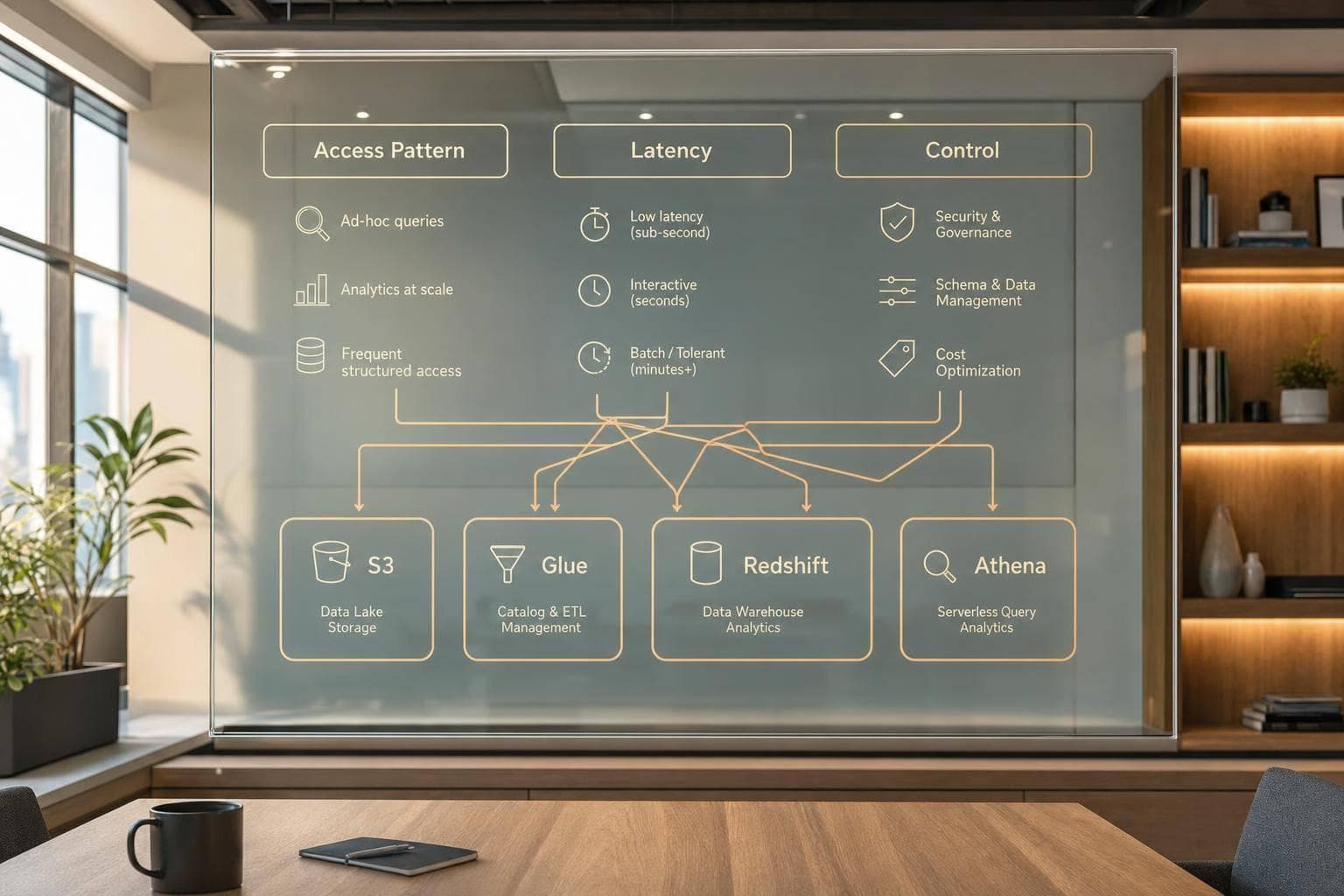
- Start with the constraint first: access pattern, latency, cost, security, or monitoring
- Pick storage based on retrieval needs: hot, warm, archive, or mixed access
- Use Lake Formation when the question asks for row-level or column-level data control
- Choose ETL vs. ELT based on when data must be cleaned or masked
- Use Glue, Step Functions, or Lambda based on pipeline scope and trigger type
- Pick Redshift, Athena, or Spectrum based on query frequency, scale, and where the data sits
- Use Kinesis Data Streams or Firehose based on latency and delivery needs
- Watch for cost and monitoring clues like Parquet, partitioning, CloudWatch, lifecycle rules, and concurrency scaling
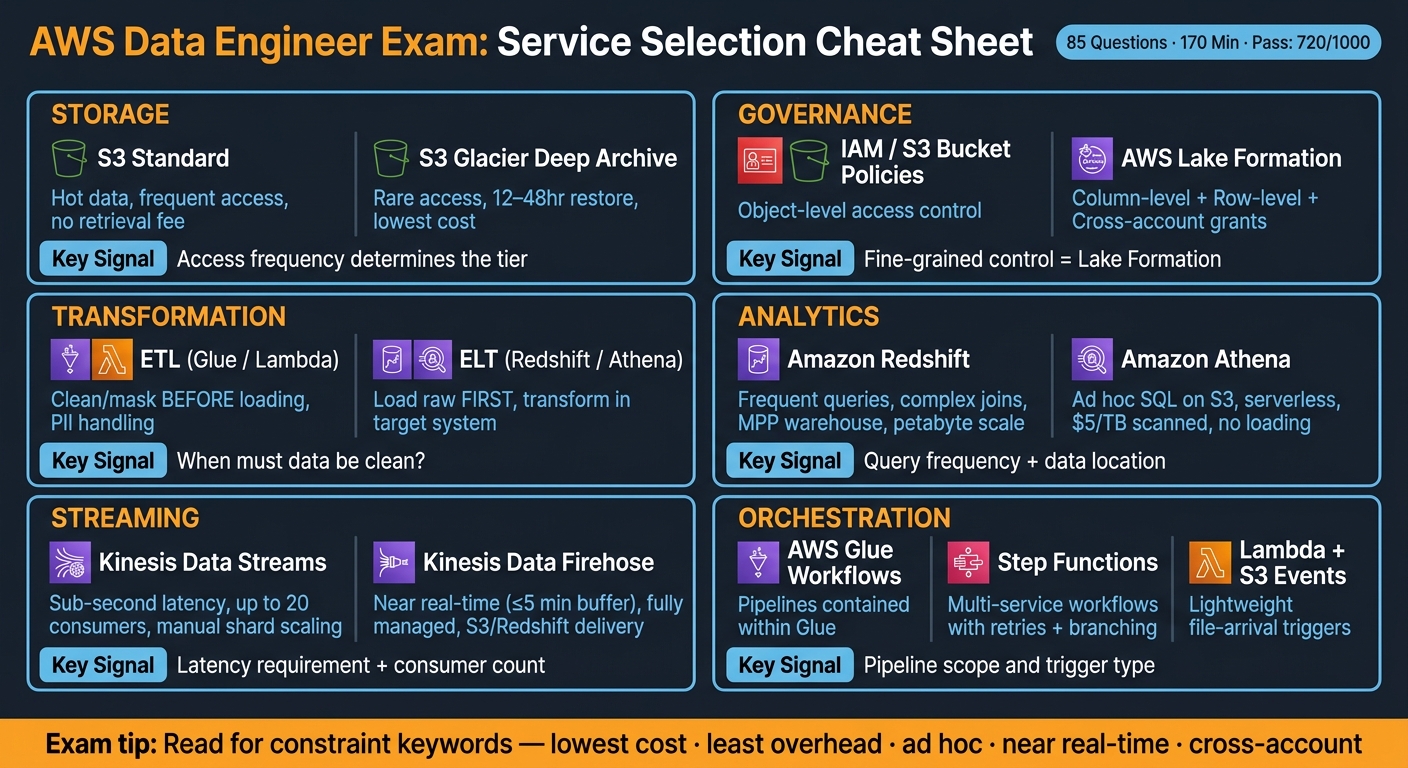
This article is not about memorizing service names. It is about reading exam wording like “lowest cost,” “least overhead,” “ad hoc,” “cross-account,” or “near real-time,” and then making the right call.
AWS Data Engineer Exam: Service Selection Cheat Sheet
AWS Certified Data Engineer Associate Practice Exam | DEA-C01 Test Preparation
Quick Comparison
| Topic | Best choice when... | Main signal |
|---|---|---|
| S3 Standard | Data is read often | Hot storage |
| S3 Standard-IA | Data is read sometimes | Warm storage with retrieval fee |
| S3 Intelligent-Tiering | Access is unknown | Mixed or changing pattern |
| Glacier tiers | Data is rarely read | Restore time matters |
| Lake Formation | Teams need row/column access control | Fine-grained governance |
| ETL | Data must be cleaned before load | Masking, validation, cleanup |
| ELT | Target system does the transform work | Raw-first load into Redshift/S3 flow |
| Glue | Large batch data prep | Serverless ETL jobs |
| Lambda | Small event-driven tasks | Light transforms, short runtime |
| Redshift | Frequent analytics and joins | Warehouse workload |
| Athena | SQL on S3 once in a while | Ad hoc query-in-place |
| Redshift Spectrum | Redshift needs S3 data without loading | Hybrid warehouse + lake query |
| Kinesis Data Streams | Low-latency custom streaming | Multiple consumers |
| Kinesis Data Firehose | Managed delivery with low setup | Near real-time delivery |
| CloudWatch | You need metrics, logs, and alarms | Pipeline visibility |
If I were using this article to study, I’d treat each practice question like a sorting exercise: What is the workload? What is the hard limit? Which AWS tool fits that exact case? That is the core lesson from start to finish.
Practice Questions on Data Lakes, Storage, and Governance
These questions usually test two separate choices:
- Which Amazon S3 storage class matches the data access pattern
- Whether AWS Lake Formation is needed for fine-grained access control
That split matters. One part is about where the data sits and what it costs to retrieve. The other is about who gets to see what.
A good way to work through these questions is simple: start with the access pattern, then figure out whether the scenario is asking about storage cost or governance scope.
Amazon S3 Storage Class and Data Lake Design Questions
A very common question in this area gives you a usage pattern and asks which S3 storage class makes the most sense.
S3 Standard is for hot data. Think active analytics jobs, raw ingestion zones, and data that gets queried all the time. S3 Standard-IA works better for warm data that still needs millisecond retrieval but doesn’t get touched every day.
When access patterns are unclear or keep changing, S3 Intelligent-Tiering is often the safe pick. It moves objects to the Infrequent Access tier after 30 consecutive days with no access. That means you don’t have to guess up front.
For archive data, retrieval time is the big clue. Glacier Instant Retrieval returns data in milliseconds. Glacier Flexible Retrieval takes minutes to hours. Glacier Deep Archive takes 12 to 48 hours.
One exam-style detail shows up a lot: use S3 Lifecycle rules with object tags or prefixes so only certain datasets transition. For example, a prefix like logs/ can move only log data to Glacier while leaving your active curated zone alone. That’s a small detail, but it’s often the difference between a right answer and a trap.
Lake Formation Permissions and Governance Questions
Once storage class is settled, the next step is access control: who can see the data, and at what level?
IAM policies and S3 bucket policies control access to S3 objects. Lake Formation handles table-level, column-level, and row-level access in the AWS Glue Data Catalog.
If the question asks for column-level or row-level control across teams, Lake Formation is the right call. IAM can’t do that at that level. If the setup spans lots of tables, LF-TBAC helps you avoid managing permissions one resource at a time. You assign tags to resources, then grant access based on those tags.
Cross-account sharing is another strong signal. Lake Formation supports cross-account grants and resource links, which is much easier than juggling complex S3 bucket policies for outside access. If the goal is least-privilege access to shared analytics tables, pick Lake Formation.
Comparison Table: S3 Storage Classes and Lake Formation Controls
Use these tables to separate retrieval speed, cost, and governance scope.
| S3 Storage Class | Best For | Retrieval Speed | Cost / Access Note |
|---|---|---|---|
| S3 Standard | Hot / frequent access | Milliseconds | Highest storage cost; no retrieval fee |
| S3 Standard-IA | Warm / infrequent access | Milliseconds | Lower storage cost; per-GB retrieval fee |
| S3 Intelligent-Tiering | Unknown or changing patterns | Milliseconds | Small per-object monitoring fee |
| S3 One Zone-IA | Reproducible warm data | Milliseconds | Lower cost than Standard-IA; single AZ only |
| Glacier Instant Retrieval | Rare access with fast restore needs | Milliseconds | Archive storage for fast retrieval |
| Glacier Flexible Retrieval | Rare access when delay is acceptable | Minutes to hours | Archive storage for slower restores |
| Glacier Deep Archive | Long-term retention (7–10 years) | 12 to 48 hours | Lowest storage cost for long-term archive |
| Lake Formation Feature | Use Case | Advantage Over IAM/S3 Policies |
|---|---|---|
| Column-level permissions | Restrict sensitive fields per team | IAM can't filter at column level |
| Row-level filtering | Segment data by department or region | Not possible with S3 bucket policies |
| LF-TBAC | Permissions at scale across many tables | Tag-based; avoids resource-by-resource management |
| Cross-account grants | Share data lake tables with other AWS accounts | Simpler than managing external bucket policies |
sbb-itb-61a6e59
Practice Questions on ETL, ELT, and AWS Glue Pipelines
After storage and access control, the exam moves into how data gets moved, changed, and coordinated. These are still service-selection questions. The difference is that now the focus is on transformation instead of storage or governance.
ETL vs. ELT Decision Questions
Use ETL when data needs to be cleaned, masked, or checked before it gets loaded. Use ELT when raw data lands first and the target system handles the transformation work.
ETL is the right pick when you need to mask PII, do heavy cleanup, or run complex transformations outside the target system. ELT works the other way around: it loads raw data first, then uses the target system’s compute layer for transformations. That’s a common match for Amazon Redshift.
If a question mentions Redshift Spectrum, it usually signals ELT, because Redshift can query data in Amazon S3 directly. On the flip side, if the scenario says PII must be masked or anonymized before storage, that points to ETL.
Glue Job, Crawler, and Orchestration Questions
These questions often lay out a batch pipeline and ask which parts to use, plus the order they should run in.
A common AWS Glue flow looks like this:
- A Glue Crawler scans the source data
- The crawler updates the Glue Data Catalog with schema metadata
- A Glue ETL job uses that metadata to transform the data and write the output to Amazon S3 or Amazon Redshift
If the question asks how to avoid processing the same data again on later runs, the answer is Job Bookmarks. They track what was already processed so the job only handles new data.
If the schema is fixed, skip the crawler. That avoids extra discovery cost.
For orchestration, scope is the main thing to watch:
- Use Glue Workflows for pipelines that stay inside Glue
- Use Step Functions when the workflow spans multiple services, such as a Glue job, an Athena query, and a Lambda function, and needs retries or branching
- Use S3 Event Notifications with Lambda for light file-arrival triggers
You’ll see these same patterns show up again in questions about Redshift, Athena, streaming, and monitoring.
Comparison Table: ETL vs. ELT and AWS Glue vs. AWS Lambda
Use these tables when a question asks whether transformation should happen before or after loading, or which automation tool fits the pipeline.
| ETL | ELT | |
|---|---|---|
| Transformation timing | Before loading into the target | After loading raw data |
| Typical target | Data warehouses or S3-based data lakes | MPP warehouses like Amazon Redshift |
| Common services | AWS Glue, Amazon EMR, AWS Lambda | Amazon S3, Amazon Redshift, Amazon Athena |
| Use case | PII masking or complex cleaning before storage | High-performance SQL processing on raw data |
| AWS Glue | AWS Lambda | |
|---|---|---|
| Workload type | Complex, large-scale ETL and data preparation | Lightweight, event-driven transformations |
| Scaling | Managed Spark clusters | Automatic, per-request scaling |
| Execution limit | Long-running jobs | 15-minute maximum timeout |
| Typical task | Batch processing of large datasets | Triggering a cleanup when a file lands in S3 |
Practice Questions on Redshift, Athena, Streaming, and Monitoring
After transformation, the exam moves into where you query data and how you move it in real time. This is where service-fit questions show up: Amazon Redshift for warehouse-style analytics, Amazon Athena for query-in-place, and Amazon Kinesis for streaming.
Redshift and Athena Service Selection Questions
Once a scenario shifts from data prep to analytics, the choice is often Redshift vs. Athena.
Use Redshift for frequent, complex analytics. Use Athena for occasional SQL on raw data in Amazon S3.
Amazon Redshift is the right pick when the question mentions complex joins, high concurrency, steady performance, or petabyte-scale warehousing. It uses columnar storage and Massively Parallel Processing (MPP), which helps it handle analytic workloads with steady speed. You can tune performance with sort keys and distribution styles to improve query speed and data placement. For most tables, AUTO distribution is the safest place to start because Redshift chooses the best method based on table size.
Athena works best for ad hoc, serverless queries right on top of Amazon S3. It costs $5 per terabyte scanned, so layout matters. If you partition your S3 data and store it in a columnar format like Apache Parquet, you can cut scan costs in a very direct way. One limit that shows up on exams: Athena can't query data in the Amazon S3 Glacier storage class.
Athena is the simplest pick for ad hoc SQL over data stored in S3.
If Redshift needs to query S3 data without loading it first, use Redshift Spectrum.
For tuning questions, a few patterns come up again and again:
- Use a single COPY command instead of many INSERT statements so Redshift can load data in parallel
- Use compressed files in the 1 MB to 124 MB range
- Use GZIP compression to reduce network load
If the question asks how to deal with bursts in read queries without resizing the cluster, the answer is Concurrency Scaling. It adds capacity automatically and behind the scenes.
Streaming Ingestion and Pipeline Monitoring Questions
When the question moves from batch analytics to live ingestion, shift your thinking from Redshift and Athena to Kinesis.
Most streaming questions are about Kinesis Data Streams vs. Kinesis Data Firehose.
Use Kinesis Data Streams when you need real-time processing with sub-second latency, multiple separate consumers, or custom stream-processing logic. It supports up to 20 consumers with Enhanced Fan-out, but you handle shard scaling yourself. Use Kinesis Data Firehose when the goal is simple delivery to S3, Redshift, or OpenSearch with very little setup. It's fully managed and serverless, but it buffers data for up to 5 minutes, so think of it as near real-time, not instant.
The same service-fit mindset applies to operations too: pick the AWS tool that shows failures fast.
For monitoring, use Amazon CloudWatch. It collects metrics and logs across AWS services, and you can set alarms to catch failures early. For pipeline troubleshooting, stalled pipeline states are a common sign that something needs attention. Enhanced VPC Routing sends Redshift COPY and UNLOAD traffic through your VPC, which gives you flow-log visibility.
Comparison Table: Redshift vs. Athena and Kinesis Data Streams vs. Kinesis Data Firehose
| Amazon Redshift | Amazon Athena | |
|---|---|---|
| Type | Managed data warehouse (provisioned or serverless) | Serverless interactive query service |
| Best fit | Complex joins, high concurrency, frequent reporting | Ad-hoc queries, data discovery, occasional use |
| Data source | Local columnar storage or S3 via Spectrum | Amazon S3 (query-in-place) |
| Pricing model | Per node/hour or per RPU-hour | $5 per TB of data scanned |
| Kinesis Data Streams | Kinesis Data Firehose | |
|---|---|---|
| Latency | Real-time | Near real-time (up to 5 minutes) |
| Management | Manual shard scaling | Fully managed, serverless |
| Consumers | Multiple (up to 20 with Enhanced Fan-out) | Managed delivery to S3, Redshift, OpenSearch, or Splunk |
| Typical destination | Custom consumers (Lambda, EC2) | S3, Redshift, OpenSearch, Splunk |
Conclusion: What These AWS Practice Questions Teach You
Across storage, ETL, warehousing, and streaming questions, the exam rewards fast service selection under constraints. The pattern is simple: match the service to the workload.
When you read a scenario, zero in on three things first:
- Access pattern
- Latency
- Control requirements
Those signals usually point you to the answer.
Key Takeaways to Review Before the Exam or Interview
Use this cheat sheet to recall the clearest signal for each service.
| Service | Primary Use Case | Key Justification |
|---|---|---|
| Amazon S3 | Data lake storage | High durability with lifecycle tiering |
| AWS Glue | Serverless ETL | Serverless ETL with catalog-driven jobs |
| Amazon Redshift | Data warehousing | MPP warehouse for frequent analytics |
| Kinesis Data Streams | Real-time streaming | Real-time fan-out and custom consumers |
| AWS Lake Formation | Governance | Row- and column-level governance |
It’s not just about picking the right service. The exam also checks whether you can spot governance, cost, and observability needs baked into the question.
Use AWS Lake Formation for access control and S3 Object Lock in Compliance Mode to stop deletion or overwrite. Use Athena Workgroups to separate queries and manage spend by team. You can cut costs with Parquet, lifecycle tiering, and Glue FLEX for non-urgent jobs. For monitoring, use CloudWatch for metrics and alarms, and EventBridge for event-driven automation.
When a question adds a control, cost, or observability requirement, that’s usually the giveaway. Pick the AWS service built for that exact job.
FAQs
How do I choose between Athena and Redshift?
Choose Amazon Athena when you want to run serverless, ad hoc SQL queries on raw data in Amazon S3 without dealing with infrastructure.
Choose Amazon Redshift when you need high-performance data warehousing, with data loaded into a managed, columnar system built for complex analytics at scale.
When should I use ETL instead of ELT?
Use ETL when data needs work before it lands in its final destination.
That usually means cleaning, structuring, or aggregating sensitive information before storage. It’s a solid fit when you want tighter control over what gets loaded, instead of pushing raw data into the target system and sorting it out later.
ETL is also common when you want to keep the data footprint small in the destination environment. For example, you might load only the fields, formats, or summaries you actually need. That can help when storage rules are strict or when data quality needs to be checked upfront.
Why use Lake Formation over IAM?
Use AWS Lake Formation when you need tighter data access control than IAM can give you. IAM controls access to AWS resources at a broad level. AWS Lake Formation goes much deeper, with permissions at the database, table, column, row, and cell level.
It also helps you manage data governance from one place. And with tag-based access control, you can scale permissions without juggling messy Amazon S3 bucket policies or separate IAM policies for each data asset.