
AWS Data Engineering: Beginner's Roadmap & Basics
If you’re trying to break into data engineering through AWS, it’s tempting to start with services: S3, Glue, EMR, Redshift, Lambda, Athena, and so on. But the video behind this article makes an important point that many beginners miss: before cloud tools become useful, you need a working mental model of data, Python behavior, SQL efficiency, and runtime costs.
That’s what makes this session valuable. It isn’t a polished service-by-service AWS overview. Instead, it reveals the practical foundations that shape real data engineering work: debugging common programming errors, understanding Python data structures, loading and inspecting files in notebooks, and thinking like an engineer who is accountable for performance and cloud spend.
For mid-level professionals moving toward data engineering or AI engineering, this is the right framing. The path is not just "learn AWS." The path is:
- Understand how data is represented
- Learn how code fails
- Practice manipulating real file formats
- Internalize cost-aware thinking
- Then scale those habits into distributed systems on AWS
Key Takeaways
- Data engineering is not just about writing code; it’s about writing cost-efficient code.
- Common error types matter because debugging speed is a core job skill, especially when working with imported datasets.
- Python fundamentals still matter in cloud roles, especially lists, dictionaries, indexing, and slicing.
- Notebook environments like Google Colab are useful for learning, but they also expose runtime limitations and session instability that mirror real-world execution issues.
- JSON and nested data are where many beginners get stuck; flattening semi-structured data is a core practical skill.
- SQL optimization is essential for data engineering, not optional. Query design affects compute cost and cluster performance.
- AWS learning should be grounded in execution realities like memory, CPU usage, cluster behavior, and data volume.
- Action item: Practice importing CSV and JSON files, then transforming them into clean tabular outputs.
- Action item: Strengthen SQL beyond syntax - focus on window functions, aggregation tradeoffs, and query efficiency.
- Action item: When learning AWS tools, always ask: what will this cost at scale?
sbb-itb-61a6e59
The Real Beginner Roadmap: Start With Data Behavior, Not Just AWS Services
A common mistake among aspiring data engineers is treating AWS as the starting point rather than the deployment layer.
The session implicitly argues for a better roadmap:
Stage 1: Learn how data behaves locally
Before distributed pipelines, you need confidence with:
- Python basics
- Data structures
- CSV and JSON ingestion
- Column access
- Indexing and slicing
- Error interpretation
Stage 2: Learn how transformations scale
Once you understand data in a notebook, you can start asking:
- What happens when the file becomes 10 GB?
- What breaks when data is nested or inconsistent?
- What is the memory cost of loading the whole object?
- Which operations are expensive?
Stage 3: Move to cloud-native patterns
Only after the above does AWS start making deeper sense:
- S3 as storage
- Spark for distributed processing
- Clusters and job execution for scale
- Cloud cost as a design constraint
This progression is especially useful for professionals transitioning from analyst, software, or BI backgrounds. It closes the gap between "I know some Python" and "I can design production-oriented data workflows."
Why Error Handling Is a Core Data Engineering Skill
One of the first themes in the video is debugging. The instructor centers several common error categories:
- Value errors
- Type errors
- Attribute errors
- Method/function-related errors
The specific taxonomy in the session is informal, but the broader lesson is accurate: most beginner roadblocks come from a small set of recurring mistakes.
What these errors usually mean in practice
Value errors
These often happen when the data itself is valid structurally, but the supplied value is not appropriate for the operation.
Example:
- Parsing a malformed date
- Converting text into an integer when the string contains non-numeric characters
- Passing unexpected column values into a transformation
For data engineers, value errors often signal dirty source data.
Type errors
These usually happen when you apply an operation to the wrong kind of object.
Example:
- Treating a list like a dictionary
- Adding strings to integers
- Calling a method that expects a DataFrame on a scalar value
These are often a sign that you’ve lost track of the shape of the data.
Attribute errors
These occur when you try to access something that doesn’t exist on that object.
Example:
- Calling
.nameon a plain dictionary - Using DataFrame-style methods on a list
- Referencing a field or attribute that is unavailable
This is especially common when switching between raw Python objects, pandas objects, and Spark objects.
Method or functionality errors
The session loosely refers to function-related issues here. In practical terms, this includes:
- Wrong syntax
- Wrong parameters
- Misunderstood method behavior
- API/version differences
That last point matters. In notebooks and cloud environments, some failures are not your logic at all. They may be caused by:
- Package version mismatch
- Kernel/runtime state issues
- Session disconnections
- Local vs hosted environment differences
Why this matters in AWS
When you run jobs on AWS, errors become more expensive:
- A failed local script costs minutes
- A failed Spark job may cost compute time, retries, and debugging cycles
- A bad production run can block downstream datasets
So beginners should train themselves to ask two questions constantly:
- What object type am I working with right now?
- What shape is the data in right now?
Those two questions prevent a surprising number of failures.
Python in Data Engineering: You Don’t Need Everything, But You Need the Right Things
The instructor spends significant time on Python basics, especially data structures. That might feel elementary, but for aspiring data engineers, this emphasis is correct.
You do not need to master all of Python before starting with AWS. But you do need comfort with the structures that appear everywhere in pipelines and transformations.
The core Python data structures to know
The session highlights:
- List
- Dictionary
- Set
- Tuple
- String
For data engineering, lists and dictionaries are the most immediately important.
Why lists matter
Lists show up everywhere:
- Rows extracted from files
- Arrays in JSON
- Ordered collections of values
- Intermediate outputs from pandas or Spark operations
You need to understand:
- Indexing
- Slicing
- Nested lists
- Iteration
- Conversion between list-like outputs and tabular form
Why dictionaries matter
Dictionaries are central because they mirror:
- JSON objects
- Record-like data
- Key-value mappings
- Schema-driven transformations
If you understand dictionaries, nested records become far less intimidating.
The deeper lesson
In data engineering, most "hard" work is not mathematical. It is structural.
You are constantly asking:
- Is this a scalar, list, dictionary, or table?
- Is this nested or flat?
- Is this a key-value object or a row-column object?
- How do I reshape this into something downstream systems can use?
That’s why Python basics remain relevant even in highly cloud-centric roles.
Google Colab, Notebooks, and the Reality of Learning Environments
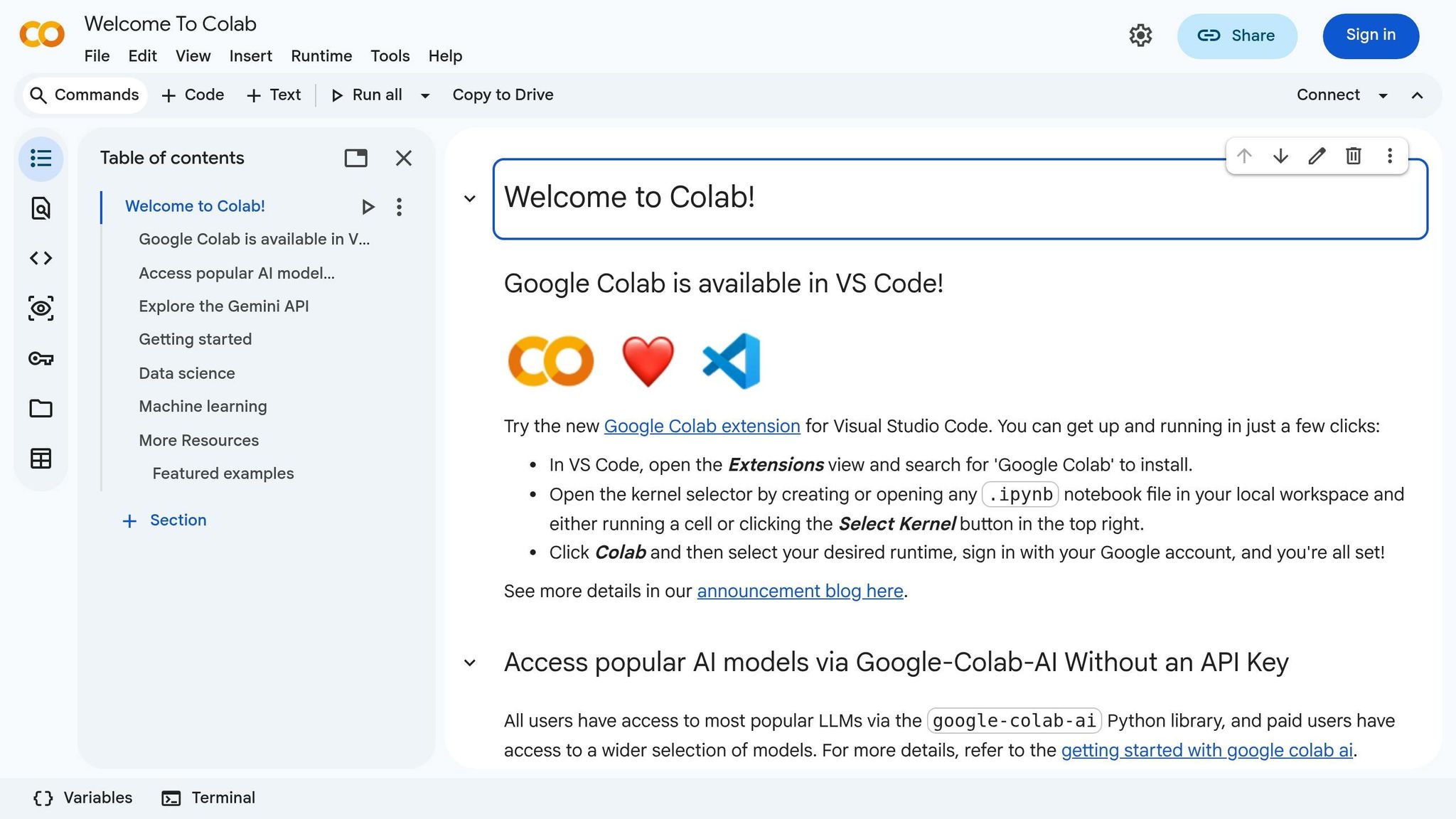
The video uses Google Colab to demonstrate code execution. That choice surfaces another useful beginner lesson: your environment matters.
The instructor points out notebook runtime concepts such as:
- Connecting to hosted runtime
- Available RAM and disk
- GPU/accelerator options
- Local runtime vs cloud-hosted runtime
For learners, this is more than setup trivia. It introduces an important professional habit: always be aware of compute context.
What notebook tools are good for
Notebooks are excellent for:
- Quick experimentation
- Learning syntax
- Testing transformations
- Inspecting outputs step by step
- Demonstrating file ingestion
Where notebooks can mislead beginners
They can also hide realities such as:
- State leakage between cells
- Session instability
- Kernel hangs
- Implicit dependencies
- Manual execution order problems
The video even shows runtime confusion and notebook instability during execution. That’s not a flaw in the lesson - it’s actually realistic. In production settings, jobs hang, sessions fail, and environments drift.
A beginner who only learns "perfect demos" is often underprepared for real engineering work.
Python, Performance, and the Instructor’s Cost-Efficiency Message
A major theme in the session is that Python can be slow, and that cost matters when code runs on cloud infrastructure.
Some of the performance framing in the video is simplified, but the engineering principle is sound: data engineers are responsible not just for correctness, but for efficient execution.
The key idea: cloud makes inefficiency visible
On a laptop, inefficient code may feel tolerable. In the cloud, inefficiency turns into:
- Longer job times
- More CPU and memory usage
- Larger cluster requirements
- Higher bills
That’s the connection the video makes between beginner coding habits and AWS data engineering.
Why imported packages and job design matter
The instructor notes that packages and transformations introduce runtime overhead. The exact overhead depends on the environment and workload, but the strategic takeaway is useful:
Every dependency and every transformation has an execution cost.
In AWS-oriented workflows, that means thinking carefully about:
- What libraries you load
- How much data you pull at once
- Whether transformations are vectorized or row-by-row
- Whether your Spark jobs shuffle excessively
- Whether you’ve written a query that forces expensive regrouping
A more precise framing for professionals
For readers with some technical background, it’s worth clarifying the idea without overstating it:
- Python itself is often not the main bottleneck in modern data engineering pipelines
- The bigger issue is usually how data is processed, not the language alone
- Libraries like pandas and Spark often rely on optimized engines under the hood
- On AWS, architecture decisions matter more than language purity
Still, the instructor’s larger point remains true: the best data engineers think about resource efficiency from the start.
SQL Is Still Non-Negotiable
One of the strongest practical messages in the video is that SQL remains essential.
That matters because many learners chasing AI or cloud roles underestimate how much day-to-day data engineering still depends on SQL fluency.
The instructor stresses that anyone working in a data role should be at least intermediate in SQL. That is sound advice.
Why SQL still dominates in data engineering
Even if your stack includes Python, Spark, and AWS services, SQL remains central for:
- Data validation
- Transformations
- Aggregation logic
- Warehouse work
- Analytics engineering handoffs
- Incremental loads
- Performance tuning
- Ad hoc investigation
The important insight: optimization matters more than syntax
The video gives a simple but useful warning: operations like heavy GROUP BY usage can slow systems when data volumes are large.
That message points beginners toward a more mature SQL mindset:
- Don’t just write a query that works
- Write a query that scales reasonably
- Understand when a window function is more appropriate
- Minimize unnecessary scans and shuffles
- Be aware of partitioning strategy
Why this directly connects to AWS
In AWS ecosystems, SQL inefficiency often translates into:
- More scanned data in Athena
- Slower transformations in Glue or Spark SQL
- Higher warehouse costs in Redshift
- Longer cluster occupancy
That means SQL is not just a query language. It is a cost-control language.
From CSV to DataFrame: Why Basic File Loading Is More Important Than It Looks
The session walks through loading a CSV into pandas and accessing a single column. On the surface, that sounds basic. But conceptually, it teaches a vital data engineering pattern:
ingest → inspect → isolate → transform
What this step teaches beginners
When you load a CSV and select a column, you are practicing:
- File-path handling
- DataFrame creation
- Column-level inspection
- Output-shape awareness
- Conversion between DataFrame and list-like structures
These are foundational moves for later work in:
- S3 file ingestion
- Glue jobs
- Spark reads
- Schema validation
- Data quality checks
The important mental shift
Beginners often view a DataFrame as "just a table." The video nudges toward a better understanding:
A DataFrame is a structured object whose columns and values can be manipulated differently depending on what the next step requires.
That becomes crucial when:
- A column must become a list
- A nested field must be expanded
- A transformation must preserve schema
- A downstream tool expects flat tabular output
The Most Valuable Part of the Session: Working With Nested JSON
The strongest practical section of the video is the JSON example.
This is where the lesson becomes highly relevant to real data engineering work. Flat CSVs are easy. Real pipelines often involve:
- Nested JSON
- Semi-structured records
- Lists inside fields
- Dictionaries inside dictionaries
- Inconsistent structure across records
These are exactly the problems many production pipelines must solve.
The problem
The example JSON contains:
- Simple fields like name and age
- A list of skills
- A nested address object
When loaded naively into a DataFrame, some fields remain as unflattened lists or nested objects. That may be technically valid, but it is often not analytically useful.
The real engineering challenge
The goal is not merely to "read" the JSON. The goal is to produce clean, usable tabular output.
That means transforming:
skills: [x, y, z]into separate columns or normalized rows
And transforming:
address: {street, city, zip}into flattened columns like:address.streetaddress.cityaddress.zip
Why this matters in the real world
This is not an academic exercise. Many AWS data engineering tasks involve exactly this kind of work:
- API ingestion into S3
- Log/event payloads
- Application telemetry
- SaaS exports
- NoSQL source dumps
If you can flatten nested JSON cleanly, you’ve already started thinking like a data engineer.
The Hidden Skill the Video Teaches: Schema Thinking
The session never formally uses the phrase "schema design" as a central concept, but it teaches it indirectly.
When the instructor asks how to clean nested JSON into a better output, the real question is:
What should the final schema look like?
That is one of the most important questions in data engineering.
Before writing code, ask:
- What should each column represent?
- Should arrays become multiple columns or multiple rows?
- Which nested keys must be preserved?
- What naming convention will make downstream use easier?
- What should happen if a nested field is missing?
These decisions matter more than memorizing syntax.
Why professionals should pay attention here
Mid-level practitioners often hit a ceiling because they know tools, but not modeling decisions.
The difference between junior and more mature data engineering thinking is often this:
A junior engineer asks, "How do I parse this?" A stronger engineer asks, "What structure best supports downstream use, performance, and maintainability?"
The video’s JSON-cleaning discussion points directly at that growth step.
Cost Awareness Is Part of the AWS Data Engineering Mindset
The title promises an AWS roadmap, and while the session spends more time on programming foundations than on AWS services, it lands on a very AWS-relevant principle: compute costs shape engineering decisions.
The instructor repeatedly returns to the idea that running jobs on clusters is not free. That includes:
- Long-running compute
- Inefficient Spark jobs
- Overuse of expensive operations
- Large data movement
- Poorly optimized queries
Why this mindset matters early
Many beginners postpone cost thinking until they have a "real" job. That’s a mistake.
If you learn cloud tools without cost awareness, you risk building habits that don’t survive production environments.
A practical AWS lens for beginners
When you start learning AWS data engineering, attach cost questions to every service:
S3
- How much data are you storing?
- How often are you reading it?
- Are you organizing data for efficient access?
EMR / Spark clusters
- How long does the cluster run?
- Are jobs shuffling too much data?
- Are you overprovisioning compute?
Glue
- Is the transformation job actually necessary?
- Is the schema handling clean or wasteful?
Redshift / Athena
- Are queries scanning more than needed?
- Are tables partitioned or modeled appropriately?
Even if the video does not detail each service, it clearly promotes the right habit: always connect technical choices to resource usage.
What Beginners Should Learn From the Session’s Rough Edges
An underrated feature of this video is that it includes live confusion:
- Syntax uncertainty
- Attribute errors
- Notebook slowness
- Session reset issues
- Trial-and-error while transforming data
That messiness is educational.
In highly edited tutorial culture, learners can develop false expectations:
- "Good engineers don’t get stuck"
- "If I understood the concept, the code should work immediately"
- "Errors mean I’m not ready"
The video shows the opposite. Real engineering work is iterative. You inspect, test, fail, revise, flatten, rename, and retry.
For professionals transitioning into data engineering, that’s an important emotional lesson: debugging is not separate from engineering - it is engineering.
A Practical Beginner Roadmap Based on the Session
If you want to turn the video’s lessons into a structured learning path, here is a practical sequence.
1. Strengthen Python for data manipulation
Focus on:
- Lists
- Dictionaries
- Indexing
- Slicing
- Basic functions
- Reading objects and outputs carefully
2. Learn pandas well enough to inspect and reshape data
Practice:
- Reading CSV and JSON
- Selecting columns
- Converting outputs between structures
- Renaming columns
- Dropping and joining columns
- Flattening nested data
3. Build comfort with semi-structured data
Work specifically on:
- Nested JSON
- Lists within fields
- Dictionaries within dictionaries
- Flattening patterns
- Clean output design
4. Advance your SQL beyond basics
Study:
- Aggregations
- Window functions
- Query readability
- Query efficiency
- Large-volume tradeoffs
5. Then move into AWS implementations
At that point, start applying the same logic using:
- S3 for data storage
- PySpark/Spark for distributed transformation
- Managed compute services for orchestration and scale
6. Keep cost as a design principle
Always ask:
- Can this transformation be cheaper?
- Can this query be lighter?
- Can this schema be cleaner?
- Can this job process less data?
Conclusion
Despite its informal delivery, this session captures something many "AWS beginner" resources miss: data engineering starts with disciplined thinking about data structures, errors, transformation logic, and efficiency.
The cloud does not replace fundamentals. It magnifies them.
If you’re an aspiring data engineer or AI engineer, the lesson is clear:
- Learn to read errors confidently
- Understand Python structures deeply enough to manipulate real data
- Practice turning messy inputs into clean outputs
- Take SQL optimization seriously
- Develop cost awareness before you start scaling workloads on AWS
That combination is what turns introductory knowledge into professional capability. AWS tools matter, but the engineers who succeed with them are the ones who already know how data behaves, how code fails, and how expensive bad design can become.
Source: "AWS Data Engineering Full Course Day 1 Introduction + Basics for Beginners Complete Roadmap 2026" - Tech Tutorials, YouTube, May 5, 2026 - https://www.youtube.com/watch?v=7NF9UnjCGR0