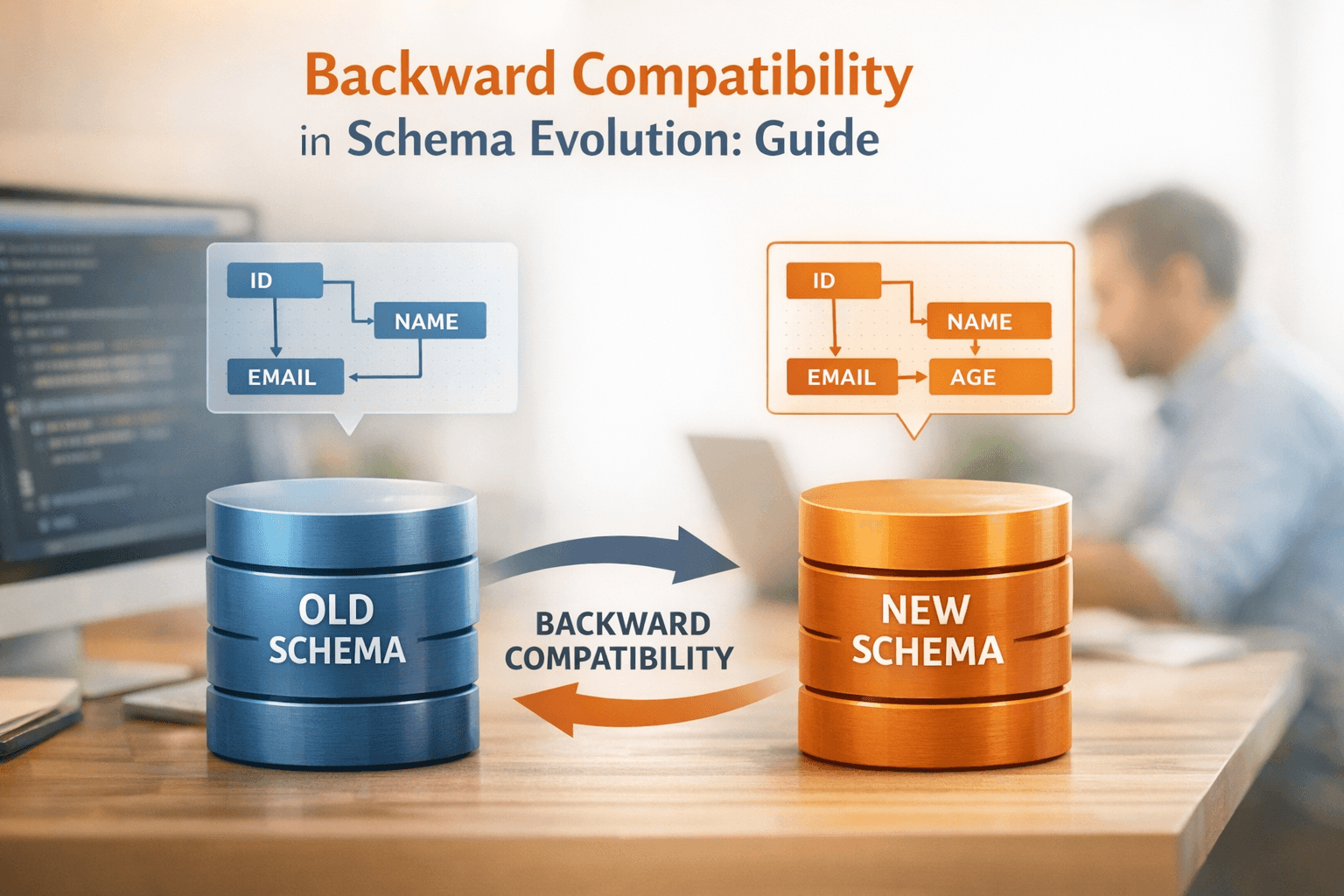
Backward Compatibility in Schema Evolution: Guide
Backward compatibility ensures that new schema versions can handle data created with older versions without breaking systems. It’s essential for smooth data processing and avoiding disruptions in data pipelines, dashboards, and machine learning models.
Key takeaways:
- Backward compatibility allows systems to read older data formats.
- Two main types: Backward (only the previous version) and Backward Transitive (all historical versions).
- Safe schema changes include adding optional fields with defaults and widening numeric types.
- Breaking changes, like removing required fields or renaming without aliases, can disrupt systems.
- Use schema registries with validation rules and automation to prevent issues.
Pro Tip: Always upgrade consumers before producers for backward-compatible updates. For long-term compatibility, use transitive validation and document schema versions.
Schema Compatibility | Schema Registry 101
Types of Backward Compatibility
Backward vs Backward Transitive Compatibility: Key Differences
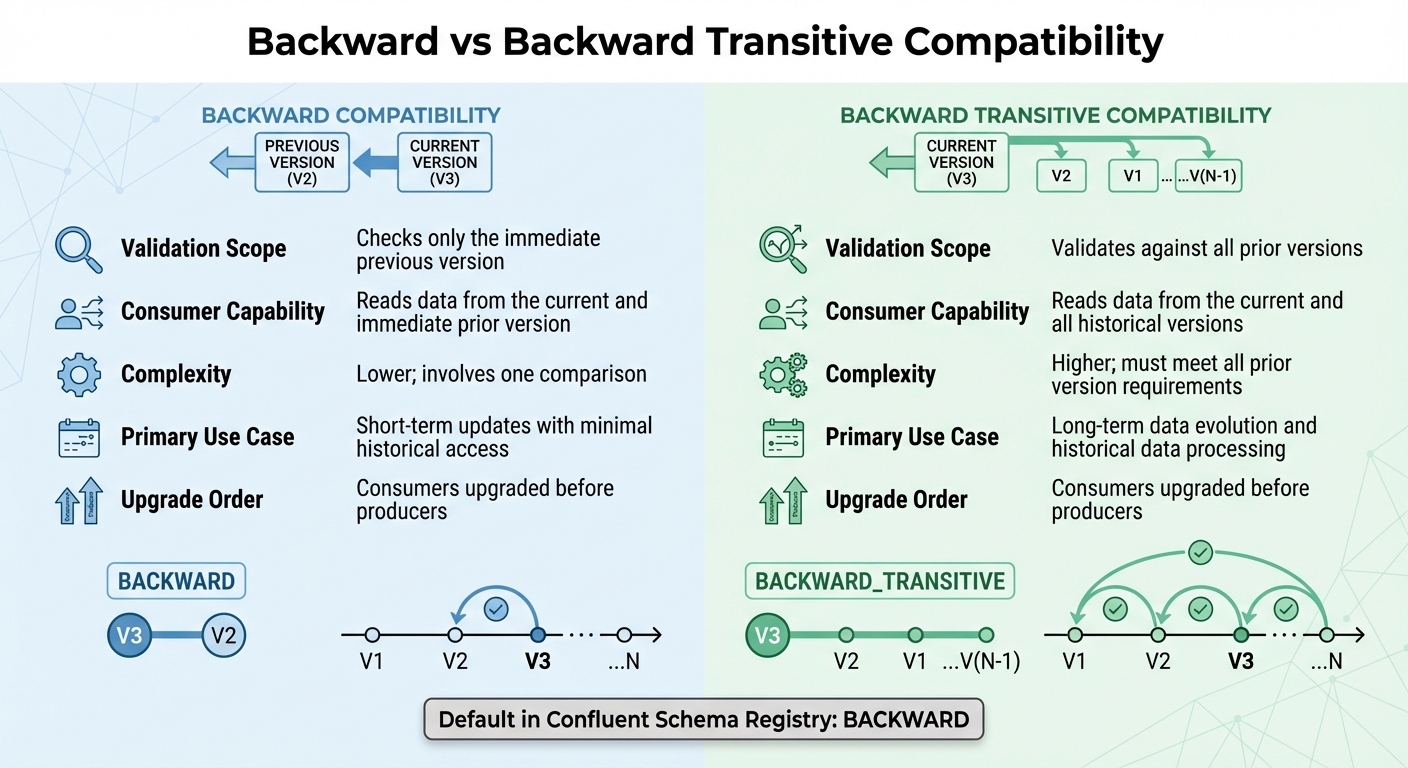
Grasping the difference between standard and transitive backward compatibility is key to avoiding costly errors. It clarifies how far back a new schema must go to read historical data. Let’s break down each compatibility type.
Backward Compatibility
Standard backward compatibility, often referred to as BACKWARD, ensures that a new schema version can read data created by the immediate prior version. When registering a new schema, the system checks it against only the most recent version in the registry. This approach works well for incremental updates where compatibility with just the last version is sufficient.
"The Confluent Schema Registry default compatibility type is BACKWARD, not BACKWARD_TRANSITIVE." - Confluent Documentation
In this setup, consumers must be upgraded before producers. This guarantees that applications reading the data can interpret the new schema before producers start using it. Safe changes here include removing fields or adding optional fields with default values. Since it involves only one comparison, this mode is less complex and ideal for short-term updates where only the latest schema transition matters.
Backward Transitive Compatibility
Backward transitive compatibility, or BACKWARD_TRANSITIVE, takes a broader approach. It ensures that a new schema version can read data from all previous versions in the schema's history. Unlike standard backward compatibility, this mode validates the new schema against every registered version, not just the latest one.
"If the consumer using the new schema needs to be able to process data written by all registered schemas, not just the last two schemas, then use BACKWARD_TRANSITIVE instead of BACKWARD." - Confluent Documentation
This is especially important for scenarios like Protobuf schemas, where new message types aren’t forward-compatible. It’s also critical for data warehousing, where SQL queries need to work across an entire historical dataset. The trade-off? Higher complexity. The new schema must align with all prior versions, making it more demanding but necessary for long-term data evolution or when reprocessing historical data stored in systems like HDFS or S3.
Comparison of Types
Choosing between these two types depends on your data access needs and how far back consumers need to read. Here's a quick look at how they compare:
| Feature | Backward Compatibility | Backward Transitive Compatibility |
|---|---|---|
| Validation Scope | Checks only the immediate previous version | Validates against all prior versions |
| Consumer Capability | Reads data from the current and immediate prior version | Reads data from the current and all historical versions |
| Complexity | Lower; involves one comparison | Higher; must meet all prior version requirements |
| Primary Use Case | Short-term updates with minimal historical access | Long-term data evolution and historical data processing |
| Upgrade Order | Consumers upgraded before producers | Consumers upgraded before producers |
For systems like Kafka Streams, only BACKWARD, BACKWARD_TRANSITIVE, and FULL compatibility modes are supported. This is because applications must read old schemas from state stores and changelogs. If your application involves long-term storage or reprocessing historical events, transitive compatibility is the safer bet. On the other hand, for short-term updates with limited data retention, standard backward compatibility is often enough.
Understanding these compatibility types lays the groundwork for making safe schema changes, which we’ll explore further in the next section. These distinctions are vital for ensuring smooth schema evolution without breaking existing functionality.
Backward Compatible Changes
Allowed Changes
When updating schemas without disrupting existing systems, certain changes are considered safe. For instance, you can delete fields since new readers will simply ignore any missing data. Similarly, adding optional fields with default values ensures smooth integration. In Avro, type widening is supported, allowing numeric types to evolve in this order: int → long → float → double. Protobuf also permits transitions like converting int32 to int64, provided the numbers remain within a manageable range. However, arbitrary changes - such as switching an int to a string - are not safe and will lead to failures.
For renaming fields, Protobuf uses tag-based identification to handle name changes safely, while Avro employs the aliases attribute to map old names to new ones. Additionally, Avro supports safe practices like updating documentation, managing aliases, or converting a field to a union type.
"If you do not provide a default value for a field, you cannot delete that field from your schema." – Oracle NoSQL Database Guide
To future-proof your schema, always include default values for fields you may want to delete later. In Protobuf, avoid reusing or altering field numbers; instead, reserve them using the reserved keyword to prevent issues.
Examples of Safe Changes in Popular Formats
These principles are reflected in practical implementations. For example, a Protobuf Subscriber message was updated by adding an email field with tag 4. Thanks to the default value mechanism, legacy clients continued to function seamlessly.
In Avro, Confluent Documentation illustrates evolving a user schema by adding a favorite_color field with a default value of "green." Historical records containing only name and favorite_number automatically populated the new field with the default value during deserialization. Similarly, Oracle NoSQL Database evolved a FullName schema by including a middle name with {"name": "middle", "type": "string", "default": ""}. This ensured backward compatibility, allowing older clients to write records without errors.
| Change Type | Avro | Protobuf | JSON Schema |
|---|---|---|---|
| Add Optional Field | Compatible (requires default) | Compatible | Compatible (Closed model) |
| Remove Optional Field | Compatible (if had default) | Compatible | Compatible (Open model) |
| Widen Scalar Type | Compatible (e.g., int to long) | Compatible (e.g., int32 to int64) | Compatible |
| Rename Field | Use Aliases | Safe (uses field tags) | Generally breaking |
"Field numbers are how protobuf identifies fields. Change the number and old messages parse into wrong fields. This breaks everything." – Protobuf Schema Evolution Guide
Protobuf also supports adding new enum values. Older code will handle these as unrecognized integers, preserving them during re-serialization. In JSON Schema, optional fields can be added in "Closed" content models, while removing fields works in "Open" models. The key takeaway? Understand your format's specific rules and rigorously test schema changes across all relevant versions before deployment.
Avoiding Breaking Changes
Changes That Break Compatibility
Certain changes to schemas can disrupt backward compatibility, leading to significant issues. For example, adding required fields without defaults, changing data types (like switching a string to an integer), or removing required fields can all cause problems. In formats like Avro, backward compatibility is maintained only if new fields are optional or have default values. Otherwise, consumers using newer schemas may fail to process older data properly [17, 11]. Renaming fields is another tricky area - it’s treated as a "delete" of the old field and an "add" of a new one, which breaks consumers expecting the original field name [3, 8]. Similarly, removing a symbol from an enum or a variant from a union (or oneof in Protobuf) creates issues because consumers might still encounter data containing the removed elements [17, 11].
Another critical point in Avro is field order. The binary encoding relies on the sequence of fields in the schema. Changing this order can corrupt data or cause failures, as the reader depends on the exact order to decode the bytes correctly.
These types of changes don’t just impact individual components - they can set off a chain reaction of failures throughout your data infrastructure.
Impact of Breaking Changes
The ripple effects of breaking changes are far-reaching. When consumers face incompatible schema updates, deserialization errors occur, leading to stalled pipelines, data loss, or corrupted outputs. These issues can disrupt analytics tools, machine learning models, and downstream services, creating a domino effect.
"In this case [incompatible changes], you will either need to upgrade all producers and consumers to the new schema version at the same time, or more likely – create a brand-new topic." – Confluent Documentation
Coordinating upgrades across multiple services becomes a logistical headache, often requiring downtime and precise orchestration. In distributed systems, where consumers may run on different schema versions, a single incompatible change can lead to data inconsistencies that are tough to diagnose and even harder to fix.
How to Prevent Breaking Changes
To avoid these pitfalls, it’s essential to implement strong validation frameworks and automated checks. Using a schema registry - such as Confluent, AWS Glue, or Pulsar - helps enforce compatibility rules and serves as the authoritative source for all applications [18, 8]. A centralized registry ensures that schemas meet compatibility modes like BACKWARD, FORWARD, or FULL before they’re registered [19, 6].
For added security, enable transitive compatibility. This ensures that a new schema is validated against all previous versions, not just the latest one, protecting older consumers still in operation [6, 13]. Incorporate schema checks into your CI/CD pipelines and use pre-commit hooks to catch risky changes, such as column removals or type alterations, before they reach production.
Here’s an example: A team using Databricks built a custom schema validation framework to automatically detect changes from DDL scripts. They flagged high-risk modifications and recorded schema versions in a centralized Delta table. This setup allowed them to add 15 columns to a 5TB table in minutes using mergeSchema=true, eliminating the need for manual rewrites.
To maintain compatibility, always provide default values when adding new fields. This ensures that older data can still be processed by newer consumers without any issues [18, 19]. Instead of directly renaming fields, use aliases to preserve compatibility for older versions. For unavoidable breaking changes, consider versioned streams. Write to two topics (e.g., payments-v1 and payments-v2) simultaneously until all consumers have been updated.
sbb-itb-61a6e59
Implementing Backward Compatibility in Practice
Building on the safe practices discussed earlier, implementing backward compatibility ensures schema evolution doesn't disrupt your system.
Using Schema Registries
Schema registries play a crucial role in maintaining compatibility within your data infrastructure. When a new schema is registered, the registry compares it against previous versions. If the update violates the configured compatibility rule - like BACKWARD compatibility - the system blocks the update with a 409 Conflict error. This prevents breaking changes from affecting production.
Each schema gets a unique global ID and a version number (e.g., version 1, 2, 3). Producers embed this global ID in their messages, ensuring accurate deserialization. Many registries, including Confluent's, default to BACKWARD compatibility. This means consumers using the latest schema can still process data created with older versions.
To further safeguard compatibility, enable transitive compatibility. This ensures that every new schema is validated against all prior versions. As Robert Yokota, Staff Software Engineer II at Confluent, explains:
"Backward compatibility, which is the default setting, should be preferred over the other compatibility levels. Backward compatibility allows a consumer to read old messages".
Registries also normalize schemas by removing unnecessary whitespace and standardizing the order of JSON properties. This prevents semantically identical schemas from being treated as separate versions. Additionally, the default TopicNameStrategy ties schemas to specific Kafka topics, tracking changes on a per-stream basis.
Once your schema registry is configured, the next step is integrating testing into your development process.
Testing Schema Compatibility
To catch issues early, integrate schema validation into your build process using tools like Maven or Gradle plugins. This proactive approach helps identify incompatible changes before they reach production.
In production environments, disable auto-registration (auto.register.schemas=false) to prevent unverified schemas from being registered. Instead, use your CI/CD pipeline to pre-register schemas only after they pass validation. For manual testing, you can check compatibility by posting to the Schema Registry REST API at /compatibility/subjects/{subject}/versions/{version}.
Enable schema normalization with normalize.schemas=true in your producer settings. This ensures schemas that differ only in formatting or property order are treated as identical, avoiding unnecessary version increments. Beyond structural validation, modern registries offer advanced features like Google Common Expression Language (CEL) to enforce business rules on field values during schema evolution.
Once your schema is validated, it's time to plan your rollout strategy.
Strategies for Rolling Out Schema Updates
The sequence of component upgrades depends on the type of compatibility you're using. For backward-compatible changes, always upgrade consumers first, followed by producers. This ensures consumers can handle the new schema structure. For forward compatibility, upgrade producers first.
| Compatibility Type | Upgrade Order | Impact |
|---|---|---|
| BACKWARD | Consumers first | New consumers can read old data; old consumers may fail with new data. |
| FORWARD | Producers first | Old consumers can read new data; new consumers may fail with old data. |
| FULL | Any order | Both old and new consumers can handle old and new data. |
Integrating the Schema Registry plugin into your CI/CD pipeline ensures changes are validated before merging. For breaking changes that can't be avoided, consider a versioned streams approach. For instance, write to a new topic (e.g., payments-v2) while keeping the existing topic active until all consumers have transitioned. Another option is to use metadata properties like major_version to group schemas, allowing compatibility checks to apply only within the same major version.
For additional tips on managing schema evolution, visit DataExpert.io Academy (https://dataexpert.io).
Best Practices for Schema Evolution
Managing schema evolution effectively goes beyond basic backward compatibility. The following best practices can help streamline this process and reduce potential disruptions.
Versioning and Documentation
Using semantic versioning is a smart way to communicate the impact of schema updates. Follow the MAJOR.MINOR.PATCH format:
- MAJOR: For breaking changes that require migration.
- MINOR: For additions that are backward-compatible, like new optional fields.
- PATCH: For minor fixes like documentation updates or metadata corrections.
This approach allows downstream teams to quickly assess whether an update will affect their systems. To handle frequent schema changes, maintaining a compatibility matrix is crucial. This matrix should document which consumer versions align with specific producer schema versions. A shared spreadsheet or data catalog can help keep this information accessible.
Additionally, storing schemas in a dedicated repository with changelogs and Architecture Decision Records (ADRs) creates a clear audit trail. This complements strict compatibility enforcement in schema registries.
As Jiten Gaikwad from Branch Boston aptly puts it:
"Data schemas are contracts. Consumers assume fields exist with predictable types and semantics."
Including a version ID in your event metadata - such as a "meta" field - further simplifies troubleshooting when working across multiple schema versions.
Automating Compatibility Checks
Incorporating automation into your workflow can significantly reduce the risk of schema-related issues. For instance, integrating the Schema Registry Maven Plugin into your CI/CD pipeline ensures compatibility validation during development. This catches breaking changes early, before they reach production.
For managing multiple schema versions, set your registry to BACKWARD_TRANSITIVE mode. This ensures that new schemas remain compatible with all previous versions, not just the most recent one. Modern validation frameworks also play a key role in automating checks and identifying anomalies early.
For streaming data, platforms like Airbyte can automatically detect structural changes. Depending on your policies, they can either propagate non-breaking changes or pause syncs for breaking ones. While automation helps, it’s worth noting that query latency may increase by up to 32% during dynamic schema validation, and storage overhead can rise by 11% to 39% when maintaining multiple versions. By catching issues early, automation helps mitigate these performance trade-offs before they escalate.
Adopting a Consumer-First Approach
When designing schemas, prioritize the needs of your data consumers. As Bianca Vaillants from BIX Tech explains:
"A schema is an API for your data. Design it with consumers in mind."
Proactive communication is key. Share schema changes and their potential impacts with engineering and analytics teams before deploying updates. For breaking changes that can’t be avoided, consider dual-write strategies. For example, producers can write to both payments-v1 and payments-v2 simultaneously. Additionally, use Dead-Letter Queues (DLQs) to isolate problematic records without disrupting processes.
During rollouts, deploy readers (consumers) first for backward-compatible updates. This ensures consumers are ready to handle the new schema structure before producers start using it in production. This consumer-first strategy minimizes risks and keeps operations running smoothly.
Conclusion
Key Takeaways
Backward compatibility isn’t just a technical box to check - it’s the backbone of keeping your systems running smoothly. By ensuring that new schema versions can handle data from older versions without hiccups, you can avoid unnecessary disruptions and keep your pipelines steady, even as business needs evolve. Plus, it helps you steer clear of piling up technical debt, which can turn into a major headache down the road.
Stick to additive changes. That means adding optional fields with default values rather than modifying or removing existing ones. And don’t forget: renaming fields counts as a breaking change. Instead, add a new field with the updated name and phase out the old one over time.
Take advantage of schema registries set to BACKWARD_TRANSITIVE mode, and always upgrade your consumers before your producers. Automating compatibility checks in your CI/CD pipelines can catch breaking changes early, saving you from production headaches. However, keep in mind that maintaining multiple schema versions can increase storage needs by anywhere from 11% to 39%. These practices, combined with the broader strategies we’ve covered, will keep your data pipelines strong and reliable.
Next Steps for Data Professionals
Now that you’ve got the principles down, it’s time to put them into action. Dive into backward compatibility by working hands-on with modern data tools. Platforms like DataExpert.io Academy (https://dataexpert.io) offer boot camps tailored for data engineering and analytics, using tools such as Databricks, Snowflake, and AWS. These programs include capstone projects where you can apply schema evolution strategies in practical scenarios, plus access to career resources and a network of peers.
To get started, incorporate compatibility checks into your current projects. If you don’t already have one, set up a schema registry and configure it to BACKWARD_TRANSITIVE mode. Integrate validation into your development workflow, and begin with non-breaking changes - like adding optional fields with default values - before tackling more complex updates. By adopting these disciplined practices, you’ll minimize disruptions caused by schema drift and broken data contracts, keeping your systems running smoothly and efficiently.
FAQs
What is the difference between backward compatibility and backward transitive compatibility?
The distinction between backward compatibility and backward transitive compatibility comes down to how they manage schema evolution and preserve data consistency over time.
With backward compatibility, a new schema is designed to read data created with an older schema version. This means systems using the updated schema can still handle data from earlier versions without any trouble.
Backward transitive compatibility, on the other hand, goes further. It ensures that the current schema works seamlessly with all previous schema versions, not just the most recent one. This approach is especially valuable for systems with long-term data lifecycles and multiple schema updates, as it ensures smooth data access throughout the entire history of changes.
What role do schema registries play in preventing breaking changes in data systems?
Schema registries play a crucial role in managing how schemas evolve over time and in preventing disruptions within data systems. Acting as a centralized hub, they store, version, and provide access to schemas for both producers and consumers, ensuring everyone stays on the same page. This consistency is vital for keeping data flowing smoothly across the system.
One of the key features of schema registries is their ability to enforce compatibility rules. These include backward, forward, and full compatibility. For instance, backward compatibility ensures that new schemas can still work with older consumers, while forward compatibility allows older schemas to process data from newer producers. This compatibility framework ensures updates don’t derail existing workflows.
Additionally, schema registries validate schema changes during updates. This step prevents incompatible modifications that might otherwise corrupt data or cause system failures. By taking this structured approach, schema registries help maintain the integrity and stability of data systems, especially in complex, distributed environments.
What schema changes can be made safely to maintain backward compatibility?
To ensure backward compatibility when evolving a schema, certain adjustments can be made without disrupting existing systems. Here are a few safe practices:
- Adding new fields: You can introduce optional fields without modifying or removing the existing ones. This way, older systems remain unaffected and continue to operate as expected.
- Using default values: When adding new fields, assigning default values helps older applications handle new data seamlessly.
- Avoiding disruptive changes: Stay away from actions like removing fields, renaming them, or changing data types in ways that could invalidate current data or queries.
By thoughtfully planning and rigorously testing schema updates, you can maintain smooth transitions and protect data integrity across your systems.