
Security and Compliance in Data Migration
I don’t call a migration secure just because the data arrived. I check every copy, every access path, and every cleanup step - not just the destination.
My checklist covers the whole move:
- Plan: Identify sensitive data, owners, approved regions, legal duties, and risks. Set approval gates before extraction.
- Protect: Encrypt stored copies and transfers, use TLS 1.2 or later, restrict access, and protect keys and audit logs.
- Test: Check records, permissions, locations, retention rules, and legal holds. Test restores and rollback before cutover.
- Close: Get sign-off, remove temporary copies, revoke migration access, and keep test results and approval records.
- Maintain: Assign owners for access reviews, key management, alerts, deletion, and incident response after the move.
My rule is simple: <u>prove the controls worked before approving cutover</u>. Encryption alone isn’t enough - you also need tested safeguards, clear ownership, and records that show what happened.
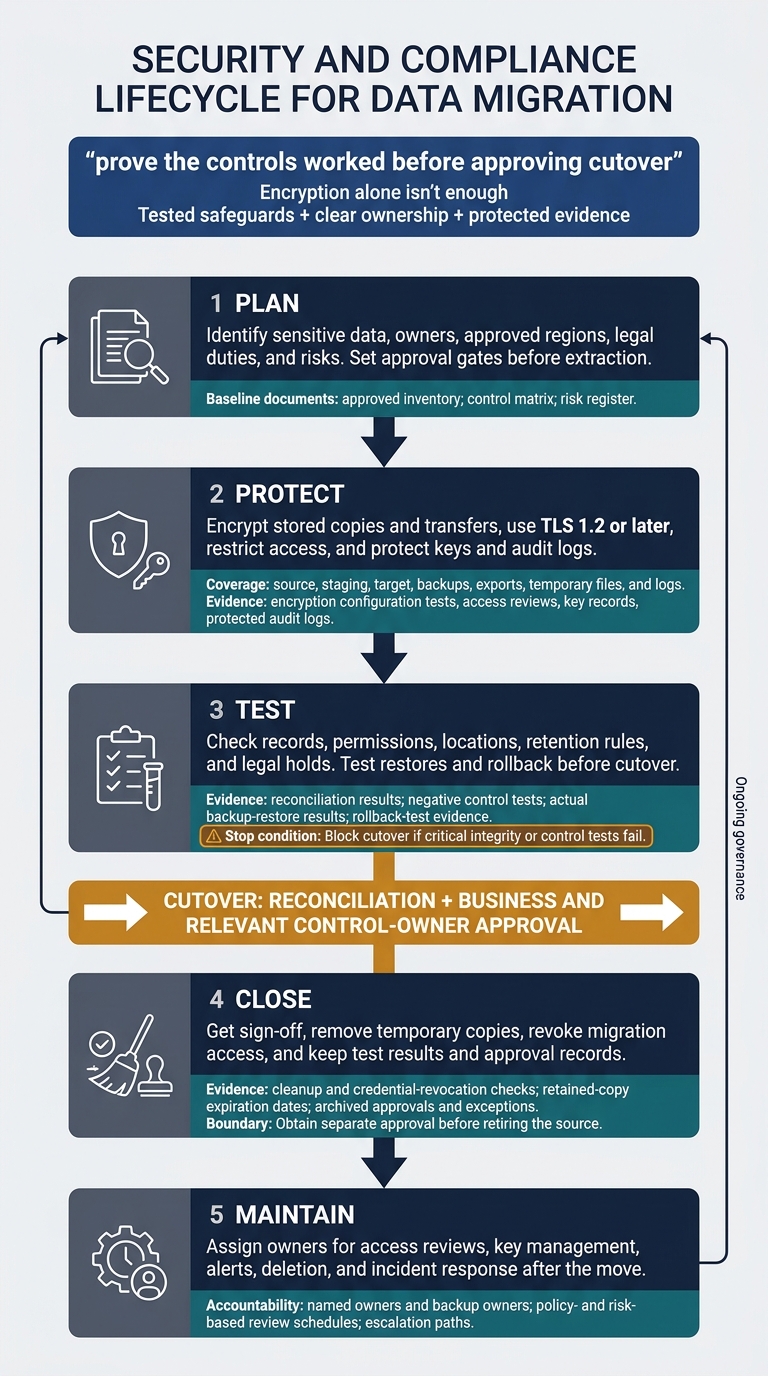
Secure Data Migration: Five Control Stages
How To Mitigate Data Security Risks During Financial Data Migration?
sbb-itb-61a6e59
Set Migration Scope, Requirements, and Risks
Start with three baseline documents: an approved inventory, control matrix, and risk register. Document the migration method, purpose, timeline, exclusions, dependencies, and success criteria. Assign accountable owners for data, security, operations, and business approval. Before expanding the migration, version, review, and approve every scope change.
Map Data, Locations, and Owners
Trace each dataset from its sources through staging, targets, backups, replicas, exports, temporary files, and logs. Include development and test environments, plus analyst exports.
Record each dataset’s volume, format, update frequency, sensitivity, retention, and permitted storage and processing regions. Classify personal information, ePHI, payment-card data, credentials, and intellectual property. Name accountable owners for datasets, systems, service accounts, administration, processing, and keys.
Go beyond table names. Include metadata, legal-hold status, and the authoritative source system. Use this inventory to link each obligation to a control and each risk to an approval gate.
Match Compliance Requirements to Controls
Ask legal, privacy, security, and records teams to identify every applicable obligation and cite its source requirement. HIPAA addresses ePHI safeguards; PCI DSS covers payment-card environments; SOX controls may apply to financial-reporting records; and state privacy laws can affect consumer-rights workflows.
Track each control as required, implemented, tested, and evidence accepted. HIPAA’s six-year documentation rule does not set a universal ePHI retention period.
| Data class and obligation | Control baseline | Validation records | Accountable owner |
|---|---|---|---|
| ePHI: confidentiality, integrity, availability | Encryption, key ownership, role-based access, logging, region checks, and retention controls | Configuration exports, access review, transfer test, activity logs | Security and data owner |
| Payment-card data: PCI DSS | Data minimization or tokenization, access controls, monitoring, and secure deletion | Scope decision, tokenization record, log review, deletion evidence | PCI control owner |
| Financial-reporting records: SOX controls | Change controls, approvals, reconciliation, and audit evidence preservation | Change ticket, approval record, reconciliation report | Finance and application owner |
| Personal information: state laws, contracts, and legal holds | Purpose limits, encryption and key policies, access controls, logging, retention, consumer-rights workflows, and legal-hold controls | Contract review, rights-request test, retention settings, deletion-block test | Privacy, legal, and records owners |
Use the control matrix to define the evidence needed before migration starts.
Assess Risks and Define Approval Gates
Rate likelihood and impact before treating each risk. Then document the residual risk and who has authority to accept it. Add due dates and evidence links to the risk register, covering access, integrity, residency, and custody risks.
| Asset | Threat | Vulnerability | Likelihood | Impact | Obligation | Mitigation | Owner | Residual risk | Required records |
|---|---|---|---|---|---|---|---|---|---|
| Staging data | Access without permission | Excessive permissions or exposed storage | Rate in register | Rate in register | Applicable privacy/security duties | Restrict identities, use private network paths and encryption, and test deletion | Security owner | Reassess after testing | Record access exports, alerts, and deletion results |
| Target records | Corruption, duplicates, metadata loss | Untested mappings or retry behavior | Rate in register | Rate in register | Integrity and reporting controls | Reconcile records, test duplicate loads, and check mappings | Data owner | Reassess unresolved differences | Record counts, hashes, and mapping approvals |
| Backups and transfer records | Regional movement without approval; custody gaps | Unchecked replication or missing logs | Rate in register | Rate in register | Residency and audit duties | Check regions, restrict manifests, and synchronize timestamps | System owner | Reassess evidence gaps | Record region settings, manifests, and operator identities |
Give each approval gate named approvers and clear pass/fail criteria. Use residual risk to decide which items must pass at each stage:
- Design: Approve scope, controls, regions, and risk treatment. Pre-migration: Require access reviews, legal-hold checks, and restore-test evidence. Transfer: Confirm the approved dataset, identity, destination, and stop conditions.
- Cutover: Proceed only after reconciliation and business sign-off. Closure: Require cleanup evidence and assigned exceptions.
Require rollback-test evidence across databases, queues, permissions, DNS, and downstream integrations. Record who has decision authority and the recovery results.
Apply Encryption, Access Controls, and Logging
Once scope, owners, and approval gates are set, protect data in transit, in storage, and in logs.
Encrypt Data and Manage Keys
Require TLS 1.2+, certificate validation, and approved ciphers for all database, API, transfer, replication, and admin traffic. Encrypt every stored copy - not just the target database. This includes exports, staging files, temporary disks, snapshots, backups, and target storage.
Record each encryption boundary, certificate owner, key identifier, and configuration test. Encryption does not replace authorization or integrity checks. Use the risk register to determine where field-level encryption, tokenization, or masking is required.
| Technique | Scope | Protection | Limitations | Complexity | Appropriate use |
|---|---|---|---|---|---|
| Transport encryption | Data moving between systems, services, or users | Protects confidentiality and integrity in transit through authenticated channels | Does not protect data after arrival or when an endpoint is compromised | Low to moderate | Database replication, APIs, file transfers, and administrative connections |
| Storage encryption | Files, databases, disks, snapshots, and backups at rest | Protects stored data when media or storage access is exposed | Authorized applications may still retrieve plaintext; compromised keys can expose broad data sets | Low to moderate | Default protection for source, staging, target, and backup storage |
| Field-level encryption | Selected columns or fields | Protects particularly sensitive values within records | Complicates search, indexing, joins, analytics, and key rotation | Moderate to high | Social Security numbers, bank-account details, health information, or payment data |
| Tokenization | Replaces a value with a non-sensitive token and keeps the mapping separately protected | Reduces exposure of the original value in downstream systems | Requires a secure token vault or service; tokens are not confidential or irreversible by default | Moderate to high | Payment, identity, or customer-reference workflows that do not need the original value |
| Masking | Replaces or obscures values, often irreversibly or for display | Reduces exposure in test, support, and analyst environments | Usually provides no cryptographic protection and may be reversible if poorly designed | Low to moderate | Nonproduction copies, screenshots, support views, and limited-access reports |
Assign a key owner. Document each key’s purpose, algorithm, strength, cryptoperiod, systems, and recovery steps. Generate keys through an approved key-management service or hardware security module - not scripts or developer workstations. Store keys separately from encrypted data, restrict administrative access, and keep key administration separate from data administration.
Define procedures for activation, rotation, suspension, revocation, compromise response, archival, recovery, and destruction. Keep evidence of each control: key-policy approvals, key inventory, access reviews, rotation records, revocation events, recovery tests, destruction certificates, and key-service audit logs.
Document customer-controlled-key requirements when contracts, regulations, or organizational policy require customers to control key creation, access, rotation, or revocation. When retiring keys, retain tightly controlled decryption access for data that must be kept.
Retrieve secrets at runtime from a secrets manager. Keep them out of scripts, tickets, notebooks, shell history, and logs, and rotate them after migration or suspected exposure.
Limit Identity and Network Access
Use named accounts, phishing-resistant MFA for privileged access, and permissions that expire automatically. Separate operators from approvers. For small teams, use two-person approval and independent evidence review.
Give extraction, loading, validation, and cleanup jobs separate, short-lived automation identities rather than shared administrator credentials. Restrict each identity by dataset, operation, environment, and migration window.
Limit processor and support access, and enforce approved network paths. Review service accounts before execution, monitor them during transfer, and disable temporary access afterward. Private connectivity does not replace encryption or access control.
| Control | Purpose | Primary owner | Migration phase | Verification records |
|---|---|---|---|---|
| RBAC | Assigns permissions by job function and separates operator, approver, owner, and auditor duties | Data or platform owner with security oversight | Before, during, and after | Role matrix, access-request approvals, entitlement export, review results |
| MFA | Requires an additional authentication factor, especially for privileged and remote access | Identity and security team | Before and during; retain for post-migration operations | MFA policy, enrollment report, authentication logs, exception approvals |
| Privileged access management | Controls, records, and limits administrative elevation through approval, vaulting, and time-bound sessions | Security or identity team | Before, during, and after | Elevation tickets, session records, checkout logs, expiration evidence |
| Network segmentation | Restricts permitted paths between source, transfer, staging, transformation, and target environments | Network or cloud platform team | Before and during; validate after cutover | Firewall rules, security-group review, connectivity tests, flow logs |
| Service-account controls | Limits automation identities by scope, credential lifetime, workload, and environment | Platform or application owner | Before, during, and after | Account inventory, policy bindings, token-expiration records, post-migration disablement |
Centralize Logs and Protect Audit Records
After restricting identities and network paths, centralize the evidence those controls produce.
Log synchronized UTC timestamps, actor or workload identity, source and destination endpoints, action, resource, result, failure reason, and a correlation ID shared across each migration run. Record access, transfer, transformation, loading, key use, backup, deletion, and reconciliation failures.
Use stable record identifiers, counts, and checksums instead of sensitive payloads. Redact passwords, tokens, private keys, and connection strings. These records support reconciliation and exception review.
| Event | Log source | Owner | Retention requirement | Alert condition | Audit artifact |
|---|---|---|---|---|---|
| Access or administrative change | Identity and privileged-access systems | Identity/security team | Access and security policy; longer if required by investigation | Unapproved elevation, failed MFA, policy change | Approval, MFA event, session record |
| Extraction or transfer | Source database, transfer tool | Data/platform owner | Migration record plus applicable regulatory or legal period | Unexpected volume, endpoint, or time window | Manifest, count, checksum, transfer log |
| Transformation or load | Pipeline and target database | Engineering or target owner | Migration evidence and required control period | Unapproved code change, load failure, duplicates | Versioned code, batch ID, load log |
| Key use or change | Key service or HSM | Key/security owner | Key and audit policy; preserve for investigations | Unapproved principal, operation, or location | Key-use, rotation, revocation records |
| Backup, restore, or cleanup | Database, storage, backup systems | System or data owner | Backup and deletion-evidence schedules; holds | Unapproved deletion or incomplete cleanup | Backup log, restore result, deletion confirmation |
| Reconciliation failure | Validation and monitoring tools | Data-quality owner | Assurance schedule; applicable compliance period | Threshold breach or unresolved exception | Exception report, remediation approval |
Forward logs to a centralized logging service, with encryption in transit and at rest. Separate write, read, and deletion permissions. Operators must not control their own audit evidence. Use immutable or append-only storage, integrity checks, restricted administrative access, and documented backup and recovery procedures.
Configure alerts for disabled logging and attempted record alteration, then test alert delivery. Set retention to the strictest applicable legal, contractual, regulatory, or litigation-hold requirement. Preserve original records and legal-hold evidence, and identify the authoritative record when logs disagree.
Validate Migration, Cutover, and Cleanup
Once controls are in place, verify that they stayed in effect through cutover.
Verify Data Residency, Retention, and Deletion
Check every place regulated data can be stored, processed, copied, restored, or accessed - not just the target region. That includes logs, support tools, and subprocessors. Approval to store data in a location does not permit overseas support access. Before cutover, check each location against contracts, laws, policies, and transfer rules.
Complete the matrix below using the approved retention schedule. For each data category, document its retention period, trigger, hold rule, disposal method, verification method, and record owner. Test holds and deletion across replicas, caches, indexes, exports, snapshots, and disaster-recovery copies. Record backup-expiration dates, and prevent restores from bringing deleted records back.
| Data category | Allowed locations | Retention period and trigger | Hold rule | Disposal method | Verification | Record owner |
|---|---|---|---|---|---|---|
| Customer personal data | Approved production, backup, and disaster-recovery regions | Approved privacy schedule; account closure or documented event | Suspend deletion for applicable holds | Application deletion; replica cleanup; controlled backup expiration | Sample queries, replica checks, expiration evidence | Privacy or data owner |
| Financial records | Approved production, backup, and archive locations | Applicable accounting or tax schedule; transaction close or fiscal-period trigger | Hold overrides normal disposal | Records-management workflow and backup expiration | Retention report, hold test, disposal record | Finance or records owner |
| Migration extracts | Encrypted staging in an approved region | Through validation and sign-off; delete afterward unless retention is required | Preserve only copies covered by a documented hold | Controlled deletion of exports and eligible versions | Object inventory, deletion logs, independent check | Migration owner |
After confirming residency and retention, test whether the migration preserved those controls.
Test Controls and Reconcile Data
Build a validation matrix that records each test’s owner, expected result, evidence, severity, and cutover impact. Verify encryption, key access and recovery, denied access, MFA, privileged access, logging, alerting, residency, and retention. Include negative tests: expired credentials must fail, held records must resist deletion, and prohibited destinations must be blocked.
Reconcile record counts, business totals, duplicates, rejects, nulls, relationships, and metadata. Use checksums only for like-for-like data. For transformed data, compare canonical values, mapping rules, and approved rounding tolerances. Give every rejected record an owner and a disposition.
Run an actual backup restore and rehearse disaster recovery, incident response, and rollback. Measure achieved recovery time and recovery point against approved objectives. Then check that restored data still follows access, residency, retention, and hold rules. Define how rollback will handle new writes and source–target resynchronization.
Block cutover if critical integrity or control tests fail. Require approval from the business owner and relevant control owners. Each exception must document the affected scope, root cause, remediation owner, deadline, compensating control, and named approver.
Once the controls pass testing and the data reconciles, proceed to cleanup and sign-off.
Remove Temporary Data and Obtain Sign-Off
After validation passes, remove only temporary migration assets: exports, snapshots, staging tables, buckets, secrets, accounts, access grants, and firewall rules. Check platform-specific versioned objects, soft-deleted copies, replicas, and recovery points. Document any retained copies and their expiration dates. Verify that revoked credentials no longer work.
Archive final inventories, residency checks, reconciliation results, recovery results, exception approvals, and cleanup evidence in a tamper-evident repository. Final sign-off must identify the migration run, covered systems, remaining risks, remediation commitments, and dated approvals. Obtain separate approval before retiring the source.
Conclusion: Keep Controls in Place After Migration
After cleanup, security work shifts from running the migration to maintaining governance. Sign-off doesn’t end that work. Keep the classification-and-obligation map current as data use, systems, vendors, regions, and laws change. Store evidence with the migration record, including results from regular reviews.
Assign named owners and backup owners for access reviews, key management, monitoring, retention, deletion, and incident response. Set the review schedule based on policy and risk, and document it in the control map alongside required evidence and escalation paths. Update incident-response playbooks for the target system, and verify that alerts reach the right responders.
Teams can practice these controls with synthetic data before applying them to live systems. During practice migrations, map controls, test denied access, reconcile counts, and archive cleanup evidence. Review privacy risk before using synthetic data in exercises. Training helps, but compliance still depends on your organization’s requirements, controls, testing, governance, and accountability.
FAQs
How do I resolve conflicting data retention requirements?
Set up formal governance that puts compliance and risk first. Store retention rules, personally identifiable information (PII) classifications, and legal holds in a central metadata table. When requirements conflict, follow the strictest regulatory mandate or the longest applicable retention period.
Use that metadata to automate deletion across source and derived tables, backups, and historical file versions. Create formal exceptions to exclude records under active legal holds. Verify deletions with row counts or checksums, and keep immutable audit logs.
How can I verify a vendor’s migration security controls?
Go beyond written policies: check that the platform enforces them. Catalog users, roles, and permissions to set a baseline, then scan for vulnerabilities with platform-specific tools.
In a sandbox, test masking and row-level filters across user roles. Check that audit logging is complete and centralized. Run deletion or migration dry runs to verify audit records and access restrictions. Review privileges regularly and watch access history for unusual activity.
What should I do if sensitive data leaks during migration?
Start your incident response plan immediately. Contain the breach by restricting IP access lists, disabling workspace exports, and isolating affected compute resources.
To assess the breach’s scope, match Indicators of Compromise across tables and join threat intelligence with audit logs. For platform-level vulnerabilities, open a support ticket with your cloud provider.
DataExpert.io Academy offers specialized boot camps and resources to help you keep building your data engineering security skills.