
Airflow DAGs: Core Concepts and Task Design
I design Airflow DAGs so failed steps can retry without duplicating data. For a daily sales pipeline, I separate extraction, validation, and publishing, use the run’s data interval, and set bounded retries: retries=3 allows 4 total attempts.
My checklist covers the controls that keep a pipeline on track:
- Workflow structure: Define the DAG, understand runs and task instances, and set clear task dependencies.
- Task execution: Choose operators, keep TaskFlow outputs small, and account for skipped branches.
- External waits: Use sensors with polling limits and timeouts, checking that data is complete - not merely present.
- Failure handling: Make reruns safe, inspect logs, and send alerts that identify the failed work.
- Scheduling: Set time zones, catchup, backfills, and concurrency limits around a dataset availability target, such as 6:00 a.m. Eastern Time.
- Testing: Check failures, historical runs, and no-data paths before deployment.
My rule: <u>a successful run should mean the required data is ready</u> - not just that the last task finished. That’s why I treat task design, scheduling, and testing as parts of the same job.
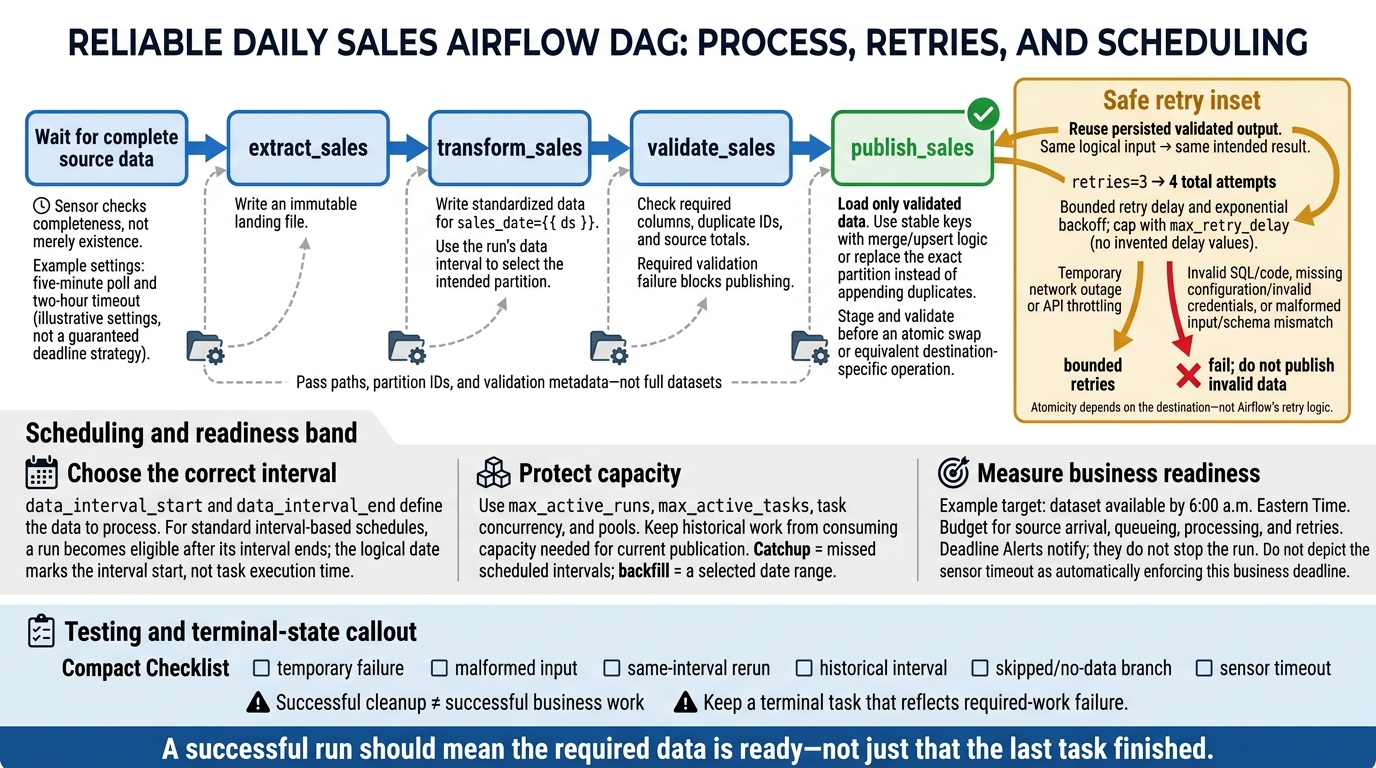
Airflow DAG Design: A Retry-Safe Sales Pipeline
2. Designing Tasks and Dependencies
Task Boundaries and Dependency Patterns
Clear task boundaries and explicit dependencies help a pipeline run reliably and rerun safely.
Give
extract_sales,transform_sales,validate_sales, andpublish_salesseparate responsibilities and persisted artifacts. Extraction writes an immutable landing file; transformation writes standardized data forsales_date={{ ds }}; validation checks required columns, duplicate IDs, and source totals; publishing loads only validated data. Pass paths, not full datasets. A publishing retry can reuse validated output without repeating extraction.
Choose task size based on what you need to monitor, how much work a retry should repeat, and how often you can reuse outputs.
| Task design | Observability | Retry scope | Scheduling overhead | Maintainability |
|---|---|---|---|---|
| Coarse-grained | Fewer signals; harder to diagnose problems | Repeats more work | Lower | Simple at first; harder to isolate changes |
| Fine-grained | Separate states and logs | Retries only the failed stage | Higher | Easier to test; too many tasks add overhead |
Split tasks where execution needs change, especially when runtime, resource needs, or retry behavior differ - not at every Python function. The >> operator points downstream. Fan-out runs branches in parallel when capacity allows; fan-in waits for all required branches.
# Chain
extract_sales >> transform_sales >> validate_sales >> publish_sales

# Alternative: fan-out, parallel transformations, then fan-in
extract_sales >> [transform_online, transform_retail, transform_partner]
[transform_online, transform_retail, transform_partner] >> validate_sales
validate_sales >> publish_sales
With task boundaries set, choose operators that fit how each task runs.
Operators, TaskFlow, and Branching
Operators define what a task does. Use PythonOperator for existing callables, TaskFlow @task for function-style inputs and outputs, and provider SQL operators for database work. TaskFlow infers dependencies from task outputs passed as inputs and sends returned values through XCom. Keep those values small - a partition path, for example, rather than a full dataset. Use BashOperator for bounded shell commands, external-system operators for remote jobs, and TriggerDagRunOperator to start another DAG.
The default trigger rule, all_success, requires every upstream task to succeed. Branching skips unselected paths, so joins usually need none_failed_min_one_success. Use all_done for cleanup and one_failed for alerts.
Successful cleanup doesn’t mean the business work succeeded. Leaf-task states determine DAG status. Keep at least one terminal task that fails or becomes upstream-failed when required work fails, and test both failure and skipped-branch cases explicitly.
Use sensors only when a downstream task needs to wait for something outside the pipeline to be ready.
Sensors and External Dependencies
Sensors wait; operators act. Poke mode holds a worker slot. Reschedule mode releases it between checks. Deferrable sensors hand the wait to the triggerer.
Set a limit on waiting so external dependencies don’t tie up workers and slow the pipeline. For this pipeline, check file completeness, database partition readiness, or upstream DAG completion. Check that data is complete - not just that it exists.
For a file due by 6:00 a.m. Eastern Time, a five-minute poll and two-hour timeout create a bounded wait before alerting on lateness.
Choose check intervals based on how recently the source data must have been updated and on source rate limits. Reconstruct any state the task needs after rescheduling.
| Component | Purpose | Execution behavior | Typical failures |
|---|---|---|---|
| Python, SQL, or Bash operator | Perform a concrete action | Runs until completion or failure | Exceptions, SQL errors, nonzero exit codes |
| External-system operator | Submit or coordinate remote work | Executes or waits for a remote job | Submission rejection, remote failure, auth errors |
| File or database sensor | Wait for data readiness | Polls or defers when supported | Missing data, timeout, wrong condition |
| External-task sensor | Wait for another DAG or task | Checks external task state | Wrong IDs, date mismatch, upstream failure |
After setting wait limits, the next concern is whether a task can retry safely.
sbb-itb-61a6e59
3. Handling Retries and Failures
Retry Settings and Execution Timeouts
Retry only when the same inputs and code could succeed on a later attempt. Setting retries=3 allows four total attempts. Use retry_delay, exponential backoff, and max_retry_delay to space attempts and cap the wait. Separate temporary failures from permanent ones, and set limits based on the dependency’s recovery time and the pipeline’s completion target.
| Failure condition | Recommended handling | Who should act |
|---|---|---|
| Temporary network outage or API throttling | Retry with bounded exponential backoff | Dependency owner if retries run out |
| Invalid SQL or code defect | Fail immediately; correct the logic | Task owner |
| Missing configuration or invalid credentials | Fail immediately; restore configuration | Deployment or platform team |
| Malformed input or schema mismatch | Fail or quarantine input; do not publish | Data owner |
| Sensor waiting timeout | Fail and alert on the missed arrival window | Upstream dependency owner |
| Task execution timeout | Investigate; retry only if the cause is transient | Task or infrastructure owner |
execution_timeout limits one task attempt. Sensor timeout limits the total wait from the first attempt before the sensor fails. For errors that retries cannot fix, throw AirflowFailException to stop repeated execution.
Reruns must produce the same intended result. That requires idempotent output design.
Idempotent Reruns and Safe Publishing
Idempotency means rerunning the same logical input produces the same intended result. Derive partitions from the DAG’s data interval - not the worker’s clock or “latest” data. Use stable keys with merge/upsert logic, or replace the exact partition instead of appending duplicates. Keep inputs fixed across retries.
Stage files and validate partitions before publishing through an atomic swap or an equivalent destination-specific step. Atomicity depends on the destination, not Airflow’s retry logic. For external side effects, use stable idempotency keys or reconcile an earlier request before repeating it. Store intermediate results durably, and pass only paths, partition IDs, and validation metadata through XCom.
Once reruns are safe, task states and logs help distinguish temporary failures from broken logic.
Task Logs, States, and Failure Alerts
Start with the task state: up_for_retry means another attempt remains; failed means no automatic retries remain. Find the first upstream task that failed, then inspect its earliest meaningful exception.
Route on_retry_callback and on_failure_callback separately. Include the owner, environment, DAG ID, task ID, run ID, data interval, attempt, error class, and log link. Keep credentials and sensitive payloads out of logs. Callbacks cover execution-driven state changes; they do not replace independent infrastructure monitoring.
The next control point is scheduling: when Airflow starts each run.
DAG Writing Best Practices in Apache Airflow
4. Scheduling and Controlling DAG Runs
Once reruns are safe, decide when each run starts and how much overlap Airflow allows.
Schedules, Data Intervals, and Logical Dates
Run time and data intervals are different. Cron sets the scheduling cadence. data_interval_start and data_interval_end define which data a run should process. With standard interval-based schedules, runs become eligible after the interval ends. The logical date marks the interval’s start - not when tasks begin. Worker availability can delay execution further, while manual triggers and custom timetables may follow different interval rules.
Timezone-aware schedules must account for DST shifts, especially around 2:00 a.m. Changing a cron boundary also changes the data interval boundaries, not just processing time. Use a custom timetable when business-day boundaries, holidays, or eligibility times need different rules.
Catchup, Backfills, and Concurrency Limits
Catchup fills missed scheduled intervals; backfill processes a selected date range. Enable catchup when you need every historical interval and the source still holds that data. Disable it when old runs are unnecessary or unsafe.
Before a backfill replaces production data, validate the repaired interval. Also check backfill syntax and reprocessing behavior against your installed Airflow version.
Use max_active_runs, max_active_tasks, task concurrency, and pools to cap overlap and protect shared systems. Base these limits on measured database capacity and API quotas, then monitor queue time. Available workers cannot bypass an exhausted pool or a DAG limit. Keep historical work from using capacity needed for current sales publication.
Completion Targets, SLAs, and Deadlines
After setting overlap limits, define the business deadline. Track when the dataset becomes available - not just whether the run succeeds.
For a daily sales pipeline, the target might be availability by 6:00 a.m. Eastern.
Allow time for source arrival, queueing, processing, and retries. Choose a monitoring reference point that matches the business target, and check whether your installed Airflow version supports it. Deadline Alerts notify through callbacks; they do not stop the run.
| Mechanism | Purpose | Trigger condition | Typical response |
|---|---|---|---|
| Deadline monitoring | Detect missed dataset availability targets | The completion threshold is crossed | Notify or invoke a callback; the run continues |
Sensor timeout |
Bound total waiting time | The condition remains unmet beyond the waiting limit | Fail with a sensor timeout |
5. Conclusion: Testing and Maintaining DAGs
Testing and Deployment Checklist
Before deployment, apply the task design, retry, and scheduling rules above. Treat DAGs as production code. Keep DAG and task IDs stable. Document inputs, outputs, and ownership. Check explicit dependencies, focused task boundaries, suitable operators, retry policies, timeouts, and trigger rules. Keep network calls, database queries, and data processing out of DAG-file imports.
Add checks for DAG imports and graphs, and test business logic separately. Cover skipped branches, sensor timeouts, temporary failures, reruns, and historical dates - not just successful runs. Use airflow dags test for a local run, then test the full DAG in staging against isolated targets. Confirm that imports, providers, connections, and secrets match the production Airflow environment.
Store these tests in version control with replay instructions and alert destinations. After deployment, review task durations and failure trends. When schemas, dependencies, or owners change, update the tests and documentation. Verify the same behavior in staging before moving to production.
Practice: Build a Daily Sales Pipeline
Use this exercise to put task boundaries, dependencies, retries, sensors, schedules, and data intervals into practice.
Hypothetical Airflow exercise: Build
example_daily_sales_pipelineto wait for a sales extract, validate required columns and duplicate keys, stage daily metrics, check counts and totals, and safely publish the2026-10-04partition. Pass the data interval into task logic instead of using today’s date. Simulate a temporary source-system or network failure and malformed input: the first should retry without duplicate output; the second should fail before publication. Rerun the same interval, then an older interval, and verify that only the intended partition changes. Test the no-data branch and confirm that the audit task still records its outcome.
For optional hands-on practice, DataExpert.io Academy offers data engineering training and capstone projects.
FAQs
How do I choose task boundaries for my DAG?
Keep each task atomic: give it one specific unit of work. This makes debugging easier and retries more effective. Make tasks idempotent, so they produce the same results no matter when or how many times they run.
Split large tasks into smaller pieces to ease resource strain and improve pipeline stability. Put complex logic in separate modules to keep DAG files lean.
How can I prevent duplicate data after a partial failure?
Make tasks idempotent: running them multiple times should produce the same result. Use UPSERT, MERGE, or INSERT OVERWRITE instead of simple INSERT statements.
Process specific partitions or logical dates, such as {{ ds }}, instead of using the current timestamp. Another option is DELETE + INSERT: remove existing data for a specific period before inserting new records.
How should I schedule my DAG to meet a 6:00 a.m. deadline?
Use a cron expression in schedule_interval. Airflow schedules runs after the data interval ends. A DAG scheduled for 6:00 a.m. typically starts after that interval ends - it doesn’t finish by 6:00 a.m.
Set start_date to a fixed date in the past instead of datetime.now to avoid unpredictable behavior. Service Level Agreements (SLAs) can trigger alerts when a task exceeds its expected duration.