
How Airflow Enhances Bootcamp Learning
Apache Airflow is a powerful tool for orchestrating data pipelines, making it a key part of data engineering bootcamps. It allows users to define workflows as Python-based Directed Acyclic Graphs (DAGs), manage task dependencies, and handle retries. Bootcamps leverage Airflow to teach students how to build reliable, production-level pipelines, covering concepts like error handling, idempotency, and integration with tools like dbt, Snowflake, and Great Expectations.
Key Takeaways:
- Airflow simplifies pipeline orchestration with a code-first approach.
- Students learn to design workflows that mirror industry practices.
- Bootcamps use Airflow to teach troubleshooting, visualization, and integration with cloud platforms.
- Capstone projects focus on building advanced pipelines with features like sensors, XComs, and task grouping.
Setting Up Apache Airflow for Bootcamp Exercises
Prerequisites and Environment Setup
To get started with Airflow, make sure you have Python 3.12 installed. Why this version? Some of the necessary packages aren't compatible with Python 3.13. You'll also need pip for managing packages and a basic comfort level with the command line.
Creating an isolated virtual environment is crucial to avoid any conflicts with packages. You can use Anaconda (Conda) or Python's built-in venv for this. Additionally, having a foundational understanding of SQL and databases will help, as Airflow relies on a metadata database to manage DAG runs and task statuses.
One important step is setting the AIRFLOW_HOME environment variable. This tells Airflow where to store configuration files and DAG scripts. Keeping this path consistent across terminal sessions will help you avoid frustrating issues like "DAG not found" errors caused by components looking in different directories.
Once your environment is ready, you can move on to installing Airflow.
Installing and Configuring Apache Airflow
For a quick and simple setup, use Airflow's standalone mode. Just run:
pipx run apache-airflow standalone
(or use uvx apache-airflow standalone if you prefer). This command sets up everything you need in one go: it initializes a SQLite database, creates an admin user, and starts all the required services. While standalone mode isn’t suitable for production, it’s perfect for learning the basics without needing to configure multiple components.
If you want more control over your setup, install Airflow via pip using the official constraints file:
pip install apache-airflow --constraint [constraints-url]
After installing, initialize the metadata database by running:
airflow db migrate
(Note: This replaces the older airflow db init command used in version 2.x.) Then, start the scheduler with:
airflow scheduler
and the API server with:
airflow api-server --port 8080
Make sure to run these commands in separate terminal windows.
For Windows users, there's a catch: Airflow doesn’t natively support Windows. To work around this, you can use Windows Subsystem for Linux (WSL) or Docker. If you're part of a DataExpert.io Academy bootcamp, they provide managed Airflow environments, so you can dive straight into creating pipelines without worrying about setup headaches.
Common Setup Problems and How to Fix Them
Even with the best preparation, you might hit a few snags. Here are some common issues and quick fixes:
-
ModuleNotFoundError: This usually means you've installed required packages (likepandas) in the wrong environment. Double-check that you've activated the correct virtual environment before installing dependencies. -
Permission Denied Errors: If Airflow workers can’t access your DAG folders, you’ll need to adjust permissions. Use this command:
chmod -R 755 [affected-directory] -
Slow DAG Parsing: Airflow parses DAGs every 30 seconds, and long parse times can slow things down. As The Data Forge puts it:
"Airflow parses DAGs every 30 seconds... Keep DAG parse time < 1 second".
To speed things up, move any heavy logic out of your DAG file and into separate Python modules. -
Stuck Tasks: If tasks remain in "scheduled" status, the scheduler might not be running. Restart it and check the logs here:
~/.local/share/airflow/logs/scheduler/latest/ -
XCom Issues: If an XCom pull returns
None, make sure your upstream task is actually returning a value or explicitly usingxcom_push(). Remember: simple print statements won’t be stored in XCom.
Once you've tackled these setup challenges, you're ready to dive into creating Airflow DAGs for your bootcamp projects.
sbb-itb-61a6e59
Teaching Workflow Orchestration with Airflow DAGs
What are DAGs?
A DAG, or Directed Acyclic Graph, defines a data pipeline's workflow in Python, ensuring each task runs in a specific, non-repeating sequence. The name itself highlights three key traits: "Directed" points to the clear execution flow, "Acyclic" guarantees no circular dependencies, and "Graph" refers to the visual map of tasks (nodes) and their relationships (edges).
At DataExpert.io Academy, students learn to structure task dependencies with precision, mirroring real-world practices. Airflow's Graph View helps visualize and debug these dependencies. As explained by Astronomer:
"Without a Dag, pipeline steps run independently with no awareness of each other. If an extraction step fails, downstream transformations might still run on stale or missing data."
This structured approach ensures tasks follow a logical order, halting downstream processes if an earlier step fails, thereby preventing data inconsistencies. Next, let’s explore how simple DAGs are built in bootcamp projects to understand these concepts in action.
Creating Simple DAGs for Bootcamp Projects
A great way to teach DAG creation is by using a three-step ETL (Extract, Transform, Load) process. Here's how it works:
- Extract: Pull data from sources like APIs or CSV files.
- Transform: Use tools like Pandas to clean and reshape the data.
- Load: Store the processed data in a destination like a database or cloud storage.
Each DAG is made up of operators, tasks, and dependencies, which are defined using the >> operator. Students can create DAGs using two approaches:
- TaskFlow API: This method uses
@dagand@taskdecorators to automatically infer task dependencies. - Traditional Syntax: This involves manually creating a
DAGinstance and defining tasks with operators likePythonOperatororBashOperator.
For example, a typical bootcamp project might involve an e-commerce ETL pipeline. This could include fetching sales logs from S3, cleaning and validating the data, enriching it with product catalog details, loading it into Snowflake, updating dashboards, and sending a Slack notification. This hands-on exercise mirrors the types of ETL challenges faced in data engineering roles, showcasing how Airflow manages task timing and sequencing.
Once students have a basic DAG working, the next step is to refine its design for better clarity and reliability.
DAG Design Best Practices for Bootcamps
To build effective workflows, students should follow these key practices when designing DAGs:
- Keep tasks atomic: Each task should handle only one specific unit of work. This makes debugging easier and ensures retries are more effective.
- Use clear task IDs: Descriptive names like
extract_customer_datamake it easier to monitor workflows in the Graph View. - Ensure idempotency: Tasks should produce the same results every time they're run, regardless of timing or frequency. As Rui Carvalho, Data Engineer at IWG, puts it:
"A good pipeline should always produce the same results, no matter when or how many times it runs."
- Encapsulate complex logic: Move intricate code into separate modules to keep DAG files lean and improve parse times. Since Airflow parses DAGs every 30 seconds, production-grade workflows should aim for a parse time of under one second.
- Limit XCom usage: Use XCom to pass only small metadata, like file paths or status flags, rather than large datasets.
Write your first DAG in Airflow 3 for beginners
Integrating Airflow with Bootcamp Tools and Platforms
Airflow Integration Tools Comparison for Data Engineering Bootcamps
Using Airflow with dbt and Great Expectations
This approach builds on the basics of DAG design to replicate what happens in real-world production setups. Airflow serves as the orchestration layer, managing the flow of data through ingestion, transformation, and validation stages. Specifically, it coordinates dbt transformations with Great Expectations validations. At DataExpert.io Academy, students learn the "Write-Audit-Publish" pattern: use dbt to seed data, validate it with Great Expectations, and then proceed with transformations only if the validation is successful.
The integration relies on specific Airflow providers. For Great Expectations, the GreatExpectationsAirflowProvider simplifies the process of calling validation suites directly from a DAG. For dbt, the astronomer-cosmos package automatically converts dbt models into individual Airflow tasks, making dependencies clear in the Graph View. This setup allows for granular retries, meaning if a single transformation fails, Airflow can retry just that task instead of restarting the entire pipeline.
In cloud environments like Snowflake, the process is even more streamlined. Since November 2025, dbt projects can be stored directly as native Snowflake objects. Airflow can trigger these projects with a simple SQL command:
EXECUTE DBT PROJECT <project_name> ARGS = 'dbt build' VERSION = 'LAST';
This setup removes the need for external dbt servers and consolidates credential management. Sainath Reddy, a Data Engineer at Anblicks, highlights the advantage:
"Every boundary between systems is a place where credentials leak, latency is added, and debugging gets harder. The native dbt project in Snowflake closes one of those boundaries."
For bootcamp settings, running Airflow, dbt, and Great Expectations in separate Docker containers ensures students can work with a consistent and reproducible environment across different operating systems. However, Airflow requires at least 4GB of memory for stable performance.
These integrations, paired with cloud platforms, make production workflows more efficient and accessible.
Cloud Integrations: AWS, Databricks, and Snowflake
Connecting Airflow to cloud platforms helps simulate real-world workflows, complementing the bootcamp's lessons on workflow orchestration. For Snowflake, the setup involves three steps: install the Snowflake provider (pip install apache-airflow-providers-snowflake), configure the connection in the Airflow UI with your credentials (Account, Login, Password, Database, Warehouse, and Role), and use the SQLExecuteQueryOperator to run SQL commands.
The native integration between Snowflake and dbt offers notable performance boosts. In April 2026, Sainath Reddy documented how switching a sales pipeline to a Snowflake-Airflow-dbt setup reduced runtimes from 28–32 minutes to 18–22 minutes. Upload times also dropped significantly, from 6–6.5 minutes to just 40–45 seconds, achieving an 8x to 10x performance improvement.
For Python-based transformations, Snowpark allows data science logic to run directly within Snowflake. Using the @task.snowpark_virtualenv decorator, Python transformations can execute natively in the cloud without moving data. This requires a Python 3.8 virtual environment for compatibility. Students are also taught to include a lightweight "warm-up" query (e.g., SELECT CURRENT_TIMESTAMP();) as the first task in a DAG to trigger Snowflake warehouse auto-resume and reduce latency.
Integration Benefits Comparison
| Tool/Integration | Primary Role | Key Bootcamp Benefit |
|---|---|---|
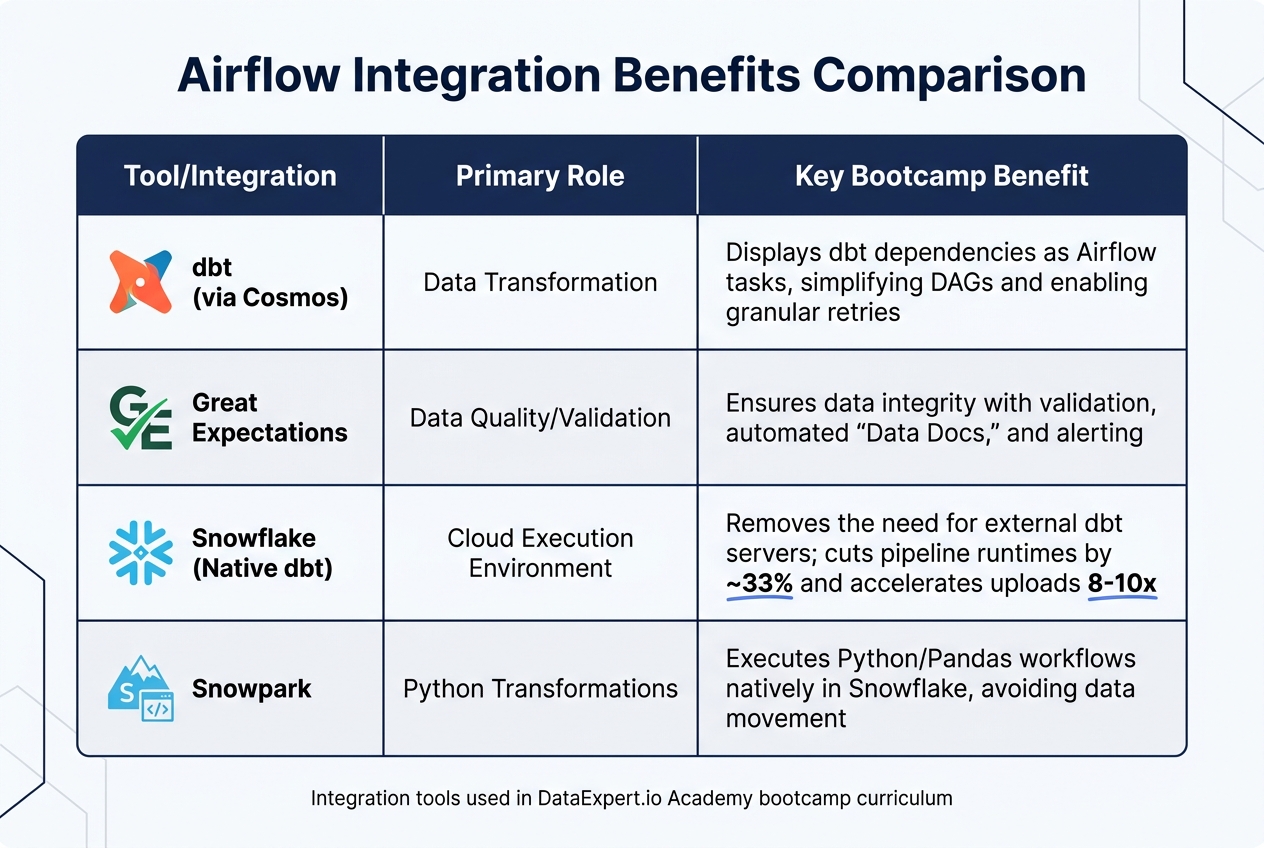
| dbt (via Cosmos) | Data Transformation | Displays dbt dependencies as Airflow tasks, simplifying DAGs and enabling granular retries |
| Great Expectations | Data Quality/Validation | Ensures data integrity with validation, automated "Data Docs", and alerting |
| Snowflake (Native dbt) | Cloud Execution Environment | Removes the need for external dbt servers; cuts pipeline runtimes by ~33% and accelerates uploads 8–10x |
| Snowpark | Python Transformations | Executes Python/Pandas workflows natively in Snowflake, avoiding data movement |
Capstone Projects Using Advanced Airflow Features
Project Progression from Basic to Advanced
Capstone projects are where students truly put their skills to the test, applying what they've learned to real-world scenarios. Starting with simple ETL pipelines, they gradually build toward creating complex, production-level workflows. Along the way, they refine their understanding of task dependencies and scheduling.
The journey begins with mastering simple Directed Acyclic Graphs (DAGs) and basic integrations. From there, students take on intermediate projects that focus on idempotency and cumulative processing. A common approach involves a 3-hop architecture - such as Bronze/Silver/Gold or Staging/Marts setups - to orchestrate dbt transformations using Airflow. By breaking pipelines into smaller, manageable stages (e.g., staging, marts, and tests), Airflow can retry only the failed portion instead of reprocessing the entire workflow. This method mirrors how companies like Airbnb drastically reduced historical data backfill times from weeks to just a few hours by leveraging staging tables.
At the advanced level, projects emphasize idempotent processing using logical dates (e.g., {{ ds }}) and operations like INSERT OVERWRITE or MERGE. Rui Carvalho, a Data Engineer, succinctly captures the essence of this approach:
"A good pipeline should always produce the same results, no matter when or how many times it runs".
Students also experiment with cumulative table designs, a technique that helped Facebook slash deduplication processing time from over 9 hours to just 45 minutes while cutting compute costs by 15%.
Advanced Airflow Features for Job Scenarios
Advanced projects introduce features that simulate real-world challenges, such as cross-team dependencies and conditional workflows. For example, the ExternalTaskSensor pauses execution until a task in another DAG is completed, while the BranchPythonOperator allows pipelines to skip unnecessary steps or branch tasks based on file metadata.
Other essential tools include XCom, which passes metadata like row counts or file paths between tasks, and TaskGroups, which organize complex DAGs into clear, manageable sections. These tools are critical for handling large-scale production pipelines. Error handling is addressed using specific TriggerRules, such as none_failed_min_one_success, ensuring pipelines complete even when certain branches are skipped.
Data quality is another central focus. Sensors like the GCSObjectExistenceSensor ensure workflows only proceed when data is available. Custom SQL tasks can also be used to detect anomalies, such as "row count drift", by flagging cases where a mart's row count drops by more than 20% compared to the previous day.
Project Complexity Comparison Table
| Project Type | Airflow Features Used | Required Skill Level | Key Learning Outcome |
|---|---|---|---|
| Basic ETL | Simple DAGs, PythonOperator, Local Files | Beginner | Understanding task dependencies and scheduling |
| Intermediate Pipeline | dbt Integration, SQL Operators, 3-Hop Architecture | Intermediate | Mastering data modeling and transformation orchestration |
| Advanced Capstone | Sensors, XComs, Custom Operators, Data Quality Checks | Advanced | Building idempotent, production-ready pipelines with automated validation |
| Production-Grade | CI/CD Integration, Cloud-Native Objects, Row-Drift Alerts | Professional | Managing end-to-end lifecycle, security, and observability in cloud environments |
These capstone projects provide a comprehensive learning experience, equipping students with the skills needed to build production-ready workflows using Airflow. By tackling these challenges, students gain a deeper understanding of advanced orchestration techniques and data pipeline management.
Conclusion
Apache Airflow plays a key role in bootcamp education by connecting theoretical knowledge with practical data engineering skills. By focusing on workflow orchestration as code, bootcamps equip students to design and manage pipelines similar to those used by companies like Facebook and Airbnb. With over 50% of the learning process devoted to hands-on exercises, students not only understand the principles of orchestration but also gain the confidence to apply them effectively in real-world scenarios.
One of Airflow's standout features in education is its focus on idempotency and production reliability. Through capstone projects, students see these concepts in action, using techniques like logical dates, data readiness sensors, and optimized write operations to address practical challenges. These experiences demonstrate how foundational skills translate into measurable improvements in real-world workflows.
The industry outcomes further highlight Airflow's value. For instance, the same practices taught during bootcamps - like incremental processing and cumulative table designs - helped Facebook cut pipeline runtimes from over 9 hours to just 45 minutes while reducing compute costs by 15%. Bootcamp students also gain experience integrating Airflow with modern tools like Snowflake, dbt, and Databricks, preparing them to work seamlessly in cloud-based environments.
DataExpert.io Academy exemplifies this approach with its 9-week Data and Analytics Boot Camp. Priced at $4,500, the program offers in-depth Airflow training and includes a year of access to Astronomer, ensuring students are well-versed in industry-standard tools. By combining hands-on projects, expert guidance, and exposure to real-world practices, the curriculum delivers job-ready skills that prepare students for production-level challenges.
FAQs
Do I need Airflow before learning dbt?
No, you don’t need to learn Airflow before diving into dbt. Airflow is primarily a tool for workflow orchestration and scheduling, whereas dbt is all about data transformation. Since these tools address different aspects of data workflows, you can explore them separately depending on what you're looking to achieve.
What’s the easiest way to install Airflow for a bootcamp?
Setting up Airflow can be straightforward if you use the right tools. The most common method is through pip. Just run:
pip install apache-airflow
Make sure to include the appropriate Python version constraints for compatibility. For those looking for a quicker installation, you can opt for uv.
If you're on Windows, you’ll need to enable Linux compatibility by using WSL2 (Windows Subsystem for Linux 2). This ensures a smoother installation process.
For quick experiments or testing, there are two great options:
-
Use standalone mode with
pipx:
This is ideal for short-term testing without a full setup.pipx run apache-airflow standalone - Or, simplify dependency management by running Airflow in a Docker container. Docker handles all the dependencies, making it a convenient choice for many users.
How do I make my Airflow tasks idempotent?
To ensure Airflow tasks are idempotent, you need to design them so they yield the same outcome, no matter how often they're executed. Some effective methods include:
- DELETE + INSERT pattern: This approach prevents duplicate entries by deleting existing data before inserting new records.
- Leveraging execution_date: Use this to process only the specific data relevant to the task's scheduled run, keeping things precise.
- Structuring tasks to work atomically on staging tables: This ensures each operation is independent and doesn't interfere with others.
These practices help maintain consistent data states, even when tasks are re-executed, avoiding potential complications.