
Error Handling in Airflow with Python Pipelines
When managing workflows in Airflow, errors are inevitable. Whether it's API failures, expired credentials, or resource constraints, how you handle these issues determines the reliability of your pipelines. Here's what you need to know:
- Common Errors: Task failures (e.g., timeouts, out-of-memory issues), dependency problems (e.g., circular dependencies), and resource constraints (e.g., memory exhaustion) are frequent challenges.
- Key Strategies:
- Use task retries with delays and exponential backoff for temporary issues.
- Implement custom exception handling with Python's
try-exceptto address specific errors. - Design tasks for idempotence to prevent duplicate outputs or incomplete results.
- Alerts and Notifications: Configure email alerts or integrate tools like Slack and PagerDuty for failure notifications.
- Logging and Debugging: Leverage Airflow's built-in logging, enable remote logging (e.g., S3), and add contextual logs in Python tasks for better troubleshooting.
5 MUST KNOW Airflow debug tips and tricks | Airflow Tutorial Tips 1
Common Errors in Airflow Python Pipelines
To troubleshoot issues in your Airflow pipelines effectively, it's crucial to understand the common problems that arise. These typically fall into three categories: task failures, dependency issues, and resource constraints. Each category has its own set of challenges and requires a tailored approach to resolve. Let’s break them down.
Task Failures and Timeout Errors
Task failures are the most frequent issues, often caused by external system disruptions. For example, database connections might drop due to network glitches or server maintenance, third-party APIs could become unavailable, or expected data files might fail to arrive on time. Other causes include bugs in task logic, syntax errors, type mismatches, or improperly configured environment variables.
Timeout errors, on the other hand, occur when a task exceeds its designated execution_timeout. When this happens, the task is terminated with a SIGTERM signal and exits with code -15. These errors are easy to spot in your logs, which will display "Task timed out" messages.
To diagnose task failures, check the exit codes in your logs:
- Exit code -9 indicates an out-of-memory (OOM) error.
- Exit code -15 signals a timeout.
The Airflow Web UI can also help. Failed tasks are highlighted in red in the Graph and Grid views, while tasks waiting for retries appear in orange.
Dependency Management Issues
Dependency problems can grind your workflows to a halt. A common issue is circular dependencies, where tasks unintentionally depend on each other in a loop. This prevents your DAG from parsing altogether. As Sahil Kumar from CloudThat explains:
"Dependencies form the backbone of any workflow, ensuring that tasks are executed in the correct order."
Another tricky scenario involves trigger rules like all_done. While helpful for cleanup tasks, this rule can obscure failures by marking the entire DAG run as successful, even if some tasks failed. To avoid this, consider adding a "watcher" task downstream with the one_failed trigger rule. This ensures the DAG fails if any task encounters issues.
Tasks can also stall due to settings like depends_on_past=True, which can block a task if a previous instance failed. Additionally, manual state changes via the REST API can create inconsistencies.
Resource and Scheduler Constraints
Resource limitations, especially memory exhaustion, can cause significant disruptions. When a task uses too much memory, the operating system may terminate it with a SIGKILL signal, resulting in an exit code of -9. This can leave "zombie tasks" that appear as "running" in the UI even though the process has ended. Airflow eventually detects these through missed heartbeats and cleans them up, but the delay can disrupt your pipeline.
The scheduler also enforces timeouts that can terminate tasks. For instance:
- Tasks queued longer than the
scheduler.task_queued_timeoutare marked as failed. - DAG files that take too long to parse may trigger timeouts controlled by
core.dagbag_import_timeout.
Enabling catchup=True can further strain resources by initiating numerous DAG runs for historical intervals, potentially overwhelming your system.
To mitigate these issues, consider using executor_config with KubernetesExecutor to allocate specific resources for each task. This prevents a single memory-intensive task from crashing an entire worker. Additionally, set catchup=False by default unless historical reprocessing is absolutely necessary.
Techniques for Error Handling in Airflow
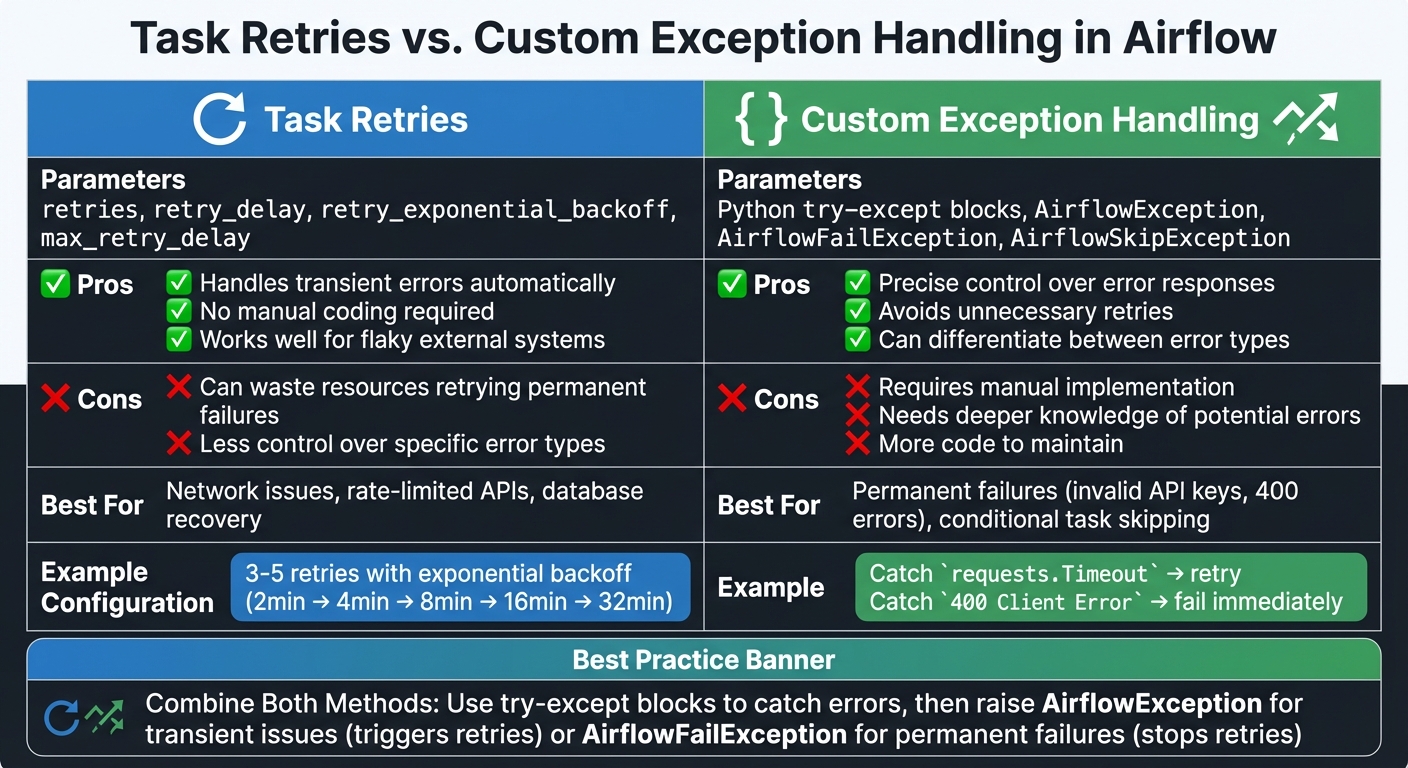
Task Retries vs Custom Exception Handling in Airflow
Once you've identified potential failure points in your Airflow workflows, the next step is implementing strategies to handle those failures effectively. Airflow provides built-in retry mechanisms and works seamlessly with Python’s exception handling, offering both automated recovery and detailed control.
Using Task Retries and Retry Delays
Task retries are a great way to handle temporary errors. You can configure retries using three main parameters: retries (number of retry attempts), retry_delay (time between retries), and retry_exponential_backoff (which increases delay times progressively). These settings can be applied globally at the DAG level using default_args or tailored to individual tasks.
For example, exponential backoff is particularly useful when dealing with rate-limited APIs or recovering databases. If you start with a 2-minute delay and configure 5 retries, the retry intervals will increase as follows: 2, 4, 8, 16, and 32 minutes. To prevent delays from becoming excessively long, use max_retry_delay to set an upper limit. As Arthur C. Codex aptly puts it:
"When your data pipeline fails at 3 AM, proper error handling isn't just nice to have - it's essential."
For network-related tasks, aim for 3–5 retries with exponential backoff. For database operations dealing with resource contention, 2–3 retries with shorter, fixed delays are often sufficient. However, retries aren’t always appropriate. For example, if an API key is invalid, retries won’t help. In such cases, raise an AirflowFailException to stop retries immediately.
When you need even more control, Python’s exception handling can be used to fine-tune error management.
Implementing Custom Exception Handling in Python Tasks
Python’s try-except blocks allow you to manage errors with precision. Whether you’re using a PythonOperator or the @task decorator, you can catch specific exceptions and determine the appropriate response. For instance, if a requests.exceptions.Timeout occurs, you can raise an AirflowException to trigger Airflow’s retry mechanism. On the other hand, for non-recoverable errors like a 400 Client Error, you might raise an AirflowFailException to fail the task immediately.
Airflow also provides specialized exceptions for different scenarios. Use AirflowSkipException to skip a task when data is unavailable but not critical. Similarly, AirflowFailException can be used to fail a task outright, bypassing retries. This level of control complements Airflow’s automatic retry configurations, allowing you to fine-tune your error-handling strategy.
When designing tasks, always aim for idempotency - tasks should produce the same result regardless of how many times they run. Use techniques like UPSERT instead of INSERT and write to specific partitions rather than relying on the current timestamp. Additionally, keep error-prone logic within the task callable rather than at the top level of your DAG file. This helps avoid performance issues with the scheduler.
Task Retries vs. Custom Exception Handling
Both task retries and custom exception handling have their strengths, and combining them often provides the best results. Task retries are ideal for handling flaky external systems, but they can waste resources when errors are permanent. Custom exception handling, while requiring more effort, ensures that you don’t retry tasks doomed to fail.
| Method | Parameters | Pros | Cons |
|---|---|---|---|
| Task Retries | retries, retry_delay |
Handles transient errors automatically | Can waste resources retrying permanent failures |
| Custom Exception Handling | Python try-except |
Offers precise control; avoids unnecessary retries | Requires manual implementation and deeper error knowledge |
The most effective approach often involves using both methods together. For example, wrap your task logic in a try-except block. For transient issues (e.g., a 500 server error), raise an AirflowException to trigger retries. For permanent errors (e.g., a 400 Client Error), raise an AirflowFailException to stop retries immediately. To reduce unnecessary alerts, set email_on_retry=False and configure on_failure_callback to send notifications only after all retries have been exhausted, preventing alert fatigue.
sbb-itb-61a6e59
Setting Up Failure Alerts and Notifications
Once you've implemented retry logic and exception handling, it's equally important to ensure your team is alerted when something goes wrong. Airflow makes this easy with options ranging from built-in email alerts to integrations with tools like Slack and PagerDuty.
Configuring Email Alerts in Airflow
To set up email notifications, you'll need to configure SMTP settings in your airflow.cfg file or through environment variables. Key parameters include smtp_host, smtp_port, smtp_user, and smtp_password. For example, if you're using Gmail, the SMTP server is smtp.gmail.com with port 587. If your Gmail account has two-factor authentication enabled, you'll need to generate an app-specific password instead of using your regular account password.
To enable email alerts for tasks, set email_on_failure=True and provide an email address in the email parameter of your task definition or default_args. For more granular control, Airflow versions 2.6 and above support the SmtpNotifier, which you can use with the on_failure_callback parameter at both the DAG and task levels. Always store your SMTP credentials securely in an Airflow Connection (commonly named smtp_default) rather than hardcoding them into configuration files.
For added clarity, you can use Jinja templates to include dynamic details like {{ ti.task_id }}, {{ execution_date }}, and {{ ti.log_url }} in your email. These details help your team quickly identify and troubleshoot issues without needing to dig into the Airflow UI. Before going live, test your SMTP setup with a dummy task that deliberately fails.
Beyond email, Airflow supports modern notification tools for more robust alerting.
Integrating Third-Party Notification Tools
Airflow integrates seamlessly with tools like Slack, PagerDuty, Discord, and Amazon SNS for real-time notifications. These integrations typically use the on_failure_callback parameter to send alerts when tasks fail. For example, the SlackNotifier can post detailed failure messages to specific Slack channels, including information like the task ID and a direct link to the log.
For workflows that demand immediate attention, PagerDuty is a great option. The PagerdutyNotifier can send alerts with metadata such as severity, source, and deduplication keys, making it easier to manage on-call escalations. With newer Airflow versions, you can even pass multiple callbacks, enabling you to trigger several notifications - for instance, sending alerts via both email and Slack for the same failure event.
If you're looking for advanced error tracking, consider integrating Airflow with Sentry. By setting sentry_on=True in your configuration, Sentry can capture detailed stack traces, log breadcrumbs of completed tasks leading up to the failure, and automatically tag errors with relevant details like dag_id and operator type. As always, ensure that API tokens and sensitive credentials are stored securely in Airflow Connections, not directly in your DAG files.
Best Practices for Logging and Debugging Errors
Using Airflow's Built-In Logging
Airflow leverages Python's standard logging framework to capture task logs, which you can view directly in the user interface. To manage disk space effectively while retaining logs, consider enabling remote logging options like S3, GCS, or WASB, and set the delete_local_logs = True parameter. This ensures logs are preserved even if local storage on workers is cleared.
For more flexibility, you can use the logging_config_class option in your airflow.cfg file. This allows you to point to a custom Python dictionary configuration, enabling you to define custom handlers or formatters beyond the capabilities of the standard configuration file. Advanced users can take this further by customizing loggers for specific operators or tasks by setting the logger_name attribute.
If your tasks produce a large volume of log data, organize the output using log grouping. You can add markers like ::group:: and ::endgroup:: in your Python code, which creates collapsible sections in the Airflow UI. This makes it much easier to navigate and pinpoint specific error details.
To confirm your logging setup is working as intended, use the CLI command airflow info. This will show you which task handler is active and whether your logging paths are configured properly. Once your logging configuration is solid, you can enhance debugging further by adding contextual logs directly within your Python tasks.
Adding Contextual Logs in Python Tasks
Airflow's built-in logging is robust, but adding contextual logs in your Python tasks can provide even deeper insights. When creating custom operators or Python tasks, always use self.log, which is available through LoggingMixin. This ensures that your log messages are well-organized and appear correctly in the Airflow UI.
For testing and debugging your DAGs locally, include dag.test() at the end of your DAG file within an if __name__ == "__main__": block. This lets you run the DAG without deploying it fully, enabling you to use tools like IDE debuggers or pdb for a closer look at potential issues. To streamline debugging, you can use the mark_success_pattern argument to bypass tasks like sensors or cleanup operations that aren't necessary during your session.
Conclusion and Key Takeaways
When building dependable Airflow pipelines, it's important to understand that errors are inevitable. From API failures to expired credentials and network issues, these disruptions are part of any production environment. What sets a resilient pipeline apart from a fragile one is how effectively you prepare for and handle these failures. As Jakub Dąbkowski wisely notes:
"It is about accepting the inevitability of failures in any complex system and developing the mindset to plan for these disruptions rather than simply responding to them".
To manage these challenges, focus on strategies that promote automatic recovery. Implement mechanisms that allow your pipeline to recover on its own and use custom exception handling to reduce the need for manual intervention. Notifications are essential - set them up to alert your team immediately when failures occur. Logging also plays a crucial role in troubleshooting; leverage Airflow's built-in logging features and enhance them with contextual logs in your Python tasks using self.log. For local testing, take advantage of the dag.test() feature to identify and address issues before deployment. Strong logging practices are the backbone of quick debugging and creating a resilient system.
The aim isn't to eliminate errors entirely - after all, that's not realistic. Instead, design your pipelines to adapt and recover automatically wherever possible, while ensuring any critical issues are flagged promptly. Consistently applying these strategies will make your workflows more robust.
If you're eager to deepen your expertise in resilient pipeline design, consider exploring hands-on courses at DataExpert.io Academy.
FAQs
How do I set up alerts for task failures in Apache Airflow?
To configure alerts for task failures in Airflow, you can enable email notifications directly within your DAG code. This involves setting up an SMTP service like SendGrid or Amazon SES to handle the email delivery process.
Start by configuring your SMTP provider and collecting the necessary details - such as the host, port, login credentials, and password. Next, update your Airflow configuration file to include these SMTP settings. Once that's done, you can use Airflow’s built-in email utility in your DAGs to define when alerts should be sent. For instance, you can set it to notify you in case of task failures or retries. You’ll also have the flexibility to specify recipient email addresses and tailor the types of events that trigger notifications.
This approach helps ensure you’re promptly notified of any issues, allowing for faster troubleshooting and reducing potential downtime.
What are the best practices for managing resource constraints in Apache Airflow pipelines?
Managing resource constraints in Apache Airflow pipelines is crucial for keeping workflows running efficiently and without interruptions. Start by setting limits on resources like CPU and memory for individual tasks. This helps prevent any single task from overwhelming the system. You can also use resource pools to manage concurrency and allocate resources more effectively, which reduces the chances of bottlenecks or system failures.
To handle temporary resource issues, implement retries with exponential backoff. This approach allows tasks to automatically retry after short delays that gradually increase, minimizing the need for manual fixes. Keep a close eye on resource usage with Airflow’s built-in logging and monitoring tools. For an extra layer of insight, external monitoring systems or tools from your cloud provider can provide real-time data to help you make proactive adjustments.
For greater reliability, design your workflows with idempotency and fault tolerance in mind. Breaking down large tasks into smaller, more manageable pieces can ease resource strain and improve the stability of your pipeline. Together, these strategies help ensure your Airflow pipelines are equipped to handle varying demands while maintaining consistent performance.
How do I handle specific errors in Airflow tasks using custom exceptions?
To address specific errors in Airflow tasks, you can use the on_failure_callback parameter in your task configuration. This allows you to set up a custom function that runs whenever a task fails, giving you the ability to handle particular exceptions in a tailored way.
Here’s how you can do it:
- Define a Callback Function: Create a function that inspects the error details or type.
- Attach the Function to the Task: Use the
on_failure_callbackparameter to assign your custom function. - Implement Error Handling Logic: Inside the callback, include steps like logging error details, sending notifications, or even retrying the task based on the error type.
Here’s an example:
from airflow.operators.python_operator import PythonOperator

def handle_specific_error(context):
    exception = context.get('exception')
    if isinstance(exception, YourCustomError):
        # Handle your specific error
        print("Custom error occurred")
    else:
        # Handle other errors
        print("General error occurred")

task = PythonOperator(
    task_id='example_task',
    python_callable=your_function,
    on_failure_callback=handle_specific_error,
)
This method gives you fine-grained control over error management in your Airflow workflows, helping you improve reliability and keep a closer eye on potential issues.