
Caching with Redis: Best Practices for Engineers
Redis is an in-memory key-value store that dramatically speeds up applications by reducing database load and latency. It’s perfect for caching database queries, API responses, session data, and more. However, to make the most of Redis, you need a solid caching strategy. Here’s what you should know:
- Key Benefits: Redis reduces query times from milliseconds to microseconds, improving app performance.
- Use Cases: Database query caching, API response storage, session management, and AI/ML workflows.
- Best Practices:
- Use clear, unique cache keys (e.g.,
user:123:profile). - Set TTLs for every key to avoid memory overuse.
- Add random TTL variations to prevent cache stampedes.
- Monitor metrics like cache hit rates and memory usage.
- Use clear, unique cache keys (e.g.,
- Scaling: Use Redis Cluster for large datasets and read replicas for high-traffic workloads.
- Security: Enable TLS, restrict access to trusted interfaces, and use ACLs for permissions.
- Fallback: Always design your app to handle cache failures gracefully by falling back to the primary database.
Redis is fast but requires careful setup and monitoring to avoid issues like data staleness, memory fragmentation, or failover problems. Follow these practices to ensure your caching layer is reliable and efficient.
Top Redis Caching Strategies Every Backend Developer Should Know
sbb-itb-61a6e59
Planning a Redis Caching Strategy
Redis Eviction Policies Compared: Which One Should You Use?
Identifying What Data to Cache
Focus on caching data that gets accessed frequently but doesn’t change often. Examples include product catalogs, feature flags, and session tokens. On the other hand, if the data changes with every request or is only accessed once, caching it can waste memory without adding any real benefit.
It’s also smart to cache data that takes a long time to compute or retrieve, like dashboard calculations or responses from slow third-party APIs. However, avoid caching data where outdated information could cause errors - think real-time financial balances or live inventory levels.
"If stale data causes a bug, don't cache it." - RaidFrame
Another tip: cache "not found" results to save resources. For instance, if a database lookup returns no results, you can store a placeholder value like null with a short time-to-live (TTL), such as 60 seconds. This prevents repeated, unnecessary queries for the same missing data.
Once you’ve identified what to cache, the next step is to create clear and unique cache keys.
Designing Cache Keys
A good cache key is clear, unique, and avoids collisions. A common best practice is to use a colon-separated format that reflects the data’s structure. For example, keys like user:123:profile or products:category:45:page:2 clearly describe what they represent and make it easier to manage related keys in bulk.
Make sure your cache keys include all parameters that affect the result. For instance, a key for a paginated, filtered query might look like this: contacts:{orgId}:{page}:{limit}:{sortField}:{sortDir}. Sorting query parameters alphabetically before generating the key ensures that identical requests don’t accidentally create different keys.
Adding versioning and namespacing to your keys can also make your cache easier to manage. For example, prefixing keys with a version number like v2:product:456 allows you to quickly invalidate an entire version of cached data. Namespacing, on the other hand, groups related keys and makes bulk operations safer and more efficient when using the SCAN command instead of the blocking KEYS command.
| Key Type | Convention Example | Purpose |
|---|---|---|
| Entity | user:{id} |
Lookup for a single record |
| List/Query | products:category:{id}:page:{n} |
Paginated or filtered results |
| Computed | order:total:{id} |
Cached results of expensive operations |
| Metadata | v2:config:features |
Versioned settings or configurations |
| Locking | lock:product:{id} |
Used for preventing cache stampedes |
After designing strong keys, the next step is to implement expiration and eviction policies to keep memory usage in check.
Setting Expiration and Eviction Policies
Every cache key should have a TTL to avoid unbounded memory usage. Choose the TTL based on how much stale data your application can tolerate. For instance, rate limit counters might only need a TTL of one minute, while static configurations could be cached for 24 hours or more.
To prevent cache stampedes, avoid setting identical TTLs. Instead, add a small random variation of ±10%. For example, a 60-second TTL could vary by 6 seconds.
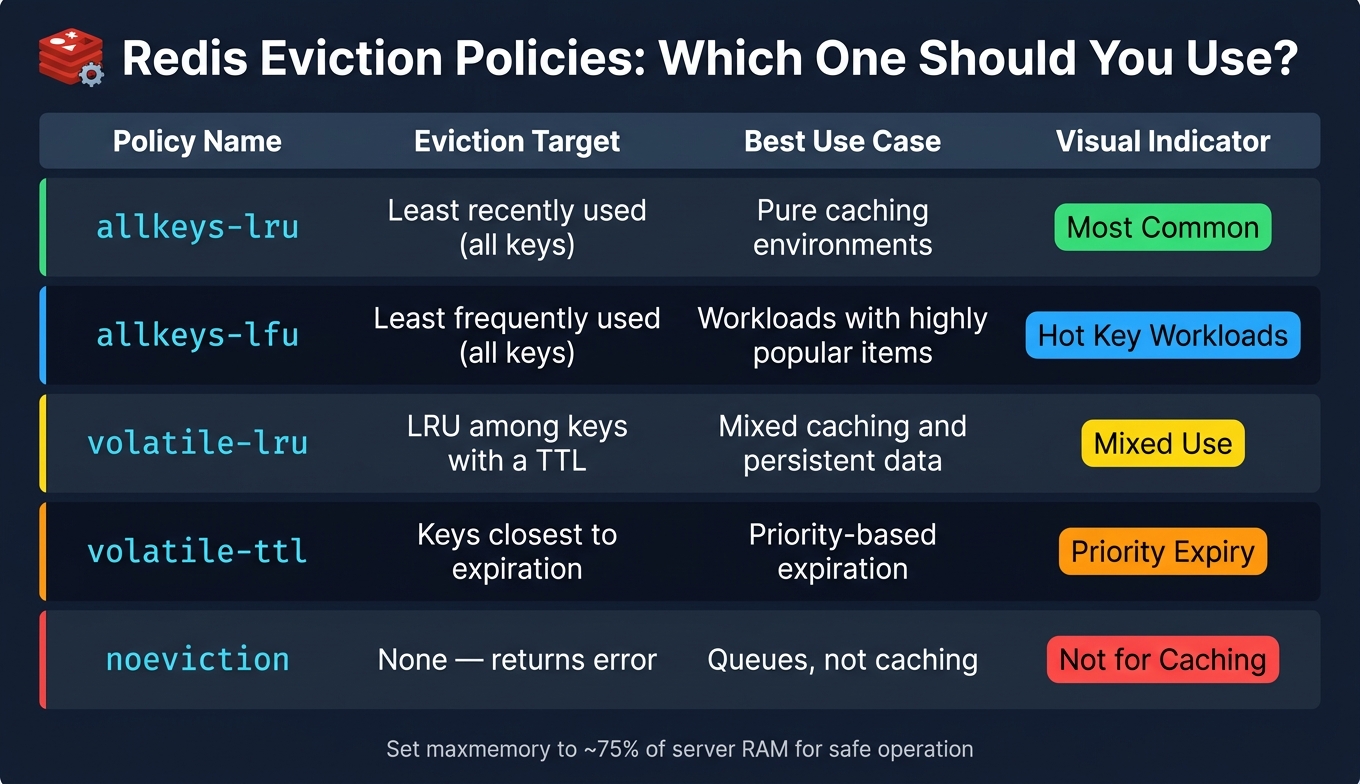
When it comes to eviction policies, the default allkeys-lru works well in most pure caching scenarios. This policy evicts the least recently used keys when memory limits are reached. If your Redis instance handles both cached and persistent data (like queues or leaderboards), consider using volatile-lru, which only evicts keys with an assigned TTL. Additionally, set the maximum memory to about 75% of your server's RAM to leave room for other processes.
| Policy | Eviction Target | Best Use Case |
|---|---|---|
allkeys-lru |
Least recently used (all keys) | Pure caching environments |
allkeys-lfu |
Least frequently used (all keys) | Workloads with highly popular items |
volatile-lru |
LRU among keys with a TTL | Mixed caching and persistent data |
volatile-ttl |
Keys closest to expiration | Priority-based expiration |
noeviction |
None (returns error) | Use cases like queues, not caching |
Implementing Redis Caches Safely and Efficiently
Choosing Redis Client Libraries and Managing Connections
Selecting the right client library for Redis depends on your programming environment. For example, Python developers often use redis-py, Java developers rely on Lettuce, Node.js developers prefer ioredis, and for multi-language support, Valkey GLIDE is a solid choice.
In production environments, connection pooling is essential. AWS engineers Qu Chen and Jim Gallagher demonstrated that switching from standard PHP connections to persistent connections with a pool of 10 significantly reduced latency - from 2.82 ms to just 0.21 ms.
"In general, creating a TCP connection is a computationally expensive operation compared to typical Valkey/Redis commands. For example, handling a SET/GET request is an order of magnitude faster when reusing an existing connection." - Qu Chen, Senior Software Development Engineer, Amazon ElastiCache
To ensure smooth operation:
- Set short connection timeouts (1–3 seconds) and slightly longer read/command timeouts (3–10 seconds).
- Enable TCP keep-alives to maintain connections.
- Use exponential backoff with jitter for reconnection attempts to avoid overwhelming Redis during outages.
Once your connectivity is optimized, the next step is refining your data models and command usage.
Optimizing Data Modeling and Commands
The way you structure and access data in Redis has a huge impact on performance. For example, storing large JSON blobs as plain strings can lead to inefficiencies, as every read operation requires full deserialization. Instead, using Redis HASH structures allows you to update individual fields atomically without touching the entire object.
Avoid storing oversized values. A single 40 MB JSON blob can increase p99 latency from 2 ms to 180 ms. Tools like redis-cli --bigkeys can help identify problematic keys, and replacing the blocking KEYS command with SCAN ensures better performance.
"Redis is single-threaded by default. One slow command, one big key, or one bad configuration and system performance degrades." - Yusuf Seyitoğlu
For executing multiple commands efficiently, pipelining is a game-changer. It can reduce network round-trip overhead by a factor of 5 to 100, depending on your network's latency. In clustered setups, use hash tags (e.g., {user:123}:profile and {user:123}:settings) to group related keys into the same hash slot. This ensures multi-key commands like MGET function correctly.
Centralizing Caching Logic in Services
Centralizing caching logic is essential for maintaining consistency across your application. A real-world example highlights the risks of neglecting this: in March 2026, an e-commerce company suffered a "Stale Price Incident" where 3,000 customers were shown outdated, lower prices for 45 minutes due to a failure in cache invalidation after a manual database update. This oversight cost the business $47,000.
A centralized caching module can prevent such incidents by standardizing practices:
- Use consistent serialization formats, such as JSON, for compatibility across services.
- Establish clear key naming conventions.
- Implement uniform failure handling.
A generic wrapper function like cacheAside<T>(key, ttl, fetchFn) can manage the entire lifecycle of checking, fetching, and storing data. This approach ensures all teams follow the same pattern, making it easier to implement features like TTL jitter, distributed mutex locks to prevent cache stampedes, and fail-open fallbacks to the database. By centralizing these practices, you ensure consistency and reliability across your caching strategy.
Operating, Monitoring, and Scaling Redis in Production
Monitoring Redis Performance and Metrics
Keeping a close eye on Redis is crucial to catch potential issues before they affect users. Redis provides a wealth of metrics through the INFO command, but focusing on the right ones can help cut through the noise.
The key areas to monitor are memory usage, cache efficiency, latency, and connections. For instance, a cache hit ratio under 80% often signals that your cache is either too small or that keys are expiring too quickly. On the memory front, the mem_fragmentation_ratio is critical - if it falls below 1.0, Redis has started swapping to disk, which can severely impact latency. Ideally, latency should stay in the 400–600 microseconds range, but if the 99th percentile exceeds 10ms consistently, immediate action is needed.
| Metric Category | Key Metrics | Alert Threshold |
|---|---|---|
| Memory | used_memory, mem_fragmentation_ratio |
Fragmentation < 1.0 |
| Cache Efficiency | keyspace_hits, keyspace_misses |
Hit ratio < 80% |
| Latency | SLOWLOG, LATENCY HISTORY |
p99 > 10ms |
| Connections | connected_clients, rejected_connections |
> 80% of maxclients |
| CPU | EngineCPUUtilization |
> 90% utilization |
| Replication | master_repl_offset, slave_repl_offset |
Lag > 5 seconds |
Set up memory alerts when usage reaches 95% of the maxmemory limit for caching workloads. Additionally, leave 30–50% headroom above maxmemory to handle background processes like RDB snapshots. For example, on a 12GB dataset, creating an RDB snapshot can cause latency spikes of 100–200ms.
"EngineCPUUtilization > 80% is the canonical 'Redis is the bottleneck' signal - it measures the single-threaded event loop." - Webalert Team
Once you've gathered performance metrics, the next logical step is scaling Redis to handle increasing demands.
Scaling Redis for Large Systems for data engineering professionals
When monitoring indicates persistent high load or memory fragmentation, scaling becomes necessary. If a shard surpasses 25GB or processes more than 25,000 operations per second, it's time to consider horizontal scaling.
For smaller datasets (under 16GB), Redis Sentinel offers high availability without the complexity of sharding. For larger workloads, Redis Cluster supports sharding across 16,384 hash slots and includes built-in failover. If your workload is read-heavy, adding read replicas can offload traffic from the master, often serving as a simpler step before transitioning to a full cluster setup.
"Running a large dataset on one Redis instance means that failover, backup, and recovery all take significantly longer." - Ajeet Raina, Redis
One challenge in scaling is addressing hot keys - keys that receive a disproportionate amount of traffic. These can overwhelm a single cluster node while others remain underutilized. Use tools to identify hot keys and large data structures to prevent them from clogging the single-threaded event loop.
Handling Failures and Building Resilience
Resilience is just as important as performance, ensuring that fallback mechanisms work smoothly during failovers.
Redis replication is asynchronous by default, meaning that if the master crashes before propagating writes, some data may be lost. For use cases where this isn't acceptable, the WAIT command can ensure a write is confirmed by a specified number of replicas. In most caching scenarios, a small risk of data loss is manageable, but this decision should be intentional.
Deploy at least three Sentinel nodes to prevent split-brain scenarios. A typical Sentinel failover takes 30 to 60 seconds, so your application's reconnect logic must handle this downtime gracefully. Use exponential backoff with jitter during reconnect attempts to avoid overwhelming the new master.
"'This is only ephemeral cache' is a statement that ages poorly at 3 a.m. when a node restarts and 40 million keys need to be re-fetched from the database." - Zak Hassan, Staff SRE
For faster restarts and minimal data loss (less than one second), consider hybrid persistence using both RDB and AOF. If you're running Redis on Linux, disable Transparent Huge Pages (THP) to avoid latency spikes and excessive memory usage during background saves. Regularly test failover procedures in staging, as client libraries differ in their ability to handle master promotion. Finding these gaps during a crisis is something you want to avoid.
Securing Redis and Ensuring Governance
Securing Redis Network Access
Securing your Redis deployment is as crucial as optimizing its performance. While Redis is designed to operate in trusted environments, taking proactive steps to secure its network access can prevent potential vulnerabilities.
Start by modifying redis.conf to bind Redis to trusted interfaces, such as 127.0.0.1 or your private IP address, and ensure that protected mode is enabled. Avoid binding Redis to 0.0.0.0, as it exposes the instance to all network interfaces, increasing the risk of unauthorized access. To further minimize exposure, use OS-level firewall tools like UFW or iptables to restrict access to port 6379. Changing the default port can also help reduce the chances of automated scans.
Redis 6.0 introduced Access Control Lists (ACLs), which allow you to create service-specific users with tailored permissions. Disable the default user by running:
ACL SETUSER default off
Then, create unique credentials for each service, granting only the permissions they require. For example, you can allow access to specific key patterns (e.g., ~cache:*) while disallowing potentially harmful commands like FLUSHALL, CONFIG, and SHUTDOWN.
| Security Layer | Performance Impact | Key Benefit |
|---|---|---|
| Network Binding | 0% | Prevents exposure to unauthorized scans |
| ACL Users | Negligible (<1%) | Protects against unauthorized changes |
| TLS Encryption | 15–20% CPU overhead | Secures data from packet sniffing |
When deploying Redis in cloud environments like AWS ElastiCache, ensure it resides in private subnets. Configure security groups to allow access only from specific application security groups. Additionally, always run the Redis process under a dedicated, unprivileged user instead of root to enhance security.
Encryption and Data Privacy
Since Redis 6.0, native TLS support has been available, making encryption a must for deployments that handle sensitive data. Disable the non-TLS port (6379) and configure Redis to use a dedicated TLS port (e.g., 6380) for all traffic. To add another layer of security, enable mutual TLS (mTLS), which requires both the server and clients to present valid certificates.
When setting up TLS, choose secure ciphers like ECDHE for key exchange and AES-GCM for encryption. Disable outdated protocols such as TLS 1.0 and 1.1, and allow only TLS 1.2 and 1.3. Keep in mind that enabling TLS may reduce throughput by 15–20% due to increased CPU usage.
Redis does not encrypt data at rest, so for sensitive information, consider client-side encryption before storing data. However, note that client-side encryption can limit Redis's ability to perform certain operations, such as comparisons or updates. To align with compliance requirements, ensure that TTL settings on sensitive keys match your data retention policies.
Automate certificate rotation using scripts or cron jobs, and set up alerts to notify you at least 30 days before certificates expire. This helps avoid unexpected production outages. Once data in transit is secured, focus on creating robust recovery and configuration strategies to maintain system stability.
Disaster Recovery and Configuration Management
"A production-ready Redis instance must have authentication and TLS enabled, persistence configured with AOF, memory limits set with an appropriate eviction policy, high availability through Sentinel or Cluster, and monitoring with alerts." - Nawaz Dhandala
To prevent configuration drift - a frequent cause of production issues - store and version-control your redis.conf file alongside your application code. Include TLS certificates, ACL rules, and persistence settings in your infrastructure-as-code repository.
For persistence, use a hybrid approach by enabling both RDB snapshots and AOF with the aof-use-rdb-preamble yes setting. This configuration allows for faster restarts while keeping data loss to under one second. Regularly validate backups using the redis-check-rdb tool. To ensure efficient failovers and backups, keep individual shards under 25 GB.
It's also essential to schedule regular failover tests. Verify that Sentinel quorum functions correctly and that your clients can resolve the new primary address during failovers. Test your reconnect logic to ensure it gracefully handles the promotion process without triggering cascading failures.
Conclusion and Key Takeaways
To craft an effective Redis caching strategy, it's all about finding the right balance between speed, reliability, and safety. Redis's performance and utility depend heavily on thoughtful implementation and ongoing management. Here's a quick recap of the key practices that can make or break your caching approach:
- TTL and eviction policies: Always set a TTL for every key, use the
allkeys-lrupolicy for caching-heavy workloads, and introduce random jitter to avoid synchronized expirations. - Cache-aside pattern: This is a go-to method for read-heavy scenarios, as it ensures the cache is populated only when needed.
- Operational best practices: Keep an eye on your hit rate, manage evictions effectively, set your
maxmemorylimit to around 75%, and prepare for failover scenarios.
This streamlined list highlights the planning, execution, and monitoring steps we've covered. Regularly revisiting and updating these practices ensures your caching strategy stays aligned with your system's evolving demands.
If you're looking to deepen your understanding of production-ready caching and related infrastructure tools, check out DataExpert.io Academy. They offer hands-on boot camps and programs that dive into cloud platforms like AWS, complete with capstone projects to sharpen your skills for real-world applications.
FAQs
How do I choose the right TTL for each cache key?
Setting a TTL (Time-to-Live) for each cache key is crucial to prevent memory problems caused by outdated data. The TTL you choose should reflect how often the data changes:
- High-frequency data (like prices): Set a TTL of 1–5 minutes.
- User-facing data (such as user profiles): Use a TTL of 5–15 minutes.
- Static data (like configurations): Opt for a TTL of 30–60 minutes.
To avoid cache stampedes, it’s a good idea to introduce a random jitter to your TTLs. This small variation helps distribute expiration times more evenly, ensuring your system runs more smoothly and scales effectively.
When should I use Redis Sentinel vs Redis Cluster?
If your data can fit within a single node’s memory and you’re looking for automated failover without sharding, Redis Sentinel is a great option. It works especially well for multi-key operations, such as Lua scripts or MGET, which are challenging to manage in sharded environments.
On the other hand, Redis Cluster is the better choice when your data surpasses the capacity of a single node (e.g., more than 16 GB) or when you need horizontal scaling. However, keep in mind that multi-key operations in Redis Cluster are restricted to keys that share the same hash tag.
How can I prevent cache stampedes and hot keys?
To handle cache stampedes, here are a few effective strategies:
- Distributed locking: Allow only one process to regenerate data after a cache miss. This can be done with unique tokens to ensure locks are released safely.
- Probabilistic early expiration: Refresh data slightly before the time-to-live (TTL) expires, while serving stale data temporarily to avoid downtime.
- Staggered TTLs: Assign varied expiration times to similar keys to prevent them from expiring all at once.
When dealing with hot keys, consider these approaches:
- Spread data across multiple Redis shards to balance the load.
- Use TTLs to manage memory usage effectively.
- Steer clear of blocking commands like
KEYSto maintain performance.