Introduction to Stream Processing Frameworks
I’d choose a stream processing framework by testing correct results and recovery - not just speed. Start with a clear target, such as having 95% of purchase events update a dashboard within 30 seconds. If an hourly report meets your needs, batch processing may be enough.
Here’s how I’d narrow the options:
- Apache Flink: A distributed engine for stateful processing, event-time windows, and checkpoint-based recovery.
- Kafka Streams: A Java library for processing inside Kafka-centered applications.
- Spark Structured Streaming: A fit for SQL and DataFrame workloads that share batch and streaming code; micro-batching is the default.
- Apache Beam: A programming model that runs through an engine such as Flink or Spark - not an engine itself.
My next step: test a small pipeline with duplicates, late events, and worker failures. Check <u>correct totals, latency, throughput, recovery time, and cost</u>, plus the work your team must do to run it. Exactly-once processing alone doesn’t guarantee correct writes to an external system.
How Stream Processing Works
2. How Events Move Through a Streaming System
Events, Operators, and Parallel Processing
A purchase event is a record such as
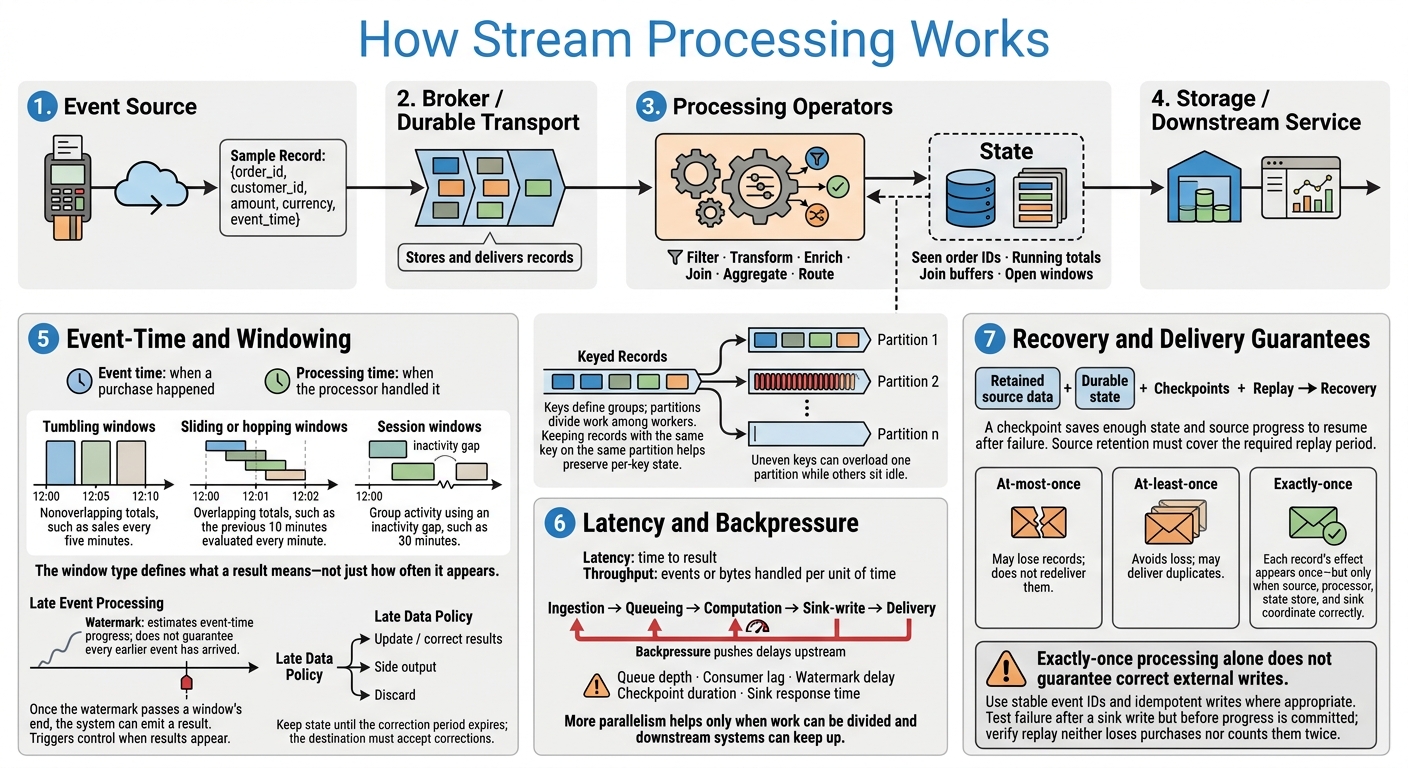
{order_id, customer_id, amount, currency, event_time}. It flows from an event source through a broker to operators, then to storage or a downstream service.
Durable transport stores and delivers records; operators compute results. Operators filter, transform, enrich, join, aggregate, and route those records.
Keys define groups, while partitions divide work among workers. Keeping records with the same key on the same partition helps preserve per-key state. More parallelism increases throughput, but uneven keys can leave some partitions handling far more work than others - a problem called partition skew. These mechanics determine whether purchases are counted once, on time, and in the right window.
Event Time, Windows, and State
Event time tells you when a purchase happened. Processing time tells you when the processor handled it. Use event time when sales need to count toward the interval in which they occurred. Windowing divides an unbounded stream into finite groups for aggregation.
Tumbling windows create nonoverlapping totals, such as sales every five minutes. Sliding or hopping windows overlap, such as the previous 10 minutes evaluated every minute. Session windows group activity using an inactivity gap, such as 30 minutes.
The window type defines what a result means - not just how often it appears.
State is information kept between events, including seen order IDs, running totals, join buffers, and open windows. It supports operators rather than acting as a separate, required stop in the pipeline.
A watermark estimates event-time progress; it doesn't guarantee that every earlier event has arrived. Once it passes a window's end, the system can emit a result. Triggers control when results appear. The late-data policy determines whether delayed purchases update or correct results, go to a side output, or get discarded. Keep state until the correction period expires, and make sure the destination can accept those corrections.
Latency, Recovery, and Delivery Guarantees
After events are keyed, windowed, and stored, system limits affect how soon usable results arrive. Latency measures time to result; throughput measures events or bytes handled per unit of time. Measure ingestion, queueing, computation, sink-write, and delivery delays separately.
A slow sink can cause backpressure, pushing delays upstream. Uneven keys can overload one partition while other workers sit idle. Track queue depth, consumer lag, watermark delay, checkpoint duration, and sink response time. Adding parallelism helps only if the work can be divided and downstream systems can keep up.
Recovery combines retained source data, durable state, checkpoints, and replay. A checkpoint saves enough state and source progress to resume after a failure. Source retention must cover the required replay period.
Delivery guarantees describe what happens to records:
- At-most-once may lose records but doesn't redeliver them.
- At-least-once avoids loss but may deliver duplicates.
- Exactly-once means each record's effect appears once - but only when the source, processor, state store, and sink coordinate correctly.
Use stable event IDs and idempotent writes where appropriate. Test failures that happen after a sink write but before progress is committed, and verify that replay neither loses purchases nor counts them twice. Frameworks differ mainly in how they implement these mechanics, which shapes correctness, latency, and recovery.
sbb-itb-61a6e59
Introduction to Stateful Stream Processing with Apache Flink | Utrecht JUG, June 2025
3. Stream Processing Frameworks and Their Roles
A framework runs processing logic. It doesn’t replace the rest of the data platform: Kafka transports records, storage systems persist them, and serving layers expose results. These roles may share infrastructure, but they aren’t interchangeable.
In the purchase-event pipeline, the framework is the execution layer between Kafka, state, and the sink.
Choosing a framework means matching it to both the workload and how your team deploys and runs software.
Apache Flink and Kafka Streams
Apache Flink is a distributed engine for bounded and unbounded data, with strong event-time support and recovery. Teams run it on a cluster or managed service and configure checkpoints and state storage. More frequent checkpoints reduce replay after a failure, but add overhead.
Kafka Streams is a Java library embedded in your application. Local state stores support joins and aggregations, while Kafka changelog topics allow state restoration after failures or task migration. Your team handles deployment, scaling, upgrades, monitoring, and Kafka capacity planning. This model suits Kafka-centered services, but you’ll need to plan for rebalancing and state restoration.
Spark Structured Streaming and Apache Beam
Spark Structured Streaming uses SQL and DataFrame/Dataset APIs, so it fits workloads where streaming and batch analytics share Spark code. Its default model is micro-batching, not continuous record-at-a-time processing. Continuous Processing is experimental, supports fewer features, and provides at-least-once guarantees. Before choosing that mode, check supported operators, connectors, guarantees, and the exact Spark version.
Apache Beam is a portable programming model - not an execution engine. Developers define transforms, windows, triggers, and state in Beam, then choose a runner such as Flink or Spark. But portability doesn’t mean identical behavior. State and timer support, connectors, performance, and controls for running jobs depend on the runner and version. Check the runner capability matrix, and test on the production runner - not just a local development runner.
Framework Capabilities and Limits
| Framework | State and recovery | Event time | Latency | Operating model and constraints | APIs and workload fit |
|---|---|---|---|---|---|
| Flink | Managed keyed/operator state, configurable state backends, and checkpoint-based recovery | Strong watermark, window, and late-event support | Designed for continuous, low-latency processing | Cluster or managed service; state, checkpoints, upgrades, and connectors need careful administration | Java, Scala, Python, SQL; availability varies by version. Stateful processing, fraud detection, sessionization, complex joins |
| Kafka Streams | Local state stores backed by Kafka changelogs; restoration and rebalancing can delay startup | Time-based operations and windows; behavior depends on topology and version | Low-latency application processing | Application-owned deployment and scaling; strong Kafka dependency | Java DSL and Processor API. Kafka-centered services, enrichment, aggregations, materialized views |
| Spark Structured Streaming | Checkpointed query state; capabilities depend on query and version | Event-time windows and watermarks; operator-specific behavior | Default execution may not meet the strictest latency targets | Spark cluster or managed platform; query, connector, and execution-mode limits need validation | SQL, Python, Scala, Java. Lakehouse ingestion, streaming ETL, analytics sharing Spark code |
| Beam | State, timers, and recovery depend on runner support | Models event time, windows, and triggers; support varies by runner | Depends on runner and configuration | Runs through a selected runner; teams still need runner-specific administration and connector validation | Java, Python, Go. Multi-runner strategies and unified batch/stream logic |
Capabilities describe the model, not a performance guarantee. These tradeoffs concern deployment, maintenance, portability, and ecosystem fit - not a universal ranking.
The next section uses these differences to build a workload-and-team selection checklist covering team skills, reliability needs, and deployment choices. For more insights on data engineering career growth, join the conversation with our community.
4. Choosing and Running a Framework
Define Workload and Team Requirements
Start with a workload profile, then use it to match the framework to the work and the team running it.
Document latency, throughput, burst length, event size, partitions, state size and retention, windows, joins, and late-data policy. Include availability, RPO/RTO, deployment constraints, integrations, portability, budget, and ownership. Specify who handles deployment, monitoring, upgrades, and on-call work. Record the team’s experience with Java, Python, SQL, Kubernetes, cloud operations, and observability.
Treat execution style as a deployment choice - not a shortcut.
| Dimension | Micro-batch execution | Always-on processing |
|---|---|---|
| Data freshness target | Seconds-to-minutes targets that tolerate batch intervals | Strict low-latency targets |
| Scheduling overhead | Check whether per-batch coordination limits data freshness | Check sustained worker utilization and capacity |
| Fit with team and infrastructure | Existing batch, SQL, and managed analytics infrastructure | Continuously available workers, monitoring, and compatible sources and sinks |
| Workload fit | Analytics, ETL, and aggregations with periodic results | Event-driven actions and stateful workloads supported by the selected engine and mode |
Neither model is always simpler or faster. Compare both using the same retailer source, state, sink, and failure tests. For a small team, observable checkpoints, bounded state, automated deployment, and a documented restart procedure can matter more than lower processing latency. Estimate costs for compute, storage, networking, monitoring, and the team’s time spent running the system.
Test Correctness and Failure Recovery
Use the pilot to check whether the framework meets the workload profile when things fail. The pipeline should produce the same correct results after a restart, replay, or sink failure.
Build the retailer pilot with the same five-minute event-time windows used earlier. Deduplicate by purchase ID; deliver a $25 purchase twice and a $40 purchase 3 minutes late. Define refund handling, window boundaries, allowed lateness, and window-close rules before running the job. Calculate expected totals independently in a reference script or spreadsheet. Include invalid and out-of-order records, then verify results before tuning throughput.
Measure p50/p95/p99 latency, consumer lag, checkpoint time, state growth, skew, backpressure, and recovery time. Test peak traffic and sink slowdowns. Terminate a worker, interrupt a checkpoint, restart, and replay records.
A successful restart does not prove the totals are correct. Validate transactional writes or idempotent upserts. Deduplicating purchase IDs alone does not make repeated aggregate updates safe.
Build a Streaming Pipeline Project
Use the pilot results to support the final framework choice.
Package the pilot as a reproducible project. Include versioned schemas, an architecture diagram, partitioning rationale, window and lateness policies, deduplication rules, checkpoint settings, deployment steps, dashboards, and failure-test results. DataExpert.io Academy can support this work through hands-on projects and practice using AWS, Databricks, and Snowflake.
5. Conclusion: Match the Framework to the Workload
After comparing framework features and operating models, focus on workload fit and operating cost. Frameworks run streaming logic, but business rules determine whether the results are correct.
Choose based on your workload, integrations, and team - not popularity. Treat exactly-once guarantees as boundary-specific: a framework’s guarantees don’t automatically make writes to external systems correct.
Compare a validated pilot’s correctness, latency, throughput, recovery time, and cost against your acceptance criteria. Include results with late events and failures, and use those measurements to justify a production rollout.
FAQs
How do I choose an allowed-lateness limit?
Set your allowed-lateness limit based on your application's needs. A shorter limit reduces latency but risks dropping late-arriving data. A longer limit keeps windows open for late events, making the data more complete but adding processing delays.
Rather than discard records that arrive after the limit, route them to a side output or dead-letter topic for auditing. Review those records to fine-tune your limit over time.
How can I safely replay historical events?
Use event-time processing with watermarks and allowed lateness to keep window results consistent when events arrive late or out of order.
Enable checkpointing/savepoints to regularly save state, including source offsets, to durable storage. This supports deterministic recovery after failures. Use exactly-once semantics where supported.
Make the sink duplicate-safe with idempotent writes or exactly-once semantics so replayed duplicates don't produce incorrect results.
How do I keep streaming state from growing indefinitely?
Use automatic state cleanup to keep stored state in check. Watermarks let the system discard state outside set time boundaries. Time-to-live (TTL) settings expire and remove stale state entries.
For large-scale applications, RocksDB can help manage memory pressure. Monitor metrics such as state row counts to check that cleanup settings work as intended and prevent resource exhaustion.