
Databricks Parameterization: A Quick Guide
Databricks parameterization simplifies SQL queries and notebooks by allowing dynamic value insertion at runtime. This approach improves flexibility, reduces redundancy, and enhances security by separating query structure from data values.
Key Takeaways:
- Dynamic Queries: Use placeholders like
:parameter_nameor?to make SQL reusable across environments. - Security: Protect against SQL injection by securing your data and separating user inputs from query logic.
- Widgets: Add interactive parameters to notebooks for quick adjustments during runtime.
- Named vs. Unnamed Parameters:
- Named (
:param): Reusable, clear syntax, ideal for complex queries. - Unnamed (
?): Simple, sequential placeholders for straightforward use cases.
- Named (
- Error Handling: Missing parameters trigger an
UNBOUND_SQL_PARAMETERerror, avoidable with default values or explicit bindings.
Parameterization is supported in Databricks Runtime 13.3+ for unnamed markers and 15.2+ for named markers. Use widgets or the IDENTIFIER() clause for dynamic table or object names. Stick to one parameter type per query for compatibility.
Tip: Use parameterization for secure, reusable, and efficient workflows in Databricks SQL and notebooks.
Unifying Parameters across Databricks | Databricks SQL | Data Master
sbb-itb-61a6e59
Using Named Parameters in Databricks SQL
Named parameters, marked with the :parameter_name syntax, allow you to insert values into SQL queries dynamically at runtime. The colon prefix distinguishes these parameters from column names or SQL variables. This method enhances both the readability and the maintainability of your queries, especially when reusing the same value multiple times.
Syntax and Examples
The syntax is simple: include named placeholders in your SQL query and then bind corresponding values using a dictionary or key-value pairs. In PySpark (introduced in Databricks Runtime 15.2), you can pass these values through the args argument in the spark.sql() method:
spark.sql(
    "SELECT * FROM sales WHERE region = :region AND price < :max_price",
    args={"region": "West", "max_price": 1000}
)
One major advantage is the ability to reuse parameters. For instance, you might use :region in both the WHERE and GROUP BY clauses without needing to rebind its value.
For dynamic object names, wrap the parameter in an IDENTIFIER() clause. Examples include:
SELECT * FROM IDENTIFIER(:table_name)- For a three-level namespace:
IDENTIFIER(:catalog || '.' || :schema || '.' || :table)
This flexibility makes it easier to construct dynamic queries while keeping them clean and manageable.
Handling Missing Parameters
If you omit a required parameter, Databricks will throw an UNBOUND_SQL_PARAMETER error. To prevent this, you can:
- Use the SQL editor's widgets to supply values.
- Pass explicit values via the
argsparameter in your code.
For additional safety, you can set default values using the parameter settings panel or by employing dbutils.widgets.text() in notebooks. This ensures smooth execution even if specific parameters aren't provided.
One important note: you cannot mix named parameters (:param) with unnamed parameters (?) in the same SQL statement. Stick to one approach to avoid compatibility issues.
Working with Unnamed Parameters in Databricks SQL
Unnamed parameter markers in Databricks SQL use a simple question mark (?) as placeholders, binding values sequentially from a provided list. This approach works well for straightforward queries where each value is used only once and follows a predictable order.
When using unnamed markers, Databricks assigns values in order from the array or list you provide via the API. The first ? in your query matches the first value in the list, the second ? takes the next value, and so on. Because of this, it's crucial to align your input values with the placeholders in the query.
Positional Placeholders and Examples
In PySpark, you can pass values as a list or array to the args parameter. Here's an example of how it works:
spark.sql(
    "SELECT * FROM sales WHERE region = ? AND price < ?",
    args=["West", 1000]
)
If you forget to provide a value for any placeholder, Databricks will throw an UNBOUND_SQL_PARAMETER error. Additionally, you can use unnamed markers to parameterize object names with the IDENTIFIER() clause, like so: SELECT * FROM IDENTIFIER(?).
It's worth noting that Databricks Runtime 13.3 and later supports unnamed parameter markers. Starting with Runtime 18.0, you can use these markers anywhere a literal of that type is allowed. However, there are limits to keep in mind: a single query can include up to 255 parameter markers, and the total size of all parameter values cannot exceed 1MB.
For consistency, stick to one type of parameterization per query. Mastering these techniques is a core part of becoming a data engineering expert.
Restrictions on Mixing Parameter Types
While unnamed parameters are simple and effective, there's an important limitation: you cannot mix named and unnamed parameters in the same SQL statement. This restriction prevents confusion over how values are assigned to placeholders.
To avoid issues, choose one method of parameterization for your query. Use unnamed parameters for straightforward, sequential substitutions. If your query needs to reuse the same value in multiple places, consider switching to named parameters, which let you reference the same value multiple times without reassigning it.
Parameterization in Databricks Notebooks and Widgets
Databricks widgets allow you to add dynamic parameters to your notebooks, making it possible to rerun code with different values without needing to rewrite it. This flexibility is useful for everything from quick analyses to building reusable production workflows. Mastering these techniques is a core part of data engineering excellence.
"The ability to pass parameters to a notebook allows a developer to take a static program and make it dynamic." - John Miner, Senior Data Architect
Creating and Accessing Widgets
Widgets can be created either through the UI (via Edit > Add parameter) or programmatically using dbutils.widgets. Using dbutils.widgets provides more flexibility and works with an attached compute cluster. Databricks supports four widget types:
- Text: For free-form input.
- Dropdown: To select from a predefined list.
- Combobox: Combines dropdown functionality with the ability to type custom text.
- Multiselect: Allows selecting multiple values.
Here’s an example of creating a text widget in Python:
dbutils.widgets.text("region", "West")
region_value = dbutils.widgets.get("region")
For a dropdown widget with predefined options:
dbutils.widgets.dropdown("year", "2026", ["2024", "2025", "2026"])
selected_year = dbutils.widgets.get("year")
Remember, all widgets return string values, so if you’re working with numbers, you’ll need to convert them explicitly. To avoid leftover widgets from previous sessions, include dbutils.widgets.removeAll() at the beginning of your notebook.
Once set up, widgets can be seamlessly used in both SQL and Python cells.
Using Widgets with SQL and Python
In SQL cells, widget values are accessed using the :param_name syntax starting with Databricks Runtime 15.2. The older ${param_name} syntax has been deprecated. When referencing widget values for table or database names, use the IDENTIFIER() clause:
SELECT * FROM sales WHERE region = :region AND year = :year
For dynamic table names:
SELECT * FROM IDENTIFIER(:table_name) WHERE price < :max_price
In Python, you can retrieve widget values with dbutils.widgets.get() and pass them into Spark SQL queries:
dbutils.widgets.text("start_date", "2026-01-01")
dbutils.widgets.text("end_date", "2026-04-27")

start = dbutils.widgets.get("start_date")
end = dbutils.widgets.get("end_date")

spark.sql(f"""
    SELECT * FROM transactions
    WHERE transaction_date BETWEEN '{start}' AND '{end}'
""")
Widget behavior can also be configured to control when code is rerun:
- "Run Notebook": Reruns the entire notebook when a value changes.
- "Run Accessed Commands": The default option, reruns only the cells that use the widget.
- "Do Nothing": Prevents automatic execution when values change.
For development purposes, setting widgets to "Do Nothing" can help avoid unnecessary reruns while testing.
Best Practices for Parameterized Queries
Building on the advantages of dynamic queries, here are some essential practices to ensure your parameterized queries are secure, efficient, and easy to maintain. These tips are relevant whether you're working with named parameters, unnamed parameters, or even notebook widgets.
Naming Conventions and Input Validation
When naming parameters, opt for descriptive, colon-prefixed names like :start_date, :end_date, or :department_id. Avoid generic names such as :param1. If your parameter name includes spaces, enclose it in backticks - for example, :\parameter with a space``. This colon prefix helps distinguish parameters from SQL elements like column names.
Input validation is a cornerstone of secure query design. Parameter markers effectively separate data from the query structure, significantly reducing the risk of SQL injection attacks. For cases where you're parameterizing object names (e.g., table or column names), always use the IDENTIFIER() clause. This ensures inputs are treated strictly as object names, not executable code.
Explicitly specifying parameter types - such as String, Integer, Decimal, Date, or Timestamp - further strengthens input validation. For those using the Databricks SQL Python connector, keep in mind that a single query can include up to 255 parameter markers, with a combined total value size limit of 1MB.
Finally, extend these practices to Data Definition Language (DDL) operations to maintain secure SQL execution.
Avoiding DDL in Parameterized Queries
Avoid using standard parameter markers in DDL statements like CREATE, ALTER, or DROP. Instead, rely on the IDENTIFIER clause to safely parameterize object names in such operations. For example:
CREATE TABLE IDENTIFIER(:table_name)
This approach ensures that identifiers are processed securely, protecting against SQL injection risks. Avoid using Python f-strings or string concatenation for DDL statements, as these methods introduce vulnerabilities.
"With dynamic SQL, it is important that we also safeguard it from SQL injections. One of the ways is to utilize Identifier clause for any substitution of schema/table/column name etc." - Rajneesh Arora, Senior Delivery Solutions Architect, Databricks
In situations where the IDENTIFIER clause isn't applicable, consider using EXECUTE IMMEDIATE. However, exercise extreme caution and thoroughly validate all inputs before proceeding.
Comparison of Parameterization Methods
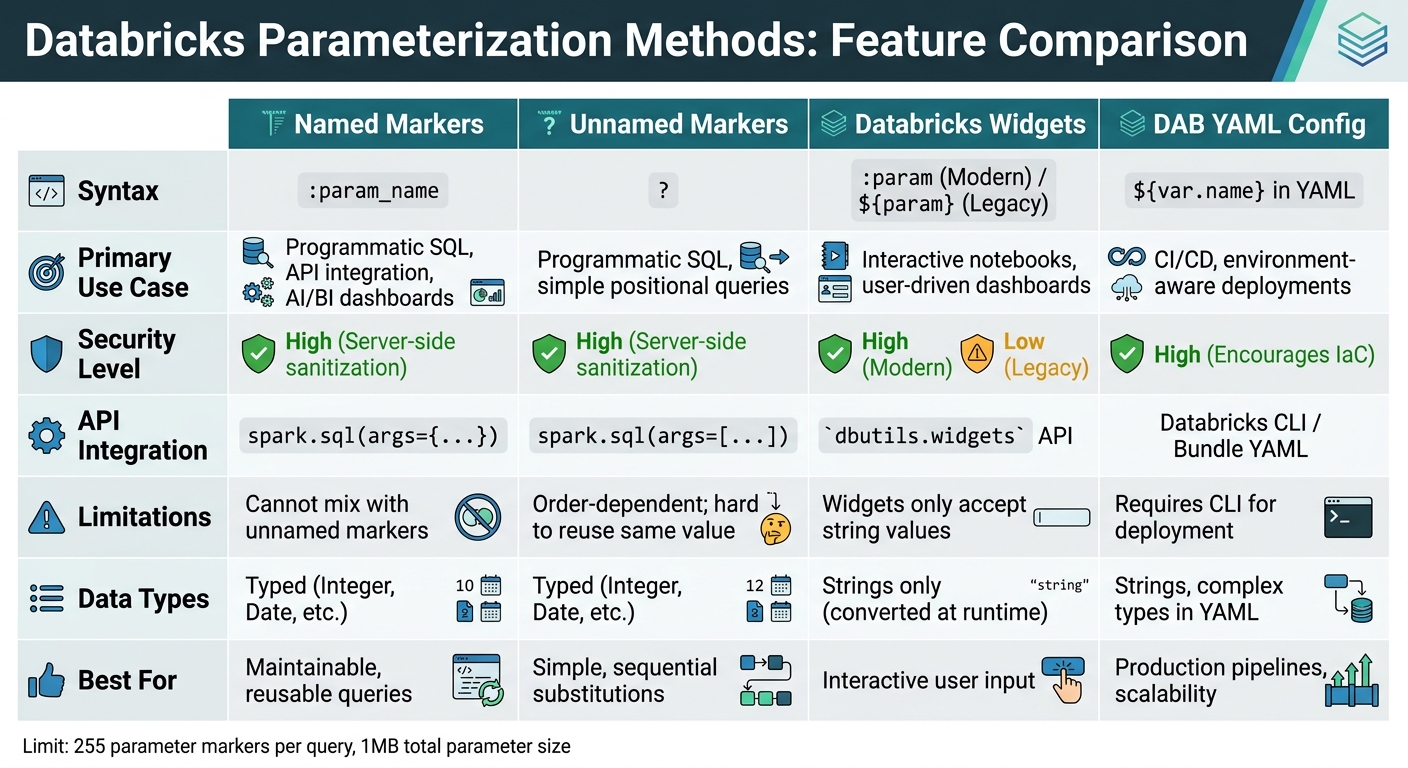
Databricks Parameterization Methods Comparison: Named vs Unnamed Markers vs Widgets vs DAB YAML
Method Comparison Table
Databricks offers several parameterization methods tailored to different workflows and security requirements. Named markers are widely used across SQL editors, notebooks, dashboards, and workflows because they offer clear syntax, strong typing, and effective protection against SQL injection attacks. On the other hand, unnamed markers (?) are suitable for straightforward, API-driven SQL executions where positional arguments are easier to manage. However, they require strict adherence to argument order and cannot reuse values within the same query.
Widgets are ideal for interactive queries, allowing users to input parameters through a graphical interface. However, they only accept string values, which are converted at runtime. For production pipelines or CI/CD workflows, YAML configurations in Databricks Asset Bundles (DABs) are invaluable. They support environment-aware deployments, enabling parameters to be defined once and adjusted dynamically across development, staging, and production environments.
Here's a detailed comparison of these methods to help clarify their use cases, syntax, and limitations:
| Feature | Named Markers | Unnamed Markers | Databricks Widgets | DAB YAML Config |
|---|---|---|---|---|
| Syntax | :param_name |
? |
:param (Modern) / ${param} (Legacy) |
${var.name} in YAML |
| Primary Use Case | Programmatic SQL, API integration, AI/BI dashboards | Programmatic SQL, simple positional queries | Interactive notebooks, user-driven dashboards | CI/CD, environment-aware deployments |
| Security | High (Server-side sanitization) | High (Server-side sanitization) | High (Modern) / Low (Legacy) | High (Encourages IaC) |
| API Integration | spark.sql(args={...}) |
spark.sql(args=[...]) |
dbutils.widgets API |
Databricks CLI / Bundle YAML |
| Limitations | Cannot mix with unnamed markers | Order-dependent; hard to reuse same value | Widgets only accept string values | Requires CLI for deployment |
| Data Types | Typed (Integer, Date, etc.) | Typed (Integer, Date, etc.) | Strings only (converted at runtime) | Strings, complex types in YAML |
Named markers are particularly effective for creating maintainable and reusable queries, as their syntax is self-explanatory. For automated workflows, YAML-based parameters in DABs excel at scalability, as they allow values to be dynamically passed to multiple tasks and overridden at runtime through APIs or the UI.
"Parameters are the backbone of creating dynamic, adaptable DABs. Think of parameters as adjustable inputs that allow your Databricks assets to behave differently based on context." - Kamil Klepusewicz, Software Engineer at Dateonic
Conclusion
Parameterization plays a key role in creating efficient and secure Databricks workflows. By separating user inputs from the SQL structure, it helps safeguard against SQL injection attacks. As Rajneesh Arora, Senior Delivery Solutions Architect at Databricks, puts it:
"Understanding and addressing the nuances of variables, parameters, and SQL injection is not just a best practice but a fundamental aspect of ensuring secure data operations."
Beyond security, parameterization supports the DRY (Don't Repeat Yourself) principle by allowing transformation logic to be reused across different environments. It also makes unit testing easier by enabling quick dataset switching.
With PySpark’s parameterization feature (introduced in Databricks Runtime 15.2), Python objects like dates and timestamps are automatically converted to SQL types, simplifying code and improving efficiency.
When choosing a parameterization method, consider your workflow needs. Options like named markers, unnamed markers, and widgets each bring unique benefits. However, avoid using f-strings, as they don't provide protection against SQL injection.
For more in-depth training on optimizing Databricks workflows, check out the courses available at DataExpert.io Academy.
FAQs
When should I use named parameters vs ? placeholders?
Named parameters are a great choice when working in interactive environments like SQL editors, dashboards, or notebooks. They improve readability and make queries easier to manage. Plus, they help boost security by keeping data separate from the logic, reducing the risk of SQL injection.
On the other hand, ? placeholders work best in programmatic contexts, such as APIs written in Python or Scala. These placeholders allow parameters to be supplied separately, which not only enhances security but also improves performance within application code.
How do I safely parameterize table or schema names?
To securely handle table or schema names in Databricks, use parameter markers such as :table_name. These placeholders are essential for preventing SQL injection while enabling dynamic query construction. When executing the query, a widget allows you to define the parameter's type and value. Stick to one type of marker - don't mix named and unnamed markers - and use them within the IDENTIFIER clause for safe and dynamic parameterization of object names during execution.
Why am I getting UNBOUND_SQL_PARAMETER and how do I fix it?
The UNBOUND_SQL_PARAMETER error occurs when parameters in your SQL query aren't properly linked, typically because of incorrect syntax or missing definitions. To fix this, make sure to use supported parameter markers, such as :parameter_name, and verify that parameters are passed correctly through the API or query interface. Refer to Databricks' guidelines on parameterization to prevent encountering this error.