
Databricks vs. Airflow for Event-Driven Workflows
When choosing between Databricks and Apache Airflow for event-driven workflows, the decision largely depends on your team's needs and infrastructure. Here's a quick breakdown:
- Databricks: Best for Spark-based data processing, managed orchestration, and workflows triggered by data changes (like file arrivals or table updates). It’s easier to use with a low-code interface and is fully managed, so there’s no need to maintain extra infrastructure. Costs are tied to compute usage, with no additional orchestration fees.
- Airflow: Ideal for orchestrating diverse systems with its Python-based, code-first approach. It offers extensive third-party integrations and is better for complex, multi-cloud workflows. However, it requires more setup, maintenance, and DevOps expertise.
Key Highlights:
- Databricks integrates orchestration directly into its platform with native triggers (e.g., file arrival, table updates) and uses Spark for scalable data processing.
- Airflow relies on Directed Acyclic Graphs (DAGs) and sensors to monitor external events but can be resource-intensive due to polling.
- Cost: Databricks is pay-as-you-go for compute, while Airflow is open-source but has hidden infrastructure costs.
Quick Comparison:
| Feature | Databricks | Airflow |
|---|---|---|
| Triggers | Native (file/table events) | Polling-based sensors |
| Ease of Use | Low-code, managed | Code-heavy, requires setup |
| Integration | Optimized for Spark | Broad third-party support |
| Cost | Compute only | Infra + management costs |
| Scalability | Serverless, elastic | Requires scaling workers |
Databricks is great for Spark-heavy, data-driven workflows, while Airflow excels in multi-platform orchestration. Many teams combine both tools: Airflow for cross-platform orchestration and Databricks for Spark tasks.
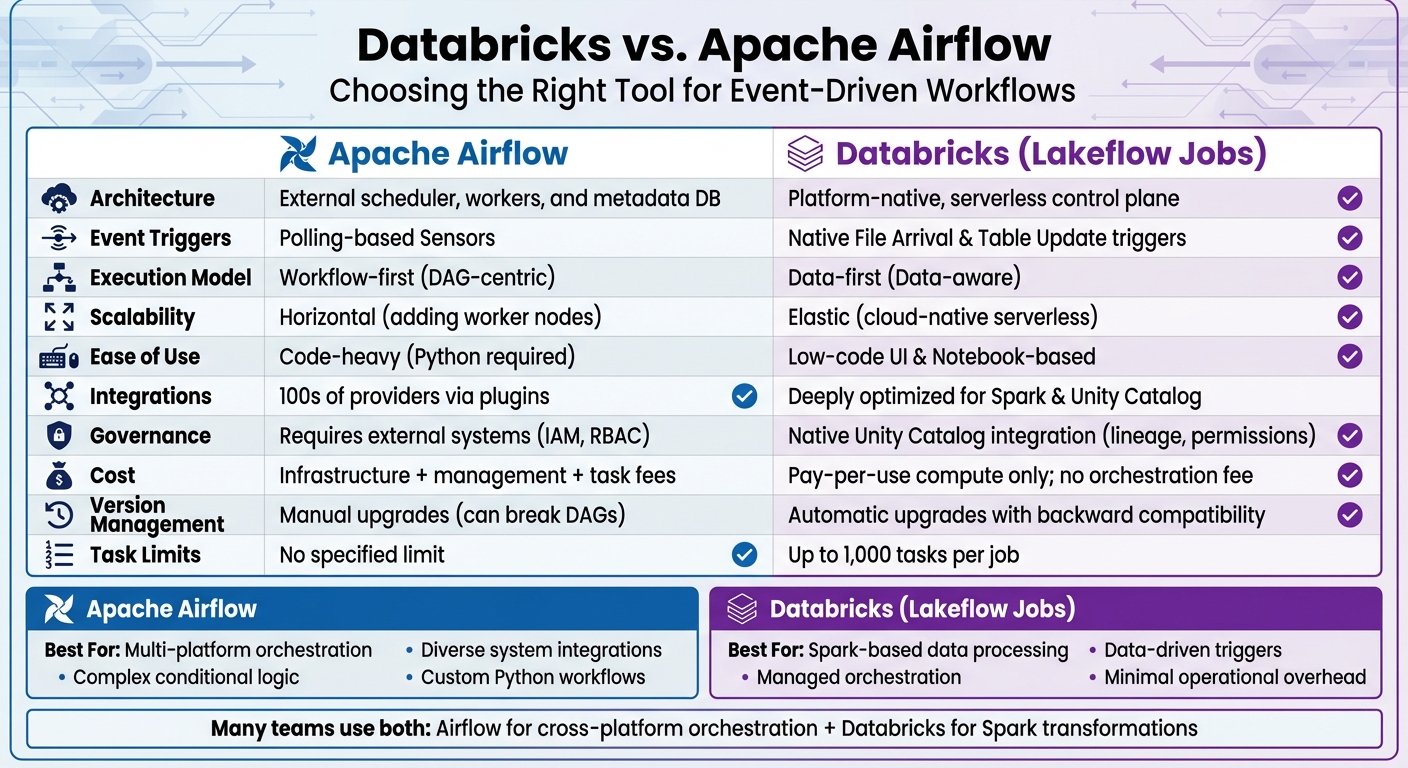
Databricks vs Apache Airflow: Feature Comparison for Event-Driven Workflows
Databricks Lakeflow vs. Apache Airflow: The Ultimate Comparison
sbb-itb-61a6e59
How Databricks Handles Event-Driven Workflows
Databricks integrates event-driven workflows directly into its Lakeflow Jobs platform (previously known as Databricks Workflows), removing the need for third-party orchestration tools. Instead of relying on polling, the system uses native triggers connected to Unity Catalog to respond to file arrivals or table updates. For example, when a new file is detected in an S3 bucket, Azure Storage, or Google Cloud Storage location registered with Unity Catalog, Databricks automatically kicks off the corresponding downstream job. Similarly, jobs are triggered when data is added, modified, or removed in Delta, Iceberg, materialized views, or streaming tables. Let’s dive into the mechanics of these native triggers.
"With table update triggers, your jobs run automatically as soon as specified tables are updated, enabling a more responsive and efficient way to orchestrate pipelines." - Databricks Blog
Native Event Triggers in Databricks
Databricks supports two main types of event triggers: file arrival triggers and table update triggers. File arrival triggers monitor Unity Catalog locations for new files, checking roughly every minute. Table update triggers, on the other hand, can monitor up to 10 managed or Delta tables per trigger. To avoid overloading the system in high-traffic environments, you can configure settings like "Minimum time between triggers" and "Wait after last change" to ensure all files in a batch are processed together .
For better scalability, users can enable "file events" on external storage locations. This feature leverages cloud-native change notifications instead of manual file listings, making it more efficient in busy environments. If file changes occur frequently, it's a good idea to create dedicated Unity Catalog volumes for specific subdirectories rather than monitoring the root of a large external location. This approach prevents potential trigger errors caused by high activity levels . These triggers work seamlessly with Spark, enabling scalable and efficient data processing.
Scaling with Spark Integration
The compute layer behind Databricks' event-driven workflows is powered by Apache Spark, which handles large-scale data processing through elastic clusters and serverless compute. When a file trigger activates, the Auto Loader (cloudFiles) processes new files with exactly-once semantics, ensuring metadata tracking. Additionally, the COPY INTO command, commonly used in these workflows, is idempotent by default. This means files are processed only once, even if a job is triggered multiple times. This tight integration ensures efficient and large-scale workflows.
A real-world example is Wood Mackenzie, which revamped its ETL pipelines in 2023 using Databricks Workflows. By automating these pipelines with event-driven triggers, they managed to process 12 billion data points weekly, reducing processing time by 80–90% while improving team collaboration. Databricks Workflows supports up to 2,000 concurrent tasks and 12,000 saved jobs in a single workspace , with a 99.95% uptime for production workloads.
User Interface and Governance Features
Databricks offers a visual authoring interface for building workflows as directed acyclic graphs (DAGs). This interface simplifies workflow creation with features like branching and looping, eliminating the need for extra code. Users can also validate paths and manage triggers using "Test connection" and "Pause/Resume" options. Unity Catalog centralizes access control for event-driven pipelines by managing permissions for storage locations and tables through standard GRANT/REVOKE commands .
The Job Monitoring Dashboard provides a detailed view of run history, task-specific logs, and performance metrics. All job data is stored in system tables, enabling SQL-based auditing. For custom monitoring, users can implement event hooks - Python callback functions - to trigger alerts or notifications, such as sending Slack messages for specific events. In 2023, Ahold Delhaize transitioned from Azure Data Factory to Databricks Workflows, leveraging these features to cut infrastructure costs and speed up deployment for their decentralized data teams.
How Airflow Handles Event-Driven Workflows
Apache Airflow uses a Python-based framework for managing event-driven workflows, building on Directed Acyclic Graphs (DAGs) to define task dependencies and execution logic. Mastering these complex architectures is a core focus for engineers at DataExpert.io Academy. Unlike Databricks, which provides managed triggers, Airflow requires users to configure their own orchestration setup. This gives users more control but also demands additional effort. With version 3.0, Airflow introduced asset-aware scheduling, moving beyond traditional cron-based triggers to support event-driven execution. Instead of relying solely on time-based schedules, Airflow now uses the AssetWatcher class to monitor external events - like message queues - and trigger DAG runs when specific conditions are met.
"Apache Airflow allows for event-driven scheduling, enabling Dags to be triggered based on external events rather than predefined time-based schedules." - Apache Airflow Documentation
Dynamic Task Mapping with DAGs
Airflow’s DAG structure offers the flexibility to create tasks dynamically at runtime. Using the .expand() method, teams can generate multiple task instances based on event data, enabling parallel processing when events occur. For instance, this is useful for handling workloads like processing multiple files that arrive simultaneously in a storage bucket. To improve efficiency, Airflow 3.0 introduced the BaseEventTrigger, which prevents unnecessary rescheduling. Additionally, external systems can programmatically trigger DAG runs through the REST API endpoint /dags/{dag_id}/dagRuns, passing event metadata directly into the workflow. Sensors further enhance Airflow's responsiveness by monitoring external conditions before task execution begins.
Using Sensors to Detect Events
Sensors in Airflow are specialized operators designed to pause DAG execution until a specific external condition is met - such as detecting a new file in S3, a database update, or an API success response. Traditionally, sensors relied on polling, where they repeatedly checked resource status at set intervals. While effective, this approach often wasted resources by occupying worker slots continuously.
"In Airflow 3... the introduction of deferrable operators and the triggerer process makes sensors scalable, efficient, and production-ready." - Sendoa Moronta, Cloud Data Architect
With Airflow 3.0, deferrable operators and the Triggerer process allow sensors to run asynchronously, freeing up worker slots while waiting for events. Sensors now operate in two modes:
pokemode, which continuously occupies a worker slot, andreschedulemode, which releases the slot between checks.
For long waits, pairing reschedule mode with an optimized poke_interval ensures responsiveness without overloading infrastructure. These advancements make Airflow’s event-detection capabilities more efficient and scalable.
Custom Plugins for Extended Functionality
To meet unique event-driven needs, Airflow includes a powerful plugin system for extending its core features. This system allows teams to build custom operators, hooks, sensors, and even UI elements using the airflow.plugins_manager. For example:
- Custom operators can handle specialized logic, such as integrating with proprietary APIs or processing unique event data.
- Custom hooks provide secure, reusable connections to external systems not covered by Airflow’s standard integrations, like internal services or proprietary databases.
- Custom sensors can monitor specific, real-time conditions tailored to a team's workflow.
For UI customization, the plugin system supports Flask blueprints, enabling teams to add custom dashboards or monitoring tools for complex workflows. While Airflow comes with over 1,000 pre-built operators to connect with third-party systems, the ability to create custom components ensures it can adapt to virtually any orchestration scenario.
Databricks vs. Airflow: Feature Comparison
When deciding between Databricks and Airflow for event-driven workflows, it's important to understand their core architectural differences. Airflow follows a "workflow-first" design, requiring users to manage a complex infrastructure stack that includes schedulers, executor fleets, metadata databases, and worker nodes. On the other hand, Databricks adopts a "data-first" approach with a fully managed, serverless control plane, removing the need for infrastructure management altogether. This fundamental contrast shapes how each platform handles triggers and scales to meet workload demands.
The execution models also vary significantly. Airflow relies on Directed Acyclic Graphs (DAGs), which are parsed by its scheduler. This model is primarily suited for time-based scheduling and uses sensors to poll for specific conditions. However, these sensors can consume worker resources during the polling process. Databricks, in contrast, integrates orchestration directly into its platform. Jobs are triggered by data state changes - such as updates to tables or new file arrivals - using built-in triggers that eliminate the need for manual polling.
"Apache Airflow was built around time-based scheduling and DAG parsing. Modern data pipelines run when: a table updates, a file lands in storage... These signals are part of the platform, not external events you poll." - Databricks Editorial Team
Cost considerations also differ between the two platforms. While Apache Airflow is open-source, it requires spending on scheduler nodes, worker clusters, metadata databases, and monitoring tools. Managed Airflow services, such as Astronomer, add subscription fees and charge based on tasks. Databricks, however, does not charge a separate orchestration fee. Users only pay for the compute resources used during task execution. Additionally, Databricks offers a 99.95% uptime SLA, providing reliability for critical workflows.
Comparison Table
| Feature | Apache Airflow | Databricks (Lakeflow Jobs) |
|---|---|---|
| Architecture | External scheduler, workers, and metadata DB | Platform-native, serverless control plane |
| Event Triggers | Polling-based Sensors | Native File Arrival & Table Update triggers |
| Execution Model | Workflow-first (DAG-centric) | Data-first (Data-aware) |
| Scalability | Horizontal (adding worker nodes) | Elastic (cloud-native serverless) |
| Ease of Use | Code-heavy (Python required) | Low-code UI & Notebook-based |
| Integrations | 100s of providers via plugins | Deeply optimized for Spark & Unity Catalog |
| Governance | Requires external systems (IAM, RBAC) | Native Unity Catalog integration (lineage, permissions) |
| Cost | Infrastructure + management + task fees | Pay-per-use compute only; no orchestration fee |
| Version Management | Manual upgrades (can break DAGs) | Automatic upgrades with backward compatibility |
| Task Limits | No specified limit | Up to 1,000 tasks per job |
These distinctions highlight which platform might be better suited for specific workflow requirements, depending on factors like scalability, ease of use, and cost efficiency. Professionals looking to implement these architectures can benefit from data engineering and AI training to master these platforms.
When to Use Each Tool
Selecting the right orchestration tool boils down to understanding the specific needs of your workload and ecosystem. Each platform has its strengths, catering to different technical requirements.
Databricks: Strengths and Best Use Cases
Databricks stands out when your workflows rely heavily on Spark-based data processing and machine learning. Its tight integration with Spark ensures high-performance analytics without the hassle of managing separate systems. If your team already works within the Databricks ecosystem, adding another orchestration tool may not make sense.
The platform's event-driven triggers are a key advantage. These triggers respond directly to data changes, avoiding the need for polling sensors. This makes Databricks a great fit for workflows that need to react automatically to new data in cloud storage or updates to Unity Catalog tables.
For teams seeking minimal operational overhead, Databricks’ fully managed, serverless architecture is a major draw. There’s no need to maintain schedulers, scale worker nodes, or patch metadata databases. Unity Catalog further simplifies governance by centralizing security, lineage tracking, and compliance for SQL, ML, and data engineering tasks. By late 2025, Databricks highlighted that AI agents were creating 80% of its databases, with AI-related products hitting a $1 billion run rate.
"Learning Apache Airflow required a significant time commitment. With Databricks, we build and deploy data workflows in one place." - Engineering Lead, YipitData
These capabilities make Databricks the go-to option for Spark-centric, data-driven workflows.
Airflow: Strengths and Best Use Cases
Airflow thrives in environments with diverse systems. Its Python-based, code-first design allows for complex custom logic and seamless integration with a wide range of third-party providers like AWS, GCP, Snowflake, and dbt. This makes it ideal for managing heterogeneous data stacks that span cloud services, on-premise databases, and external APIs.
Airflow is particularly strong in handling complex orchestration, such as conditional logic, branching, and advanced retry policies. Centralized connection management simplifies operations by letting teams define connections once and reuse them across workflows. Its cloud-agnostic nature means it can be deployed on any cloud or on-premise setup, avoiding vendor lock-in.
"Airflow is the clear winner [for integrations]... its ecosystem provides exceptional integration variety." - Daniel Beach, Data Engineering Central
For lightweight tasks like calling REST APIs or running Python scripts, Airflow is often more cost-effective than Spark clusters. In performance tests, Airflow completed standard ETL tasks in 8.66 seconds, compared to Databricks' 6 minutes and 55 seconds due to cluster startup overhead.
Limitations of Each Tool
Databricks has some notable limitations:
- No centralized connection management, requiring connections to be redefined in individual notebooks or tasks.
- Limited native branching, which complicates routing without additional nesting.
- A single job is capped at 1,000 tasks.
- Using Spark clusters for simple tasks can lead to unnecessary compute costs.
- While strong within its ecosystem, Databricks lacks native connectors for many external tools, often requiring custom code for integrations.
On the other hand, Airflow comes with operational challenges:
- Requires manual setup and maintenance of schedulers, web servers, and worker nodes, which can be time-consuming.
- Sensor-based monitoring can tie up worker resources while waiting for events.
- As an orchestrator, Airflow isn’t designed for heavy data transformations.
- Open-source versions come with hidden infrastructure costs, such as maintaining scheduler nodes, worker clusters, and metadata databases.
Given these constraints, many teams adopt a hybrid approach. Airflow often serves as the top-level orchestrator for managing cross-platform dependencies, while Databricks Workflows handle Spark-specific compute tasks. This strategy combines Airflow’s broad integration capabilities with Databricks’ processing efficiency.
How to Choose Between Databricks and Airflow
Deciding between Databricks and Airflow often comes down to your current infrastructure and team expertise. If your workflows heavily rely on Spark and your team is already working within the Databricks ecosystem, introducing another tool like Airflow could add unnecessary complexity. Databricks Workflows is built to handle thousands of jobs with managed orchestration, making it a natural fit in such environments. On the other hand, if you're managing a variety of systems - like Snowflake, AWS, local scripts, or APIs - Airflow's vendor-neutral design and extensive library of operators make it a great option.
Your team's skill set is another key factor. Airflow requires strong Python and DevOps knowledge to develop and maintain DAGs (Directed Acyclic Graphs). In contrast, Databricks offers a more user-friendly experience with its notebook-based interface and GUI, making it accessible to data analysts and scientists. That said, advanced use of Databricks still benefits from familiarity with Spark. For instance, YipitData’s Engineering Manager, Hillevi Crognale, noted their migration from Airflow to Databricks Workflows:
"Databricks Workflows was available, we would never have considered building out a custom Airflow setup. We would just use Workflows."
This shift allowed their team of over 300 analysts to create ETL pipelines more efficiently, sidestepping Airflow's steep learning curve.
Cost is another important consideration. Databricks charges only for compute (measured in DBUs) and doesn’t add orchestration fees. Meanwhile, Airflow’s open-source version is free, but you'll need to account for infrastructure and potential subscription costs. For simpler tasks, like making REST API calls, Airflow’s lightweight workers can be more cost-effective than starting up Spark clusters.
In many cases, teams find that a hybrid approach works best. Airflow can manage cross-platform dependencies while Databricks handles heavier Spark transformations. As data engineer Daniel Beach explains:
"I use BOTH Apache Airflow and Databricks Workflow in production today. These tools complement each other and are not mutually exclusive."
For example, the DatabricksRunNowOperator in Airflow can trigger existing Databricks jobs. This integration ensures runs are visible in the Databricks Jobs UI while avoiding duplicate job definitions.
The choice also depends on whether your workflows are schedule-driven or data-driven. Airflow is designed around time-based schedules and cron jobs, while Databricks Lakeflow takes a data-first approach. It uses native triggers to respond to events like table updates, file arrivals, or quality check failures without the need for polling.
Conclusion
When deciding between these tools, it's all about how they fit into your environment. Think about where your data lives and how your team prefers to work.
Databricks Lakeflow Jobs is ideal for teams focused on Spark-based processing. Its native triggers take the hassle out of managing schedulers manually. On the other hand, Airflow shines when orchestrating a variety of systems, thanks to its customizable Python DAGs.
Cost and performance are key factors to weigh. Databricks charges only for compute, with no extra orchestration fees, and offers a solid 99.95% uptime SLA. For simpler tasks, like API calls, Airflow can be incredibly cost-effective - think $0.10–$0.50 per task compared to $3–$5 when running on a Databricks cluster. If your workflows rely heavily on Spark transformations or machine learning, Databricks offers seamless integration and serverless scaling. Meanwhile, Airflow’s flexibility is unmatched for complex conditional logic or dynamically generated tasks.
Interestingly, many teams find success combining the two: leveraging Airflow for cross-platform orchestration while using Databricks to handle Spark transformations.
FAQs
How 'real-time' are Databricks file and table triggers?
Databricks file and table triggers are described as "real-time" because they handle new data as it comes in. This is particularly effective in continuous pipeline mode, which constantly watches dependent Delta tables. Updates are performed only when there are actual data changes, making the process both efficient and timely.
When do Airflow sensors become too expensive to run?
Airflow sensors can become costly when their resource consumption and operational expenses surpass the value they provide, particularly in large-scale deployments. The scheduler's design plays a significant role in escalating costs as the number of DAGs increases, leading to more task queuing and frequent database queries. Using numerous sensors or managing continuous event monitoring can push expenses to an unsustainable level. Managed Airflow environments might help alleviate some of these financial pressures, but the costs can still add up.
What’s the best way to use Airflow and Databricks together?
Combining Airflow and Databricks works best when you use Airflow as the orchestration tool to schedule and manage workflows that involve Databricks jobs or tasks. Airflow's operators can trigger various Databricks components like notebooks, scripts, or Delta Live Tables transformations. This setup allows for smooth scheduling, dependency management, and error handling. By pairing Airflow's flexibility with Databricks' scalable Spark engine, you can achieve efficient and reliable data processing.