
Scaling with Databricks and Snowflake: Strategies
Scaling data platforms like Databricks and Snowflake involves managing increasing workloads and securing your data. The two main approaches are:
- Horizontal Scaling: Adds more compute nodes to handle concurrent tasks, ideal for high user activity. Snowflake uses Multi-Cluster Warehouses, while Databricks adds worker nodes dynamically.
- Vertical Scaling: Increases the power of a single node, suited for complex queries. Snowflake resizes warehouses (e.g., Small to Medium), and Databricks uses larger instance types.
Key insights:
- Horizontal scaling improves concurrency but not individual query speed.
- Vertical scaling enhances performance for resource-heavy tasks.
- Both platforms offer auto-suspend/termination to minimize idle costs.
- Snowflake’s scaling policies (Standard vs. Economy) balance cost and performance.
- Databricks leverages features like Photon Engine and autoscaling modes for efficiency.
Quick Comparison:
| Feature | Snowflake | Databricks |
|---|---|---|
| Horizontal Scaling | Multi-Cluster Warehouses (Auto-Scale/Economy) | Autoscaling with worker nodes |
| Vertical Scaling | Resizing Virtual Warehouses (X-Small to 6X-Large) | Larger instance types, memory-optimized nodes |
| Cost Control | Credit-based billing, auto-suspend | DBUs, spot instances, auto-termination |
| Special Features | Auto-scaling modes, cache management | Photon Engine, GPU/Graviton support |
For hybrid setups, Databricks excels in data engineering, while Snowflake handles analytics. Combining both platforms optimizes performance and costs for diverse workloads.
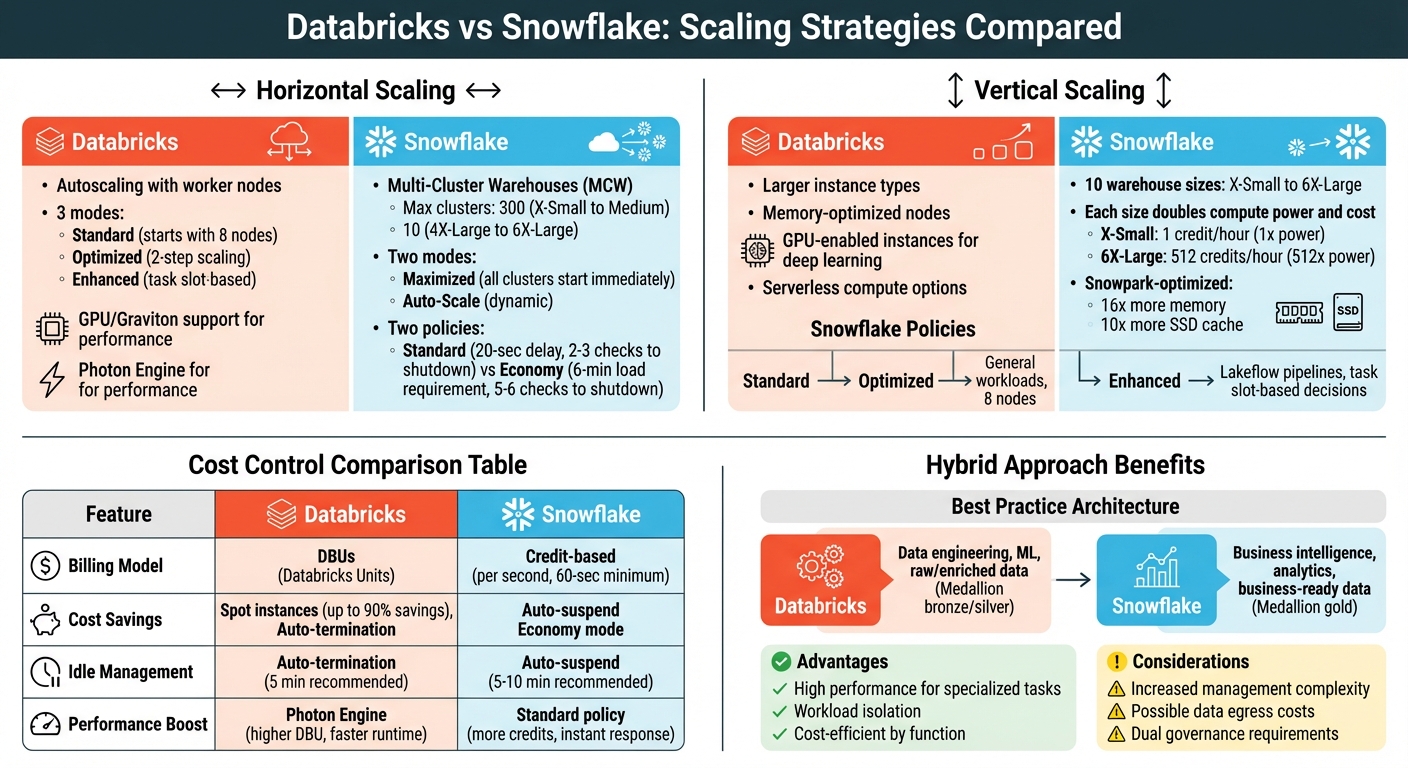
Databricks vs Snowflake Scaling Strategies Comparison
Blending Snowflake & Databricks at Janus Henderson Investments - Datalere Webinar
Horizontal Scaling in Snowflake
Snowflake manages horizontal scaling using Multi-Cluster Warehouses (MCW), a feature available in Enterprise Edition or higher. Instead of boosting the power of a single warehouse, this method dynamically adds or removes identical compute clusters to handle query concurrency. Think of it like opening more checkout lanes at a busy store - each cluster works independently to process queries, cutting down wait times.
Multi-Cluster Warehouses and Auto-Scaling Modes
To configure a multi-cluster warehouse, you'll set MIN_CLUSTER_COUNT and MAX_CLUSTER_COUNT. The maximum number of clusters varies: up to 300 for X-Small through Medium warehouses, but only 10 for 4X-Large through 6X-Large sizes.
Snowflake offers two modes for managing these clusters:
- Maximized Mode: All clusters start up immediately when the warehouse resumes. This mode is ideal for steady workloads with high concurrency needs.
- Auto-Scale Mode: Cluster count adjusts dynamically based on demand, making it better suited for workloads that fluctuate.
Within Auto-Scale Mode, there are two policies to choose from:
- Standard Policy: This default option focuses on performance. A new cluster starts immediately when a query gets queued, though there’s a 20-second delay between starting additional clusters. For shutting down, the system checks load every minute and removes clusters after 2–3 consecutive low-demand checks.
- Economy Policy: This policy is more conservative. It only starts a new cluster if the system predicts enough load to keep it busy for at least 6 minutes. Shutdowns take longer too, requiring 5–6 consecutive low-demand checks.
As Hevo Data puts it:
The objective of [the Standard] policy is to prevent or minimize queuing of queries.
When setting up, start with MIN_CLUSTER_COUNT=1 and MAX_CLUSTER_COUNT=2 or 3, then adjust based on observed load. For critical workloads, consider setting the minimum higher than 1 to maintain availability even if a cluster fails.
These scaling configurations directly influence costs, which we’ll dive into next.
Cost Impact of Scaling Policies
Your choice of auto-scaling policy affects both performance and costs. Snowflake’s billing is credit-based, and credit usage scales with the number of active clusters. For example, a Medium warehouse uses 4 credits per hour per cluster, so running 3 clusters simultaneously costs 12 credits per hour. Snowflake bills by the second, with a 60-second minimum.
The tradeoff between Standard and Economy policies boils down to performance versus cost:
- Standard Policy: Prioritizes responsiveness, making it ideal for interactive dashboards and applications with strict SLAs where users expect instant results. However, this approach uses more credits.
- Economy Policy: Focuses on cost savings by fully utilizing existing clusters before spinning up new ones. It’s better for batch processing, non-critical reporting, and background ETL jobs.
To manage costs effectively, set a short auto-suspend period (e.g., 5–10 minutes) to avoid unnecessary credit consumption when warehouses are idle. Monitor metrics like Peak Queued Queries or use the warehouse_load_history view to ensure your cluster maximum is sufficient. Keep in mind that when clusters shut down, their local data cache is lost, which can temporarily slow down subsequent queries until the cache is rebuilt.
Table: Snowflake Scaling Policy Comparison
| Policy Name | Description | Use Case | Cost Impact |
|---|---|---|---|
| Standard | Starts clusters immediately when queries are queued or resources are low | Interactive dashboards, SLA-sensitive applications | Higher; prioritizes responsiveness |
| Economy | Adds clusters only if load is sufficient to keep them busy for ≥ 6 minutes | Batch processing, non-critical reporting, background ETL | Lower; focuses on credit conservation |
Vertical Scaling in Snowflake
After looking at horizontal scaling, let’s break down how vertical scaling can improve performance by boosting the power of individual compute nodes.
While horizontal scaling adds more clusters to manage multiple users, vertical scaling takes a different route - it increases the capacity of a single warehouse. This involves adding more CPU, memory, and temporary storage. Think of it as upgrading a single checkout lane to handle more customers, rather than opening additional lanes.
Resizing Virtual Warehouses
Snowflake provides ten warehouse sizes, ranging from X-Small to 6X-Large. Each size increase doubles both the compute power and the hourly credit cost. For example, an X-Small warehouse uses 1 credit per hour, while a 6X-Large warehouse requires 512 credits per hour - offering 512 times the compute power.
The impact on performance depends on your workload. For large and complex queries, performance scales proportionally with warehouse size. However, for smaller tasks like simple SELECT statements or basic aggregations, upgrading from Medium to X-Large might not yield noticeable improvements.
You can resize a warehouse at any time, even while it’s running. Queries already in progress will continue using the original resources, while new or queued queries automatically benefit from the additional compute power as soon as it’s available. Snowflake charges by the second, with a 60-second minimum for each start or resize operation.
A good approach is to start with smaller warehouses and scale up based on actual performance needs.
Dynamic Resource Allocation
When you submit a query, Snowflake automatically allocates the necessary compute resources. If the warehouse doesn’t have enough capacity, the query waits in a queue until resources are freed by completed tasks.
One clear sign that your warehouse might need an upgrade is memory spilling. This happens when a query uses more memory than what’s available, forcing data to be written to local disk or remote storage, which slows things down significantly. For memory-heavy workloads, like machine learning training, Snowpark-optimized warehouses are a better fit. These warehouses offer 16 times more memory and 10 times more local SSD cache per node compared to standard options.
Keep in mind that suspending or resizing a warehouse clears its cache, which may temporarily reduce performance.
Table: Snowflake Warehouse Sizes and Costs
| Warehouse Size | Credits / Hour | Compute Power Multiplier |
|---|---|---|
| X-Small | 1 | 1x |
| Small | 2 | 2x |
| Medium | 4 | 4x |
| Large | 8 | 8x |
| X-Large | 16 | 16x |
| 2X-Large | 32 | 32x |
| 3X-Large | 64 | 64x |
| 4X-Large | 128 | 128x |
| 5X-Large | 256 | 256x |
| 6X-Large | 512 | 512x |
Credits are billed per second with a 60-second minimum.
sbb-itb-61a6e59
Scaling in Databricks
Databricks offers a flexible scaling model that works well alongside Snowflake's strategies, emphasizing adaptable data engineering and AI infrastructure. The platform provides granular control by scaling horizontally - adding or removing worker nodes dynamically - and vertically, through selecting specific instance types and leveraging serverless compute.
Cluster Autoscaling and Node Types
Databricks supports three distinct autoscaling modes: Standard, Optimized, and Enhanced.
- Standard Mode: Begins with 8 nodes and scales up exponentially as needed.
- Optimized Mode: Adjusts from the minimum to maximum number of nodes in just two steps, scaling down after short periods of underutilization (40–150 seconds).
- Enhanced Autoscaling: Tailored for Lakeflow Spark pipelines, this mode uses task slot utilization (busy vs. total slots) and task queue size to make scaling decisions. It can proactively shut down underused nodes without disrupting active tasks.
For resource-heavy tasks like complex ETL operations or heavy data shuffles, fewer but larger nodes are recommended to minimize network and disk I/O. If your queries frequently spill data to disk, memory-optimized instances are ideal. For deep learning workloads, GPU-enabled instances are a must, while AWS Graviton instances offer excellent cost-efficiency on Amazon EC2. To avoid interruptions, always use on-demand instances for driver nodes, even if spot instances are used for worker nodes.
These scaling features pave the way for better performance, further boosted by the Photon Engine.
Using the Photon Engine for Performance
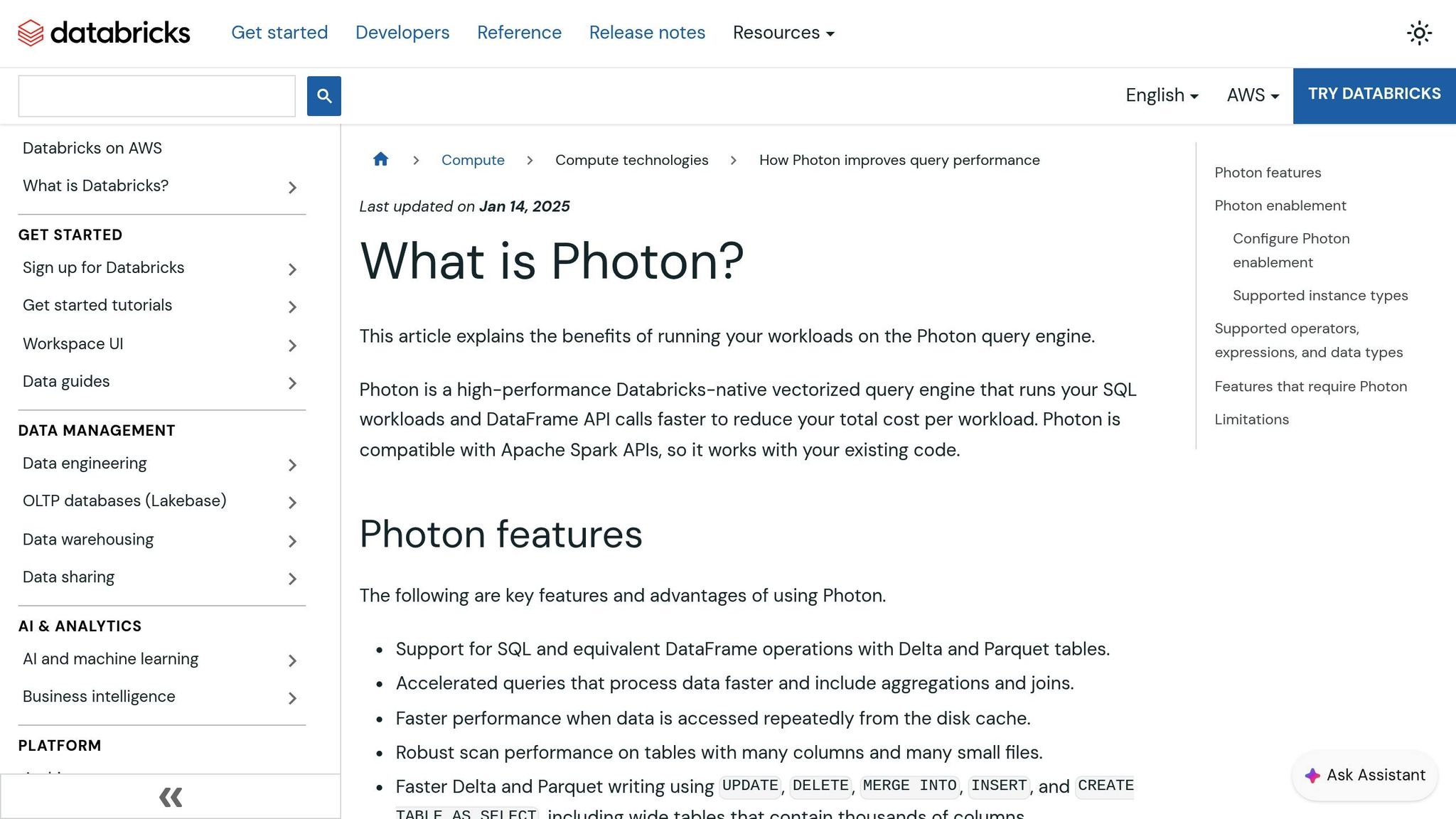
The Photon Engine takes Databricks’ dynamic scaling to the next level by significantly speeding up data processing. As a vectorized query engine written in C++, Photon processes data in batches rather than row-by-row, which greatly enhances the efficiency of SQL and DataFrame operations.
Photon optimizes performance by replacing slower sort-merge joins with faster hash joins and improving write operations for Delta and Parquet formats. This includes commands like UPDATE, DELETE, MERGE INTO, and INSERT, particularly for wide tables with thousands of columns. Enabled by default on SQL warehouses running Databricks Runtime 9.1 LTS and above, Photon shines in handling complex joins, aggregations, and large table scans. However, it offers limited advantages for quick queries under 2 seconds.
Keep in mind that Photon-enabled instances use Databricks Units (DBUs) at a different rate compared to standard instances, so it’s essential to weigh the performance benefits against the cost.
Table: Horizontal Scaling – Databricks vs. Snowflake
| Platform | Key Features | Strengths | Limitations |
|---|---|---|---|
| Databricks | Enhanced Autoscaling, Serverless Compute, Photon Engine, GPU/Graviton support | Highly granular control over node types; proactive node shutdown based on task slot usage | Limited downscaling for Structured Streaming; requires specific runtimes for Photon |
| Snowflake | Multi-cluster warehouses, Auto-scaling modes (Standard/Economy) | Simple "T-shirt" sizing; rapid upscaling to maintain low query latency; near-instant vertical scaling without restarts | Fixed limit of one cluster per 10 concurrent queries in Classic/Pro tiers; less control over hardware for specialized tasks |
Hybrid Scaling Approaches and Best Practices
A hybrid approach combines Databricks for data engineering and machine learning with Snowflake for high-concurrency business intelligence (BI). By splitting these workloads, you can avoid resource conflicts and manage costs more effectively. This strategy aligns each platform with tasks it handles best, building on earlier scaling methods.
When to Combine Databricks and Snowflake
One popular hybrid model uses the Medallion framework: Databricks processes raw and enriched data layers, while Snowflake handles business-ready analytics. This setup is ideal for organizations needing both high-throughput transformations and low-latency dashboards for hundreds of users. For example, in October 2025, Janus Henderson Investments adopted this architecture. Databricks powered their ingestion pipelines and complex transformations, while Snowflake served as a governed layer for analytics.
"Operating Snowflake and Databricks together requires discipline. This guide distills five principles: Store Once, Serve Many, Separate by Workload, Govern Consistently, Control Cost Through Isolation, and Design for Observability."
– Michael Spiessbach, Data Architect
Workload Management and Cost Optimization
Managing workloads efficiently is key to making a hybrid setup work. For cost control, configure Snowflake's auto-suspend and Databricks' auto-termination to 5 minutes for interactive tasks, reducing idle compute charges. Use Snowflake's multi-cluster warehouses in Standard scaling mode for high-throughput or low-latency needs, and enable Databricks' Photon engine for analytics. While Photon affects DBU consumption, faster processing often lowers overall costs. For non-critical Databricks worker nodes, spot instances can save up to 90% compared to on-demand VMs. Tagging resources with identifiers like Business_Unit and Project helps track spending. Regularly review metrics like "Peak Queued Queries" in Databricks and "Query History" in Snowflake to decide when to scale vertically (larger warehouses) or horizontally (additional clusters).
The table below highlights the pros and cons of hybrid versus single-platform scaling approaches.
Table: Hybrid vs. Single-Platform Scaling
| Strategy | Advantages | Disadvantages |
|---|---|---|
| Hybrid Scaling | High performance tailored to specific tasks; workload isolation; cost-efficient by function | Increased management complexity; possible data egress costs; dual governance requirements |
| Single-Platform | Simplified governance; unified billing; less architectural overhead | May compromise performance for specialized tasks like machine learning or high-concurrency BI |
Conclusion and Key Takeaways
Scaling effectively comes down to making the right choice between vertical and horizontal scaling, depending on your needs. Vertical scaling enhances the power of individual nodes to handle complex queries, while horizontal scaling adds more nodes to manage high-concurrency scenarios. Striking the right balance between these methods ensures better workload management and keeps costs under control.
Both Snowflake and Databricks simplify resource management by ensuring you only pay for compute time that's actively used. Snowflake uses automatic multi-cluster management to handle workloads efficiently, while Databricks employs its serverless SQL warehouses with AI-driven Intelligent Workload Management. These systems scale resources dynamically - spinning up quickly when needed and scaling down aggressively during idle periods. Additionally, both platforms feature auto-suspend options, which help eliminate idle costs. For example, setting auto-suspend to 5 minutes for interactive workloads can strike a balance between quick restarts and reduced credit usage.
On the cost optimization front, Snowflake’s Economy mode focuses on fully utilizing existing clusters, minimizing the need to launch new ones. Conversely, its Standard mode prioritizes faster query responses. Databricks offers cost-saving features for non-critical tasks and leverages its Photon engine to speed up SQL workloads. While this may increase DBU consumption, the reduced runtime often compensates for the added cost. These strategies align closely with the scaling methods discussed earlier, creating a cohesive approach to managing both platforms efficiently.
FAQs
What are the key differences between Snowflake's Standard and Economy scaling policies in terms of cost and performance?
Snowflake offers two distinct scaling approaches, tailored to different workload needs and priorities:
- Standard Scaling Policy: This approach uses independent virtual warehouses, which are billed per second according to their size. Larger warehouses come with higher hourly costs but ensure steady, reliable performance. It’s a solid choice for tasks that demand consistent and predictable computational power.
- Economy Policy: This option emphasizes cost savings by automatically adjusting and resizing resources based on demand. While it helps reduce expenses, it may lead to slight fluctuations in performance. It's a better fit for workloads where minimizing costs takes precedence over maintaining consistent performance.
What are the key advantages of using Databricks' Photon Engine for data processing?
Databricks' Photon Engine is designed to boost query performance with its native vectorized query engine, specifically tailored for Apache Spark APIs. This engine can achieve speeds up to 12 times faster for tasks like SQL workloads, DataFrame operations, and AI/ML processes. On top of that, it offers up to 80% savings in total costs.
This combination of speed and cost efficiency makes it an appealing option for businesses aiming to scale their data operations while optimizing resource use and accelerating time-to-insight.
When is it ideal to use a hybrid scaling approach with Databricks and Snowflake?
A hybrid scaling approach is a smart choice when you want to leverage the best of both Databricks and Snowflake to manage a variety of data workloads effectively. Databricks shines in handling large-scale data processing and advanced analytics, while Snowflake is tailored for data warehousing and delivering smooth query performance.
This method is particularly useful for organizations looking to balance cost, performance, and scalability. It’s especially effective when working with massive datasets or intricate workflows that demand both powerful analytics capabilities and efficient storage options.