
Databricks vs Snowflake: Which Platform to Learn First
If you're exploring careers in data, you’ve likely heard of Databricks and Snowflake. Both are major cloud data platforms, but they serve different purposes:
- Databricks: Best for data engineers, data scientists, and machine learning professionals. It’s built for processing large-scale data, developing AI models, and handling real-time streaming.
- Snowflake: Ideal for data analysts, business intelligence developers, and SQL users. It’s designed for structured data, analytics, and creating dashboards with minimal infrastructure management.
Key Takeaways:
- Databricks: Focuses on flexibility and advanced workflows. Requires knowledge of programming languages like Python, SQL, or Scala.
- Snowflake: Simplifies SQL-driven analytics with a user-friendly interface. Perfect for quick business insights and reporting.
Quick Comparison:
| Platform | Best For | Learning Curve | Key Strengths |
|---|---|---|---|
| Databricks | AI/ML, Data Engineering | Moderate (coding skills required) | Advanced data pipelines, unstructured data, AI |
| Snowflake | SQL, Business Intelligence | Easy (SQL-first) | Fast analytics, managed experience |
Which to learn first? Pick Databricks if you're targeting technical roles like machine learning or engineering. Choose Snowflake if you're focused on analytics and business intelligence. Both platforms are valuable, and learning both can boost your career prospects.
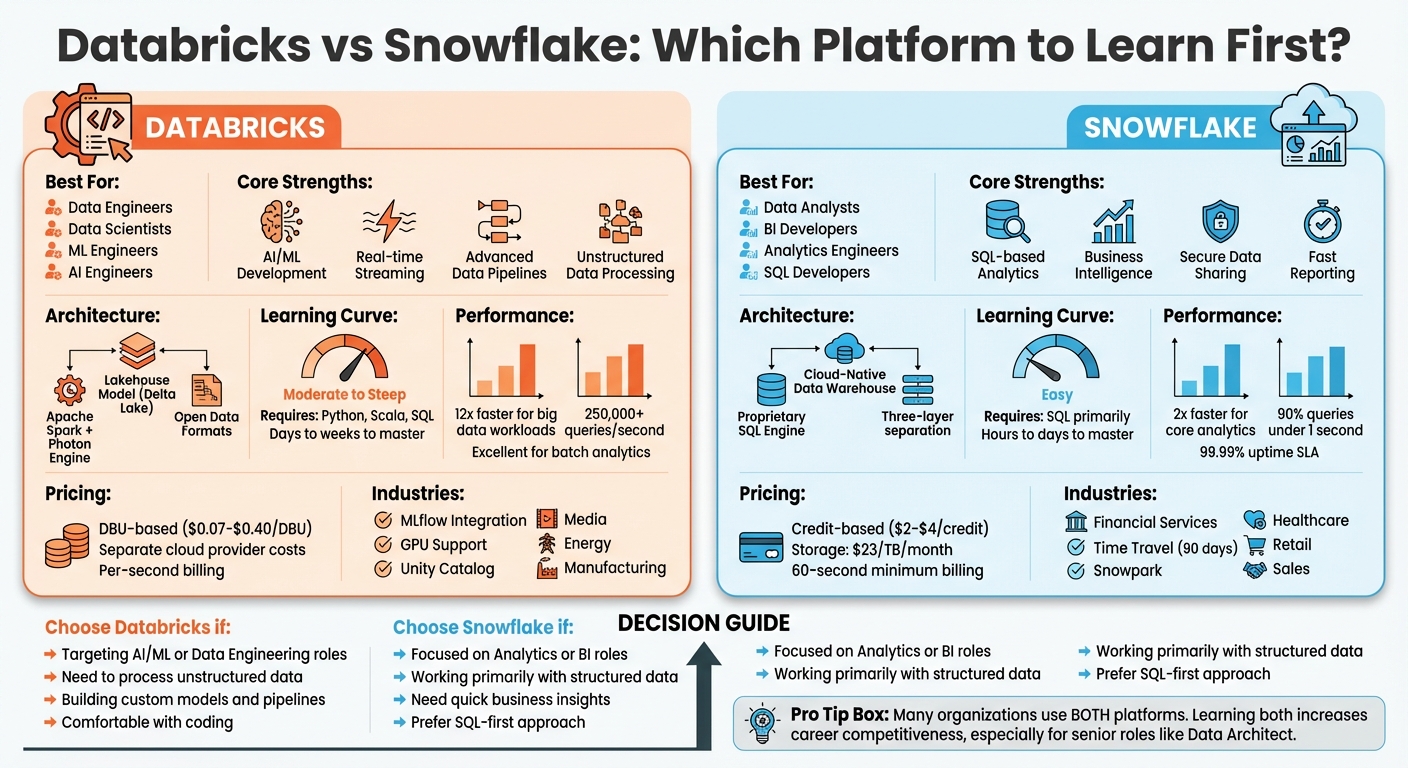
Databricks vs Snowflake: Platform Comparison for Data Professionals
Databricks: Features, Strengths, and Use Cases
Databricks Architecture and Key Features
Databricks is built on a lakehouse architecture, which combines the affordability of data lakes with the performance of data warehouses. Powered by Apache Spark and enhanced by its Photon engine, it delivers faster SQL query performance while keeping costs in check.
At its core is Delta Lake, which ensures reliable data storage with features like ACID transactions, schema enforcement, and "Time Travel" for accessing previous data versions. To streamline governance, Unity Catalog provides a centralized way to manage data and AI assets across multiple workspaces.
For data engineering, Databricks offers tools like Auto Loader for incremental data ingestion and Lakeflow Spark Declarative Pipelines, which handle dependencies and scale infrastructure automatically. On the AI development side, the platform includes Databricks Runtime for Machine Learning, supporting popular frameworks like Hugging Face and DeepSpeed. It also introduces "AI Functions", enabling SQL analysts to integrate large language models directly into data workflows. Additionally, MLflow is embedded to help track experiments, manage models, and oversee deployments throughout the machine learning lifecycle.
Where Databricks Excels
Databricks shines in scenarios that demand real-time streaming, intricate ETL pipelines, or advanced machine learning. Its ability to process both structured and unstructured data in a unified environment eliminates the need for separate storage systems.
Real-world use cases highlight its benefits. For instance, AT&T used Databricks to cut fraud by 70–80%, while Adobe improved performance by 20% by integrating data and AI efforts across more than 90 teams. The platform's capabilities have also earned it the top spot in Execution and Vision in the 2025 Gartner® Magic Quadrant™ for Data Science and Machine Learning Platforms.
"Databricks is infrastructure for builders." - Horkan, Head of Data Platforms
Learning Curve for Databricks
Getting started with Databricks requires familiarity with Python, Scala, or SQL, as it operates in a notebook-style environment. Users also need a solid grasp of distributed computing concepts and cluster configuration. While the platform supports multiple programming languages, including SQL, Python, Scala, R, and Java, its versatility comes with a steeper learning curve compared to SQL-only systems.
This initial effort is worth it for professionals in data engineering, data science, and machine learning roles, where deeper control over infrastructure and compute resources is often essential. Once mastered, Databricks enables users to build custom AI models, process streaming data, and handle complex analytical workflows. This strong technical foundation sets the stage for a comparison with Snowflake's architecture in the following section.
Snowflake: Features, Strengths, and Use Cases
Snowflake Architecture and Key Features
Snowflake is a cloud-native data warehouse that blends elements of shared-disk and shared-nothing architectures, creating a hybrid model. Its design is built on three distinct layers: database storage (a centralized repository), compute (independent virtual warehouses), and cloud services (which handle coordination and management). This separation ensures both ease of use and high performance.
Data is stored in a compressed, columnar format and divided into micro-partitions, while independent virtual warehouses allow compute resources to scale separately, avoiding resource bottlenecks. The cloud services layer takes care of key tasks like security, metadata, query optimization, and managing the Snowflake Horizon Catalog, which provides unified governance across your data environment.
Snowflake is versatile in its capabilities, supporting Snowpark for building applications and pipelines in Python, Java, and Scala. It can handle both structured and semi-structured data and uses Snowgrid for seamless data sharing, disaster recovery, and governance across AWS, Azure, and GCP. These features make it a powerful option for handling a variety of data workloads efficiently.
For data ingestion, Snowflake offers Dynamic Tables that enable SQL-based transformations with automated dependency management. Streaming ingestion is up to 50% cheaper, and its Generation 2 Standard Warehouses deliver analytics performance that’s twice as fast.
Where Snowflake Excels
Snowflake’s architecture is the foundation of its success in several key areas. It thrives in SQL-based analytics, business intelligence, and scenarios that require secure data sharing across organizations. Its fully managed SaaS model takes care of maintenance, upgrades, and infrastructure tuning, making it an excellent choice for teams without extensive data engineering expertise.
Real-world examples highlight Snowflake’s capabilities. For instance, KFC, under the guidance of Data Architect Luis Bastos, slashed data sharing times from days to seconds while reducing database operational costs by 70%. Their system now processes over 500,000 daily order transactions. Similarly, NYC Health + Hospitals, led by Deputy Chief Data Officer Shahran Haider, migrated 100 billion rows of healthcare data to Snowflake. This move cut the time needed to provide users with updated membership data from five days to just five minutes.
"KFC's data sharing processes changed from taking days to being completed in just seconds. This allows access to more data faster and allows us to achieve greater insights and enhance our advanced analytics capabilities." - Luis Bastos, Data Architect, KFC
Snowflake’s reliability is another standout feature. With a 99.99% uptime SLA and built-in cross-region failover, the platform delivers enterprise-grade dependability. In one retail case study, 90% of user queries were resolved in under one second through self-service dashboards. Its Secure Data Sharing feature allows live, governed data access for external partners across different cloud providers without requiring data duplication or movement.
Learning Curve for Snowflake
Snowflake’s design makes it approachable, even for those new to cloud data platforms. Its SQL-first approach and Snowsight interface enable users to quickly create worksheets, build dashboards, and monitor queries. This ease of use appeals to business intelligence analysts and report developers who rely on tools like Tableau or Power BI.
The platform operates as "infrastructure for consumers" rather than builders. It eliminates the need to understand distributed computing concepts or manage cluster configurations - Snowflake handles these complexities behind the scenes.
For users transitioning from traditional SQL databases, Snowflake’s familiar query syntax and user-friendly interface help them get up to speed quickly. Features like Time Travel, which allows users to access or restore data from a specific period, provide an added layer of security for those still learning the ropes.
Databricks vs Snowflake: Architecture, Use Cases, and Performance
Architecture Differences
Databricks and Snowflake follow two very different architectural philosophies. Databricks is built on a Lakehouse model powered by Delta Lake, which merges the flexibility of data lakes with the reliability of ACID transactions. Its architecture splits into two planes: a managed control plane for tasks like notebooks and job management, and a data plane that operates within your cloud account. Databricks leans on Apache Spark and the Photon vectorized engine for its processing power.
Snowflake, in contrast, is a cloud-native data warehouse with three distinct layers: storage (using a compressed columnar format), compute (via virtual warehouses), and cloud services (handling metadata, security, and optimization). Its proprietary, serverless engine is finely tuned for SQL-based analytics.
When it comes to scaling, Snowflake uses multi-cluster warehouses for automatic horizontal scaling during high concurrency. Databricks offers more control, enabling both vertical and horizontal scaling with customizable node types. Another key difference is in data formats: Databricks supports open standards like Delta Lake and Apache Iceberg, while Snowflake primarily uses proprietary formats, although it recently added native Iceberg support for easier integration.
| Feature | Databricks | Snowflake |
|---|---|---|
| Core Model | Unified Data Lakehouse (Delta Lake) | Cloud-Native Data Warehouse |
| Primary Engine | Apache Spark with Photon | Proprietary SQL Engine |
| Scalability | Granular control with vertical & horizontal scaling | Automatic multi-cluster horizontal scaling |
| Data Formats | Open (Delta, Iceberg, Parquet, JSON) | Proprietary (with Iceberg support) |
| Multi-Cloud | Native on AWS, Azure, GCP | Native on AWS, Azure, GCP |
These architectural differences shape how each platform performs under different workloads, as explored below.
Performance by Workload Type
Performance varies significantly depending on the workload. Databricks shines in batch analytics, especially when handling complex transformations. Its distributed Spark engine ensures high throughput, making it a top choice for large-scale data processing. For streaming workloads, Databricks offers Spark Structured Streaming, capable of millisecond-level latency. Snowflake’s Snowpipe Streaming, on the other hand, operates on a micro-batch model, making it ideal for near-real-time business intelligence.
In the realm of AI and machine learning, Databricks outpaces Snowflake with its deep MLflow integration and native GPU support, enabling it to handle over 250,000 queries per second. Snowflake’s Snowpark is better suited for lighter ML workloads.
When it comes to query concurrency, Snowflake has a clear edge, successfully resolving 90% of queries in under one second in a recent study. Databricks can match this level of performance, but it requires additional tuning of its SQL Warehouses.
For specific big data workloads, Databricks has been shown to process data up to 12x faster (as demonstrated in TPC-DS benchmarks). However, for core analytics, Snowflake often delivers results 2x faster in practical scenarios. For instance, in 2025, Travelpass, a travel company, reported 65% cost savings and a 350% increase in data delivery efficiency after switching from Databricks to Snowflake. This was shared by Data Architect David Webb.
| Workload Type | Databricks Performance | Snowflake Performance |
|---|---|---|
| Batch Analytics | High throughput for complex transformations | Optimized for fast SQL and structured data |
| Streaming | Native Spark Structured Streaming with low latency | Snowpipe Streaming (micro-batch model) |
| AI & Machine Learning | Deep integration with MLflow and GPU support | Supported via Snowpark (better for light ML) |
| Concurrency | Requires tuning of SQL Warehouses | Excellent; handles many simultaneous queries |
Career Opportunities: Databricks vs Snowflake
Job Market Demand for Databricks Skills
When choosing between Databricks and Snowflake, it’s essential to consider your career aspirations. Databricks is a go-to platform for roles that demand advanced technical knowledge in areas like data engineering, machine learning, and AI. Careers such as Data Engineers, ML Engineers, AI Engineers, Data Scientists, and Data Architects often involve building intricate systems from scratch - Databricks is tailor-made for these tasks.
Industries like Technology, Media, Energy, and Manufacturing heavily rely on Databricks for handling massive unstructured datasets, including sensor data, logs, images, and video streams. Its ability to manage real-time streaming and facilitate custom AI model development makes it a critical tool for organizations aiming to embrace an "AI-native" approach.
For instance, in FY2024, the U.S. Navy used Databricks Workflows, MLflow, and Apache Spark to create a model that predicted errors in financial transactions. This system reviewed $40 billion in transactions, freed up $1.1 billion for other priorities, and saved 218,000 work hours. Similarly, 7-Eleven utilized Databricks Mosaic AI and LangGraph to develop a marketing assistant that monitors performance across more than 13,000 stores and automates campaign creation.
Databricks certifications are also highly valued. According to reports, 95% of certified professionals solve problems faster, while 93% claim improved efficiency. Organizations that invest in Databricks certifications experience 88% greater cost savings.
"What Databricks has allowed us to do is understand how both our engineers and our data scientists can work together on projects and how they can really accelerate time to value for our customers." - Andrew Fletcher, Partner at Valorem Reply
Job Market Demand for Snowflake Skills
On the other hand, Snowflake caters to roles focused on business analytics and reporting. It’s ideal for BI Analysts, Data Analysts, Analytics Engineers, and SQL Developers who thrive in its user-friendly, managed environment.
Industries like Financial Services, Healthcare, Retail, and Sales often turn to Snowflake for its ability to handle structured data while ensuring compliance and ease of use. Snowflake excels at delivering quick business insights without the need for extensive infrastructure management.
One of Snowflake's standout features is its simplicity. Analysts proficient in SQL can deliver results within hours, whereas mastering Databricks may take days.
Matching Platform to Career Goals
The career paths tied to these platforms are quite distinct. Databricks tends to attract professionals in highly technical roles, while Snowflake appeals to those in business-focused positions.
If your goal is to work in AI/ML engineering or data science, Databricks is the better choice. To excel, you'll need to focus on tools like Apache Spark, MLflow, Python, and Scala - key technologies for managing the complete machine learning lifecycle. With global AI adoption expected to grow at a 35.9% annual rate between 2025 and 2030, the demand for these skills will only increase.
For those pursuing analytics engineering, business intelligence, or other business-facing roles, Snowflake is a strong contender. Proficiency in SQL and tools like dbt will enable you to deliver quick results in Snowflake's streamlined environment.
Interestingly, many large organizations, especially in Retail and Supply Chain, use both platforms. They leverage Snowflake for interactive business intelligence and Databricks for heavy-duty data engineering and machine learning tasks. Gaining expertise in both platforms can make you highly competitive, particularly for senior roles like Data Architect, where designing hybrid architectures is a significant part of the job.
| Career Path | Best Platform | Core Skills Required | Learning Curve |
|---|---|---|---|
| AI/ML Engineer | Databricks | Python, Spark, MLflow, Scala | Days to weeks |
| Data Engineer | Databricks | Spark, Python, SQL, Distributed Computing | Days to weeks |
| Analytics Engineer | Snowflake | SQL, dbt, BI Tools | Hours to days |
| Data Analyst | Snowflake | SQL, Tableau/Power BI | Hours to days |
| Data Scientist | Databricks | Python, R, MLflow, Notebooks | Days to weeks |
sbb-itb-61a6e59
Databricks vs Snowflake: Which is BETTER for Your Data Needs
Pricing and Cost Considerations
When deciding which platform to learn first, understanding their pricing structures is key. Both Databricks and Snowflake use consumption-based pricing, but they approach it in different ways, impacting cost predictability and management.
How Databricks Pricing Works
Databricks uses Databricks Units (DBUs) as its pricing model, which measures processing power. Your total cost includes Databricks fees (calculated in DBUs) along with your cloud provider's charges for virtual machines, storage, and networking.
The cost per DBU varies by workload type:
- AI workloads: $0.07/DBU
- Data Engineering: $0.15/DBU
- SQL: $0.22/DBU
- Interactive/ML: $0.40/DBU
Billing is calculated per second, with no minimum requirement. However, the overall pricing can be less predictable because Databricks separates its fees from the cloud provider’s charges. For example, storage costs depend on your provider's rates for services like AWS S3 or Azure Data Lake Storage.
Databricks claims that its Unity Catalog managed tables can cut costs by over 50% through features like automated clustering and optimization.
"ETL workloads typically account for 50% or more of an organization's overall data costs. With a single, unified Data Intelligence Platform... Databricks delivers excellent value and savings across all of these use cases." - Databricks
How Snowflake Pricing Works
Snowflake, on the other hand, uses a credit-based system to price storage, compute, and cloud services.
Storage is billed at around $23 per terabyte per month in major U.S. regions, based on your average daily usage after compression. Compute costs depend on the edition you choose:
- Standard Edition: $2.00 per credit
- Enterprise Edition: $3.00 per credit (includes features like multi-cluster warehouses and 90-day time travel)
- Business Critical Edition: $4.00 per credit (enhanced compliance and disaster recovery)
Virtual warehouses range in size from X-Small (1 credit/hour) to 6X-Large (512 credits/hour), with credits doubling at each step. Billing is per second, but there’s a 60-second minimum. Additionally, services like metadata management are free, provided they don’t exceed 10% of your daily compute credits.
Snowflake’s pricing is highly predictable. You know the exact cost of each credit and can set up resource monitors to manage spending. For even more cost certainty, Snowflake offers pre-paid "Capacity" plans with long-term price guarantees.
In 2025, TravelPass reported 65% cost savings after switching from Databricks to Snowflake, citing more efficient data delivery to business units.
Cost Comparison
The best pricing model for you depends on your workload and how much infrastructure management you’re prepared to handle.
| Factor | Databricks | Snowflake |
|---|---|---|
| Primary Unit | Databricks Units (DBUs) | Snowflake Credits |
| Storage Billing | Charged by cloud provider | Managed by Snowflake (~$23/TB) |
| Billing Granularity | Per-second (no minimum) | Per-second (60-second minimum) |
| Cost Predictability | Moderate (DBU + cloud costs) | High (fixed credit rates) |
| Best For | Heavy ETL, AI/ML workloads | BI, analytics, structured data |
| Management Effort | Higher (manual cluster tuning) | Lower (fully managed) |
Databricks is often the better choice for data engineering and machine learning tasks where you need granular control and can optimize cluster configurations.
Snowflake, however, excels in scenarios where predictable costs and minimal administrative effort are priorities. Its fully managed service is ideal for teams focused on analytics rather than infrastructure.
Conclusion: Which Platform Should You Learn First?
The choice ultimately hinges on your career aspirations. If you're aiming for roles in data engineering or AI/ML, Databricks is a strong starting point. Its detailed infrastructure control, support for Python and Scala, and ability to handle complex ETL pipelines and real-time streaming make it an excellent fit. On the other hand, if your focus is on analytics engineering or business intelligence, Snowflake is the better option. Its SQL-first approach, seamless integration with dbt, and minimal infrastructure management make it ideal for these areas.
"Databricks is infrastructure for builders. Snowflake is infrastructure for consumers." - Horkan, Head of Data Platforms
That said, the line between these platforms is becoming less distinct. Snowflake has ventured into AI/ML with Cortex, while Databricks has strengthened its SQL and BI capabilities through tools like Databricks SQL and AI/BI Genie. Many organizations now use both: Databricks for engineering and AI tasks, and Snowflake for governed analytics. This hybrid approach underscores the growing overlap between the two platforms, making expertise in both highly valuable for modern data careers.
The numbers back this up. Databricks saw its revenue climb from $1.5 billion to $2.4 billion between mid-2023 and mid-2024, while Snowflake reached $3.8 billion in revenue for the four quarters ending in April 2025. This growth highlights the increasing demand for cross-platform skills, making knowledge of both ecosystems a significant career asset.
Success in this field, however, requires more than theoretical knowledge - it demands hands-on experience. Managing Spark clusters or optimizing data warehouses is best learned through practical application. Programs like those offered by DataExpert.io Academy provide a direct path to this kind of experience. Their specialized boot camps in data engineering, analytics engineering, and AI engineering include real-world capstone projects and access to both Databricks and Snowflake environments. Whether you opt for the 15-week Data and AI Engineering Challenge ($7,497) or shorter 5-week boot camps ($3,000 each), you'll gain practical skills that mirror workplace demands.
Start with the platform that aligns with your immediate career goals, then expand your expertise to the other. This dual-platform approach is the smartest way to stay competitive in 2026 and beyond.
FAQs
What’s the difference in difficulty when learning Databricks versus Snowflake?
Snowflake is known for having a gentler learning curve, largely because it relies on SQL - a language many data professionals are already comfortable with. Its fully managed platform enables users with even basic SQL skills to quickly create dashboards and generate reports. This makes it a great fit for teams that prioritize analytics and need an accessible solution.
Databricks, by contrast, requires a deeper technical background. To make the most of it, users need to understand Apache Spark, work with programming languages like Python or Scala, and grasp concepts such as cluster management and notebook-based workflows. This makes Databricks a better choice for those with software development expertise or anyone focused on data engineering and machine learning tasks.
Essentially, Snowflake works well for beginners or SQL-centric roles, while Databricks caters to those with more advanced technical skills, offering the tools needed for tackling complex data challenges.
How do Databricks and Snowflake pricing models affect cost management?
Both Databricks and Snowflake base their pricing on resource usage, but the way they structure their costs differs, which can influence how you manage your budget.
Databricks uses a pay-as-you-go approach with per-second billing. You’re charged for the exact runtime of your jobs, notebooks, or clusters. For organizations with predictable workloads, committed use contracts can help lower expenses by offering discounts. To keep costs under control, it's important to monitor job runtimes, cluster sizes, and workload patterns closely.
Snowflake, on the other hand, separates costs into three categories: storage, compute (virtual warehouses), and cloud services credits. Storage is billed monthly, while compute costs are tied to credits used during warehouse operation. To manage spending, warehouses can be paused or resized as needed. This credit-based system provides a more predictable budget framework, but keeping an eye on warehouse usage is still key to avoiding unnecessary charges.
Databricks works best for dynamic, bursty workloads like AI projects, while Snowflake’s model is better suited for steady analytics tasks that benefit from clearer cost predictability. Choosing the right platform depends on how well their pricing structures align with your workload needs.
Which platform should data professionals learn first: Databricks or Snowflake?
Both Databricks and Snowflake are top-tier data platforms in the U.S., each offering exciting career paths. The right choice largely depends on what you want to achieve in your career.
If you're passionate about data engineering, AI, or machine learning, Databricks could be your go-to. Its unified lakehouse architecture is built for handling large-scale data processing, real-time analytics, and advanced AI/ML workflows. This makes it a strong option for roles like data engineers, machine learning engineers, or AI researchers.
On the flip side, Snowflake is a cloud-native platform tailored for SQL-based analytics, seamless data sharing, and governance. It’s a great match for professionals focused on business intelligence, analytics engineering, or data governance roles.
In short, if you’re aiming for AI/ML and engineering-heavy work, Databricks opens doors in a rapidly evolving field. But if your interests lean toward SQL-driven analytics and governance, Snowflake offers a reliable path in analytics-oriented careers.