
Error Handling in dbt: Best Practices
When working with dbt, error handling is essential to keep your data pipelines running smoothly. Here’s what you need to know:
- dbt separates compile-time and runtime: Errors can occur at different stages, from SQL compilation to execution. Catching and isolating problems early is critical.
- Common errors include SQL mistakes, invalid data type casts, YAML formatting issues, and database connection problems.
- Key strategies:
- Validate configurations before execution.
- Use database-safe functions like
TRY_CASTorSAFE_CAST. - Leverage dbt tests (
unique,not_null, etc.) to flag data quality issues early.
- Debugging tools: Use
dbt debug, inspect compiled SQL, and review logs for quick troubleshooting. - CI/CD integration: Automate error detection in pipelines using Slim CI and test severity thresholds to prevent cascading failures.
How to test and debug your dbt models
Common dbt Errors
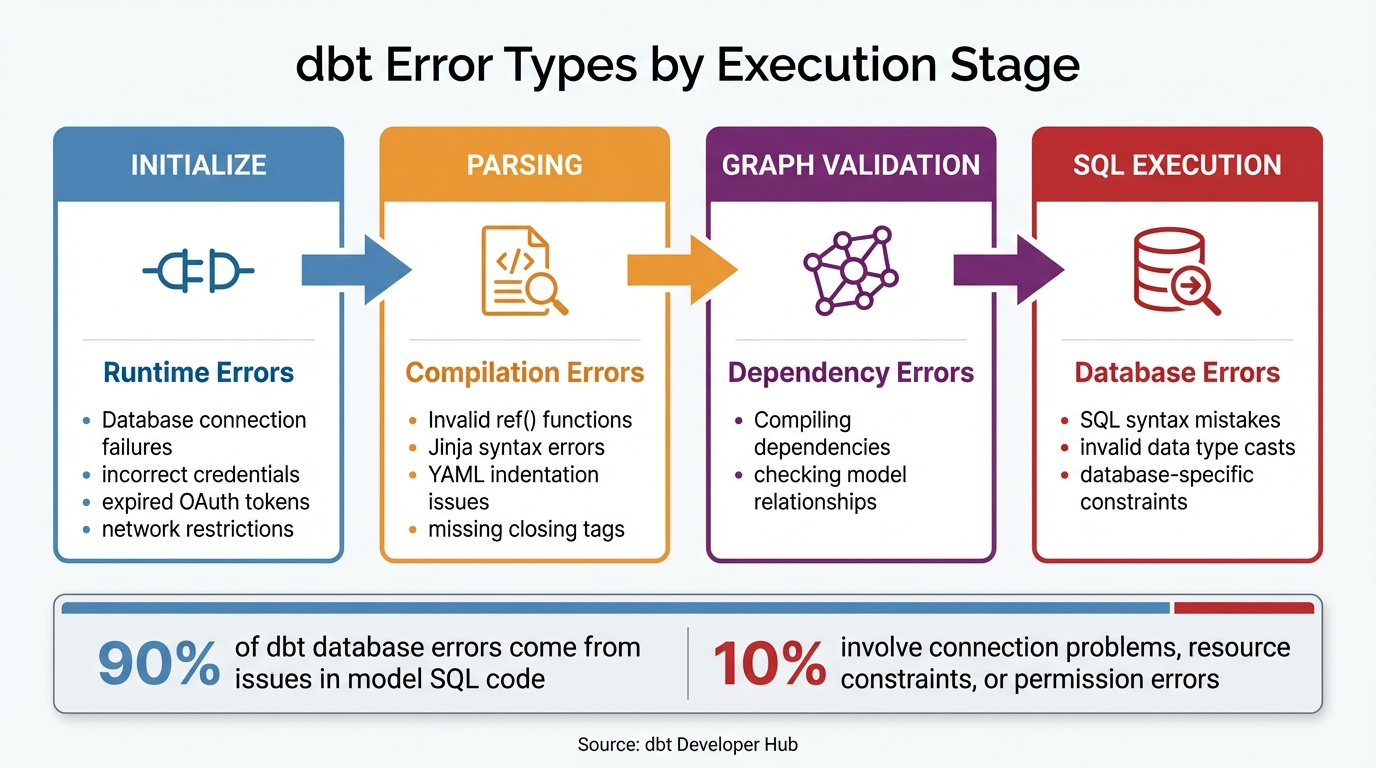
dbt Error Types by Execution Stage: A Troubleshooting Guide
Errors in dbt can range from compilation problems to database and model failures. Each type occurs at a specific stage in the workflow, meaning different solutions are needed depending on where the issue arises.
The dbt Developer Hub outlines four main stages in the execution flow: Initialize (checking project setup and database connection), Parsing (validating Jinja and YAML files), Graph Validation (compiling dependencies), and SQL Execution (running models against the database). Identifying the stage where the error occurs can save time during troubleshooting.
Interestingly, about 90% of dbt database errors come from issues in model SQL code. The remaining 10% usually involve connection problems, resource constraints, or permission errors. Let’s break down each type of error and how to address them.
Compilation Errors
Compilation errors occur before any SQL queries hit the database. These happen during the parsing and template compilation stage, where dbt checks Jinja snippets in .sql files and YAML structure in .yml files. While they’re usually straightforward to fix, catching them early is key.
- Invalid
reffunctions are a common issue. This happens when{{ ref('model_name') }}references a model that doesn’t exist. To fix it, double-check that the filename in yourmodels/directory matches the one in thereffunction. - Jinja syntax errors are another frequent problem. These can include missing closing tags like
{% endmacro %}or{% endif %}, unbalanced curly braces}}, or improperly nested loops and conditionals. Check the file mentioned in the error and ensure all tags are properly closed. - YAML indentation issues can also trip you up. dbt often fails to parse
.ymlfiles due to improper spacing, such as over-indentingcolumnsundermodels. Using a YAML validator or enabling indentation guides in your code editor can help. Typos in property names, like writingtestsinstead ofdata_tests, can also cause dbt to reject the configuration.
For more complex errors, try the interactive debugger. Use DBT_MACRO_DEBUGGING=1 dbt compile -m <model_name> to inspect variables with ipdb. If a model isn’t found, running with the --no-partial-parse flag can clear manifest cache issues.
Model and Test Errors
Once compilation errors are resolved, runtime issues in models and tests may arise. Model execution errors occur during the SQL execution phase, after compilation. These are often caused by SQL syntax mistakes, invalid data type casts, or database-specific constraints.
For example, incorrect join logic - like joining SCD Type 2 tables on non-unique keys - can lead to row multiplication and long runtimes. To avoid runaway queries, set database timeouts to limit execution time.
Test failures, on the other hand, are not the same as errors. A test failure happens when a query successfully runs but returns rows that violate an assumption, such as nulls in a non-nullable column. These indicate data quality issues rather than code bugs.
As Analytics Engineer Hanna Le explains:
Test failures should not be considered an 'error'. If it does what you expect (which is to highlight a data input issue or to verify a critical assumption...), then the failure is expected to happen.
You can use error_if and warn_if configurations to set thresholds for test failures. For instance, you might allow up to 10 duplicates as a warning but fail the test at 1,000. To handle malformed data gracefully, use safe SQL functions like SAFE_CAST (BigQuery) or TRY_CAST (Snowflake), which return NULL instead of failing the model.
Database Errors
Database-specific issues are often the hardest to resolve, as they come directly from the data warehouse. These errors typically occur as Runtime Errors during initialization or Database Errors during SQL execution.
- Connection failures can stop the project from initializing or executing models. Common causes include incorrect credentials, expired OAuth tokens, network restrictions, or mismatched
profilenames indbt_project.ymlandprofiles.yml. For Snowflake, incorrect port configurations (it typically uses port 443) can also block connections. Rundbt debugto test the connection, and if it fails, work with your Database Administrator to verify credentials and network access. Snowflake users in dbt Cloud can resolve "authentication has expired" errors by reconnecting their account through Profile Settings → Credentials. - Resource limitations are another frequent issue. Many dbt accounts have a pod memory limit of 600MiB per run. Exceeding this limit results in a "run memory limits" error. This often happens when macros using
run_query()try to process excessively large result sets. Refactor these queries withLIMITorWHEREclauses to reduce the data volume.
For persistent database errors, check the logs/dbt.log file. This log contains a detailed history of queries and error codes from the warehouse. Clear the log and re-run only the problematic model to isolate the issue.
Early Error Detection with dbt Tests
Catching errors early is crucial to avoiding problems that arise from model and database issues. With dbt tests, you can validate data quality at every stage of your pipeline. These tests flag violations right away, whether during development or production runs, so you can fix issues before they snowball.
A dbt test works like a SQL query that identifies "failing" records - rows that break a specific rule. This lets you address data quality problems early in the process, reducing the risk of errors spreading through your models.
Built-in Generic Tests
dbt offers four built-in generic tests: unique, not_null, accepted_values, and relationships. These tests are parameterized SQL queries defined in .yml files, making them reusable across models, columns, sources, and snapshots.
Here’s how they work:
uniqueensures that every value in a column is distinct. For instance, a primary key likeorder_idshould never have duplicates.not_nullchecks that a column contains no null values. This is useful for mandatory fields likeuser_id.accepted_valuesvalidates that column values match a predefined list. For example, apayment_methodcolumn might only allow 'credit_card', 'paypal', or 'bank_transfer'. If a new value sneaks in, the test catches it before it disrupts downstream logic.relationshipsenforces referential integrity between tables. For example, it ensures that everycustomer_idin anorderstable exists in thecustomerstable, preventing orphaned records.
| Test Name | Purpose | Example Use Case |
|---|---|---|
unique |
Ensures every value in a column is unique. | Validating primary keys like order_id. |
not_null |
Ensures a column contains no null values. | Checking required fields like user_id. |
accepted_values |
Validates column values against a list. | Ensuring status is only 'placed', 'shipped', or 'completed'. |
relationships |
Validates referential integrity. | Ensuring product_id in sales exists in products. |
You can tweak these tests using warn_if and error_if configurations. For example, you might allow up to 10 duplicate records as a warning but fail the test if duplicates hit 1,000. This flexibility helps you balance catching critical issues without blocking your entire pipeline over minor glitches.
If the built-in tests don’t cover your needs, you can create custom tests.
Custom Data Tests
Custom tests come in two flavors: singular tests and generic tests.
- Singular tests are ideal for complex, model-specific checks. Stored in the
tests/directory, they handle scenarios like ensuring total sales amounts are always positive or verifying that date ranges in a subscription table don’t overlap for the same customer. - Generic tests are reusable and parameterized. Stored in
tests/generic/ormacros/, they accept arguments likemodelandcolumn_name, making them versatile across multiple models. Before creating a custom test, check open-source packages likedbt-utilsordbt-expectationsto see if a solution already exists.
When naming your tests, choose descriptive names like test_positive_sales_amount. This makes it easier to understand failure logs and act quickly. As Elliot Trabac, Data and Analytics Engineer at Gorgias, explains:
Having additional information, like being aware of what changes will happen and which models they'll affect, alongside existing CI/CD checks, adds an extra layer of security.
Configuring Store Failures
By default, dbt reports the number of records that failed a test - but you can also configure it to save which records failed. Enable the store_failures option to save these rows into a physical table in your database, usually in a schema called dbt_test__audit.
This can be set at the project level in dbt_project.yml or for individual tests in .yml files. Each time a test runs, dbt updates the failure table with the latest results. If the test passes, the table will simply be empty.
For more control, use store_failures_as to decide whether failures are stored as a table or a view. The default is ephemeral, meaning nothing is stored. Note that your database user must have "create schema" permissions, as dbt will create the audit schema automatically.
In 2024, the dbt Labs data team improved their data quality while reducing the total number of tests by 80%. They achieved this by implementing a centralized failure management system. By setting store_failures: true across their project and leveraging BigQuery's wildcard selectors, they created a "Data Quality Base Table" partitioned by date. This table fed into a Google Looker Studio dashboard, where business analysts could copy-paste machine-generated SQL queries to inspect failing records. This setup drastically cut the time between error detection and resolution.
To make failure tables easier to manage, use the alias configuration. This ensures predictable naming conventions, like table_name__column_name__test_name, which simplifies aggregating failure data and building dashboards for stakeholders who don’t use the dbt CLI.
Error Handling Strategies for dbt Workflows
After setting up dbt tests to catch errors early, the next step is figuring out how to handle those errors during execution. Since dbt compiles Jinja macros before SQL execution, traditional runtime error handling like try/except isn’t an option. Instead, dbt provides built-in tools and strategies to manage errors effectively, ensuring your workflows remain smooth and reliable.
Data Segregation: Separating Good Data from Bad
One of the most effective ways to handle errors is by keeping validated data separate from problematic records. This involves validating and cleaning incoming data through specific models. Problematic records can then be isolated into exception tables or filtered out, ensuring downstream models only use clean, trustworthy data.
For example, instead of relying on standard CAST functions that can cause your pipeline to crash when encountering invalid data, use error-tolerant SQL functions like SAFE_CAST in BigQuery or TRY_CAST in Snowflake. These functions return NULL for invalid values rather than throwing an error. You can then filter out rows with failed casts by adding conditions like WHERE clean_column IS NOT NULL in your staging models.
Additionally, placing complex or high-risk transformations into dedicated staging models is a smart move. This approach isolates fragile logic, making it easier to debug issues if they arise. It’s worth noting that about 90% of database errors in dbt stem from mistakes in the model’s SQL code. By isolating these transformations, you create a clearer path for troubleshooting.
Using Macros for Error Management
Once your data is properly segregated, macros can help you standardize error handling across your project. dbt’s exceptions namespace provides tools to manage errors during the compilation phase. For example, you can use exceptions.raise_compiler_error to fail a model when certain conditions - like invalid arguments or unsupported configurations - are met. As the dbt Developer Hub explains:
Note that throwing an exception will cause a model to fail, so please use this variable with care!
For less critical issues, exceptions.warn logs a warning without stopping execution. This is useful for flagging anomalies that don’t require halting production. If you want to treat these warnings as errors in specific environments, you can use the --warn-error-options flag in your CI/CD pipelines. This gives you precise control over which warnings should block deployments.
Before diving into custom error-handling macros, it’s a good idea to check the dbt-utils package. It might already have a solution that fits your needs. This saves time and ensures you’re leveraging community-tested tools.
sbb-itb-61a6e59
Debugging and Troubleshooting Techniques
Effective debugging is essential for quickly resolving issues, especially when paired with strong error-handling strategies. dbt categorizes errors into four main types: Runtime Errors, Compilation Errors, Dependency Errors, and Database Errors. Each error message includes details like the type of error and the exact file path, providing a clear starting point for troubleshooting. A key skill here is learning to interpret error logs effectively.
Reading Error Messages and Logs
dbt provides two main log outputs: the CLI console for real-time updates and the logs/dbt.log file for more detailed information. To troubleshoot a specific model, clear the dbt.log file and rerun the model to narrow down the issue.
For structured logs, use the --log-format json option, which includes fields like invocation_id, thread_name, and node_info. If you prefer to see only error messages, add the -q or --quiet flag. On the other hand, the --debug flag (or -d) displays all debug-level logs in the console, making it especially helpful for diagnosing complex macro logic.
Once you've reviewed the logs, the next step is to examine the compiled SQL to identify the root cause of the problem.
Inspecting Compiled SQL
dbt stores the raw SELECT statements it generates in the target/compiled/ directory, while the target/run/ directory contains the full DDL and DML statements (like CREATE TABLE or INSERT) executed in your data warehouse. As explained by the dbt Developer Hub:
The
target/compileddirectory containsselectstatements that you can run in any query editor.
If you encounter a database error, copy the compiled SQL from target/run/ and paste it into your warehouse's query editor (e.g., Snowflake UI, BigQuery Console) to identify syntax issues. For failing tests, the compiled SQL can be found in target/compiled/schema_tests/, which helps you locate the specific records causing the failure. Reviewing the source .sql file alongside its compiled version in your code editor can also clarify how Jinja macros and ref() functions are being resolved.
Using the dbt Debug Command
The dbt debug command is a powerful tool for validating your environment, including the dbt_project.yml file and database connectivity, before running other commands. It’s especially useful when setting up a new project or troubleshooting connection problems. If dbt can’t locate your profiles.yml file, use dbt debug --config-dir to find out where dbt is searching. To test only the warehouse connection, run dbt debug --connection.
| Validation Axis | What It Checks |
|---|---|
| Database Connection | Tests connectivity to your warehouse using the current profile and target. |
| dbt Project Setup | Verifies the existence and YAML validity of the dbt_project.yml file. |
| System Environment | Checks OS, Python version, and dbt version compatibility. |
| Required Dependencies | Ensures external tools like git are available for commands like dbt deps. |
| Adapter Details | Confirms the correct database adapter is installed and compatible. |
After updating credentials in profiles.yml, run dbt debug to confirm that the connection is working. If you see a "Not a dbt project" error, this command will also verify whether the dbt_project.yml file exists and is valid in your current directory.
These techniques work hand-in-hand with broader strategies to integrate error handling into CI/CD workflows, ensuring smoother project execution.
Orchestration and CI/CD Integration
Incorporate error handling directly into your automated pipelines. Continuous Integration (CI) jobs automatically trigger when developers open pull requests, testing code within isolated schemas before anything reaches production. By combining pipeline orchestration with early error detection, you can establish a resilient dbt workflow.
To optimize performance, use Slim CI with the dbt build --select state:modified+ command. This approach focuses only on modified models and their dependents, comparing your pull request against the production manifest through environment deferral. This way, dbt avoids rebuilding the entire project unnecessarily. For instance, if you tweak a single staging model, Slim CI will rebuild just that model and any downstream marts relying on it, saving both time and compute costs.
Managing Test Failures in Pipelines
The dbt build command plays a critical role in CI pipelines. It processes nodes in DAG order and automatically skips downstream models if an upstream test fails. This prevents cascading errors. To further refine failure handling, use the --warn-error flag, which elevates all warnings (like test warnings or deprecations) to hard failures that stop the pipeline.
You can also set test severity at the model level using error_if and warn_if. For example, error_if: ">10" allows up to 10 failing records as a warning but halts deployment if failures exceed that number. This feature is especially helpful for managing expected data drift where minor anomalies are acceptable. Adding SQLFluff as a pre-build step can catch syntax and formatting errors before they reach the warehouse. Meanwhile, running dbt sl validate --select state:modified+ ensures that any model changes won't disrupt downstream metrics in the Semantic Layer. Together, these strategies create a strong foundation for deployment safeguards.
Preventing Failed Deployments
Blocking faulty code from merging is just as important as managing test failures. Configure your CI pipeline to treat warnings as errors in production, effectively preventing problematic code from advancing. The dbt Project Evaluator package can enforce modeling standards by flagging deviations with an error severity, stopping pull requests that don't meet your team's guidelines. For more complex workflows, consider using a QA or Release branch to validate code before merging it into the main branch.
dbt Cloud also helps streamline processes by canceling stale CI runs when new commits are made, avoiding resource waste and conflicting states. If a job fails due to a transient issue, the "Rerun from failure" feature (available in dbt v1.6+) lets you pick up from the failed step rather than restarting the entire process.
| Feature | Purpose in Error Handling | Recommended Command/Flag |
|---|---|---|
| Slim CI | Limits scope of errors to modified nodes | dbt build --select state:modified+ |
| Warning Promotion | Prevents merging code with deprecations | --warn-error-options '{"error": "all"}' |
| SQL Linting | Catches syntax/style errors early | sqlfluff lint models --dialect <adapter> |
| Semantic Check | Prevents breaking downstream metrics | dbt sl validate |
| Test Severity | Defines conditional failure thresholds | config(error_if=">10") |
Conclusion and Key Takeaways
Handling errors effectively in dbt requires a proactive approach: identifying issues early, diagnosing them accurately, and preventing them from spiraling into larger problems. By building on earlier detection strategies, you can ensure smoother workflows and fewer disruptions.
Start by applying unique and not_null tests to every primary key. Regularly check the compiled SQL in the target/ directory and use error_if and warn_if settings to set clear failure thresholds. Familiarity with the four main error types - Runtime, Compilation, Dependency, and Database - can save you significant troubleshooting time. For production environments, take advantage of commands like dbt retry (introduced in v1.6+) to pick up workflows right where they failed, complementing your error detection efforts.
Control warnings precisely in production with the --warn-error-options flag to avoid unnecessary pipeline interruptions. During development, use the "store failures" feature to capture and investigate problematic records. These steps - spanning from early detection to strategic error management - are essential for building robust dbt workflows.
As the dbt Developer Hub wisely puts it:
Learning how to debug is a skill, and one that will make you great at your role!
If you're looking to deepen your expertise and create resilient workflows, DataExpert.io Academy offers hands-on boot camps and training programs. The Winter 2026 Analytics Engineering Camp ($3,000 one-time) includes lifetime access to content, five guest speakers, and a capstone project. Alternatively, the All-Access DataExpert.io Subscription ($125/month or $1,500/year) provides over 250 hours of content, along with tools like Databricks, Snowflake, and AWS. These resources are designed to help you master the skills needed to build dependable data pipelines from the ground up.
FAQs
What are the most common dbt errors, and how can you avoid them?
When working with dbt, you might encounter issues like data validation failures, syntax errors, or model compilation problems. These hiccups can disrupt your workflow, but the good news is that most of them are avoidable with a few smart practices:
- Test Regularly: Use dbt's built-in testing tools to catch potential issues before they snowball into bigger problems.
- Pay Attention to Error Messages: Error messages are your best friend when troubleshooting. Take the time to read them carefully - they often point directly to the problem.
- Keep Models Modular: Simplify debugging by breaking down complex models into smaller, reusable pieces. This makes it easier to isolate and fix issues.
- Version Control Is Key: Maintain a clear version history for your work. This not only helps you track changes but also allows you to roll back if something goes wrong.
By sticking to these practices, you can reduce headaches and keep your dbt workflows running smoothly.
How can I use dbt tests to maintain high data quality in my workflows?
To maintain high-quality data in your dbt workflows, data tests play a crucial role. These tests help identify potential problems, such as null values, duplicate records, invalid relationships, or unexpected data. You can define these tests directly in your models or schema files using the tests: YAML key. For more specific requirements, you can even build custom generic tests tailored to your needs.
dbt also lets you set thresholds for these tests using configurations like severity, error_if, and warn_if. These settings give you control over when a test should trigger a warning or an error. For more advanced scenarios, dbt’s exceptions namespace allows you to programmatically enforce rules, ensuring that any issues are flagged and addressed promptly.
By embedding thorough data tests and error-handling mechanisms into your dbt workflows, you can ensure your data remains reliable and consistent throughout the pipeline.
How can I effectively handle and troubleshoot database errors in dbt workflows?
To address and troubleshoot database errors in dbt, start by checking the error messages in dbt's logs. These messages usually pinpoint the type of error and its location, helping you narrow down the issue. You can dig deeper by examining the compiled SQL files in the target/compiled directory or reviewing the detailed logs in logs/dbt.log.
Testing individual models is another effective way to isolate problems. Additionally, dbt allows you to configure settings like severity, error_if, and warn_if. These options let you customize how errors and warnings are flagged, enabling you to catch data quality or logic issues early in the process. Using the --warn-error flag during runs can further enhance error handling by treating warnings as errors, which is especially useful in critical environments.
For more control, dbt provides macros like raise_compiler_error and warn. These can be embedded in models or other macros to programmatically trigger errors or warnings. By combining these tools and strategies, you can create a robust error-handling process that ensures smoother workflows in dbt.