How to Learn SQL for Data Engineering: A Roadmap
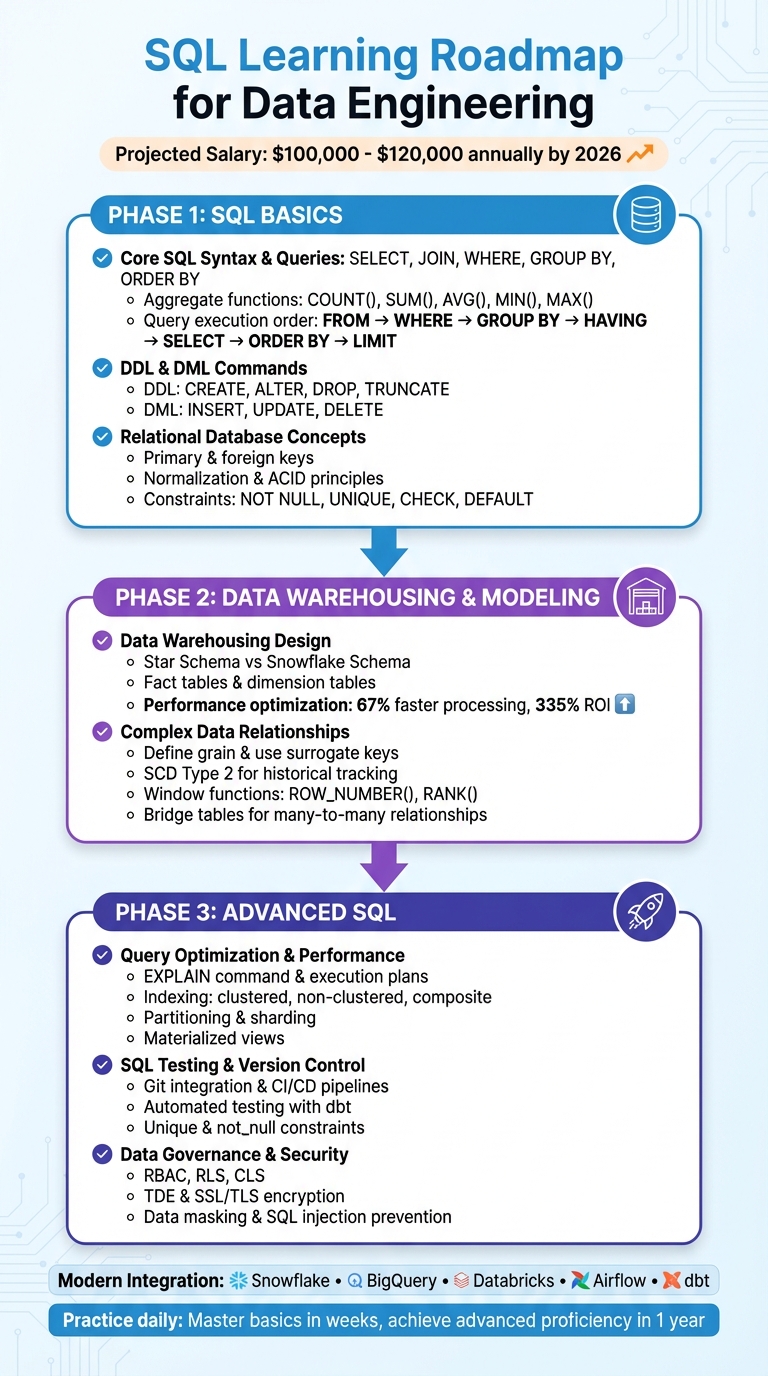
SQL is the backbone of data engineering, powering everything from data pipelines to large-scale analytics. Mastering SQL is essential for structuring data, optimizing performance, and building scalable systems. By 2026, SQL-related roles are projected to offer salaries between $100,000 and $120,000 annually, reflecting its high demand in the job market.
This roadmap breaks SQL learning into three phases:
- Basics: Learn querying (
SELECT,JOIN,WHERE), database structures, and relational design. - Data Warehousing: Master schemas (star, snowflake), data modeling, and handling complex relationships.
- Advanced SQL: Optimize queries, test pipelines, and secure data using advanced techniques.
SQL integrates seamlessly with modern tools like Snowflake, BigQuery, and Airflow, making it indispensable for data workflows. Consistent practice, hands-on projects, and real-world datasets will help you build job-ready expertise. SQL remains a long-term investment for a successful tech career.
SQL Learning Roadmap for Data Engineering: 3-Phase Guide from Basics to Advanced
Master SQL in 15 Day for Data Engineering with 4 Projects
Phase 1: Learning SQL Basics
To kick off your SQL journey, focus on three essential skills: querying data, managing database structures, and understanding relational design. These are the building blocks for nearly every data engineering task, from creating ETL pipelines to fine-tuning data warehouse performance.
Core SQL Syntax and Queries
The SELECT statement is the cornerstone of SQL. You’ll use it to retrieve data from tables, filter results with WHERE, group data with GROUP BY, and sort the output using ORDER BY. But here’s a key detail: SQL doesn’t process commands in the order you write them. Instead, it follows this sequence: FROM → WHERE → GROUP BY → HAVING → SELECT → ORDER BY → LIMIT. Understanding this flow will help you write efficient queries and debug unexpected results.
Joins are another must-know concept. They allow you to combine data from multiple tables. Start with INNER JOIN and then explore LEFT, RIGHT, and FULL JOIN. To summarize data, you’ll rely on aggregate functions like COUNT(), SUM(), AVG(), MIN(), and MAX(). For more advanced filtering, operators like AND, OR, IN, BETWEEN, and LIKE (using % and _ wildcards) are your go-to tools.
Once you’ve got the basics of querying down, it’s time to dive into DDL and DML commands to round out your foundational knowledge.
DDL and DML Commands
Data Definition Language (DDL) commands are used to shape your database’s structure. For example:
CREATE TABLEdefines new tables with specific columns and data types.ALTER TABLEmodifies existing tables, like adding new columns or constraints.DROP TABLEdeletes entire tables.TRUNCATEclears all rows from a table but keeps its structure intact.
Data Manipulation Language (DML) commands, on the other hand, deal with the data itself:
INSERT INTOadds new rows.UPDATEmodifies existing records.DELETEremoves rows.
When using UPDATE or DELETE, always include a WHERE clause to avoid unintended changes to every row in the table. To keep your data more recoverable, consider soft deletes by adding a deleted_at column instead of permanently removing records.
| SQL Category | Purpose | Common Commands |
|---|---|---|
| DDL | Define/modify database structure | CREATE, ALTER, DROP, TRUNCATE |
| DML | Add, change, or remove data | INSERT, UPDATE, DELETE |
| DQL | Retrieve data | SELECT |
Relational Database Concepts
Relational databases organize data into tables, with primary keys uniquely identifying each row and foreign keys linking related tables. To minimize redundancy, normalization splits data into multiple tables. For example, instead of repeating customer addresses in every order record, you store them in a separate table.
To maintain data integrity, constraints are crucial. For instance:
NOT NULLensures a column can’t have empty values.UNIQUEprevents duplicate entries.CHECKvalidates conditions, like ensuring a salary is positive.DEFAULTprovides fallback values when none are specified.
Relational databases also adhere to ACID principles (Atomicity, Consistency, Isolation, Durability), ensuring reliable transactions. Start practicing with SQLite before moving on to more advanced systems like PostgreSQL or MySQL.
It’s worth noting that SQL is an in-demand skill. Over 1,167,840 learners have joined Codecademy’s "Learn SQL" course to master the basics. As Lane Wagner, Founder of Boot.dev, aptly puts it:
"SQL is everywhere these days. Whether you're learning backend development, data engineering, DevOps, or data science, SQL is a skill you'll want in your toolbelt".
Phase 2: SQL for Data Warehousing and Modeling
Once you've nailed the basics of SQL, it's time to take things up a notch. Advanced data warehousing techniques allow you to structure data for analytics on a large scale, ensuring top performance. Why does this matter? Poor data modeling costs businesses a staggering $14 million annually, eating up as much as 20% of revenue.
Data Warehousing Design Approaches
When it comes to data warehousing, two popular design methods stand out: the star schema and the snowflake schema.
The star schema is a favorite for its simplicity. At its core is a fact table that holds key metrics, like sales totals or order counts. Surrounding it are dimension tables - think customer names, product categories, or dates - that provide the context. These dimension tables are denormalized, meaning all the data is stored in single, wide tables. This setup makes queries faster because you only need one-hop joins from the fact table to each dimension.
On the other hand, the snowflake schema takes a more complex approach. Instead of lumping all data into one dimension table, it breaks it into smaller, normalized tables. For instance, product data might be split into separate tables for products, categories, and subcategories. This reduces redundancy and makes updates easier since changes only need to be made in one place. However, it also complicates queries, as they require multi-hop joins across several tables. That said, modern cloud platforms like Snowflake and Databricks are bridging the performance gap with features like columnar storage and automatic query optimization, making snowflake schemas more practical than they used to be.
| Aspect | Star Schema | Snowflake Schema |
|---|---|---|
| Normalization | Denormalized (single wide tables) | Normalized (split into sub-tables) |
| Query Speed | Faster (fewer joins) | Slower (multi-hop joins) |
| Storage Efficiency | Lower (more redundancy) | Higher (less duplication) |
| Maintenance | Harder (updates affect many rows) | Easier (centralized updates) |
| Best Use Case | Ad-hoc queries and dashboards | Complex hierarchies and integrity |
In reality, most teams blend the two methods. For example, they might denormalize commonly accessed dimensions like Time or Product for speed while normalizing more complex hierarchies like organizational charts for easier maintenance. Before diving into SQL, it's crucial to define your performance goals - like ensuring most queries finish in under 5 seconds - and estimate your daily data load. These considerations act as your "SLA" and guide your design choices.
A modular, layered modeling approach works best. Break transformations into three layers: Staging (clean and standardize raw data), Intermediate (reusable building blocks), and Marts (business-ready fact and dimension tables). Use prefixes like stg_, dim_, and fct_ to keep things organized. Keeping SQL model files under 100 lines of code makes them easier to read and debug, helping you avoid "modelnecks" - long-running models that slow down your pipeline.
Managing Complex Data Relationships
Once you've chosen your design, the next step is handling complex relationships while maintaining data integrity and performance.
Start by defining the grain of each fact table - essentially, the level of detail represented by each row. For example, is each row an order line item or a daily summary of customer activity? Getting this right from the start prevents double-counting and ensures consistent aggregations. Use surrogate keys (unique integers) as primary keys for dimension tables. This shields your model from changes in the source data. To preserve historical data, adopt Slowly Changing Dimension Type 2 (SCD2), which tracks changes over time with valid_from and valid_to columns . For many-to-many relationships, like products belonging to multiple categories, bridge tables are your go-to solution for maintaining dimensional integrity.
When duplicates crop up after joins, resist the temptation to use SELECT DISTINCT as a quick fix. As analytics expert Jim Kutz points out:
"Using
SELECT DISTINCTto clean up duplicates often signals an incorrect join strategy that should be addressed at the source rather than masked downstream".
A better approach? Use window functions like ROW_NUMBER() or RANK() within a Common Table Expression (CTE) to pinpoint and filter the most relevant records before joining. This tackles the root cause instead of just hiding the issue.
Effective SQL data modeling can deliver impressive results. Organizations report 67% faster data processing and a 335% ROI on data initiatives. Take Sallie Mae, for example. By modernizing its data infrastructure and moving to a cloud data warehouse, the company slashed data processing times by over 80% and saved $1.2 million annually.
Phase 3: Advanced SQL for Data Engineering
Now that you’ve mastered data modeling, it’s time to tackle the real-world challenges of making SQL pipelines faster, more reliable, and secure. This phase dives into the advanced techniques needed to optimize performance, ensure robustness, and safeguard your data.
Query Optimization and Performance Tuning
Slow queries do more than just frustrate users - they can drive up cloud costs and strain resources. To avoid this, start by analyzing execution plans with the EXPLAIN command before deploying code. This step helps you spot inefficiencies like full table scans or resource-heavy data shuffles. Once identified, you can implement targeted improvements to streamline performance.
Efficient indexing is a game-changer. Whether it’s clustered, non-clustered, or composite indexes, these structures minimize I/O demands by reducing the need to scan entire tables. Another quick win? Avoid SELECT * in production queries. Instead, specify only the columns you need to cut down on data processing. Applying WHERE clauses early on also helps filter rows before joins or aggregations, saving both time and resources.
When dealing with large subqueries, replacing IN with EXISTS can yield better performance, and opting for UNION ALL instead of UNION avoids the extra overhead of deduplication. Even small tweaks, like eliminating unnecessary function calls, can lead to dramatic improvements. For example, reworking a query to use hire_date >= '2024-01-01' instead of YEAR(hire_date) = 2024 resulted in a sixfold speed increase, dropping execution time from 1 minute 53 seconds to just 20 seconds.
For large datasets, partitioning and sharding are essential strategies. Breaking tables into smaller chunks - based on keys like dates or regions - lets the query engine focus only on relevant segments. Platforms like Databricks even support primary key constraints with the RELY option, which can optimize query rewriting by cutting out unnecessary joins.
| Technique | Best Used For | Performance Impact |
|---|---|---|
| Clustered Index | Primary keys and range queries | High; physically reorders data on disk |
| Non-Clustered Index | Columns used in JOIN/WHERE clauses | Medium; creates a separate pointer structure |
| Partitioning | Large tables with clear filter keys (e.g., Date) | High; limits scanning to relevant data |
| Materialized View | Complex, static historical data | High; replaces real-time computation with a lookup |
Once your queries are running efficiently, the next step is to ensure your SQL models are robust and maintainable with proper testing and version control.
SQL Testing and Version Control
In production environments, SQL pipelines must be rigorously tested. This means integrating version control, automated testing, and peer reviews into your workflow. Store all SQL code, scripts, and infrastructure definitions in Git, and use branching strategies like Gitflow with Pull Requests to manage changes.
Modern SQL testing often involves writing queries to identify records that fail specific conditions, rather than just asserting expected results. For example, to test for duplicate primary keys, you might write a query that selects rows where COUNT(*) > 1. If the query returns no rows, the test passes. At a minimum, ensure every model enforces unique and not_null constraints on primary key columns. Testing assumptions about source data - like validating that a status column contains only expected values - can help catch upstream issues early.
"dbt brings software engineering best practices like version control, testing, modularity, CI/CD, and documentation to analytics workflows - helping teams build production-grade data pipelines".
With over 100,000 members in the dbt community, treating SQL like software is now the norm. Setting up separate development, staging, and production environments is another key practice. Using state-based execution in CI/CD pipelines allows you to test only the modified models, keeping production data safe.
After performance and testing, the final piece of the puzzle is ensuring your data pipeline is secure.
Data Governance and Security
A fast pipeline is only as good as its security. Start by implementing Role-Based Access Control (RBAC) to define permissions at the database and table levels. For more granular control, use Row-Level Security (RLS) and Column-Level Security (CLS). Always follow the principle of least privilege, granting only the access necessary for specific tasks.
Encrypting data both at rest and in transit is non-negotiable. Use Transparent Data Encryption (TDE) and SSL/TLS protocols, and conduct regular security audits to monitor for configuration changes or vulnerabilities. In non-production environments, dynamic data masking can replace sensitive information with realistic but fake data, allowing developers to work safely with production-like datasets. While encryption protects data even if access controls are bypassed, it’s most effective when paired with robust access management.
Other best practices include using SQL Server Audit to monitor transaction logs, sanitizing database inputs to prevent SQL injection, and favoring Windows authentication over SQL Server logins to reduce vulnerabilities. Finally, staying on top of updates for both the operating system and SQL Server ensures that known security flaws are patched promptly.
| Security Feature | Purpose | Implementation Level |
|---|---|---|
| RBAC | Controls access to specific database objects | Database/Table |
| RLS | Restricts which rows a user can see | Row-Level |
| CLS | Hides sensitive columns | Column-Level |
| TDE | Encrypts data at rest | Storage/Physical |
| Data Masking | Obfuscates sensitive data in non-production environments | Application/Presentation |
sbb-itb-61a6e59
Using SQL with Modern Data Engineering Tools
SQL plays a central role in connecting modern data platforms, orchestration tools, and transformation frameworks into unified pipelines. Whether you're creating ETL workflows, managing massive data warehouses, or scheduling transformations, SQL acts as the glue that holds everything together.
SQL in ETL Pipelines
SQL is essential for managing the entire data movement process. It's used to create staging tables, load raw data, and handle upserts with commands like INSERT ... ON CONFLICT DO UPDATE, which help deduplicate records before they reach production tables. A declarative approach is often preferred in modern data engineering - simply define the desired outcome in SQL, and platforms like Databricks or Snowflake will take care of the execution details.
Tools such as dbt (Data Build Tool) have revolutionized how engineers use SQL for pipelines. With dbt, you can write modular SELECT statements and let the tool manage the creation of tables, views, or incremental models. To simplify complex transformations, use Common Table Expressions (CTEs), which break queries into manageable, readable chunks. Also, avoid SELECT * - it's better to specify only the columns you need to reduce data transfer costs.
SQL in Cloud Data Warehouses
SQL's role extends beyond ETL pipelines into cloud data warehouses, where optimization is key. Warehouses like Snowflake, BigQuery, and Redshift separate storage from compute, focusing on reducing the amount of data processed and minimizing compute time. For example, Snowflake uses automatic micro-partitioning (typically between 50 MB and 500 MB of uncompressed data). To improve performance on large tables, you can define clustering keys on frequently filtered columns, such as dates, to enable better query pruning.
In Databricks, Delta Lake commands like OPTIMIZE can compact small files, while VACUUM removes unnecessary files from the transaction log. Similarly, in BigQuery, adding a WHERE clause on a partitioned table can significantly cut query costs by avoiding full table scans. Another way to save on compute costs is by using materialized views, which store the results of complex aggregations and make analytical queries more efficient.
Efficient data types are another area to pay attention to - choosing VARCHAR(50) instead of VARCHAR(MAX) can improve memory usage. Avoid over-partitioning; if partitions are too small (fewer than 1 million rows), group them by week or month instead of daily. For high-throughput ingestion, batch your inserts using bulk-loading tools like Snowflake's COPY INTO command.
SQL with Orchestration Tools
SQL also integrates seamlessly with orchestration tools to automate workflows. Apache Airflow, for instance, uses operators like SQLExecuteQueryOperator to execute SQL statements directly within workflows. For more advanced scenarios, database-specific Hooks (e.g., PostgresHook or SnowflakeHook) offer a Python interface for efficient data loading.
When combining dbt with Airflow, tools like Cosmos can transform dbt models into Airflow DAGs or Task Groups. These come with built-in features like retries and alerting, making it easier to manage SQL-based transformations alongside other pipeline tasks. To maintain cleaner orchestration, store SQL code in separate .sql files within your dags/ folder and pass file paths to operators.
"Cosmos is an Open-Source project that enables you to run your dbt Core projects as Apache Airflow DAGs and Task Groups with a few lines of code." - Adrian Lee and George Yates, Snowflake
For smoother integration, use virtual environments to prevent dependency conflicts between Airflow and dbt. Additionally, the DbtTaskGroup feature can help organize SQL models into logical clusters in the Airflow UI, making monitoring and management more straightforward. Together, these tools highlight how SQL remains a cornerstone of scalable and efficient data engineering pipelines.
Learning SQL Through Hands-On Projects
Once you've grasped the basics of SQL, diving into hands-on projects is the best way to reinforce your skills and understand how SQL fits into real-world workflows. Watching tutorials or reading guides can only take you so far - practical application is where the real learning happens. Begin with projects that align with your current abilities and gradually tackle more complex challenges as your confidence grows.
Beginner Projects
Start with projects that focus on database design and data cleaning. For example, you could take raw CSV files, like Major League Baseball game data, and convert them into a structured, normalized SQL database. This process helps you learn how to organize data for efficient querying. Other beginner-friendly options include working with datasets such as the NYC Squirrel Census or Kickstarter campaign data. These projects let you practice importing raw data, handling missing values, and ensuring consistency.
To get started, use database management tools like SQLite or PostgreSQL to write and test your queries. Incorporating Git into your workflow for version control is also important - it mirrors professional practices and allows you to track changes over time. Once you're comfortable with these foundational skills, you can start tackling challenges that mimic real-world ETL (Extract, Transform, Load) processes.
Intermediate Projects
As you advance, focus on projects that simulate real-world ETL workflows. For instance, try implementing the Medallion architecture, which organizes data into three layers: Bronze (raw data), Silver (cleaned and validated data), and Gold (business-level aggregates). Another valuable exercise is practicing Change Data Capture (CDC) by simulating how INSERT, UPDATE, and DELETE operations update target tables incrementally. You can also design tables using Slowly Changing Dimensions (SCD Type 2) to track historical changes.
Using Common Table Expressions (CTEs) is a great way to simplify complex business logic into modular, readable steps. Before diving into queries, always define the "output grain" - what each row in your result set represents. This clarity will help you write better SQL. A good workflow includes importing raw data into staging tables before performing merges or upserts. To replicate production environments, schedule your SQL pipelines using tools like Airflow or Databricks Jobs.
These intermediate projects set the stage for tackling advanced challenges that involve large-scale data and intricate business logic.
Advanced Projects
Advanced projects are an opportunity to showcase your ability to manage large-scale data and handle complex requirements. For example, use the TPC-H dataset, which ranges from 1 GB to over 100 GB, to practice creating analytical tables and optimizing 22 challenging business queries to run in under five seconds. Another idea is building a market basket analysis system by using self-joins on massive fact tables to identify product bundling opportunities. This involves calculating metrics like Support, Confidence, and Lift.
You could also create Year-over-Year (YoY) growth datasets, calculating metrics like current period sales, prior period sales, and year-to-date totals using window functions. For a more advanced challenge, implement Reverse ETL workflows, where you move curated data from analytical tools like Snowflake back into operational databases to support real-time applications and APIs. As part of these projects, focus on query optimization techniques, such as filtering data early in your transformations to reduce the amount of data scanned and minimize warehouse costs.
"The expectation from an advanced SQL practitioner is not just the ability to answer complex questions. But the ability to answer complex questions with easy-to-understand SQL." - Start Data Engineering
Conclusion
SQL plays a central role in managing, transforming, and analyzing data across industries, making it a must-have skill for anyone working with modern data systems. Whether you're using cloud-based platforms like Snowflake and BigQuery or orchestrating ETL pipelines with tools like Airflow, SQL serves as the backbone that ties the entire data stack together.
To develop job-ready expertise, follow a phased learning approach. Begin with the basics: understanding syntax, mastering JOINs, and applying filters. Then, move on to intermediate topics like data modeling and schema design. Finally, dive into advanced areas such as query optimization, window functions, and performance tuning. This progression not only enhances your query-writing skills but also helps you design efficient, scalable data transformations.
The key to mastering SQL lies in consistent, hands-on practice. Work with industry-standard datasets, such as TPC-H, to simulate real-world challenges. Build projects that solve practical business problems and document your progress in a portfolio. By dedicating at least an hour a day to practicing queries, you can grasp the fundamentals in a matter of weeks and achieve advanced proficiency within a year. As Data Engineer Harsha Kumavat aptly says:
"SQL won't die. It will evolve. Learning SQL is one of the best long-term investments you can make in your tech career".
FAQs
What are the best ways to practice SQL with real-world examples?
The most effective way to sharpen your SQL skills is by working with realistic datasets and practicing in an interactive environment. Begin with platforms that offer guided exercises, which walk you through everything from basic SELECT statements to more intricate operations like joins and subqueries. These step-by-step exercises are a great way to build a solid understanding of SQL fundamentals.
Once you’ve mastered the basics, try tools that mimic real-world databases. These often come with preloaded schemas tailored to scenarios like healthcare or e-commerce, giving you the chance to practice advanced commands such as INSERT, UPDATE, and DELETE. Mastering these commands is especially useful for tasks like building ETL pipelines in data engineering.
If you’re ready for a tougher challenge, look for platforms with tiered difficulty levels. These often cover topics like GROUP BY, window functions, and advanced filtering techniques. Progressing through these levels will help you tackle SQL tasks in analytics workflows and manage large-scale data projects with confidence.
What are the best ways to optimize SQL queries for faster performance?
To make your SQL queries run faster and more efficiently, focus on reducing the amount of data the database needs to process and guiding it toward the best execution path. One of the first steps is to create indexes on columns that are frequently queried. Indexes act like a roadmap, helping the database locate rows quickly without scanning the entire table.
Another key tip: avoid using SELECT *. Instead, only retrieve the specific columns you actually need. This reduces the amount of data transferred and processed. Also, make sure to apply filters early in the WHERE clause to narrow down the results before performing joins or aggregations.
When working with joins, use indexed keys and try to process smaller datasets first. If you're dealing with large subqueries, opt for EXISTS instead of IN, as it often performs better. Avoid applying functions or calculations to indexed columns, since this can prevent the database from using the index effectively.
For more advanced optimization, partition large tables so the database can scan only the relevant partitions instead of the entire table. Defining primary-key constraints is another useful step, as it helps the database understand which data is unique. To spot inefficiencies, regularly review execution plans, which provide insights into how queries are executed. If your queries are complex, consider breaking them down using Common Table Expressions (CTEs), but be mindful of the potential performance overhead they might introduce.
By combining these strategies, you can make your queries faster and more resource-efficient, which is essential for smooth data-engineering workflows.
What is the difference between star and snowflake schemas in data warehousing?
Star and snowflake schemas are two common approaches to organizing data warehouses, and the key difference lies in how the dimension tables are structured.
In a star schema, each dimension is stored in a single, flat table directly linked to the central fact table. This creates a straightforward, easy-to-understand layout. On the other hand, a snowflake schema breaks dimensions into multiple related tables. For example, a product dimension might be split into separate tables for product, category, and subcategory, forming a more intricate, branched structure.
Star schemas are favored for their simplicity and speed since they involve fewer joins, making them perfect for quick reporting and analysis. Snowflake schemas, though slightly slower due to the need for additional joins, are more storage-efficient by minimizing redundancy. They’re particularly well-suited for handling hierarchical data or systems where dimension updates are frequent.
The choice between these two depends on your specific needs - star schemas excel in simplicity and performance, while snowflake schemas offer better efficiency and adaptability.