
What Makes Great Analytics Pull Requests
A strong analytics PR does 3 things fast: it stays small, explains metric impact, and shows proof. If I change a filter, join, or KPI rule, I’m not just editing SQL - I may change dashboard numbers, reports, and business calls. That’s why a good PR needs clear scope, a short context block, metric notes, and test evidence.
Here’s the short version:
- Keep it to one logical change
- State what changed and why
- List affected metrics, models, and dashboards
- Show proof with tests, row counts, and screenshots
- Split big PRs by refactor, layer, or dashboard work
A few simple checks can cut review time by a lot. In the article, small PRs are described as taking minutes to review, while large ones can take days and often need a meeting. That gap matters when one metric tweak can shift reported results by 100% of downstream views that use it.
If I mix staging, marts, docs, and BI edits in one PR, review slows down and mistakes get harder to spot. If I keep the change tight and label the impact up front, reviewers can focus on whether the logic is right.
| Area | What I include |
|---|---|
| Scope | One model, one metric change, or one dashboard update |
| Context | Summary, Why, Impact, Risk, Rollback Plan |
| Metric notes | Grain, joins, filters, denominator, attribution window |
| Proof | dbt tests, row-count checks, before/after screenshots |
| Split points | Refactor vs. feature, data layer, metric vs. dashboard |
Bottom line: if a reviewer can understand the change, its downstream effect, and the proof in one pass, the PR is in good shape.
How to review a Pull Request effectively? 🚀
sbb-itb-61a6e59
How Big an Analytics Pull Request Should Be
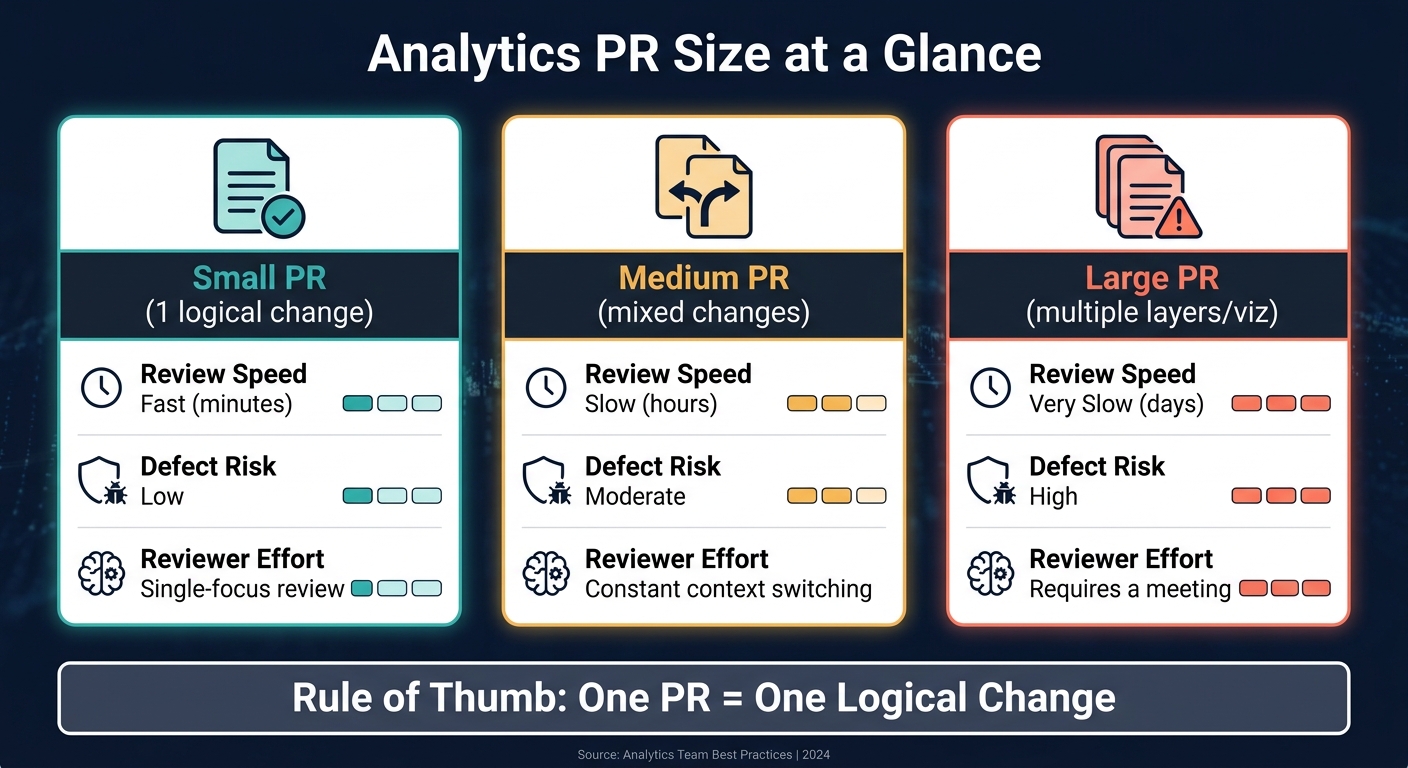
Analytics PR Size: Review Speed, Defect Risk & Effort Compared
Keep analytics pull requests small enough that someone can review the whole thing in one pass. Raw line count matters less than this: can the reviewer grasp the change, its impact, and the proof without bouncing around the diff?
Smaller PRs also cut the odds of missed metric drift or downstream dashboard mistakes. They make it much easier to explain why the change exists and what evidence backs it up.
A good rule of thumb: one PR, one logical change. That means one model update, one metric definition change, or one dashboard adjustment, not all three at once.
What Counts as One Logical Change
A logical change is one self-contained unit of work that can be reviewed, tested, and merged on its own. In analytics engineering, that usually means a model update, a metric definition change, or a transformation pattern change. Mastering these workflows is essential to pass analytics engineering interviews at top-tier companies.
Refactors should live in their own PRs. So if you're doing renames, folder moves, or formatting cleanup, keep that separate from changes to calculations or downstream data flow. Mixing the two is how a simple review turns into a scavenger hunt.
Signs a Pull Request Is Too Large
If a reviewer needs a meeting just to figure out where to start, the PR is too large.
You’ll often see the same pattern in oversized PRs: changes across staging, intermediate, and mart layers, plus docs and test files, all packed into one diff. Another common problem is mixing SQL schema changes with BI tool edits like LookML or Tableau XML.
PR size changes review effort and defect risk:
| PR Size | Review Speed | Defect Risk | Reviewer Effort |
|---|---|---|---|
| Small (1 logical change) | Fast (minutes) | Low | Single-focus review |
| Medium (mixed changes) | Slow (hours) | Moderate | Constant context switching |
| Large (multiple layers/viz) | Very slow (days) | High | Requires meeting |
When large PRs mix layers or dashboard edits, review slows down and defects get harder to pin down. Split schema changes and dashboard edits into separate PRs.
Once the scope is under control, the next step is making sure the PR gives reviewers enough context to check the change fast.
What Context, Metric Notes, and Evidence To Include
Once the PR is small enough to review, the description needs to carry the rest.
Write a Context Block That Explains the Change, Reason, and Impact
Every analytics PR should start with a short, structured context block to maintain analytics excellence. Stick to five fields: Summary, Why, Impact, Risk, and Rollback Plan.
That block should name every downstream model, dashboard, or dependency touched by the change. Use lineage tools like OpenLineage or Monte Carlo to make that list explicit. This helps technical reviewers check pipeline health, while business reviewers can sanity-check the logic. Both groups need enough context to understand what’s changing and why.
If the change affects numbers, say so right away. Don’t make reviewers guess what will move.
Add Metric Notes When Definitions or Filters Change
Call out any change to grain, joins, filters, denominator logic, attribution windows, or KPI definitions directly in the PR.
Be concrete about the expected metric shift. For example: "This change removes internal test accounts from the is_active filter. Expect 'Active Users' to decrease after deployment." If you use the dbt Semantic Layer, MetricFlow, or Cube to centralize definitions, note exactly which metric definitions are changing and why. Changes in the metrics layer need extra scrutiny because they flow into downstream reporting.
Then back it up with proof from both the data side and the BI side.
Attach Screenshots and Test Output That Prove the Change
Attach evidence that fits the kind of change you made. Here’s a simple guide:
| Artifact | Purpose | When to Include |
|---|---|---|
| dbt Test Results | Confirms uniqueness, non-nulls, and business logic | Every model change or refactor |
| Row-Count Checks | Catches data loss or fan-out from joins | Any change involving joins or new filters |
| Before/After Screenshots | Visual proof of BI tool changes (Looker, Tableau, Hex) | Changes to downstream models or dashboards |
| Distribution Comparison | Validates metric distributions remain reasonable | Major logic overhauls or source migrations |
| Pipeline/Unit Test Output | Confirms the code runs cleanly in orchestration | Changes to DAGs or complex transformations |
Label every screenshot with its environment, such as Staging or Development.
When To Split a Large Analytics Pull Request
Sometimes trimming scope isn't enough. A PR can still be too big to review well.
That usually happens when one PR mixes staging, core, and dashboard work in the same diff. At that point, reviewers can't check any one layer cleanly. The fix is simple: split the work at natural review boundaries so each PR can stand on its own.
Split by Refactor, Feature, or Data Layer
There are three common ways to split this kind of work:
| Split Approach | What It Means | Benefits | Drawbacks |
|---|---|---|---|
| Refactor vs. Feature | Separate cleanup work, like renaming columns or applying style guide formatting, from new business logic. | Reviewers can focus on logic bugs without getting pulled into formatting changes. | You have to manage and merge more than one PR for the same task. |
| Data Layer (Medallion) | Split changes by architectural stage - Staging (Bronze), Core (Silver), and Marts (Gold). | This lets teams check data quality at the source before it affects downstream models. | Code can sit too long if the lower layers don't get merged soon. |
| Metric vs. Dashboard | Separate dbt or SQL model changes from BI or semantic layer updates. | This helps avoid broken dashboards by checking the schema before visualization updates go live. | It takes coordination between data engineering and BI teams. |
Use the Medallion split when you need to prove upstream data quality before touching downstream marts.
After you've picked the split, sequence the PRs so upstream changes land first. That's the part that keeps the rest of the stack from drifting out of sync.
How To Sequence Dependent Pull Requests
Start with upstream schema or model changes. Merge those before downstream dashboard or reporting PRs. That way, the downstream diff matches the data it relies on.
A few habits help here:
- Keep downstream PRs in Draft until the upstream model is merged and checked.
- In GitHub or GitLab, put the dependency at the top of the PR description, like "Depends on #142."
- If a downstream change relies on an upstream branch that hasn't merged yet, branch from that upstream feature branch instead of
main. That lets reviewers focus on the incremental diff, not a pile of unrelated changes.
Conclusion: A Clear Standard for Better Analytics Pull Requests
After scope, context, metric notes, and evidence, the standard is simple: a strong analytics PR stays small, spells out the impact, and shows proof.
Key Points To Carry Into Your Next Pull Request
Before you open your next PR, do a quick check:
- One clear purpose - Does this PR make one logical change?
- Context block - Did you explain the change, the reason, and the downstream impact?
- Metric notes - If a metric definition or filter changed, is that called out plainly?
- Evidence attached - Are dbt test results or screenshots included?
- Scope check - If it mixes refactoring, feature work, or multiple data layers, should it be split?
That kind of discipline matters. A PR should be easy to review, easy to test, and easy to trust.
To put these habits into practice, DataExpert.io Academy offers hands-on analytics engineering training to build trust in the numbers.
FAQs
How small should an analytics PR be?
Keep an analytics pull request small enough for a focused review. The exact number of lines matters less than keeping it to one logical change or feature.
When a pull request mixes unrelated updates, split it into smaller, separate reviews. That makes it easier for reviewers to follow the context, check test output, and catch problems without digging through a grab bag of changes.
What proof should I attach to an analytics PR?
Include proof that your changes were checked and still meet quality standards, such as:
- automated data quality test output
- dbt test results, if applicable
- screenshots or dashboard signals that show the metrics are correct
- relevant logs or lineage traces that confirm the data flowed through the right steps
That gives reviewers clear evidence that the logic works as expected.
When should I split one analytics PR into several?
Split an analytics pull request when it helps keep the work focused, makes review easier, and lowers the chance of problems.
This matters most when the changes touch separate features or different logic paths that can be tested and shipped on their own. Smaller PRs make feedback, documentation, and testing faster and more dependable.