
Hive Query Optimization Questions Explained
Hive query optimization is all about speeding up your HiveQL queries and making them more efficient. Here’s the bottom line: Optimized Hive queries can run up to 15x faster and save significant storage and compute resources. Without optimization, queries on large datasets can drag on for hours, wasting time and resources.
Key takeaways:
- Partitioning: Reduces the data scanned by splitting tables into smaller subsets. Use low-cardinality columns like
yearorregion. - Bucketing: Speeds up joins and sampling by organizing data into fixed buckets using a hash function. Best for high-cardinality columns like
user_id. - Compression: Cuts storage needs by 50–90% and speeds up queries by 20–50%. Use columnar formats like ORC with codecs like Zlib or Snappy.
- Tez Engine: Processes data in memory for faster execution compared to MapReduce.
- Vectorized Execution: Processes data in batches for 3–10x faster query speeds, especially with ORC or Parquet formats.
- Small Files: Consolidate small files to avoid metadata overload and improve performance.
For advanced optimization, focus on Cost-Based Optimization (CBO), addressing data skew, and leveraging tools like EXPLAIN to analyze query plans. Whether you're prepping for interviews or managing production workloads, mastering these techniques is essential for handling massive datasets efficiently.
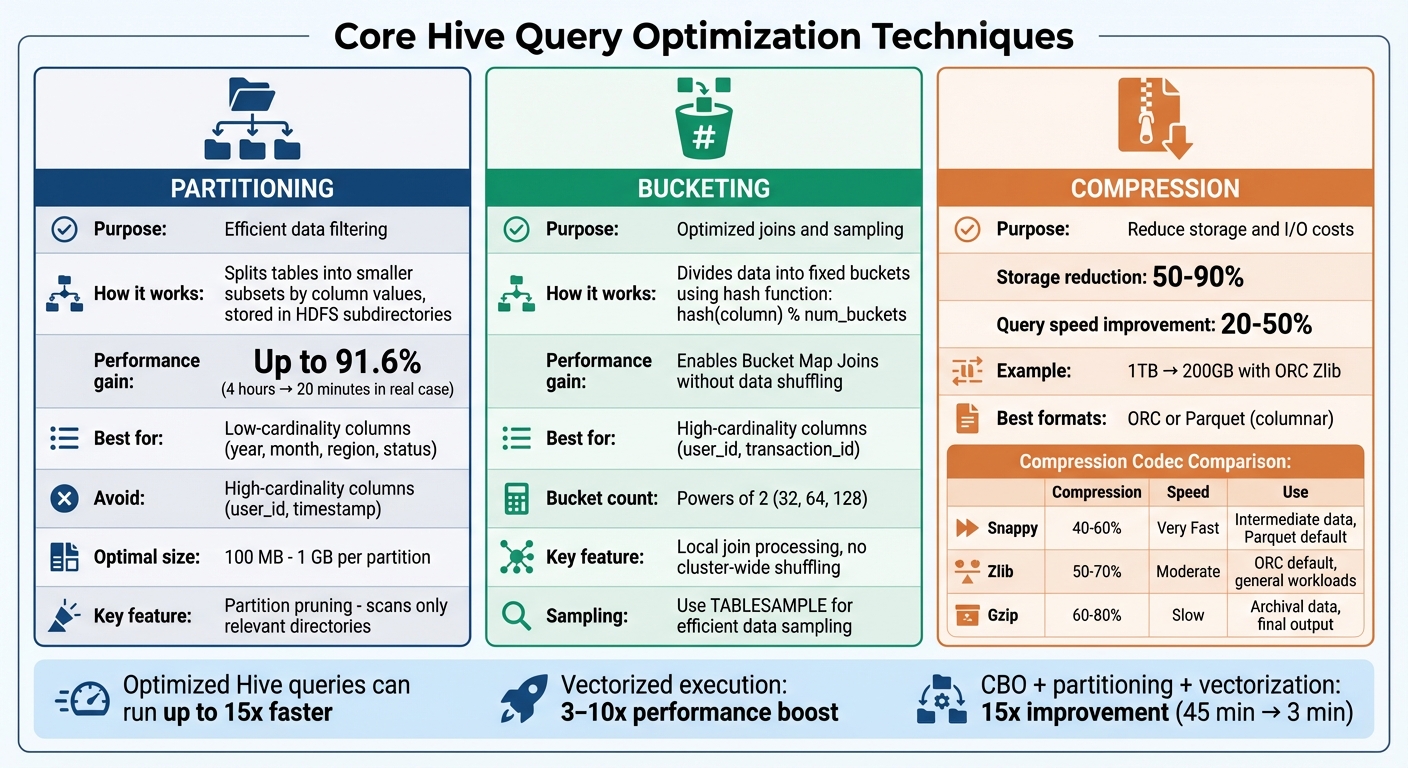
Hive Query Optimization Techniques Comparison: Partitioning vs Bucketing vs Compression
Hive Optimization Techniques With Examples
sbb-itb-61a6e59
Core Techniques for Hive Query Optimization
When it comes to improving Hive performance, three techniques often make the biggest difference: partitioning, bucketing, and compression. Each addresses a specific challenge - partitioning improves filtering, bucketing enhances joins, and compression reduces both storage and I/O demands.
Partitioning for Efficient Data Filtering
Partitioning organizes a Hive table into smaller subsets based on column values, with each subset stored in its own HDFS subdirectory (e.g., /table_name/year=2025/month=04). When a query includes a WHERE clause that matches a partition key, Hive only scans the relevant directories, skipping the rest. This process, known as partition pruning, can drastically cut down the amount of data read.
The results can be dramatic. For example, in January 2025, Marcus Newman, a big data architect, revamped a social media analytics pipeline for a Fortune 500 company using a 250-node cluster. Initially, processing billions of tweet impression logs took 4 hours. By partitioning the impressions table by the created_at date column, partition pruning was enabled for hourly jobs, reducing ETL runtime to just 20 minutes - a 91.6% improvement. Similarly, in August 2014, engineers at Quaero partitioned large historical tables by a "dataset instance id" column and adopted Apache Parquet format, cutting workflow execution time by about 50%.
"Properly leveraging partitions and buckets can accelerate Hive query speeds by 100x on massive datasets!"
- Marcus Newman, Software Guru
To maximize partitioning benefits, choose low-cardinality columns like year, month, region, or status as partition keys. Avoid high-cardinality columns like user_id or timestamp, as these can create millions of tiny directories, overloading the HDFS NameNode and Hive Metastore. Aim for partition sizes between 100 MB and 1 GB. Before running queries, use the EXPLAIN command to ensure partition pruning is working as expected.
Bucketing for Optimized Joins and Sampling
Bucketing divides data into a fixed number of files (buckets) using a hash function - typically hash(column) % num_buckets. Unlike partitioning, which creates subdirectories, bucketing keeps all files in a single directory, avoiding metadata overload.
The real advantage of bucketing becomes apparent during joins. When two tables are bucketed on the same join key and have matching bucket counts, Hive can perform Bucket Map Joins. This means rows with the same join key are grouped into corresponding buckets, allowing Hive to process the join locally on the same node without shuffling data across the cluster - one of the most resource-intensive operations in distributed systems.
Bucketing also simplifies sampling. Instead of scanning the entire dataset, you can use TABLESAMPLE(BUCKET x OUT OF y) to read specific bucket files. For bucketing, use high-cardinality columns like user_id or transaction_id, which distribute data more evenly. Set bucket counts to powers of 2 (e.g., 32, 64, 128) for better balance, and always enable SET hive.enforce.bucketing=true; before inserting data to ensure proper hashing.
Compression to Reduce Storage and I/O Costs
Compression minimizes the size of stored data, cutting storage needs by 50% to 90% while speeding up query execution by 20% to 50%. For example, compressing a 1TB table with the ORC Zlib codec can shrink it to about 200GB. Compression can be applied at three levels: table storage (permanent files), intermediate data (temporary shuffle files), and final output.
For the best results, pair compression with columnar formats like ORC or Parquet, which compress columns independently based on data patterns. For intermediate MapReduce or Tez outputs, Snappy is a great choice due to its low CPU overhead and quick decompression. For general ORC table storage, Zlib strikes a good balance between compression ratio and speed. Use Gzip for archival data where storage size matters more than query speed, as it has a higher CPU cost.
| Codec | Compression Ratio | Speed | Best Use Case |
|---|---|---|---|
| Snappy | Moderate (40–60%) | Very Fast | Intermediate data, Parquet default |
| Zlib | Moderate to High (50–70%) | Moderate | ORC default, general workloads |
| Gzip | High (60–80%) | Slow | Archival data, final output |
To further optimize, enable vectorized query execution with hive.vectorized.execution.enabled=true, which speeds up processing for compressed ORC and Parquet data. Additionally, configure intermediate compression using set hive.exec.compress.intermediate=true and output compression with set hive.exec.compress.output=true.
Common Challenges and Solutions in Hive Queries
Even with partitioning, bucketing, and compression in place, Hive queries can still run into performance issues. These often stem from three main problems: the accumulation of small files that strain the metadata layer, slower execution engines that waste resources, and traditional row-by-row processing that doesn't fully utilize modern CPUs. Addressing these challenges can significantly improve the efficiency of Hive deployments.
Avoiding Small Files and Metadata Overload
Small files are a common culprit behind sluggish Hive performance. They often result from streaming ingestion tools like Spark Structured Streaming or Kafka, which create tiny files in kilobyte sizes. Over-partitioning is another issue - partitioning by high-cardinality columns like user_id can create thousands of directories, each containing a single small file. High parallelism settings, such as Spark's default spark.sql.shuffle.partitions=200, can also break datasets into hundreds of small files unnecessarily.
Each file, directory, and block in HDFS consumes around 150 bytes of NameNode memory. For example, storing 192 separate 1 MB files uses over 100 times more memory than storing a single 192 MB file. AWS benchmarks show that compacting 582,000 small CloudTrail files (0.14 MB each) into 336 larger files (247 MB each) reduced query time from 40 seconds to 9.7 seconds. Reading 1 million small files on S3 can even lead to up to 1,000× higher costs in GET/LIST requests.
"The small files problem is engineering debt that compounds daily. Every streaming micro-batch, every over-partitioned write, every unchanged Spark default adds more tiny files to the pile."
- Yunus Alper Körükcü, Senior Big Data Engineer
To tackle this, you can enable automatic file merging in Hive by configuring these settings:
hive.merge.tezfiles=truehive.merge.smallfiles.avgsize=134217728(128 MB)hive.merge.size.per.task=268435456(256 MB)
For streaming workloads, increasing trigger intervals to 1–5 minutes allows more data to accumulate before writing. Regularly running compaction jobs using INSERT OVERWRITE or commands like OPTIMIZE can consolidate files into the optimal size range of 128 MB to 1 GB. Databricks, for instance, introduced "Predictive Optimization" in June 2024, automating OPTIMIZE and VACUUM operations. This feature has delivered 20× faster selective queries and halved storage costs.
Using Tez for Faster Query Execution
Tez offers a faster alternative to MapReduce by reducing I/O overhead. Unlike MapReduce, which writes intermediate results to HDFS, Tez processes data in memory. It uses a Directed Acyclic Graph (DAG) to model tasks, enabling more complex query plans. Additionally, it reuses YARN containers for subsequent tasks, cutting down on resource initialization overhead. When properly configured, Tez can boost query performance by up to 50%.
"Tez data processing framework combines the MapReduce task as a node of DAG, enforcing concurrency and serialization."
- Amit Singh Rathore, Staff Data Engineer, Visa
To enable Tez, configure these settings:
hive.execution.engine=teztez.am.container.reuse.enabled=truehive.prewarm.enabled=trueand specify the number of containers withhive.prewarm.numcontainers=<n>hive.tez.auto.reducer.parallelism=true, which lets Hive dynamically adjust parallelism based on data size
Enabling Vectorized Query Execution
Traditional row-by-row execution can be inefficient, as it incurs repeated function calls and memory accesses. Vectorized execution improves this by processing data in batches - typically 1,024 rows at a time - and using Single Instruction, Multiple Data (SIMD) instructions. This approach allows operations like filtering and arithmetic to be performed on entire vectors simultaneously, reducing CPU cycles and improving cache efficiency. It works particularly well with columnar storage formats like ORC or Parquet.
Vectorized execution can deliver 5–10× performance improvements for analytical queries, with aggregation and filter operations often seeing speedups of 3–10×.
To enable vectorization, use these settings:
hive.vectorized.execution.enabled=true(for map-side operations)hive.vectorized.execution.reduce.enabled=true(for reduce-side aggregations)
Make sure your tables are stored as ORC or Parquet to take full advantage of these benefits. You can verify vectorization by running the EXPLAIN command and looking for the "Vectorized execution enabled" indicator in the query plan. If needed, adjust the batch size with hive.vectorized.execution.batch.size=1024 based on available memory.
Advanced Optimization Techniques for Hive
When working with Hive on large datasets, basic optimizations can only take you so far. To push performance even further, advanced techniques like Cost-Based Optimization (CBO), indexing (for older Hive versions), and addressing data skew become essential. These methods are particularly valuable in production environments dealing with terabyte-scale data and often come up in technical discussions.
Cost-Based Optimization (CBO)
CBO, powered by Apache Calcite, evaluates multiple query execution plans and picks the most efficient one based on data statistics like row counts, distinct values, and histograms. It’s designed to automatically optimize operations - for example, using broadcast joins for smaller tables and shuffle joins for larger ones. Additionally, CBO can apply filters early in the process, reducing the volume of data that needs to be handled.
Here’s an example of its impact: A 2 TB dataset query that initially took 45 minutes was reduced to just 3 minutes by combining CBO with partitioning and vectorized execution. This involved using partitioned ORC tables and adjusting reducer counts, achieving a 15× improvement. Switching to the ORC format not only speeds up queries (3–10× faster) but also slashes storage costs by as much as 80%.
To enable CBO, you’ll need to configure these settings:
hive.cbo.enable=truehive.compute.query.using.stats=truehive.stats.fetch.column.stats=true
CBO depends on accurate statistics, so regularly run ANALYZE TABLE commands to update stats at both table and column levels. For massive tables, sampling (e.g., SAMPLE 10 PERCENT) can help reduce overhead. Always verify your execution plans with the EXPLAIN command to ensure CBO is active.
While CBO automates optimization in modern Hive setups, older systems often relied on manual indexing.
Using Hive Indexing for Faster Queries
Before Hive 3.0, indexing played a key role in improving query performance by avoiding full table scans. Indexes mapped column values to file blocks, enabling faster lookups on frequently filtered columns. The process involved:
- Creating an index:
CREATE INDEX index_name ON TABLE table_name (column_name) AS 'handler' WITH DEFERRED REBUILD - Populating the index:
ALTER INDEX index_name ON table_name REBUILD - Enabling index filtering:
SET hive.optimize.index.filter=true
Compact indexes worked well for general use, while bitmap indexes were ideal for low-cardinality columns. However, indexing was removed in Hive 3.0. Today, materialized views, Bloom filters, and columnar storage formats like ORC and Parquet have replaced it. If you’re still using Hive 2.x or earlier, indexes can be helpful, but remember to rebuild them after data updates.
Avoiding Data Skew in Hive Queries
Data skew is a hidden performance killer. It occurs when certain tasks end up processing the bulk of the data, leaving others underutilized. This imbalance can turn a 10-minute query into a 2-hour ordeal.
"Data skew in Hive is one of those silent killers of performance that can turn a 10-minute query into a 2-hour nightmare."
- Arthur C. Codex, AI Author, Reintech
Skew disrupts parallel processing, forcing some tasks into near single-threaded execution. This often leads to disk spills, which are dramatically slower - 10 to 100 times - compared to in-memory processing. In a 100-node cluster, a skewed 2-hour job can waste significant compute resources.
To tackle skew, enable skew join optimization by setting hive.optimize.skewjoin=true. Define a threshold (e.g., hive.skewjoin.key=100000) to process heavy keys separately using map joins. For columns with extreme skew or many NULL values, consider salting. This involves adding a random suffix to skewed keys (e.g., CONCAT(key, '_', CAST(RAND() * 10 AS INT))) to distribute data more evenly across reducers. Alternatively, list bucketing with the SKEWED BY clause can create separate directories for known skewed values.
These advanced techniques can significantly improve Hive’s performance, especially when dealing with large-scale data and complex queries. By fine-tuning your setup and addressing bottlenecks like skew, you can make Hive a reliable and efficient tool for big data processing.
Preparing for Hive Query Optimization Interviews
Getting ready for Hive query optimization interviews means showcasing your ability to solve problems in real-world scenarios. Interviewers want to see how you approach challenges: pinpointing bottlenecks, applying targeted optimizations, testing changes in a realistic setup, and measuring the results. It’s not just about knowing what to do - it’s about explaining why a particular method works for a specific problem. This foundation is key to excelling in both theoretical and practical aspects of the interview.
Hands-On Practice with Industry Tools
Practical experience with Hive and related tools is non-negotiable. Working on platforms like Databricks or AWS helps you understand how partitioning creates subdirectories in HDFS and how bucketing generates specific part-files. You’ll also get familiar with execution engines like Tez, Spark, and MapReduce, learning to fine-tune settings such as container size and memory allocation. Regularly using the EXPLAIN command will sharpen your ability to detect skews and verify that the Cost-Based Optimizer (CBO) uses your statistics effectively.
Programs like DataExpert.io Academy’s boot camps are particularly useful. These courses offer hands-on training and capstone projects that mimic real production environments. You’ll practice tasks like implementing ACID tables, experimenting with join optimization, and enabling vectorized execution to see performance boosts firsthand. Structured learning paths, combined with mentor support and expert-led sessions, immerse you in realistic optimization scenarios.
Mock Interviews and Technical Assessments
Once you’re comfortable with the tools, mock interviews are a great way to refine your skills. When discussing slow query performance, highlight factors like skew, column cardinality, and data access patterns. Walk interviewers through your diagnostic process: use EXPLAIN to analyze the execution plan and ANALYZE TABLE to gather statistics for cost-based optimization. Focus on impactful changes, such as switching to ORC format for faster query execution and significant storage savings or partitioning data based on low- to medium-cardinality columns.
Be prepared to dive into join strategies. For example, you might explain how ordering tables by size (smallest first) or using MAPJOIN for small datasets can eliminate costly shuffles. Offer actionable recommendations: filter out unnecessary records early, use CTEs instead of calculated fields in JOIN clauses, replace ORDER BY with SORT BY in distributed environments to avoid single-reducer bottlenecks, and enable vectorization to process rows more efficiently.
Learning from Community and Mentorship
Joining a learning community can expose you to a variety of optimization challenges. For instance, DataExpert.io Academy’s All-Access Subscription ($125/month or $1,500/year) connects you with a network of learners and professionals. It provides over 250 hours of content and access to platforms like Databricks, Snowflake, and AWS. Guest speakers often share insights into real-world challenges, such as managing metadata overload from excessive partitioning or troubleshooting skewed joins.
Mentorship plays a key role in avoiding common mistakes, like treating Hive as if it were a traditional RDBMS or partitioning by high-cardinality columns. Experienced mentors can review your EXPLAIN outputs, advise on when to use bucket map-side joins versus SMB joins, and explain the specific conditions and configurations each strategy requires. This guidance not only sharpens your technical skills but also builds the confidence to handle technical assessments with ease.
Conclusion
Hive optimization revolves around several core techniques: partitioning, bucketing, file formats, and execution engines. Marcus Newman, an independent Big Data consultant, highlights the power of these methods:
"Properly leveraging partitions and buckets can accelerate Hive query speeds by 100x on massive datasets!"
These strategies deliver tangible performance improvements. For instance, enabling vectorized query execution can boost compatible operations by up to 10x.
Applying these fundamentals effectively requires thoughtful decision-making. Partitioning shines when filtering data by attributes like date or region, while bucketing is ideal for optimizing joins on shared IDs. Techniques like map-side joins can bypass costly shuffle phases for smaller tables, and cost-based optimization leverages statistics to choose the most efficient execution plan. Each decision impacts performance differently, depending on factors like data size, query complexity, and cluster setup.
Hands-on practice is vital for mastering Hive. Over time, Hive has grown from a simple MapReduce tool into a robust framework supporting features like ACID transactions, Tez execution, and advanced file formats. Real-world challenges - such as data skew, metadata management, and configuration tuning - demand practical experience. Regularly using tools like EXPLAIN plans, experimenting with optimization settings, and working with platforms like Databricks, Snowflake, or AWS can sharpen your problem-solving abilities. These practices not only improve query performance but also enhance your overall data engineering expertise.
Whether you're preparing for technical interviews or managing production workloads, focus on understanding how Hive translates queries into execution plans. Be ready to explain trade-offs, such as why SORT BY can outperform ORDER BY in distributed setups, when to choose SMB joins over bucket map-side joins, or how to balance partition granularity against metadata overhead. Developing this level of technical insight not only improves performance but also positions you for advanced roles in the field.
For hands-on training and skill-building, explore resources and boot camps available at DataExpert.io Academy.
FAQs
How do I choose between partitioning and bucketing for a table?
When dealing with large datasets, using partitioning can significantly improve query performance. It's best suited for low-cardinality columns, like date or category, as it reduces the amount of data scanned during queries. However, avoid partitioning on high-cardinality columns, as this can lead to an overwhelming number of small files, which can hurt performance.
For high-cardinality columns, consider bucketing instead. This technique helps evenly distribute data, making joins more efficient and enabling sampling when needed. By strategically combining partitioning and bucketing, you can optimize data organization and query performance based on your specific patterns and needs.
What’s the fastest way to diagnose why a Hive query is slow?
To diagnose a slow Hive query, start by examining its execution plan. This will help you spot bottlenecks and inefficiencies by focusing on elements like operators, dependencies, and execution stages. Once you've identified the problem areas, you can move on to performance tuning. This involves keeping an eye on system configurations, organizing data effectively, and ensuring proper resource allocation. These steps are essential for tackling slow queries and improving overall performance.
How can I fix data skew in Hive joins?
To address data skew in Hive joins, start by pinpointing the skewed keys. Once identified, handle them separately to balance the workload. This can be done by running two queries: one specifically for the skewed keys using techniques like map-side or in-memory hash joins, and another for the remaining non-skewed data.
You can also take advantage of Hive's built-in skew join optimization features or adjust your queries to isolate the skewed keys. These methods ensure a more even data distribution, leading to better join performance.