
How Partitioning Impacts Query Performance
Partitioning is a database technique that breaks large tables into smaller, independent sections, making queries faster and more efficient. It reduces the amount of data scanned, improves resource usage, and supports parallel processing. By focusing only on relevant partitions, it lowers costs in cloud environments like Google BigQuery and Amazon Athena.
Key benefits include:
- Faster Queries: Partition pruning skips irrelevant data, reducing I/O operations.
- Cost Savings: In cloud systems, scanning fewer partitions cuts costs.
- Better Resource Use: Optimizes CPU, memory, and parallel processing.
- Scalability: Handles large datasets efficiently.
Real-world examples highlight its impact:
- GitLab reduced query times from 2 seconds to 0.2 seconds using hash partitioning.
- Regeneron cut query times from 30 minutes to 3 seconds with optimized partitioning.
Partitioning strategies include:
- Horizontal Partitioning: Divides data by rows (e.g., date ranges or hash keys).
- Vertical Partitioning: Splits data by columns for narrower queries.
- Partition Pruning: Skips unnecessary partitions based on query filters.
To design an effective partitioning strategy:
- Analyze Query Patterns: Identify frequent filters (e.g., dates or regions).
- Choose the Right Keys: Ensure even data distribution and pruning efficiency.
- Balance Partition Sizes: Avoid excessive small files or too many partitions.
Partitioning works best for large datasets with range-based queries, while indexing suits selective lookups. Combining both can optimize performance for complex workloads.
How Partitioning Improves Query Performance
Reduced Data Scanning
Partitioning allows the query engine to focus only on the relevant partitions matching a query filter, skipping over unnecessary data entirely. Instead of reading through an entire table, the system zeroes in on just the partitions you need, significantly cutting down on I/O operations.
This targeted scanning directly impacts costs in cloud-based data warehouses like Amazon Athena and Google BigQuery, where charges are based on the volume of data scanned. Since pruned partitions are excluded from these calculations, partitioning can lead to noticeable cost savings. Pairing partitioning with columnar file formats like Parquet or ORC further enhances efficiency. These formats allow the engine to leverage metadata - such as minimum and maximum values - to bypass unnecessary data blocks within a partition, reducing the amount of data loaded into memory.
By minimizing data scanning, partitioning not only lowers costs but also frees up system resources, leading to faster query processing.
Better Resource Utilization
Partitioning significantly improves how CPU and memory resources are used. Since the engine scans only the partitions relevant to the query, fewer CPU cycles are required, and less data is loaded into memory. This is especially beneficial in distributed systems, where partition-wise joins enable large tables to be processed locally within individual partitions. This reduces network traffic and allows for more efficient parallel processing.
Memory usage also becomes more efficient when aligned indexes are employed. In systems like SQL Server, aligned indexes share the same partition scheme as the table, enabling sort operations to be handled one partition at a time. On the other hand, nonaligned indexes require concurrent sorting across all partitions, which can significantly increase memory demands. For large-scale operations, SQL Server advises having at least 16 GB of RAM to handle multiple partitions without running into issues during DML and DDL operations.
Together, these optimizations ensure that partitioning boosts overall query performance while making better use of available resources.
Metrics and Case Studies
The benefits of partitioning are not just theoretical - they’re backed by real-world results. For example, in November 2025, GitLab's engineering team enhanced their "Issue group search" by applying hash-based partitioning to the issues table, dividing it into 64 partitions. Using top_level_namespace as the partitioning key, they slashed query execution times on a warm cache from 2 seconds to 0.2 seconds - an impressive 8-10x speedup. Additionally, partition-level indexes became 10x to 100x smaller than the original global indexes. However, query planning time did increase slightly, from 10 milliseconds to 40 milliseconds, due to the added complexity of managing partition metadata.
Another example comes from Regeneron, whose optimized lakehouse architecture reduced query times for drug target identification from 30 minutes to just 3 seconds - a staggering 600x improvement. Similarly, Bread Finance transitioned to a partitioned lakehouse platform and achieved a 90% reduction in data processing time, while scaling to handle 140 times more data with only a 1.5x increase in costs.
These case studies highlight partitioning’s ability to deliver not only technical efficiency but also measurable business benefits. From cutting query times to managing larger datasets with minimal cost increases, partitioning proves to be a powerful tool for organizations aiming to optimize performance.
Leveraging table partitioning for query performance and data archiving | POSETTE 2025
Common Partitioning Strategies and Mechanisms
To enhance query performance, databases rely on specific partitioning strategies tailored to different needs.
Horizontal Partitioning
Horizontal partitioning divides a table into smaller subsets of rows, with each partition sharing the same schema but holding different data slices. This method improves scalability by spreading the workload and reducing the need to scan large datasets. For instance, if a table is partitioned by date ranges, queries can focus on relevant partitions instead of scanning the entire table.
A popular variation is hash partitioning, which evenly distributes rows across partitions using a hash function applied to a chosen key. For best results, the number of partitions should typically be a power of two (e.g., 2, 4, 8, or 16). This approach minimizes data skew and avoids overloading specific partitions, often referred to as "hot" partitions. Range partitioning, on the other hand, is ideal for managing historical data and supports operations like "rolling windows", where older partitions can be dropped, and new ones added seamlessly with tools like EXCHANGE PARTITION. For example, Azure SQL pools automatically distribute tables into 60 parts, but over-partitioning can degrade performance. To maintain efficiency, aim for at least 1 million rows per partition to ensure good compression.
Vertical Partitioning
Vertical partitioning breaks a table down by columns rather than rows, storing specific fields in separate partitions. This is particularly useful for wide tables where queries often access only a subset of columns. By retrieving only the necessary fields, vertical partitioning reduces I/O operations, memory usage, and data transfer costs. For even greater performance gains, composite partitioning combines horizontal partitioning with a secondary hash, creating an additional layer of optimization.
Partition Pruning
Partition pruning is a critical optimization technique that allows the database engine to ignore partitions irrelevant to a query. During query planning, the engine evaluates the WHERE clause to identify which partitions to skip. For example, a filter like WHERE date_col >= '2024-01-01' enables effective pruning, while wrapping the partition key in a function (e.g., WHERE YEAR(date_col) = 2024) prevents the optimizer from recognizing it as a partition key.
Different partitioning methods handle filters differently. Range partitioning works well with inequality and range predicates, while hash and list partitioning are better suited for equality or IN predicates.
A performance test using NYC Taxi trip data on Apache Iceberg highlights the impact of pruning. Researchers Karthic Rao and Shreyas Mishra observed that a query filtering by fare_amount on a partitioned-only table took 5.0 seconds, processing 5,443,360 rows and skipping just 2 data files. After introducing internal sorting within partitions for finer pruning, execution time dropped to 2.1 seconds, with only 1,239,324 rows processed and 26 data files skipped.
Partition pruning also reduces costs in cloud-based warehouses like BigQuery, where pruned partitions are excluded from byte-scanned calculations. To maintain efficiency, ensure partition file counts remain below 1,000 objects per operation and verify pruning effectiveness using the EXPLAIN statement.
These strategies provide a strong foundation for crafting an efficient partitioning approach.
sbb-itb-61a6e59
Designing a Partitioning Strategy
To ensure your queries run efficiently, your partitioning strategy should align closely with actual query patterns. A well-thought-out approach can significantly boost query speed while minimizing resource use. These principles also build on earlier insights about reducing data scanning and optimizing resource allocation.
Identifying Query Patterns
The first step in designing a partitioning strategy is understanding your workload. Dive into query filters, typical result sizes, and query frequency to identify the best partition columns. For instance, if 80% of your queries filter by date, a time-based partition key is a smart choice. Microsoft's Azure Well-Architected Framework highlights this approach:
"Choose your partitioning strategy carefully to maximize the benefits and minimize adverse effects".
Focus on optimizing for common queries rather than rare edge cases. Amazon Athena's documentation reinforces this:
"A good strategy is to optimize for the most common queries and avoid optimizing for rare queries".
By catering to the 80-90% of frequently used queries, you'll achieve better system performance overall. Once you have a clear understanding of query patterns, the next step is selecting partition keys that enable effective partition pruning.
Choosing the Right Partition Keys
The right partition key is critical for partition pruning, a process that skips irrelevant data during query execution. To achieve this, your partition key should frequently appear in query filters and distribute data evenly across partitions to avoid "hot partitions" - a common source of performance bottlenecks.
For hash partitioning, use high-cardinality columns and aim for partition counts that are powers of two, such as 2, 4, 8, or 16, to ensure balanced data distribution. If joins are a priority, partition large tables using the same key. This allows the database engine to process equijoins faster by pairing corresponding partitions.
When lifecycle management is a consideration, date columns are particularly effective. They allow for metadata-only operations, like dropping old partitions, without needing to scan the data. SQL Server and Azure SQL Database support up to 15,000 partitions per table, but going beyond 100,000 partitions can increase memory overhead and slow down the query optimizer.
In Amazon Athena, always use the STRING data type for partition keys to ensure effective filtering through the AWS Glue Data Catalog. Additionally, write queries that directly reference partition columns, such as WHERE partition_col > '2024-01-01', instead of derived conditions like WHERE YEAR(partition_col) = 2024. This ensures the engine can recognize and prune partitions effectively. Once you’ve chosen the optimal keys, focus on balancing partition sizes to maintain consistent performance.
Balancing Partition Size and Scalability
Partition sizes play a critical role in balancing performance and scalability. Databricks suggests avoiding partitioning entirely for tables under 1 TB, as built-in optimizations handle smaller datasets efficiently. When partitioning is necessary, aim for partitions between 1 GB and 100 GB in size. Within each partition, files should range from 100 MB to 1 GB - smaller files can lead to excessive metadata overhead, slowing down query planning.
StarRocks recommends keeping total partition counts between 100 and 10,000 per table, with each partition limited to 20,000 tablets across replicas. The choice of granularity should depend on your data volume: daily partitions work well for standard BI reporting, hourly partitions are suitable for large datasets exceeding multiple tablets per day, and monthly partitions are ideal for historical archives. For systems like Amazon S3, which supports up to 5,500 requests per second to a single index partition, excessive small files can trigger "SlowDown" errors during execution.
For fields with high cardinality, such as User IDs, consider bucketing or clustering instead of partitioning to avoid creating thousands of tiny files. Regularly monitor for skewed data distribution and clean up metadata for empty partitions. Listing unused partitions during query planning can add unnecessary latency.
Partitioning vs. Indexing: A Comparison
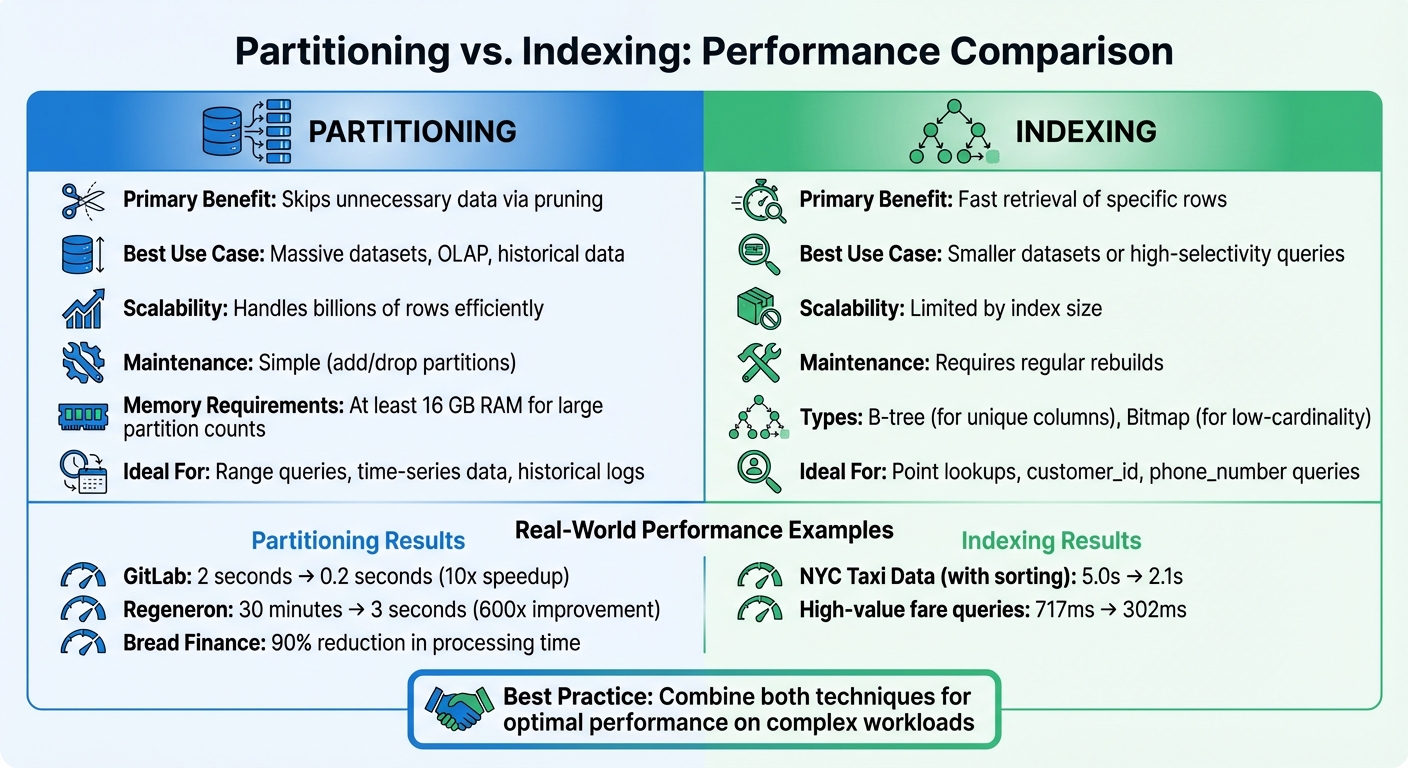
Partitioning vs Indexing: Performance Comparison for Database Optimization
Following the discussion on partition pruning, let’s dive into how partitioning compares to indexing. Partitioning enhances performance by skipping over irrelevant portions of data that don't meet the query's criteria. On the other hand, indexing relies on structures like B-trees or bitmaps to pinpoint specific rows directly, avoiding the need to scan the entire table.
Choosing between partitioning and indexing comes down to data size and query patterns. Partitioning is ideal for massive datasets accessed in large chunks or ranges - think historical logs or time-series data. Indexing, however, shines in scenarios requiring point lookups or selective queries that retrieve only a small percentage of rows. For instance, SQL Server documentation notes that partitioning rarely benefits OLTP systems handling single-row queries. Understanding these distinctions helps determine the best approach for different workloads.
Performance Metrics: Partitioning vs. Indexing
The performance of these techniques varies in terms of resource usage and scalability. Partitioning improves concurrency by enabling locks at the partition level instead of the table level, reducing contention. However, managing thousands of partitions demands significant memory - at least 16 GB of RAM - to avoid failures in data manipulation or definition tasks.
Indexing speeds up point lookups but can be resource-intensive. B-tree structures, while effective, consume considerable disk space and CPU power for maintenance. Bitmap indexes, by contrast, are more compact, often requiring only a fraction of the size of the indexed data.
| Feature | Partitioning | Indexing |
|---|---|---|
| Primary Benefit | Skips unnecessary data via pruning | Fast retrieval of specific rows |
| Best Use Case | Massive datasets, OLAP, historical data | Smaller datasets or high-selectivity queries |
| Scalability | Handles billions of rows efficiently | Limited by index size |
| Maintenance | Simple (add/drop partitions) | Requires regular rebuilds |
Use Cases for Partitioning
Partitioning is a game-changer for managing large-scale data and historical "rolling windows." Tasks like backups, restores, and data loading can focus on individual partitions, which is crucial for very large databases (VLDBs). For time-series analysis, range or interval partitioning is often the go-to strategy. It simplifies rolling window management by allowing old data to be purged and new data added through metadata operations, avoiding row-by-row deletions.
A study from November 2024 using NYC Yellow Taxi trip data illustrates partitioning's potential. For a query filtering fare_amount between 19.3 and 36.2, a partitioned-only table processed 5,443,360 rows in 5.0 seconds. Adding a sort order within the partitions reduced execution time to 2.1 seconds and cut processed rows to 1,239,324. For high-value fares (≥ $650), the sorted and partitioned table handled 360,586 rows in just 302 milliseconds, compared to 2,949,936 rows in 717 milliseconds for an unsorted version.
Partitioning also excels in equijoins between tables partitioned on the same columns. By aligning partitions, the database engine can process joins more efficiently. Modern systems like SQL Server support up to 15,000 partitions per table or index, offering flexibility for large-scale implementations.
When to Use Indexing Instead
Indexing is the better choice for high-cardinality lookups targeting specific values. For instance, B-tree indexes work well on unique or near-unique columns like customer_id or phone_number. In data warehouses, bitmap indexes are especially useful for ad hoc queries involving multiple conditions on low-cardinality columns.
While partitioning typically involves tens to hundreds of partitions, indexing is more suitable for smaller tables or highly selective queries. Combining both techniques can often yield the best results. For example, local bitmap indexes on partitioned tables can handle complex AND/OR conditions efficiently before accessing the table. However, over-partitioning can backfire - queries that don’t take advantage of partition elimination can suffer from unnecessary overhead. By striking the right balance, partitioning and indexing together can significantly enhance query performance for complex workloads.
Conclusion: Key Takeaways on Partitioning and Query Performance
Summary of Key Benefits
Partitioning can revolutionize query performance by using partition pruning to bypass irrelevant data, which drastically cuts down on data scans. This not only speeds up query execution but also enhances system efficiency. By allowing systems to leverage multiple processors for large-scale operations, partitioning improves parallel processing. Additionally, it boosts concurrency by employing partition-level locks instead of locking entire tables.
Another advantage is how partitioning simplifies managing large datasets. For example, rolling windows enable you to add new data and drop old partitions through metadata operations, eliminating the need for row-level deletions. Some systems, like SQL Server, support up to 15,000 partitions per table, making partitioning a scalable solution for handling massive datasets.
Practical Recommendations
To get the most out of partitioning, start by aligning your partition keys with your most frequent query patterns. If your queries often filter by date, partition on date columns. Similarly, for region-based queries, geographic partitioning is a smart choice. Make sure partition columns remain unaltered in your WHERE clauses to ensure effective pruning.
Be mindful of the number of partitions. Over-partitioning can lead to fragmented datasets with many small files, increasing metadata overhead and slowing down query planning. Aim for file sizes between 100 MB and 1 GB to maintain efficiency. For systems with a large number of partitions, consider using partition projection to calculate file locations in memory, which reduces the need for expensive catalog lookups.
Combining partitioning with columnar file formats like Parquet or ORC can further improve data skipping within each partition. However, systems managing numerous partitions may require at least 16 GB of RAM to avoid memory-related issues.
These strategies provide a solid foundation for optimizing partitioning in your data workflows.
Further Learning Resources
The best way to master partitioning is by working hands-on with real datasets and modern tools. Platforms like DataExpert.io Academy (https://dataexpert.io) offer specialized boot camps in data engineering and analytics. These programs provide practical training with tools like Databricks, Snowflake, and AWS. You'll also tackle capstone projects that let you apply partitioning strategies to real-world data warehouse scenarios. Plus, you'll gain access to a supportive learning community and insights from experienced industry professionals during guest speaker sessions.
FAQs
How does partitioning help improve query performance?
Partitioning boosts query performance by limiting the amount of data the system needs to scan. Using methods like partition pruning, the database focuses only on the relevant partitions, skipping the need to scan the entire table. This reduces the workload and speeds up query execution.
Breaking data into smaller, more manageable segments also helps make better use of system resources. This is particularly useful for handling massive datasets in modern data warehouses, ensuring quicker results and greater efficiency when running complex queries.
What should you consider when selecting a partitioning strategy for your data warehouse?
When deciding on a partitioning strategy, it's crucial to focus on what enhances query performance and simplifies data management. Start by selecting a partitioning type that matches your data structure and query patterns. For example, range partitioning works well for time-series data, while list partitioning is better suited for categorical data. Keep in mind that partitions should ideally hold at least 1 GB of data to ensure smooth performance.
You should also factor in the purpose of the data, your scalability requirements, and whether you’ll need features like pruning, which helps queries run faster by scanning less data. Make sure your strategy aligns with the tools and platforms you're using - whether it's Databricks, Snowflake, or BigQuery - to guarantee compatibility and efficiency. Ultimately, tailoring your partitioning approach to fit your workload and dataset size is key to getting the best outcomes.
What’s the difference between partitioning and indexing for large datasets?
Partitioning and indexing are both powerful tools to improve query performance, but they serve distinct purposes and are best used in different situations.
Partitioning involves breaking a large table into smaller, more manageable pieces based on criteria like dates, regions, or other logical divisions. By doing this, the database only needs to scan the relevant partition during a query, cutting down on the amount of data processed and speeding things up.
Indexing, in contrast, uses data structures like B-trees or hash maps to pinpoint specific rows quickly. This helps improve lookup times but doesn’t necessarily reduce the volume of data scanned.
Partitioning shines when dealing with massive datasets, especially in data warehouses, as it narrows the scope of queries to just the relevant partitions. However, it requires thoughtful planning to prevent problems like uneven data distribution. On the other hand, indexing is excellent for optimizing queries on columns with high selectivity, making it easier to retrieve specific records efficiently.
Ultimately, the choice between partitioning and indexing comes down to the size of your dataset and the type of queries you're running.