Snowflake Pipelines: Event-Driven vs Scheduled Tasks
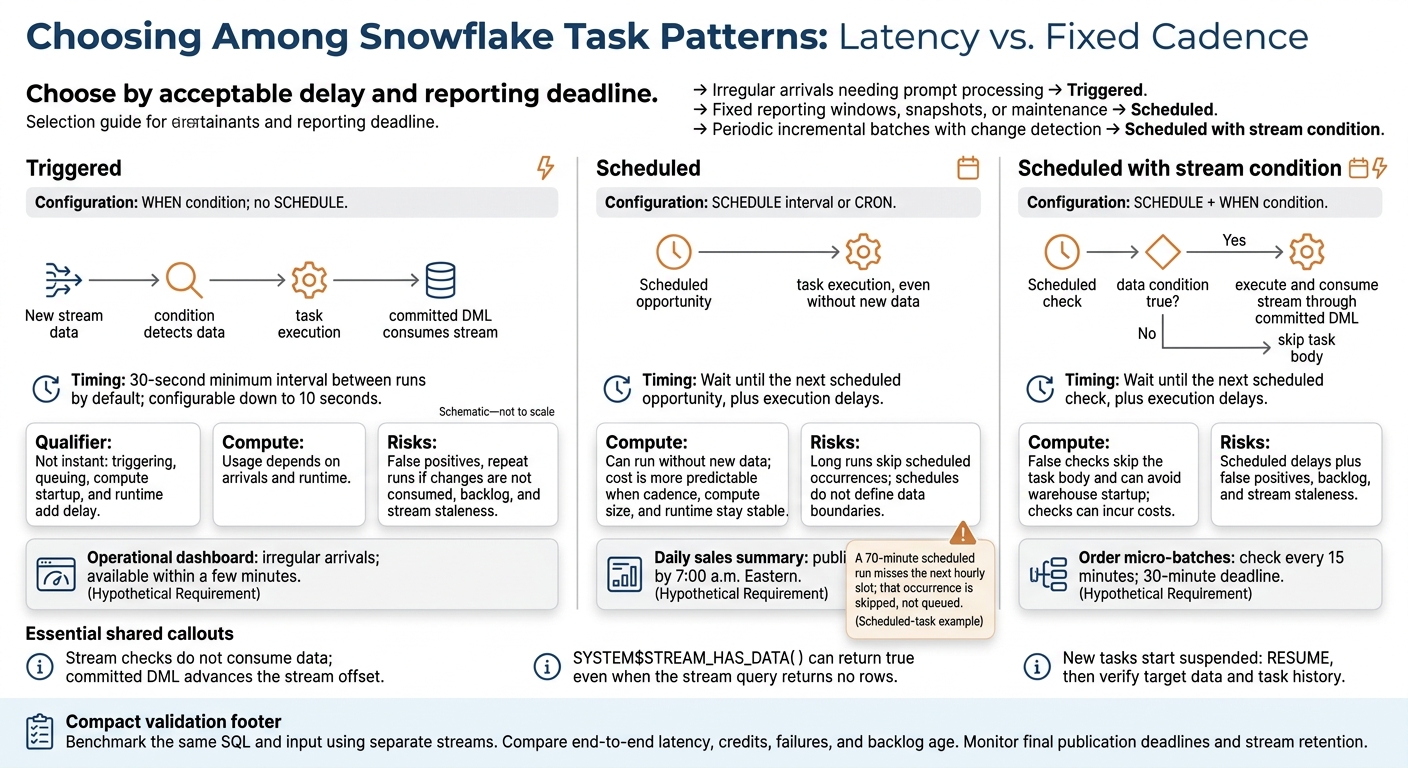
Use triggered Snowflake tasks when new data needs prompt processing. Use scheduled tasks for fixed times, or add a stream condition to skip runs when no changes are detected. Triggered tasks default to a 30-second minimum interval between runs, configurable down to 10 seconds - not instant processing.
The choice comes down to latency, timing, compute cost, and recovery. Stream checks do not consume data; committed DML advances the stream offset.
Quick Comparison
| Criterion | Triggered | Scheduled | Scheduled with stream condition |
|---|---|---|---|
| Starts when | Stream condition detects data | Interval or CRON time arrives | Scheduled check detects data |
| Best fit | Irregular arrivals needing prompt processing | Reports, snapshots, maintenance | Periodic incremental batches |
| Latency | Trigger and execution delays | Wait until the next scheduled run | Wait until the next scheduled check |
| Compute and cost | Depends on arrivals and runtime | Can run without new data | False checks skip the task body; checks can incur costs |
| Main risks | False positives, backlog, stream staleness | Long runs skip scheduled slots | Scheduled delays plus stream risks |
Start new tasks with RESUME, then verify target data and task history. Compare patterns using the same SQL and input with separate streams, tracking latency, credits, failures, and backlog age. For production use, also check permissions, stream retention, retry behavior, and whether the final output meets its deadline.
Snowflake Tasks: Triggered vs Scheduled
Triggered Tasks: Run When Stream Data Is Available
SQL: Create and Test a Triggered Task
Use this pattern when orders arrive at uneven intervals and reporting needs to update as soon as changes land.
Run the example in a test database/schema with an existing orders_wh warehouse. The creating role needs privileges for the database objects, stream, task, and warehouse. If you are new to these concepts, consider an entry-level data engineering boot camp to master the fundamentals. New tasks start suspended.
-- Hypothetical small-business pipeline: Maple Street Goods.
CREATE OR REPLACE TABLE orders_source (
    order_id NUMBER,
    customer_id NUMBER,
    order_ts TIMESTAMP_NTZ,
    order_total NUMBER(10, 2)
);

CREATE OR REPLACE STREAM orders_stream
    ON TABLE orders_source
    APPEND_ONLY = TRUE;

CREATE OR REPLACE TABLE orders_processed (
    order_id NUMBER,
    customer_id NUMBER,
    order_ts TIMESTAMP_NTZ,
    order_total NUMBER(10, 2),
    processed_ts TIMESTAMP_NTZ
);

CREATE OR REPLACE TASK process_orders_triggered
    WAREHOUSE = orders_wh
    WHEN SYSTEM$STREAM_HAS_DATA('orders_stream')
AS
    INSERT INTO orders_processed
        (order_id, customer_id, order_ts, order_total, processed_ts)
    SELECT order_id, customer_id, order_ts, order_total,
           CURRENT_TIMESTAMP()
    FROM orders_stream;

ALTER TASK process_orders_triggered RESUME;

INSERT INTO orders_source
    (order_id, customer_id, order_ts, order_total)
VALUES
    (1001, 501, CURRENT_TIMESTAMP(), 42.50),
    (1002, 502, CURRENT_TIMESTAMP(), 18.00);

SELECT order_id, customer_id, order_total, processed_ts
FROM orders_processed
ORDER BY order_id;

SELECT SYSTEM$STREAM_HAS_DATA('orders_stream') AS has_pending_changes;
This pipeline handles inserts only. Full CDC requires the right stream type and metadata handling for updates and deletes.
Stream Offsets and Trigger Conditions
SYSTEM$STREAM_HAS_DATA() can return true even when the next query returns no rows. The task must still consume the stream through DML. Give independent consumers separate streams so one pipeline doesn't advance another's offset.
The task body must consume the relevant streams. Otherwise, the condition can stay true and trigger repeated runs. A triggered task has a WHEN condition but no SCHEDULE. Adding SCHEDULE means the task checks its condition only at the scheduled times.
Compute Options and Trigger Intervals
Keep WAREHOUSE = orders_wh to control warehouse size and isolation, or use the serverless version below. Don't point both tasks at the same stream unless you intend them to share consumption.
Serverless uses TARGET_COMPLETION_INTERVAL instead of WAREHOUSE. That interval is a target, not a guarantee. Standalone executions don't overlap, so changes that arrive during a long run wait for a later execution.
Triggered tasks reduce waiting time compared with scheduled tasks, but they don't promise instant processing. Backlogs can grow during long runs or bursts. Size compute based on burst volume, transformation complexity, and measured run duration.
ALTER TASK process_orders_triggered SUSPEND;

CREATE OR REPLACE TASK process_orders_serverless
    TARGET_COMPLETION_INTERVAL = '5 MINUTES'
    WHEN SYSTEM$STREAM_HAS_DATA('orders_stream')
AS
    INSERT INTO orders_processed
        (order_id, customer_id, order_ts, order_total, processed_ts)
    SELECT order_id, customer_id, order_ts, order_total,
           CURRENT_TIMESTAMP()
    FROM orders_stream;

ALTER TASK process_orders_serverless RESUME;
sbb-itb-61a6e59
Snowflake Tasks and Task Graphs | CRON Schedules, AFTER Chains, Serverless and Triggered Tasks
Scheduled Tasks: Run at Set Times
Triggered tasks wait for data. Scheduled tasks follow the clock. Use them for hourly windows, reporting deadlines, snapshots, and maintenance. A schedule sets when a task can run - not which data it processes.
For exact batches, store a watermark and use a half-open window: timestamp >= window_start AND timestamp < window_end. Move the watermark forward only after a successful run, and define how to handle late arrivals and reruns.
SQL: Create Hourly and CRON Tasks
Run this setup in a test database/schema with permission to create warehouses and tasks. Use stream-driven tasks for incremental changes and unconditional tasks for fixed reporting windows. 1 HOUR creates recurring hourly opportunities; it doesn't guarantee a top-of-hour run.
These examples process incremental changes hourly and take a daily snapshot.
CREATE WAREHOUSE scheduled_etl_wh
  WAREHOUSE_SIZE = 'XSMALL'
  AUTO_SUSPEND = 60
  AUTO_RESUME = TRUE
  INITIALLY_SUSPENDED = TRUE;

CREATE TABLE scheduled_orders (
  order_id NUMBER,
  order_total NUMBER(12, 2),
  received_at TIMESTAMP_LTZ
);

CREATE STREAM hourly_orders_stream
  ON TABLE scheduled_orders;

CREATE TABLE hourly_order_changes (
  order_id NUMBER,
  order_total NUMBER(12, 2),
  received_at TIMESTAMP_LTZ,
  processed_at TIMESTAMP_LTZ
);

CREATE TASK hourly_orders_task
  WAREHOUSE = scheduled_etl_wh
  SCHEDULE = '1 HOUR'
AS
  INSERT INTO hourly_order_changes
  SELECT order_id, order_total, received_at, CURRENT_TIMESTAMP()
  FROM hourly_orders_stream;

ALTER TASK hourly_orders_task RESUME;

CREATE TABLE daily_order_snapshot (
  snapshot_at TIMESTAMP_LTZ,
  order_count NUMBER,
  total_sales NUMBER(38, 2)
);

CREATE TASK daily_order_snapshot_task
  WAREHOUSE = scheduled_etl_wh
  SCHEDULE = 'USING CRON 0 6 * * * America/New_York'
AS
  INSERT INTO daily_order_snapshot
  SELECT CURRENT_TIMESTAMP(), COUNT(*),
         COALESCE(SUM(order_total), 0)
  FROM scheduled_orders;

ALTER TASK daily_order_snapshot_task RESUME;
The CRON task runs at 6:00 a.m. New York time, following local Eastern time through standard time and daylight saving time. Use UTC for a fixed global time or coordination without DST changes. Test local-time schedules across DST transition dates.
Stream Conditions and Empty Runs
Use a WHEN clause only when stream-driven work should depend on the schedule. The condition below checks stream availability only at scheduled times. A false result skips the task body. A true result allows it to run, but false positives can occur, and the DML must still consume the stream.
Keep snapshots, reconciliation, and maintenance unconditional when they need to run without new data. In this clock-driven pattern, a standalone task or task-graph root needs a schedule to run automatically. Use EXECUTE TASK for manual testing.
ALTER TASK hourly_orders_task SUSPEND;

ALTER TASK hourly_orders_task
  MODIFY WHEN SYSTEM$STREAM_HAS_DATA('hourly_orders_stream');

ALTER TASK hourly_orders_task RESUME;

-- Request a test run; then verify the target and task history.
EXECUTE TASK hourly_orders_task;
Compute Sizing and Processing Windows
The work needs to fit between scheduled runs. Warehouse-backed tasks inherit the warehouse size and auto-suspend settings, and each resume bills for at least 1 minute. Serverless scheduled tasks omit WAREHOUSE and can use USER_TASK_MANAGED_INITIAL_WAREHOUSE_SIZE for initial sizing.
Size the work to finish comfortably before the next scheduled run, and set USER_TASK_TIMEOUT_MS to limit execution time. A 70-minute run misses the next hourly slot. If the previous run is still active, Snowflake skips that occurrence rather than queuing it. Use durable watermarks and idempotent catch-up logic instead of assuming every scheduled occurrence will execute.
Triggered vs Scheduled Tasks: Key Differences
Compare these patterns by latency, cadence, and cost. Streams advance only when DML consumes them. Schedules control when Snowflake checks for work.
Strengths and Limits of Each Pattern
The main trade-off is latency versus fixed cadence. Scheduled tasks with a stream condition pair a fixed cadence with change detection.
| Dimension | Triggered task | Scheduled task | Scheduled task with stream condition |
|---|---|---|---|
| Triggering and stream use | Runs when a WHEN condition detects stream data; has no SCHEDULE clause. A false condition skips execution. |
Runs on a SCHEDULE interval or CRON expression. May not use a stream and can run without new data. |
Checks for stream data on SCHEDULE. A false condition skips the task body. |
| Typical latency | Follows data arrival, with delays from triggering, queuing, compute startup, and task duration. | Waits for the next scheduled opportunity, plus execution delays. | Waits for the next scheduled check, plus execution delays. |
| Compute usage | Compute may activate when the task runs. | Can use compute on every scheduled execution, even without new data. | A false condition can avoid starting or resuming a warehouse, but checks can incur costs. |
| Cost predictability | Varies with arrival volume and timing. | More predictable when cadence, compute size, and runtime stay stable. | Depends on check frequency, false positives, and task runtime. |
| Management complexity | Requires stream lifecycle management, correct consumption, and capacity for bursts. | Requires a suitable interval or CRON window and a plan for empty runs. | Requires schedule management, stream health checks, and condition logic. |
| Workload fit | Unpredictable arrivals that need prompt processing. | Fixed reporting windows, snapshots, maintenance, and predictable batches. | Regular checkpoints with change detection. |
| Failure risks | False positives can cause empty runs; unconsumed changes can trigger repeat executions. Backlogs and stream staleness can delay processing. | Long runs can cause skipped windows. SQL may process data outside the intended snapshot boundary. | False positives can cause empty runs; unconsumed changes can keep the condition true. Backlogs and staleness remain risks. |
For stream-based patterns, check that true conditions lead to DML consumption. Otherwise, the condition can stay true and cause repeat executions.
Choose by Data Arrival and Deadline
Start with the longest acceptable delay between a source commit and target availability. Let workload timing - not implementation preference - guide the choice.
These hypothetical Snowflake requirements illustrate the choice:
Workload Arrival pattern and deadline Task choice Operational dashboard updates Irregular arrivals throughout the day; available within a few minutes Triggered task Periodic order micro-batches Variable arrivals; processing allowed every 15 minutes, with a 30-minute deadline Scheduled task with a stream condition Daily sales summary Data accumulates all day; publish by 7:00 a.m. Eastern Scheduled task Late-arriving sales corrections Corrections arrive after daily processing; check hourly and refresh the summary Scheduled task with a stream condition
Once a pattern meets your latency and deadline needs, compare costs under matching conditions.
Compare Costs Under Matching Conditions
Benchmark the same SQL, data volume, and compute settings over the same observation window. Use separate streams for each test. Include quiet periods, bursts, and failure recovery, while keeping retries and downstream work constant.
| Measurement to record | Triggered | Scheduled | Scheduled with stream condition |
|---|---|---|---|
| Evaluations and executions | Trigger evaluations and task body runs, where observable | Scheduled opportunities and task body runs | Scheduled condition checks, skipped task bodies, and false-positive runs |
| Compute time | Startup, active runtime, and idle time | Startup, runtime including empty runs, and idle time | Check overhead, recorded separately from startup, runtime, and idle time |
| Processing work | Change rows consumed; retries | Rows processed; empty runs; retries | Change rows consumed; retries |
| Billed usage | Warehouse or serverless credits | Warehouse or serverless credits | Credits, including condition-check overhead where applicable |
| Business outcome | Time to target availability and backlog age | Deadline compliance and completeness | Deadline compliance and backlog age |
Compare latency, credits, execution count, and backlog age together. Label any dollar example as illustrative and use actual account rates. Next, use task history and stream health checks to track these results.
Monitor Task Runs and Stream Health
After comparing latency and cost, check that each run produced complete data and met the publication deadline.
Check Task History and Data Backlogs
Query INFORMATION_SCHEMA.TASK_HISTORY for recent runs. Compare SCHEDULED_TIME with QUERY_START_TIME to estimate the start delay. Then compare QUERY_START_TIME with COMPLETED_TIME to estimate execution duration. Use QUERY_ID to investigate individual queries. Account Usage history can lag by up to 45 minutes.
SELECT
    name AS task_name,
    scheduled_time,
    query_start_time,
    completed_time,
    state,
    error_code,
    error_message,
    query_id
FROM TABLE(
    INFORMATION_SCHEMA.TASK_HISTORY(
        TASK_NAME => 'LOAD_CUSTOMERS_TASK',
        SCHEDULED_TIME_RANGE_START =>
            DATEADD('hour', -24, CURRENT_TIMESTAMP()),
        RESULT_LIMIT => 1000
    )
)
ORDER BY scheduled_time DESC;
Check task history alongside source arrival times, expected-versus-received counts, and rejected-row counts. Inspect stream metadata, especially STALE and STALE_AFTER. Once offsets pass retention, unconsumed changes are lost.
SYSTEM$STREAM_HAS_DATA() checks a trigger condition - it does not count the backlog. It can return true even when the stream yields no rows. Track rows consumed and the oldest unprocessed event timestamp. Set separate alerts for missing arrivals, growing backlogs, retention risk, and missed deadlines.
SHOW STREAMS IN SCHEMA RAW;

DESCRIBE STREAM RAW.CUSTOMER_EVENTS_STREAM;
Troubleshoot Suspended and Delayed Tasks
When runs fall behind or stop, check task state first, warehouse behavior second, and SQL third. Start with SHOW TASKS IN SCHEMA ANALYTICS and task history. Repeated failures can suspend execution; the default threshold is 10 consecutive failures unless configured otherwise.
Before resuming, check permissions, missing objects, SQL errors, and stream health. For delays, distinguish warehouse contention from slow SQL. For triggered tasks, inspect the condition and configured trigger interval. For serverless triggered tasks, compare runtime with TARGET_COMPLETION_INTERVAL: it is a sizing target, not a deadline. Suspending a task does not cancel an execution that's already running.
ALTER TASK ANALYTICS.LOAD_CUSTOMERS_TASK RESUME;
Scheduled tasks skip overlapping runs, so compare runtime with the schedule's cadence. Test task-graph overlap settings before allowing concurrent writes. For downstream work linked with AFTER, enable child tasks before resuming the root. If a predecessor fails, the child is not scheduled and may not appear in task history.
For multi-task pipelines, monitor the final publication step, not just the root task. In this example, check that downstream publication completes after BUILD_DAILY_FACTS succeeds.
CREATE OR REPLACE TASK ANALYTICS.PUBLISH_DAILY_REPORT
    WAREHOUSE = PIPELINE_WH
    AFTER ANALYTICS.BUILD_DAILY_FACTS
AS
    CALL ANALYTICS.PUBLISH_REPORT_PROCEDURE();
Conclusion: Choose and Test Your Task Pattern
Use triggered tasks for irregular arrivals and the lowest latency, scheduled tasks for fixed windows, and scheduled tasks with a stream condition for predictable checkpoints that skip empty runs.
Before deployment, define your arrival patterns, latency limits, run windows, compute ceilings, and recovery steps. Check that committed DML - not reads - advances stream offsets. Test for false positives, and monitor stream age and backlog to track staleness risk.
Put your choice to the test with a side-by-side portfolio project. Build both versions with the same input and SQL, but use separate streams. Compare end-to-end latency, empty runs, rows processed, failures, backlog, and compute. Include the SQL, task-history output, and a short memo explaining your production choice.
Support your design with test results, and visit DataExpert.io Academy for more hands-on Snowflake practice.
FAQs
How can I switch task types without missing data?
Put idempotency and atomic processing first when switching between event-driven and scheduled tasks. Idempotent logic produces the same results even if a task runs more than once. Use Write-Audit-Publish (WAP) or a DELETE + INSERT strategy to process data in staging tables before merging it into the destination.
When switching from scheduled to stream-triggered tasks, use Snowflake streams to track table changes. This lets you update data incrementally instead of reprocessing entire datasets.
How do I prevent duplicate records after retries?
Build idempotent pipelines so repeated runs produce the same result. In Snowflake, use MERGE with a join key to update existing records and insert new ones. Or use DELETE and INSERT to replace data within a specific time window.
In Airflow, use execution dates to isolate atomic batches. Set up destinations to handle duplicate writes safely with unique constraints or idempotent logic.
How do I recover from a stale stream?
A Snowflake stream becomes stale when its offset falls outside the source table’s retention period, set by DATA_RETENTION_TIME_IN_DAYS. Once the change history it needs is purged, the stream can no longer track updates consistently.
To recover, recreate the stream. The new stream tracks only changes made after its creation. You may also need a full refresh or backfill of downstream tables to fill any data gaps.