
White-Label Embedded Analytics: Guide 2026
White-label embedded analytics puts reports inside your SaaS app, under your brand - but a logo change isn’t enough. I recommend starting with 1 customer workflow, testing it across 2 tenants, and requiring zero cross-tenant data leaks before launch.
My checklist covers the work behind that experience:
- Architecture: Choose how queries reach your data, enforce tenant boundaries, and keep cached results scoped to the right users.
- Branding and embedding: Check licensing, tenant themes, domains, exports, and accessibility. Choose a dashboard, individual components, or an API-built interface.
- Security and tracking: Keep credentials on the server, enforce permissions across every data path, and separate audit logs from usage and cost tracking.
- Deployment and ownership: Separate test and production systems, assign owners, and require passing tests for data accuracy, access, performance, and rollback.
My rule: <u>prove the full workflow before expanding</u>. That means testing sign-in, reports, exports, and revoked access - not just whether a dashboard loads.
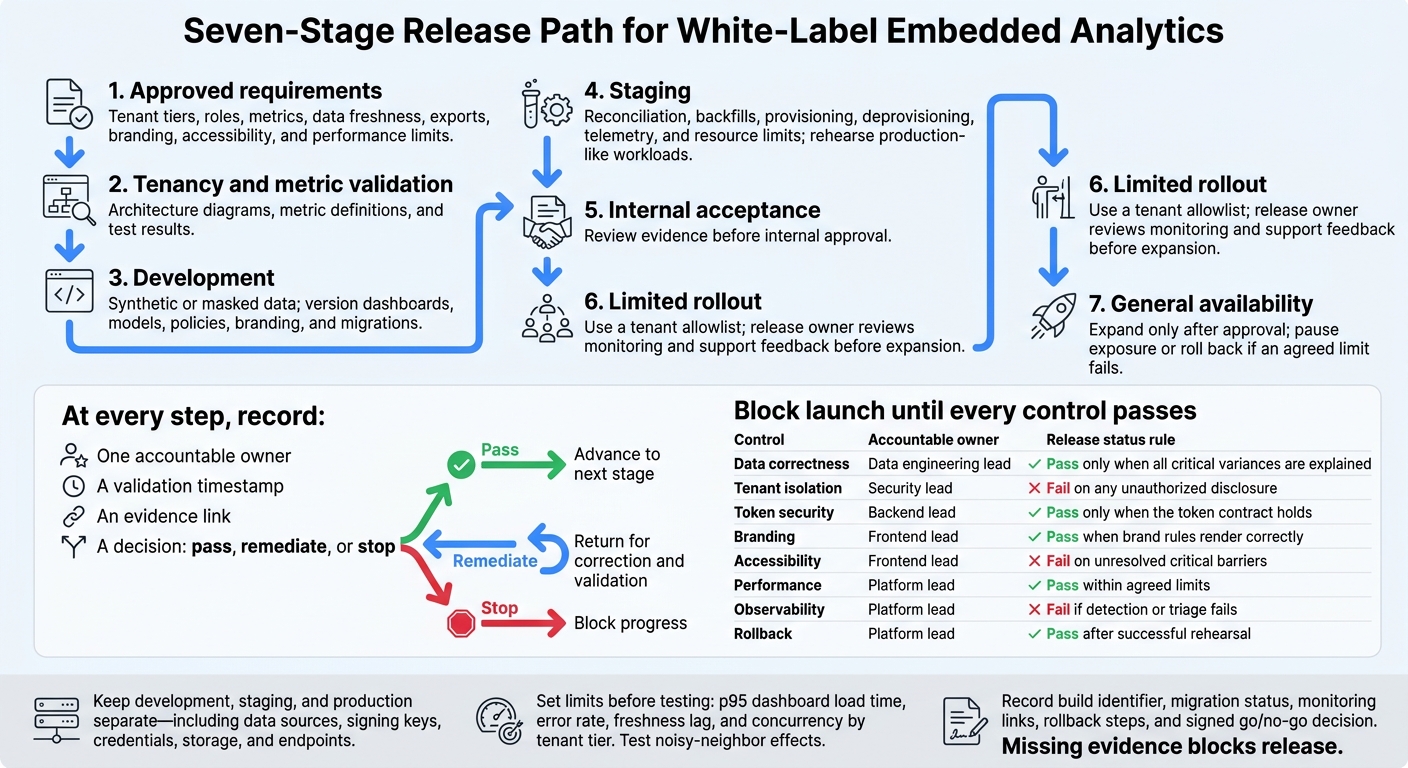
Embedded Analytics Deployment: 7 Release Stages
2. Branding and SaaS Integration
Set Global and Tenant Branding
Apply the tenant boundary across every visible surface: login screens, dashboards, exports, and emails.
Get a written capability matrix and a test account before you start. Verify support for custom fonts, domains, favicon replacement, provider-brand removal, branded emails, and export styling. Check branding across dashboards, login screens, browser titles, and error pages. Document platform limits for tenants, sessions, APIs, exports, schedules, and development environments.
Store logos, colors, fonts, labels, domains, and email identity in centralized global_brand_settings and tenant_brand_settings. Use this order: tenant override → global default → safe application fallback. Include draft, published, and version fields so teams can preview changes and roll them back. Validate assets, color contrast, and domain ownership.
Set locale, currency, and time zone explicitly. For en-US defaults, use $1,234.56, comma thousands separators, MM/DD/YYYY, and 12-hour times with time zones. Keep international tenants’ preferences intact. Check these settings in tooltips, CSV and PDF exports, scheduled emails, loading states, and errors - not just dashboards.
Choose and Build the Embed
Once branding is defined, choose the lightest embed that supports the workflow.
| Approach | UI control | Development effort | Maintenance | Product experience |
|---|---|---|---|---|
| Full dashboard | Low to moderate | Low | Monitor provider UI changes | Complete analytics page with limited customization |
| Individual components | Moderate to high | Moderate | Own layout, resizing, and event handling | Charts fit alongside product actions |
| API-built workflow | Highest | High | Own rendering, state, accessibility, and API changes | Fully integrated experience |
Use the simplest supported SDK, web component, iframe, or API that meets the workflow’s needs. Connect it to a backend session endpoint that returns a short-lived, scoped embed artifact for the requested content. Keep signing secrets and administrative credentials on the server. Treat signed URLs like credentials: use HTTPS and redact them from logs. Handle token expiry explicitly.
Test the embed in the same route, browser, and session state your customers will use. Check exports, responsive layouts, keyboard access, loading announcements, and support for 200% zoom. Verify that links return users to the correct SaaS route, filter events work, and the back button behaves as expected.
Test custom domains and browsers with third-party cookies blocked. If the embed relies on cross-site iframe cookies, SameSite=None requires Secure. Restrict CSP origins, configure the embed’s frame-ancestors policy to allow approved hosts, and validate both the origin and payload of postMessage events. Record load times, token refresh failures, JavaScript errors, and implementation hours.
sbb-itb-61a6e59
Transform SaaS Products with Embedded Analytics | Boost Engagement, Monetization & Retention
3. Security and Usage Tracking
Once branding and embed setup are complete, secure live access, exports, and telemetry.
Secure Sessions, Data Access, and Exports
Use the SaaS app as the identity source, rather than creating a separate analytics login. Validate session signatures, expiration, issuer, and audience. Resolve permitted tenants, roles, groups, and scopes on the server.
Enforce deny-by-default tenant and row policies below the UI across queries, drill-downs, saved views, and APIs. Check tenant switches against current membership. Document credential rotation, revocation, logout, and session reissue after privilege changes.
For exports and scheduled reports, recheck permissions, filters, recipients, and destinations when jobs run. Require short-lived, encrypted downloads that enforce current access. Keep verified tenant context intact in background workers, encrypt generated files at rest, and apply size, rate, and time limits. Shared links must enforce current access - not provide a way around it.
Test Tenant Isolation and Access Changes
Automate tests for allowed and denied requests across every data path. Cover missing or invalid tenant IDs, altered signatures, expired claims, incorrect issuer or audience claims, and cross-tenant access through APIs, exports, scheduled sends, and caches. Test concurrent requests and your chosen isolation model.
Store sanitized inputs, expected and observed results, build version, and remediation status. Require zero successful cross-tenant reads, exports, scheduled sends, or cache hits before release.
Measure how role removal, tenant removal, logout, password reset, and account suspension affect active sessions, caches, shared links, and queued jobs. Document the maximum enforcement delay: token expiration alone does not provide immediate revocation. Include the policy version in cache keys when permissions can change without a new login. Reauthorize background jobs at execution, and verify access to previously generated files.
Track Usage, Audit Logs, and Performance
Track three separate streams: security audit, product usage, and performance/cost. Measure each per tenant to verify isolation, adoption, and performance without exposing user data.
Use stable IDs, verified tenant context, correlation IDs, and synchronized UTC timestamps. Exclude tokens and sensitive row data. Define whether refreshes, retries, polling, and duplicate browser events count, and document the deduplication window.
Track views, active tenants, interactions, exports, and feature use by plan or role. Set alerts for unusual denials, export spikes, errors, latency, and resource exhaustion. Use tenant-level usage and cost trends to set capacity and plan limits. Do not treat product usage events as billing-grade metering unless the records are authoritative, immutable, deduplicated, and reconciled.
| Stream | Purpose | Key fields | Retention | Owner |
|---|---|---|---|---|
| Security audit | Investigate access and prove controls | Actor, verified tenant, request, resource, result, policy version, timestamp, correlation ID | Policy-defined; integrity-protected; tightly restricted access | Security |
| Product usage | Measure adoption | Stable user and tenant IDs, feature, dashboard, plan, role, timestamp, outcome, deduplication key | Retain only as needed for analysis; privacy-controlled access | Product analytics |
| Performance and cost | Diagnose failures and plan capacity | Query/embed ID, latency, status, error class, concurrency, queue depth, CPU, memory, cache hits, warehouse cost | Troubleshooting detail; longer-lived trend aggregates; engineering access | Platform or SRE |
Require these controls to pass as release gates before deployment.
4. Deployment, Ownership, and Launch Checks
Build, Test, and Deploy Across Environments
Follow this release path: approved requirements → tenancy and metric validation → development → staging → internal acceptance → limited rollout → general availability. At every step, record one accountable owner, a validation timestamp, an evidence link, and a decision: pass, remediate, or stop.
The brief should cover tenant tiers, roles, metrics, data freshness, exports, branding, accessibility, and performance limits. Evidence should include architecture diagrams, metric definitions, and test results. These gates put the branding, security, and isolation rules above into practice, testing the architecture under production-like conditions.
Keep development, staging, and production separate - including their data sources, signing keys, credentials, storage, and endpoints. Use synthetic or masked data in development. Version dashboards, models, policies, branding, and migrations. Automate checks for schemas, dependencies, migrations, and environment variables. Protect CI/CD with least-privilege access and secret scanning. Never store credentials in source code or logs.
The staging checklist must cover reconciliation, backfills, provisioning, deprovisioning, telemetry, and resource limits. Rehearse with production-like workloads before internal approval, then use a tenant allowlist to release to a limited customer group. Expand only after the release owner reviews monitoring and support feedback. If an agreed limit fails, pause exposure or roll back.
Assign Owners and Document Handoffs
Assign a named owner to each release gate before rollout. One person can fill multiple roles, but every control needs one accountable owner and a backup. Each handoff should state where the artifact lives, its acceptance criteria, open risks, and the next approver.
| Team | Control point | Required handoff |
|---|---|---|
| Product | Scope, acceptance, rollout approval | Approved brief, decision log |
| Data and analytics engineering | Metrics, lineage, data freshness, reconciliation | Versioned definitions, data tests, freshness runbook |
| Backend and security | Identity, provisioning, access | Token contract, access matrix, threat model |
| Frontend | Embed lifecycle, branding, accessibility | UI acceptance record, screenshots, accessibility findings |
| Platform or DevOps | Deployment, monitoring, rollback | Deployment manifest, migration record, rollback runbook |
| QA | Regression, failure paths, isolation, load | Executed test plan, defects, release recommendation |
| Customer teams | Readiness, documentation, escalation | Support playbook, training confirmation, escalation matrix |
Set Pass/Fail Launch Gates
Block launch until every control passes. Set limits before testing, including p95 dashboard load time, error rate, freshness lag, and concurrency by tenant tier. Test noisy-neighbor effects - not just isolated sessions. Keep each gate closed until evidence is available. Before approval, confirm support coverage, incident escalation, and customer communication procedures.
| Control | Validation method | Accountable owner | Evidence | Release status rule |
|---|---|---|---|---|
| Data correctness | Reconcile metrics across tenants and date ranges; verify data freshness | Data engineering lead | Reconciliation and freshness reports | Pass only when all critical variances are explained |
| Tenant isolation | Execute the approved isolation regression suite | Security lead | Test results and policy evidence | Fail on any unauthorized disclosure |
| Token security | Test issuance, expiration, scope, and rotation | Backend lead | Automated results, security approval | Pass only when the token contract holds |
| Branding | Check defaults, tenant overrides, and fallbacks | Frontend lead | Approved screenshots, configuration version | Pass when brand rules render correctly |
| Accessibility | Test keyboard, focus, labels, contrast, and screen readers | Frontend lead | Findings against the target WCAG level | Fail on unresolved critical barriers |
| Performance | Load small, typical, and largest expected tenants concurrently | Platform lead | Latency, error, and resource report | Pass within agreed limits |
| Observability | Trigger alerts and trace failures to the tenant and request | Platform lead | Alert delivery records, runbook | Fail if detection or triage fails |
| Rollback | Disable exposure and restore the prior compatible version | Platform lead | Rehearsal transcript, recovery time | Pass after successful rehearsal |
Record the build identifier, migration status, monitoring links, rollback steps, and signed go/no-go decision. Missing evidence blocks release.
5. Conclusion: Validate One Workflow Before Expanding
Launch one complete workflow - not just one dashboard. Define the outcome it must prove. Then validate sign-in, signed context, tenant-scoped queries, branded rendering, exports, and audit events. Test both success and failure paths.
Run the workflow across two tenants, multiple roles, and one user whose access has been revoked. Check exports and failure cases, not just successful screen views. Use the same connections and caches as production to expose hidden isolation failures. Keep branding tenant-scoped, with identity and data policies controlling access.
Have the named owners review the workflow’s evidence against the release gates. Adoption does not override a failed security gate. Keep broader access closed until critical failures are fixed.
After launch, use that same workflow to guide expansion. Track weekly active users, workflow completion, p95 latency, export failures, and cost per completed workflow, segmented by tenant and role. Use those results to improve onboarding, optimize queries, or expand. Add one dashboard, role, tenant tier, or export type at a time, and rerun the same regression tests.
FAQs
Which tenant isolation model fits my SaaS app?
Choose based on your security needs and how complex your access rules are. Most mature environments use a hybrid approach: Role-Based Access Control (RBAC) sets broad, stable boundaries, while Attribute-Based Access Control (ABAC) adds fine-grained filters, such as regional restrictions, consent flags, or project scope.
ABAC gives you more flexibility, but it needs a more sophisticated policy engine and careful design. RBAC is simpler and easier to audit.
How can I prevent analytics from slowing down my app?
Separate storage and compute resources so reporting queries don’t disrupt critical operations. Use materialized views or pre-aggregated summary tables to speed up queries.
Build curated Gold tables around recurring business questions. Apply Z-ordering to common filter columns and use micro-partitioning to help queries skip data they don’t need. Track query latency and pipeline bottlenecks with observability tools to spot slow queries before they cause bigger problems.
How should I budget for white-label embedded analytics?
Keep infrastructure costs in line with business needs. Use pay-per-use pricing, automate resource management so you’re not paying for idle compute, and scale storage and compute separately. Invest in standardized metrics and business rules in the Gold layer to cut duplication and keep metric definitions from drifting.
Aim for reliability that meets business needs - not perfection. Budget for DataExpert.io Academy training to help your team manage complex systems while keeping technical debt and day-to-day management overhead low.